I’m trying to understand how to tune the optimizer for aligning almost-aligned images, in this case adjacent frames in a time-series.
I’m having a terrible time tuning the optimizer learning rates and estimates per iteration. Things seem to go off and result in the images being further away than their starting position which seems completely unintuitive that this could happen.
I’ve only had success with SetOptimizerAsConjugateGradientLineSearch where the step size is getting dynamically adjusted smaller at the cost of much slower processing.
Can anyone assist in helping me understand how to tune learningRate, maximumStepSizeInPhysicalUnits and perhaps explain SetOptimizerScalesFromPhysicalShift?
The docs/tutorials I’ve read don’t really explain the role these play in enough detail for me to understand… Thanks.
As the images align and the metric space approaches a minimum the space “flattens” and the gradient becomes small… approaching zero at the theoretical optimum. I have encountered this before, it is particularly bad with only a small number of parameters such as translation only.
I don’t recall off hand what the solution was.. maybe a line search optimizer?
I don’t recall off hand what the solution was.. maybe a line search optimizer?
Indeed, that’s how I came to SetOptimizerAsConjugateGradientLineSearch as working, however.. there is still the issue of learning rate estimation being way off at the start…
We have faced similar issues in the past with stock ITK registration and BRAINS. For many years I thought that this is somehow inevitable and it is normal that optimization parameters need to be tuned for each registration task. Then we discovered Elastix, which works without any parameter tuning on a wide variety of images. ANTs and Greedy are similarly robust, they can be more accurate for conplex fields, but tend to be slower.
We have been using Elastix, ANTs, Greedy successfully for registering frames of time sequences in 4D CT, MR, and ultrasound. Elastix is the fastest, so that is our default choice.
We tried pairwise registration of neighbour time points, but it was too fragile: a small registration error anywhere affected all subsequent timepoints; and combining long transformation chains was more prone to drift. Instead, we do sequence registration by choosing a reference time point (near the center of the time range) and registering each time point to this reference time point.
Regarding optimizing similarity metric and optimization for small differences: A well-designed registration tool already performs a robust optimization schedule, which starts with a stage that has a large convergence range to take care of large displacement, and ends with small, high-precision alignments in final stages. This works well for time sequence registration, too, but if you want to save time, you may tryremove the first stage of the registration, as the initial misalignment is already small. We usually do not bother with such adjustments though, as the first registration stage tend to be faster, so removing it does not save much time overall (and if there is a small bulk transform and we do not remove it then the fine registration stages may need more time, so we may end up with slower registration overall).
You can try sequence registration using Elastix in 3D Slicer using the SequenceRegistration extension. It just takes a few clicks. Unfortunately, we haven’t yet published the version that supports ANTs and Greedy as well (we need to get the associated paper published first).
You can try sequence registration using Elastix in 3D Slicer
Thanks for the suggestions @lassoan, I’ve been meaning to try Elastix tools. I should note everything I do is “at scale” on HPC so interactive and GUI tools are always a no-go. Can this all be done in the base elastix CLI or python interfaces?
Yes, of course, after you figured out what works well using GUI/interactive tools then you can easily automate using Python or shell scripting. You can either write your script to run in Slicer’s virtual Python environment (then you can use Slicer modules), or go one level lower and use a generic Python environment to run your script that calls Elastix directly.
Another set of options to try is the method for Estimating the OptimizerScales. There is " SetOptimizerScalesFromIndexShift" along with “SetOptimizerScalesFromJacobian”. I have had good success with the IndexShift.
I was using (as per all the image registration examples) SetOptimizerScalesFromPhysicalShift. This is what was giving me the crazy learning rate estimates.
This data is all mouse-sized with small voxels. I wonder if this is another case (like the tolerance calculations from NIFTI-reading a while ago…) that might have some hidden precision/sizing bugs?
I’m not sure if it’s a bug or a documentation to design issue. The target of these parameter scales may be 1 pixel/index or 1 unit of physical spacing (I’d have to dive into the code to find out) If you have spacing of 0.001 mm (micron) then the later is problematic.
p.s. You may be interested in this microscopy registration code: sitk-ibex/sitkibex/registration.py at main · niaid/sitk-ibex · GitHub It normalizes the spaces on the images, then fixes the transform with additional scaling transform, to the results would work on the original spacing.
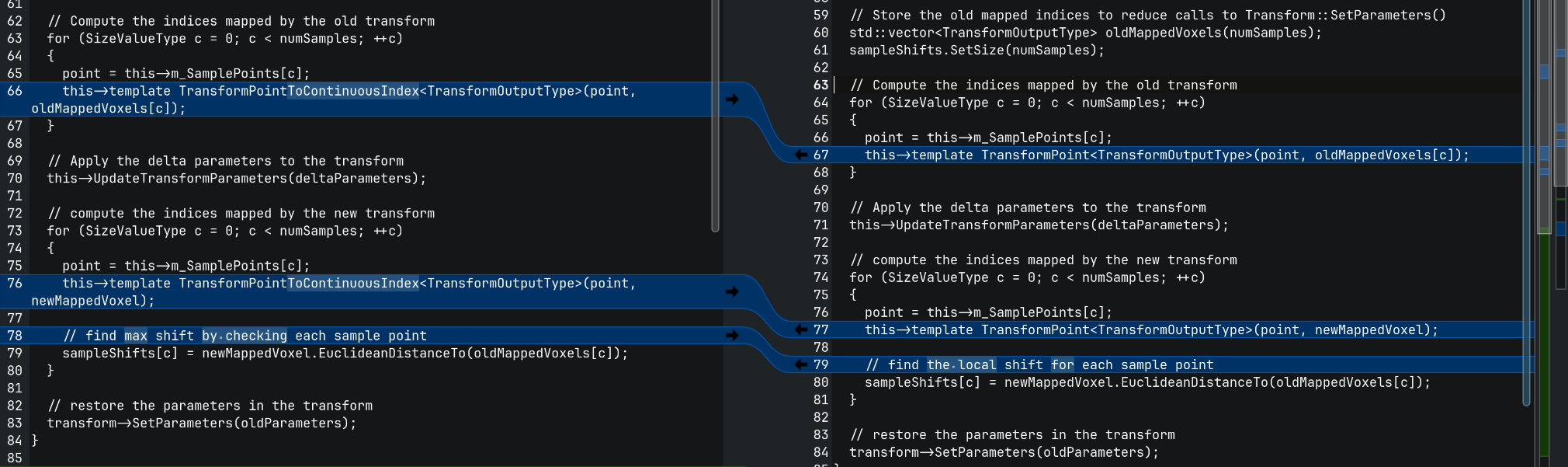
By my read on the left we have the SetOptimizerScalesFromIndexShift, where the point shift is calculated by computing the Euclidean distance between Index differences. I think that means that this method would be susceptible to having weird scales from anisotropic fixed images.
Meanwhile, on the right we have SetOptimizerScalesFromPhysicalShift where “real space” Euclidean distance is calculated for the shifts.
I think this means that maximumStepSizeInPhysicalUnits is interpreted differently based on the scales estimator? Maybe also other parameters in the optimizer?