# Subtract two meshes

**URL:** https://discourse.itk.org/t/subtract-two-meshes/1945
**Category:** Beginner Questions
**Created:** [June 5, 2019, 9:00am UTC](https://discourse.itk.org/t/subtract-two-meshes/1945 "2019-06-05T09:00:33Z")
**Posts on this page:** 17
**Page:** 1

<div class="post-metadata">

### Author: ![zandarina](https://discourse.itk.org/letter_avatar_proxy/v4/letter/z/4af34b/32.png) [@zandarina](https://discourse.itk.org/u/zandarina)
#### Post date: [June 5, 2019, 9:00am UTC](https://discourse.itk.org/t/subtract-two-meshes/1945/1 "2019-06-05T09:00:33Z")

</div>

Hi everybody,

I have a general question. I have an stl image and i read it with vtk and i fill it to be a solid. Now, i would like to make a substraction with another stl also solid. But the function of vtk is not optimum so it does not work with my polydata. So I wonder if i can convert this polydata into an itk image to do the substraction there. Or i will have to get another library as people do. What i would like is to reduce the number of libraries because i already have a few. So i wonder if there is a function to do that in my polydata solids in itk. Otherwise, i will install an additional library as vtkbool but i´d rather not to include more projects in my project.

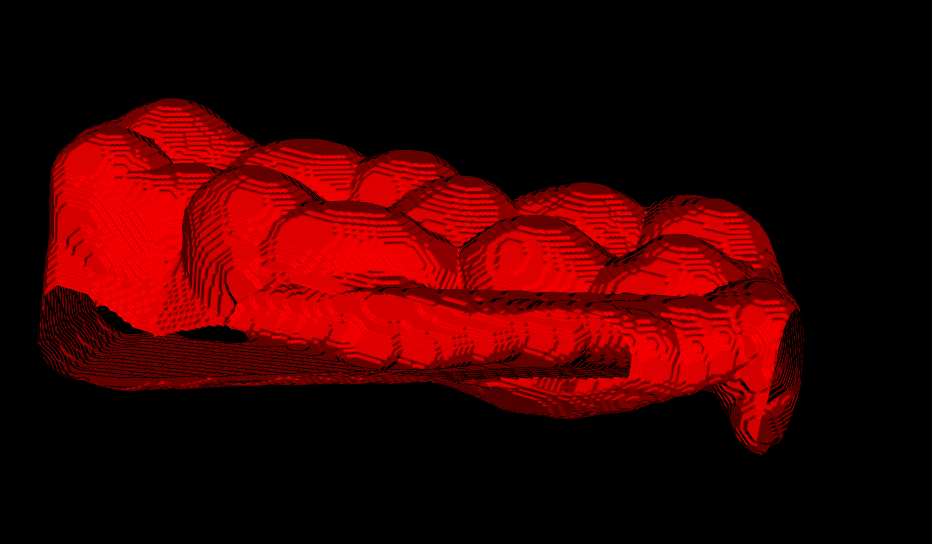
Thanks

---

<div class="post-metadata">

### Author: ![dzenanz](https://discourse.itk.org/user_avatar/discourse.itk.org/dzenanz/32/1093_2.png) [@dzenanz](https://discourse.itk.org/u/dzenanz)
#### Post date: [June 5, 2019, 2:39pm UTC](https://discourse.itk.org/t/subtract-two-meshes/1945/2 "2019-06-05T14:39:34Z")

</div>

You can convert vtkPolyData into images, then do boolean operations on the images, and then convert the result back into vtkPolyData. But the poly to image conversion is a lossy operation, as it introduces discretization (you need to pick an image spacing). Not to mention that it will almost certainly be less efficient. And when you convert the image back to polygonal representation, you will have many small triangles and no large polygons - very annoying if you started with some large polygons.

So vtkbool library sounds like the right tool for the job.

---

<div class="post-metadata">

### Author: ![lassoan](https://discourse.itk.org/user_avatar/discourse.itk.org/lassoan/32/27_2.png) [@lassoan](https://discourse.itk.org/u/lassoan)
#### Post date: [June 6, 2019, 5:21am UTC](https://discourse.itk.org/t/subtract-two-meshes/1945/3 "2019-06-06T05:21:52Z")

</div>

> [@dzenanz](#):
>
> So vtkbool library sounds like the right tool for the job.

Yes, vtkbool is promising.

VTK also has some built-in Boolean mesh operations but they do not work reliably: they randomly give incorrect results for completely valid input meshes. Slightly moving the meshes usually fixes the problems, but often there is no time to do this or you don’t want to change the meshes.

There are Boolean mesh operations in CGAL. If they are more robust than the current VTK filters then maybe you could implement ITK or VTK filter wrappers around them.

---

<div class="post-metadata">

### Author: ![zandarina](https://discourse.itk.org/letter_avatar_proxy/v4/letter/z/4af34b/32.png) [@zandarina](https://discourse.itk.org/u/zandarina)
#### Post date: [June 6, 2019, 6:13pm UTC](https://discourse.itk.org/t/subtract-two-meshes/1945/4 "2019-06-06T18:13:19Z")

</div>

Thank you all. I will try to voxelize and if it is very loosy i will try the library you recommend me.

Thanks !!

---

<div class="post-metadata">

### Author: ![zandarina](https://discourse.itk.org/letter_avatar_proxy/v4/letter/z/4af34b/32.png) [@zandarina](https://discourse.itk.org/u/zandarina)
#### Post date: [June 12, 2019, 1:53pm UTC](https://discourse.itk.org/t/subtract-two-meshes/1945/5 "2019-06-12T13:53:44Z")

</div>

Dear all,

Instead of substracting two meshes i have decided to do a dilation of the mesh converted in image data filled the hole with triangles and converted to itk image. Doing this, i avoid the substraction. But the result of the dilation is the contour scaled but the interior is empty. The dilation should only make it thicker right?. I cannot understand how it behaves like an scale around its center and hollow inside. Instead of keeping the geometry and make it thicker from the contour.

Thanks for the help

```
vtkSmartPointer<vtkFillHolesFilter> fillHolesFilter =
	vtkSmartPointer<vtkFillHolesFilter>::New();
fillHolesFilter->SetInputData(polyData);
fillHolesFilter->SetHoleSize(100000.0);
fillHolesFilter->Update();

// Make the triangle winding order consistent
vtkSmartPointer<vtkPolyDataNormals> normals2 =
	vtkSmartPointer<vtkPolyDataNormals>::New();
normals2->SetInputData(fillHolesFilter->GetOutput());
normals2->ConsistencyOn();
normals2->SetComputeCellNormals(1);
normals2->SplittingOff();
normals2->Update();

vtkSmartPointer<vtkImageData> pd1 = getFromPolydataToImage(normals2->GetOutput(),1); //tested it works

typedef itk::Image<signed short, 3> ImageType3d;

typedef itk::VTKImageToImageFilter<ImageType3d> VTKImageToImageType;

VTKImageToImageType::Pointer vtkImageToImageFilter =
	VTKImageToImageType::New();

vtkSmartPointer<vtkImageData> image_data = vtkImageData::SafeDownCast(pd1);
vtkSmartPointer<vtkImageCast> cast_image = vtkSmartPointer<vtkImageCast>::New();
cast_image->SetInputData(image_data);
cast_image->SetOutputScalarTypeToShort();
cast_image->Update();
vtkImageToImageFilter->SetInput(cast_image->GetOutput());

using FilterType3d = itk::VTKImageToImageFilter<ImageType3d>;
FilterType3d::Pointer filter = FilterType3d::New();
filter->SetInput(cast_image->GetOutput());

try {
filter->Update();
} catch (itk::ExceptionObject& error) {
std::cerr << "Error: " << error << std::endl;
return;
}

using StructuringElementType = itk::FlatStructuringElement< 3 >;
StructuringElementType::RadiusType radius;
radius.Fill(1);
StructuringElementType structuringElement =
	StructuringElementType::Ball(radius);

using PixelType = signed short;
constexpr unsigned int Dimension = 3;
using ImageType = itk::Image< PixelType, Dimension >;
using ReaderType = itk::ImageFileReader< ImageType >;

using BinaryDilateImageFilterType = itk::BinaryDilateImageFilter< ImageType, ImageType,
	StructuringElementType >;

BinaryDilateImageFilterType::Pointer dilateFilter =
	BinaryDilateImageFilterType::New();
dilateFilter->SetInput(filter->GetOutput());
dilateFilter->SetKernel(structuringElement);
dilateFilter->SetForegroundValue(255);
dilateFilter->SetBackgroundValue(0);

using FilterType = itk::ImageToVTKImageFilter< ImageType >;
FilterType::Pointer filter2 = FilterType::New();
filter2->SetInput(dilateFilter->GetOutput());
filter2->Update();
```

---

<div class="post-metadata">

### Author: ![dzenanz](https://discourse.itk.org/user_avatar/discourse.itk.org/dzenanz/32/1093_2.png) [@dzenanz](https://discourse.itk.org/u/dzenanz)
#### Post date: [June 12, 2019, 2:37pm UTC](https://discourse.itk.org/t/subtract-two-meshes/1945/6 "2019-06-12T14:37:55Z")

</div>

How does `pd1` look like? If it looks like a sheet, the dilate filter will turn it into a thicker sheet. If `pd1` is a filled shape, then please provide a runnable example with input data so we can debug it.

---

<div class="post-metadata">

### Author: ![zandarina](https://discourse.itk.org/letter_avatar_proxy/v4/letter/z/4af34b/32.png) [@zandarina](https://discourse.itk.org/u/zandarina)
#### Post date: [June 12, 2019, 8:29pm UTC](https://discourse.itk.org/t/subtract-two-meshes/1945/7 "2019-06-12T20:29:35Z")

</div>

Thank you for your quick response. i send you the runnable example with the stl. But i want to get is a “thicken” volume.

Thanks

(Attachment stls.stl is missing)

[HelloWorld.cxx](https://discourse.itk.org/uploads/default/original/1X/cb74a329f2a76c3e043ae0b38d1df0bd512c4352.cxx) (13.9 KB)

---

<div class="post-metadata">

### Author: ![zandarina](https://discourse.itk.org/letter_avatar_proxy/v4/letter/z/4af34b/32.png) [@zandarina](https://discourse.itk.org/u/zandarina)
#### Post date: [June 12, 2019, 8:35pm UTC](https://discourse.itk.org/t/subtract-two-meshes/1945/8 "2019-06-12T20:35:51Z")

</div>

It does not let me attach any file. I include the code here as in the cpp. Thanks

```
//#include "stdafx.h"
#include <vtkColorTransferFunction.h>
#include <vtkCommonDataModelModule.h>
#include <vtkCompositeDataIterator.h>

#include <vtkLinearTransform.h>.
#include <vtkMultiBlockDataSet.h>
#include <vtkParametricSpline.h>
#include <vtkParametricFunctionSource.h>
#include <vtkPiecewiseFunction.h>
#include <vtkPolyDataMapper.h>
#include <vtkSmartVolumeMapper.h>
#include <vtkSphereSource.h>
#include <vtkSTLReader.h>
#include <vtkTransformPolyDataFilter.h>
#include <vtkTubeFilter.h>
#include <vtkUnstructuredGrid.h>
#include <vtkVolumeProperty.h>
#include <vtkXMLMultiBlockDataReader.h>
#include <vtkXMLMultiBlockDataWriter.h>
#include <itkVTKImageToImageFilter.h>

#include <vtkDICOMImageReader.h>
#include <vtkInteractorStyleImage.h>
#include <vtkImageSlab.h>
#include "itkImageFileReader.h"
#include "itkImageFileWriter.h"
#include "itkGDCMImageIO.h"
#include "itkImageSeriesReader.h"
#include "itkImageSeriesWriter.h"
#include "itkGDCMSeriesFileNames.h"
#include <itkCastImageFilter.h>
#include <itkImageToVTKImageFilter.h>
#include "itkBinaryThresholdImageFilter.h"
#include "itkExtractImageFilter.h"
#include "itkRegionOfInterestImageFilter.h"
#include "itkConnectedComponentImageFilter.h"
#include "itkLabelGeometryImageFilter.h"
#include "itkFlipImageFilter.h"
#include "itkFixedArray.h"

#include "vtkImageStencilData.h"
#include <vtkCellPicker.h>
#include <vtkInteractorStyleTrackballCamera.h>
#include <vtkRenderer.h>
#include <vtkRenderWindow.h>
#include <vtkRenderWindowInteractor.h>
#include "vtkImageMagnitude.h"
#include <vtkImageViewer2.h>
#include <vtkMatrix4x4.h>
#include <vtkTransform.h>
#include <vtkImageAppend.h>
#include <vtkResliceImageViewer.h>

#include <vtkImageLogic.h>
#include <vtkMarchingCubes.h>
#include <vtkPolyDataToImageStencil.h>
#include <vtkImageStencil.h>
#include <vtkSmoothPolyDataFilter.h>
#include <vtkLinearExtrusionFilter.h>

#include <itkGDCMImageIO.h>
#include <itkGDCMSeriesFileNames.h>
#include <itkMetaDataObject.h>

#include <vtkAbstractVolumeMapper.h>
#include <vtkBox.h>
#include <vtkCamera.h>
#include <vtkCellPicker.h>
#include <vtkCleanPolyData.h>
#include <vtkClipPolyData.h>
#include <vtkCommand.h>
#include <vtkFillHolesFilter.h>
#include <vtkGenericOpenGLRenderWindow.h>
#include <vtkImageAppend.h>
#include <vtkImageData.h>
#include <vtkImageMapToWindowLevelColors.h>
#include <vtkImageReslice.h>
#include <vtkImplicitBoolean.h>
#include <vtkInteractorStyleImage.h>
#include <vtkLightKit.h>
#include <vtkMapper.h>
#include <vtkObjectFactory.h>
#include <vtkParametricFunctionSource.h>
#include <vtkParametricSpline.h>
#include <vtkPlane.h>
#include <vtkPointData.h>
#include <vtkPoints.h>
#include <vtkPolyDataMapper.h>
#include <vtkPolyDataNormals.h>
#include <vtkProperty.h>
#include <vtkPropPicker.h>
#include <vtkRenderWindow.h>
#include <vtkRenderWindowInteractor.h>
#include <vtkRenderer.h>
#include <vtkRendererCollection.h>
#include <vtkResliceImageViewer.h>
#include <vtkSmartPointer.h>
#include <vtkSplineFilter.h>
#include <vtkSplineRepresentation.h>
#include <vtkStringArray.h>
#include <vtkStripper.h>
#include <vtkTransform.h>
#include <vtkTransformPolyDataFilter.h>
#include <vtkTriangleFilter.h>
#include <vtkWarpVector.h>
#include <vtkWindowLevelLookupTable.h>

#include <itkKernelImageFilter.h>

#include <vtkImageLogic.h>
#include <vtkMarchingCubes.h>
#include <vtkPolyDataToImageStencil.h>
#include <vtkImageStencil.h>
#include <vtkSmoothPolyDataFilter.h>
#include <vtkLinearExtrusionFilter.h>

#include "vtkImageCast.h"
#include "itkBinaryDilateImageFilter.h"
#include "itkImageFileReader.h"
#include "itkBinaryBallStructuringElement.h"
#include <itkImage.h>

vtkRenderer * global_renderer;
float *seeds = new float[3];

#include <vtkSmartPointer.h>
#include <vtkObjectFactory.h>
#include <vtkRenderWindow.h>
#include <vtkRenderWindowInteractor.h>
#include <vtkRenderer.h>
#include <vtkActor.h>
// headers needed for this example
#include <vtkImageViewer2.h>
#include <vtkDICOMImageReader.h>
#include <vtkInteractorStyleImage.h>
#include <vtkActor2D.h>
#include <vtkTextProperty.h>
#include <vtkTextMapper.h>
// needed to easily convert int to std::string
#include <sstream>

vtkSmartPointer<vtkImageData> getFromPolydataToImage(vtkSmartPointer<vtkPolyData> pd) {
	////////////////////
	vtkSmartPointer<vtkImageData> whiteImage =
		vtkSmartPointer<vtkImageData>::New();
	double bounds[6];
	pd->GetBounds(bounds);
	double spacing[3]; // desired volume spacing
	spacing[0] = 0.1;
	spacing[1] = 0.1;
	spacing[2] = 0.1;
	whiteImage->SetSpacing(spacing);

	// compute dimensions
	int dim[3];
	for (int i = 0; i < 3; i++)
	{
		dim[i] = static_cast<int>(ceil((bounds[i * 2 + 1] - bounds[i * 2]) / spacing[i]));
	}

	whiteImage->SetDimensions(dim);
	whiteImage->SetExtent(0, dim[0] - 1, 0, dim[1] - 1, 0, dim[2] - 1);

	double origin[3];
	origin[0] = bounds[0] + spacing[0] / 2;
	origin[1] = bounds[2] + spacing[1] / 2;
	origin[2] = bounds[4] + spacing[2] / 2;
	whiteImage->SetOrigin(origin);

#if VTK_MAJOR_VERSION <= 5
	whiteImage->SetScalarTypeToUnsignedChar();
	whiteImage->AllocateScalars();
#else
	whiteImage->AllocateScalars(VTK_UNSIGNED_CHAR, 1);
#endif
	// fill the image with foreground voxels:
	unsigned char inval = 255;
	unsigned char outval = 0;
	vtkIdType count = whiteImage->GetNumberOfPoints();
	for (vtkIdType i = 0; i < count; ++i)
	{
		whiteImage->GetPointData()->GetScalars()->SetTuple1(i, inval);
	}

	// polygonal data --> image stencil:
	vtkSmartPointer<vtkPolyDataToImageStencil> pol2stenc =
		vtkSmartPointer<vtkPolyDataToImageStencil>::New();
#if VTK_MAJOR_VERSION <= 5
	pol2stenc->SetInput(pd);
#else
	pol2stenc->SetInputData(pd);
#endif
	pol2stenc->SetOutputOrigin(origin);
	pol2stenc->SetOutputSpacing(spacing);
	pol2stenc->SetOutputWholeExtent(whiteImage->GetExtent());
	pol2stenc->Update();

	// cut the corresponding white image and set the background:
	vtkSmartPointer<vtkImageStencil> imgstenc =
		vtkSmartPointer<vtkImageStencil>::New();
#if VTK_MAJOR_VERSION <= 5
	imgstenc->SetInput(whiteImage);
	imgstenc->SetStencil(pol2stenc->GetOutput());
#else
	imgstenc->SetInputData(whiteImage);
	imgstenc->SetStencilConnection(pol2stenc->GetOutputPort());
#endif
	imgstenc->ReverseStencilOff();
	imgstenc->SetBackgroundValue(outval);
	imgstenc->Update();

	return imgstenc->GetOutput();
}

int main() {

	vtkSmartPointer<vtkSTLReader> reader =
		vtkSmartPointer<vtkSTLReader>::New();
	reader->SetFileName("stls.stl");
	reader->Update();

	/*vtkSmartPointer<vtkFillHolesFilter> fillHolesFilter =
		vtkSmartPointer<vtkFillHolesFilter>::New();
	fillHolesFilter->SetInputData(reader->GetOutput());
	fillHolesFilter->SetHoleSize(100000.0);
	fillHolesFilter->Update();*/

	// Make the triangle winding order consistent
	vtkSmartPointer<vtkPolyDataNormals> normals2 =
		vtkSmartPointer<vtkPolyDataNormals>::New();
	normals2->SetInputData(reader->GetOutput());
	normals2->ConsistencyOn();
	normals2->SetComputeCellNormals(1);
	normals2->SplittingOff();
	normals2->Update();

	vtkSmartPointer<vtkImageData> pd1 = getFromPolydataToImage(normals2->GetOutput()); //tested it works

	typedef itk::Image<signed short, 3> ImageType3d;

	typedef itk::VTKImageToImageFilter<ImageType3d> VTKImageToImageType;

	VTKImageToImageType::Pointer vtkImageToImageFilter =
		VTKImageToImageType::New();

	vtkSmartPointer<vtkImageData> image_data = vtkImageData::SafeDownCast(pd1);
	vtkSmartPointer<vtkImageCast> cast_image = vtkSmartPointer<vtkImageCast>::New();
	cast_image->SetInputData(image_data);
	cast_image->SetOutputScalarTypeToShort();
	cast_image->Update();
	vtkImageToImageFilter->SetInput(cast_image->GetOutput());

	using FilterType3d = itk::VTKImageToImageFilter<ImageType3d>;
	FilterType3d::Pointer filter = FilterType3d::New();
	filter->SetInput(cast_image->GetOutput());

	try {
		filter->Update();
	}
	catch (itk::ExceptionObject& error) {
		std::cerr << "Error: " << error << std::endl;
		return 0;
	}

	using StructuringElementType = itk::FlatStructuringElement< 3 >;
	StructuringElementType::RadiusType radius;
	radius.Fill(5);
	StructuringElementType structuringElement =
		StructuringElementType::Ball(radius);

	using PixelType = signed short;
	constexpr unsigned int Dimension = 3;
	using ImageType = itk::Image< PixelType, Dimension >;
	using ReaderType = itk::ImageFileReader< ImageType >;

	using BinaryDilateImageFilterType = itk::BinaryDilateImageFilter< ImageType, ImageType,
		StructuringElementType >;

	BinaryDilateImageFilterType::Pointer dilateFilter =
		BinaryDilateImageFilterType::New();
	dilateFilter->SetInput(filter->GetOutput());
	dilateFilter->SetKernel(structuringElement);
	dilateFilter->SetForegroundValue(255);
	dilateFilter->SetBackgroundValue(0);

	using FilterType = itk::ImageToVTKImageFilter< ImageType >;
	FilterType::Pointer filter2 = FilterType::New();
	filter2->SetInput(dilateFilter->GetOutput());
	filter2->Update();

	vtkSmartPointer<vtkMarchingCubes> surface =
		vtkSmartPointer<vtkMarchingCubes>::New();

	surface->SetInputData(filter2->GetOutput());
	surface->SetValue(0, 0.5);
	surface->Update();

	vtkSmartPointer<vtkSmoothPolyDataFilter> smoothFilter =
		vtkSmartPointer<vtkSmoothPolyDataFilter>::New();
	smoothFilter->SetInputConnection(surface->GetOutputPort());
	smoothFilter->SetNumberOfIterations(15);
	smoothFilter->SetRelaxationFactor(0.1);
	smoothFilter->FeatureEdgeSmoothingOff();
	smoothFilter->BoundarySmoothingOn();
	smoothFilter->Update();

	// Update normals on newly smoothed polydata
	vtkSmartPointer<vtkPolyDataNormals> normalGenerator = vtkSmartPointer<vtkPolyDataNormals>::New();
	normalGenerator->SetInputConnection(smoothFilter->GetOutputPort());
	normalGenerator->ComputePointNormalsOn();
	normalGenerator->ComputeCellNormalsOn();
	normalGenerator->Update();

	vtkSmartPointer<vtkPolyData> poly = vtkSmartPointer<vtkPolyData>::New();
	poly = surface->GetOutput();

	vtkSmartPointer<vtkPolyDataMapper> splintMapper =
		vtkSmartPointer<vtkPolyDataMapper>::New();
	splintMapper->SetInputConnection(surface->GetOutputPort());
	splintMapper->ScalarVisibilityOff();

	vtkSmartPointer<vtkActor> splintActor =
		vtkSmartPointer<vtkActor>::New();
	splintActor->SetMapper(splintMapper);
	//originalActor->GetProperty()->SetInterpolationToFlat();

	vtkSmartPointer<vtkRenderWindow> renderWindow =
		vtkSmartPointer<vtkRenderWindow>::New();
	renderWindow->SetSize(640, 480);

	// Create a camera for all renderers
	vtkSmartPointer<vtkCamera> camera =
		vtkSmartPointer<vtkCamera>::New();

	// Setup both renderers
	vtkSmartPointer<vtkRenderer> renderer =
		vtkSmartPointer<vtkRenderer>::New();

	renderer->AddActor(splintActor);
	//renderer->AddActor(warpedActor);
	//renderer->AddActor(originalActor);
	//renderer->AddActor(substractActor);

	renderWindow->AddRenderer(renderer);

	vtkSmartPointer<vtkRenderWindowInteractor> interactor =
		vtkSmartPointer<vtkRenderWindowInteractor>::New();
	interactor->SetRenderWindow(renderWindow);

	renderWindow->Render();
	interactor->Start();

	//The end
	return 0;

}
```

---

<div class="post-metadata">

### Author: ![dzenanz](https://discourse.itk.org/user_avatar/discourse.itk.org/dzenanz/32/1093_2.png) [@dzenanz](https://discourse.itk.org/u/dzenanz)
#### Post date: [June 12, 2019, 9:01pm UTC](https://discourse.itk.org/t/subtract-two-meshes/1945/9 "2019-06-12T21:01:20Z")

</div>

Your source file got attached properly, but not the mesh (`.stl`). Can you upload it to file sharing service and put the link here?

---

<div class="post-metadata">

### Author: ![zandarina](https://discourse.itk.org/letter_avatar_proxy/v4/letter/z/4af34b/32.png) [@zandarina](https://discourse.itk.org/u/zandarina)
#### Post date: [June 12, 2019, 9:13pm UTC](https://discourse.itk.org/t/subtract-two-meshes/1945/10 "2019-06-12T21:13:19Z")

</div>

Thank you, here i uploaded the stl

[https://wetransfer.com/downloads/68dd03742818380b926da2078448711020190612211129/4ba785b566880235a6571443aada659d20190612211129/fa59c4](https://wetransfer.com/downloads/68dd03742818380b926da2078448711020190612211129/4ba785b566880235a6571443aada659d20190612211129/fa59c4)

Thanks for the help

cheers

---

<div class="post-metadata">

### Author: ![dzenanz](https://discourse.itk.org/user_avatar/discourse.itk.org/dzenanz/32/1093_2.png) [@dzenanz](https://discourse.itk.org/u/dzenanz)
#### Post date: [June 12, 2019, 9:38pm UTC](https://discourse.itk.org/t/subtract-two-meshes/1945/11 "2019-06-12T21:38:58Z")

</div>

As far as I can tell, your program is working correctly. But dilation by 1 pixel is hardly noticeable. Putting 10 in radius (`radius.Fill(10);`) makes it visibly thicker. This also dilates the gums/teeth beyond image boundary. You might want to enlarge the bounds during polydata to image conversion to prevent clipping.

---

<div class="post-metadata">

### Author: ![zandarina](https://discourse.itk.org/letter_avatar_proxy/v4/letter/z/4af34b/32.png) [@zandarina](https://discourse.itk.org/u/zandarina)
#### Post date: [June 13, 2019, 7:36am UTC](https://discourse.itk.org/t/subtract-two-meshes/1945/12 "2019-06-13T07:36:41Z")

</div>

Hi, thank you for answering, I changed to my code the radius to 10 and i attach what i get, a hollow image (bigger but not thicker as it was scaled along the normal) with new holes where i can see it empty inside.

I do not understad what i do wrong. As dilation should only make thicker the contour.

Thanks
 ![](https://discourse.itk.org/uploads/default/original/1X/cb12cebb4ff1c253ff6e16c75a97fe3b995b7e76.png)

---

<div class="post-metadata">

### Author: ![zandarina](https://discourse.itk.org/letter_avatar_proxy/v4/letter/z/4af34b/32.png) [@zandarina](https://discourse.itk.org/u/zandarina)
#### Post date: [June 13, 2019, 9:38am UTC](https://discourse.itk.org/t/subtract-two-meshes/1945/13 "2019-06-13T09:38:51Z")

</div>

Hi

changing the boundaries of the polydata i closed the holes and i got the thickess.

Thanks

---

<div class="post-metadata">

### Author: ![dzenanz](https://discourse.itk.org/user_avatar/discourse.itk.org/dzenanz/32/1093_2.png) [@dzenanz](https://discourse.itk.org/u/dzenanz)
#### Post date: [June 13, 2019, 1:19pm UTC](https://discourse.itk.org/t/subtract-two-meshes/1945/14 "2019-06-13T13:19:26Z")

</div>

> [@zandarina](#):
>
> bigger but not thicker

Polygonal surface is infinitely thin, by definition.

> [@zandarina](#):
>
> changing the boundaries of the polydata i closed the holes and i got the thickess.

I assume you accomplished what you wanted?

---

<div class="post-metadata">

### Author: ![zandarina](https://discourse.itk.org/letter_avatar_proxy/v4/letter/z/4af34b/32.png) [@zandarina](https://discourse.itk.org/u/zandarina)
#### Post date: [June 13, 2019, 2:16pm UTC](https://discourse.itk.org/t/subtract-two-meshes/1945/15 "2019-06-13T14:16:56Z")

</div>

Hi,

### vtkLinearExtrusionFilter

Yes, i just solved it. After being stuck for two days, i realized there is a function that does the same and quicker. Because the dilate filter was dilating me in both sides of the stl so i was not able to get the substraction

Thank you very very much for all the help. Now i understand how the dilation works

---

<div class="post-metadata">

### Author: ![Jens\_Munk\_Hansen](https://discourse.itk.org/user_avatar/discourse.itk.org/jens_munk_hansen/32/1866_2.png) [@Jens\_Munk\_Hansen](https://discourse.itk.org/u/Jens_Munk_Hansen)
#### Post date: [January 20, 2021, 2:22am UTC](https://discourse.itk.org/t/subtract-two-meshes/1945/16 "2021-01-20T02:22:56Z")

</div>

I am looking into a similar problem. The function that you realized can do the same is what function?

---

<div class="post-metadata">

### Author: ![lassoan](https://discourse.itk.org/user_avatar/discourse.itk.org/lassoan/32/27_2.png) [@lassoan](https://discourse.itk.org/u/lassoan)
#### Post date: [February 17, 2021, 11:59pm UTC](https://discourse.itk.org/t/subtract-two-meshes/1945/17 "2021-02-17T23:59:26Z")

</div>

Update: we have experimented a bit with [vtkbool](https://github.com/zippy84/vtkbool) library and it seems to work quite well, even for complex meshes.

We have now made vtkbool available with a GUI (and as wrapped Python classes that can be used by any Python script) in 3D Slicer’s Python environment, so you can easily try if it works for you:

> **[New experimental feature: Boolean operations (union, intersection,...](https://discourse.slicer.org/t/new-experimental-feature-boolean-operations-union-intersection-difference-on-meshes/16048)**
>
> We have added a new module - Combine models - to Sandbox extension to compute union, intersection, or subtraction operations on models (surface meshes). This can be used to construct surgical guides and various other patient-specific devices by...
