# Stacking Z dimension images using SimpleITK
**URL:** https://discourse.itk.org/t/stacking-z-dimension-images-using-simpleitk/6623
**Category:** Beginner Questions
**Tags:** python, simpleitk
**Created:** [May 9, 2024, 12:12pm UTC](https://discourse.itk.org/t/stacking-z-dimension-images-using-simpleitk/6623 "2024-05-09T12:12:00Z")
**Posts on this page:** 20
**Page:** 1
### Author:  [@sleepingcat4](https://discourse.itk.org/u/sleepingcat4)
#### Post date: [May 9, 2024, 12:12pm UTC](https://discourse.itk.org/t/stacking-z-dimension-images-using-simpleitk/6623/1 "2024-05-09T12:12:01Z")
I’m trying to stack multiple Z dimension images where the images are taken in XYZ axis. (Images are in .tiff format) I want those 2D images to create a 3D Volume.
I was tinkering with SimpleITK on Python, I got some results but it wasn’t good. It looked like merged images into one. Rather creating a 3D cell-volume. (I was using Pyvista library for visualisation)
I think it’s achievable in SimpleITK but unsure how. Can someone point me to the right direction? Thank you!
(I’m working on mice brain scans)
---
### Author:  [@dzenanz](https://discourse.itk.org/u/dzenanz)
#### Post date: [May 9, 2024, 12:12pm UTC](https://discourse.itk.org/t/stacking-z-dimension-images-using-simpleitk/6623/2 "2024-05-09T12:12:44Z")
This is a cross-post from [image.sc forum](https://forum.image.sc/t/stacking-z-dimension-images-using-simpleitk/96099?u=dzenanz).
---
### Author:  [@zivy](https://discourse.itk.org/u/zivy)
#### Post date: [May 9, 2024, 12:49pm UTC](https://discourse.itk.org/t/stacking-z-dimension-images-using-simpleitk/6623/3 "2024-05-09T12:49:18Z")
Hello @sleepingcat4,
The relevant classes are [ImageSeriesReader](https://simpleitk.org/doxygen/latest/html/classitk_1_1simple_1_1ImageSeriesReader.html) and [JoinSeriesImageFilter](https://simpleitk.org/doxygen/latest/html/classitk_1_1simple_1_1JoinSeriesImageFilter.html).
Sample code:
```auto
import SimpleITK as sitk
num_images_in_z = 5
# all z slices are expected to have the same number of pixels, origin, spacing and
# direction cosine matrix. The code below creates num_images_in_z accordingly and
# each has a unique constant value
all_z_slices = [sitk.Image([512,512], sitk.sitkUInt16)+i for i in range(num_images_in_z)]
volume = sitk.JoinSeries(all_z_slices)
sitk.Show(volume)
```
---
### Author:  [@sleepingcat4](https://discourse.itk.org/u/sleepingcat4)
#### Post date: [May 9, 2024, 3:24pm UTC](https://discourse.itk.org/t/stacking-z-dimension-images-using-simpleitk/6623/4 "2024-05-09T15:24:47Z")
Yes, I thought SimpleITK didn’t have dedicated forum. When I saw ITK had its dedicated forum, I posted my question here as well : )
---
### Author:  [@sleepingcat4](https://discourse.itk.org/u/sleepingcat4)
#### Post date: [May 9, 2024, 3:33pm UTC](https://discourse.itk.org/t/stacking-z-dimension-images-using-simpleitk/6623/5 "2024-05-09T15:33:08Z")
Thank you for the help! I wanted to add another detail: my images look like this
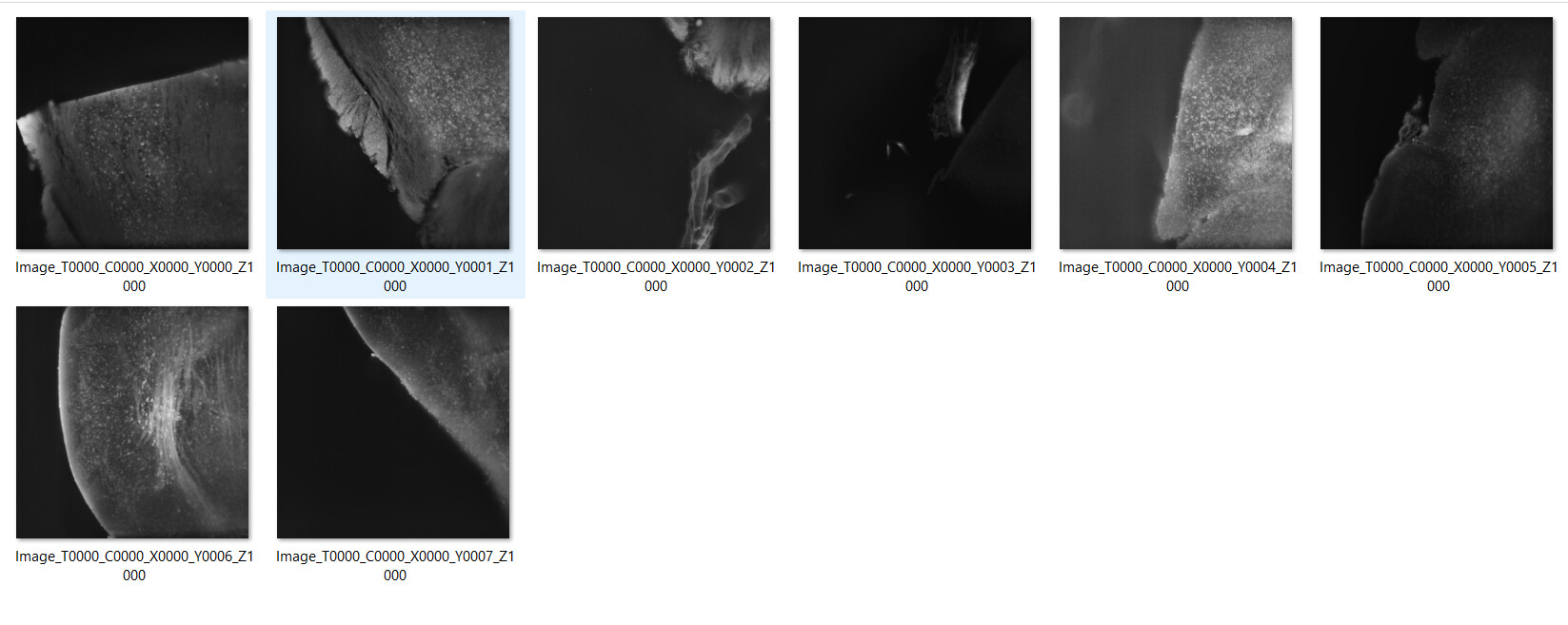
although obviously not all the images for the stack to be complete are present here. But, Can you guide me what method I should use to make this images transform from 2D to 3D Volume using SimpleITK.
Example code will be really helpful for me to get started + if you can point me to the right documentation as well. @zivy
What I already tried?
I tried this below code
```auto
import os
import SimpleITK as sitk
import cv2
import numpy as np
folder_path = "sample"
file_names = os.listdir(folder_path)
file_names.sort()
image_list = []
for file_name in file_names:
image_path = os.path.join(folder_path, file_name)
# Use OpenCV to read the TIFF image
image_cv2 = cv2.imread(image_path, cv2.IMREAD_UNCHANGED)
image = sitk.GetImageFromArray(image_cv2)
image_list.append(image)
volume = sitk.JoinSeries(image_list)
output_filename = "stacked_volume.nii.gz"
output_path = os.path.join(os.getcwd(), output_filename)
sitk.WriteImage(volume, output_path)
```
later used `Pyvista` library to visualise the results. It didn’t give me a 3D Volume rather it was a static image merged in 3D axis. I would appreciate all the help you can give me. Thank you!
---
### Author:  [@zivy](https://discourse.itk.org/u/zivy)
#### Post date: [May 9, 2024, 4:01pm UTC](https://discourse.itk.org/t/stacking-z-dimension-images-using-simpleitk/6623/6 "2024-05-09T16:01:09Z")
Hello @sleepingcat4,
The code is overly complicated. ITK/SimpleITK is able to read TIFF images. If you provide the list of files sorted according to z they will be readily read as a 3D image (volume). Not sure what you mean by “ **static** image merged in 3D axis”. If these images are supposed to be a single 2D image with multiple channels that is one line of code too, just a different one. See code below:
```auto
import os
import SimpleITK as sitk
folder_path = "sample"
file_names = os.listdir(folder_path)
file_names.sort()
# if files are supposed to be a 3D image
image = sitk.ReadImage(file_names.sort())
# or if files are supposed to be a 2D multi channel image use the line below
#image = sitk.Compose([sitk.ReadImage(file_name) for file_name in file_names])
# check if the spatial information was read correctly
print(f"image size: {image.GetSize()}")
print(f"image spacing: {image.GetSpacing()}")
print(f"image origin: {image.GetOrigin()}")
```
---
### Author:  [@sleepingcat4](https://discourse.itk.org/u/sleepingcat4)
#### Post date: [May 9, 2024, 4:27pm UTC](https://discourse.itk.org/t/stacking-z-dimension-images-using-simpleitk/6623/7 "2024-05-09T16:27:12Z")
Thanks for the help! I modified your code a bit to prevent `NonType` exception. and these are the results I received:
```auto
import os
import SimpleITK as sitk
folder_path = "sample"
file_names = os.listdir(folder_path)
file_names.sort() # Sort the list of file names
# If files are supposed to be a 3D image
image = sitk.ReadImage([os.path.join(folder_path, file_name) for file_name in file_names])
# Check if the spatial information was read correctly
print(f"Image size: {image.GetSize()}")
print(f"Image spacing: {image.GetSpacing()}")
print(f"Image origin: {image.GetOrigin()}")
-------------------
results
Image size: (2048, 2048, 8)
Image spacing: (1.0, 1.0, 1.0)
Image origin: (0.0, 0.0, 0.0)
```
Can you guide me what route I should take to stack those XYZ dimension 2D images into 3D Volume?
@zivy
---
### Author:  [@zivy](https://discourse.itk.org/u/zivy)
#### Post date: [May 9, 2024, 5:39pm UTC](https://discourse.itk.org/t/stacking-z-dimension-images-using-simpleitk/6623/8 "2024-05-09T17:39:57Z")
Hello @sleepingcat4,
The images were stacked into a volume, it’s just a very thin one, 8 slices in z direction vs. the 2048 for x and y. One thing that is suspicious is the image spacing. It is rarely, if ever, [1,1,1].
Is the pixel size information available in the tiff images? If yes, then there is a problem in the reading. The x,y,z spacing of [1,1,1] is a default used when the pixel spacing information is missing or not detected. If you know the original spacings then you can set them `image.SetSpacing([x_spacing, y_spacing, z_spacing])` and then the volume will have the correct size.
If you don’t know whether the files contain the spatial information you could try another package that can read tiff files (a different implementation) see what that reports. Specifically [pyvips](https://github.com/libvips/pyvips):
```auto
import pyvips
file_name =
image = pyvips.Image.new_from_file(file_name)
print(f"spacing: {image.xres}, {image.yres}")
```
---
### Author:  [@sleepingcat4](https://discourse.itk.org/u/sleepingcat4)
#### Post date: [May 9, 2024, 6:06pm UTC](https://discourse.itk.org/t/stacking-z-dimension-images-using-simpleitk/6623/9 "2024-05-09T18:06:12Z")
I have used the code you provided earlier to both stack the images together for a 3D Volume construction and also to see the spacing. After stacking the images together using the following code, I received this result:
```auto
import os
import SimpleITK as sitk
folder_path = "sample"
file_names = os.listdir(folder_path)
file_names.sort() # Sort the list of file names
# If files are supposed to be a 3D image
# image = sitk.ReadImage([os.path.join(folder_path, file_name) for file_name in file_names])
# Check if the spatial information was read correctly
# print(f"Image size: {image.GetSize()}")
# print(f"Image spacing: {image.GetSpacing()}")
# print(f"Image origin: {image.GetOrigin()}")
image = sitk.Compose([sitk.ReadImage(os.path.join(folder_path, file_name)) for file_name in file_names])
# saving
output_file_path = "result.nii.gz"
sitk.WriteImage(image, output_file_path)
print(f"Result saved as {output_file_path}")
```
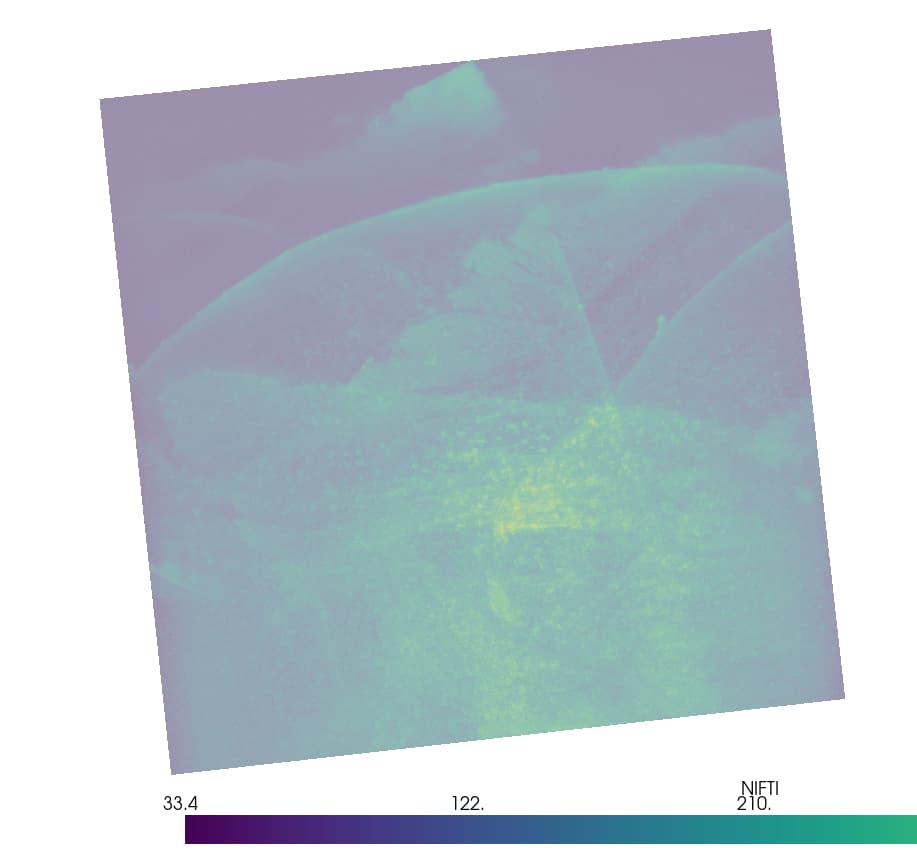
Yes, I realise the layers are extremely thin, still I am unsure why it looks like a 2D merged image than a crude 3D construction? If you could explain on that, will be helpful.
I used this below code and Pyvista to visualise the results
```auto
import pyvista as pv
# Load the file as a PyVista grid
grid = pv.read("result.nii.gz")
# Create a plotter and add the grid
plotter = pv.Plotter()
plotter.add_mesh(grid, opacity=0.5)
plotter.show()
```
Also after running the pyvips library, I received this result
```auto
import pyvips
file_name = "Image_T0000_C0000_X0000_Y0000_Z1000.tiff"
image = pyvips.Image.new_from_file(file_name)
print(f"spacing: {image.xres}, {image.yres}")
-----------------------------
result
spacing: 1.0, 1.0
```
Btw the title configuration register file have these following values
```auto
# Define the number of dimensions we are working on
dim = 2
# Define the image coordinates
Image_T0000_C0000_X0000_Y0000_Z1000.tiff; ; (0.0, 0.0)
Image_T0000_C0000_X0001_Y0000_Z1000.tiff; ; (1544.9514162524083, 17.072951450086833)
Image_T0000_C0000_X0002_Y0000_Z1000.tiff; ; (3096.9032049704, 37.14534362046079)
Image_T0000_C0000_X0003_Y0000_Z1000.tiff; ; (4643.90301598235, 54.14568694049926)
```
And the tile configuration file contains these values
```auto
# Define the number of dimensions we are working on
dim = 2
# Define the image coordinates
Image_T0000_C0000_X0000_Y0000_Z1000.tiff; ; (0.0, 0.0)
Image_T0000_C0000_X0001_Y0000_Z1000.tiff; ; (1638.0, 0.0)
Image_T0000_C0000_X0002_Y0000_Z1000.tiff; ; (3276.0, 0.0)
```
If you can help me out, that’ll be helpful thanks for the previous help as well 🙂
@zivy
---
### Author:  [@dzenanz](https://discourse.itk.org/u/dzenanz)
#### Post date: [May 9, 2024, 6:49pm UTC](https://discourse.itk.org/t/stacking-z-dimension-images-using-simpleitk/6623/10 "2024-05-09T18:49:42Z")
If you have a 2D `TileConfiguration.txt`, you might not have a 3D stack - you might have a 2D montage. Take a look at [this example](https://github.com/InsightSoftwareConsortium/ITKMontage/blob/master/examples/Simple%20Montage.ipynb), and/or [this one](https://github.com/InsightSoftwareConsortium/ITKMontage/blob/master/examples/SimpleMontage.py).
---
### Author:  [@sleepingcat4](https://discourse.itk.org/u/sleepingcat4)
#### Post date: [May 10, 2024, 6:10am UTC](https://discourse.itk.org/t/stacking-z-dimension-images-using-simpleitk/6623/11 "2024-05-10T06:10:57Z")
I’ll take a look and run some code to see if it reaches my desired outcome. And let you guys know
---
### Author:  [@sleepingcat4](https://discourse.itk.org/u/sleepingcat4)
#### Post date: [May 10, 2024, 9:14am UTC](https://discourse.itk.org/t/stacking-z-dimension-images-using-simpleitk/6623/12 "2024-05-10T09:14:19Z")
I’m getting error, I think SimpleITK is changed a lot since the code was written. Can you guys please help me out?
I received this errors while working with the code shown in this [example](https://github.com/InsightSoftwareConsortium/ITKMontage/blob/master/examples/Simple%20Montage.ipynb)
errors, I received
```auto
AttributeError Traceback (most recent call last)
Cell In [6], line 5
1 dimension = 2
3 tile_config_file = "TawsifExampleDataApr2024\RawTiles\FOS_TMP_1000\TileConfiguration.txt"
----> 5 stage_tiles = itk.TileConfiguration[dimension]()
6 stage_tiles.Parse(tile_config_file)
AttributeError: module 'SimpleITK' has no attribute 'TileConfiguration'
```
also received another error
```auto
AttributeError Traceback (most recent call last)
Cell In [7], line 7
4 import SimpleITK as itk
5 import matplotlib.pyplot as plt
----> 7 itk.auto_progress(1)
8 itk.TileConfiguration.GetTypes()
9 itk.auto_progress(0)
AttributeError: module 'SimpleITK' has no attribute 'auto_progress'
```
I’m new to this library, if guys could help me out, that’ll be really helpful. @dzenanz @zivy
---
### Author:  [@zivy](https://discourse.itk.org/u/zivy)
#### Post date: [May 10, 2024, 12:44pm UTC](https://discourse.itk.org/t/stacking-z-dimension-images-using-simpleitk/6623/13 "2024-05-10T12:44:25Z")
Hello @sleepingcat4,
The ITKMontage module is part of ITK but not part of SimpleITK. You will need to switch to using ITK (`pip install itk` or `conda install -c conda-forge itk` depending on which Python you are using).
---
### Author:  [@sleepingcat4](https://discourse.itk.org/u/sleepingcat4)
#### Post date: [May 10, 2024, 1:20pm UTC](https://discourse.itk.org/t/stacking-z-dimension-images-using-simpleitk/6623/14 "2024-05-10T13:20:58Z")
thanks for the help. I have a new problem:
```auto
AttributeError Traceback (most recent call last)
Cell In [1], line 9
7 # Pre-load ITKMontage components
8 itk.auto_progress(1)
----> 9 itk.TileConfiguration.GetTypes()
10 itk.auto_progress(0)
File ~\AppData\Roaming\Python\Python38\site-packages\itk\support\lazy.py:131, in LazyITKModule. __getattribute__ (self, attr)
130 def __getattribute__ (self, attr):
--> 131 value = types.ModuleType. __getattribute__ (self, attr)
132 if value is not_loaded:
133 with type(self).get_lock(): # All but one thread will block here.
AttributeError: module 'itk' has no attribute 'TileConfiguration'
```
I’m unsure whether itk removed this TileConfiguration module or not. Can you help me out? @zivy
---
### Author:  [@dzenanz](https://discourse.itk.org/u/dzenanz)
#### Post date: [May 10, 2024, 1:37pm UTC](https://discourse.itk.org/t/stacking-z-dimension-images-using-simpleitk/6623/15 "2024-05-10T13:37:04Z")
You need `pip install itk-montage`.
---
### Author:  [@sleepingcat4](https://discourse.itk.org/u/sleepingcat4)
#### Post date: [May 10, 2024, 3:30pm UTC](https://discourse.itk.org/t/stacking-z-dimension-images-using-simpleitk/6623/16 "2024-05-10T15:30:31Z")
thanks for kind help. I am getting an error where it says, the filter module is receiving two different input type whilst the previous code blocks from the example ran just fine. Can you help me out with this?
Code producing the error:
```auto
print("Producing the mosaic")
resampleF = itk.TileMergeImageFilter[type(color_images[0]), itk.RGBPixel[itk.F]].New()
resampleF.SetMontageSize(stage_tiles.GetAxisSizes())
for t in range(stage_tiles.LinearSize()):
resampleF.SetInputTile(t, color_images[t])
index = stage_tiles.LinearIndexToNDIndex(t)
resampleF.SetTileTransform(index, montage.GetOutputTransform(index))
resampleF.Update()
itk.imwrite(resampleF.GetOutput(), str(out_file))
print("Resampling complete")
```
error:
```auto
{
"name": "TemplateTypeError",
"message": "itk.TileMergeImageFilter is not wrapped for input type `itk.Image[itk.UC,2], itk.RGBPixel[itk.F]`.
To limit the size of the package, only a limited number of
types are available in ITK Python. To print the supported
types, run the following command in your python environment:
itk.TileMergeImageFilter.GetTypes()
Possible solutions:
* If you are an application user:
** Convert your input image into a supported format (see below).
** Contact developer to report the issue.
* If you are an application developer, force input images to be
loaded in a supported pixel type.
e.g.: instance = itk.TileMergeImageFilter[itk.Image[itk.SS,2], itk.D].New(my_input)
* (Advanced) If you are an application developer, build ITK Python yourself and
turned to `ON` the corresponding CMake option to wrap the pixel type or image
dimension you need. When configuring ITK with CMake, you can set
`ITK_WRAP_${type}` (replace ${type} with appropriate pixel type such as
`double`). If you need to support images with 4 or 5 dimensions, you can add
these dimensions to the list of dimensions in the CMake variable
`ITK_WRAP_IMAGE_DIMS`.
Supported input types:
itk.Image[itk.SS,2]
itk.Image[itk.UC,2]
itk.Image[itk.US,2]
itk.Image[itk.F,2]
itk.Image[itk.D,2]
itk.Image[itk.RGBPixel[itk.UC],2]
itk.Image[itk.RGBAPixel[itk.UC],2]
itk.Image[itk.SS,3]
itk.Image[itk.UC,3]
itk.Image[itk.US,3]
itk.Image[itk.F,3]
itk.Image[itk.D,3]
itk.Image[itk.RGBPixel[itk.UC],3]
itk.Image[itk.RGBAPixel[itk.UC],3]
itk.Image[itk.SS,4]
itk.Image[itk.UC,4]
itk.Image[itk.US,4]
itk.Image[itk.F,4]
itk.Image[itk.D,4]
itk.Image[itk.RGBPixel[itk.UC],4]
itk.Image[itk.RGBAPixel[itk.UC],4]
",
"stack": "---------------------------------------------------------------------------
KeyError Traceback (most recent call last)
File ~\\AppData\\Roaming\\Python\\Python38\\site-packages\\itk\\support\\template_class.py:525, in itkTemplate. __getitem__ (self, parameters)
524 try:
--> 525 this_item = self. __template__ [key]
526 except KeyError:
KeyError: (, )
During handling of the above exception, another exception occurred:
TemplateTypeError Traceback (most recent call last)
Cell In [11], line 2
1 print(\"Producing the mosaic\")
----> 2 resampleF = itk.TileMergeImageFilter[type(color_images[0]), itk.RGBPixel[itk.F]].New()
3 resampleF.SetMontageSize(stage_tiles.GetAxisSizes())
4 for t in range(stage_tiles.LinearSize()):
File ~\\AppData\\Roaming\\Python\\Python38\\site-packages\\itk\\support\\template_class.py:529, in itkTemplate. __getitem__ (self, parameters)
526 except KeyError:
527 import itk
--> 529 raise itk.TemplateTypeError(self, key)
530 return this_item
TemplateTypeError: itk.TileMergeImageFilter is not wrapped for input type `itk.Image[itk.UC,2], itk.RGBPixel[itk.F]`.
To limit the size of the package, only a limited number of
types are available in ITK Python. To print the supported
types, run the following command in your python environment:
itk.TileMergeImageFilter.GetTypes()
Possible solutions:
* If you are an application user:
** Convert your input image into a supported format (see below).
** Contact developer to report the issue.
* If you are an application developer, force input images to be
loaded in a supported pixel type.
e.g.: instance = itk.TileMergeImageFilter[itk.Image[itk.SS,2], itk.D].New(my_input)
* (Advanced) If you are an application developer, build ITK Python yourself and
turned to `ON` the corresponding CMake option to wrap the pixel type or image
dimension you need. When configuring ITK with CMake, you can set
`ITK_WRAP_${type}` (replace ${type} with appropriate pixel type such as
`double`). If you need to support images with 4 or 5 dimensions, you can add
these dimensions to the list of dimensions in the CMake variable
`ITK_WRAP_IMAGE_DIMS`.
Supported input types:
itk.Image[itk.SS,2]
itk.Image[itk.UC,2]
itk.Image[itk.US,2]
itk.Image[itk.F,2]
itk.Image[itk.D,2]
itk.Image[itk.RGBPixel[itk.UC],2]
itk.Image[itk.RGBAPixel[itk.UC],2]
itk.Image[itk.SS,3]
itk.Image[itk.UC,3]
itk.Image[itk.US,3]
itk.Image[itk.F,3]
itk.Image[itk.D,3]
itk.Image[itk.RGBPixel[itk.UC],3]
itk.Image[itk.RGBAPixel[itk.UC],3]
itk.Image[itk.SS,4]
itk.Image[itk.UC,4]
itk.Image[itk.US,4]
itk.Image[itk.F,4]
itk.Image[itk.D,4]
itk.Image[itk.RGBPixel[itk.UC],4]
itk.Image[itk.RGBAPixel[itk.UC],4]
"
}
```
reference to the example: [ITKMontage/examples/Simple Montage.ipynb at master · InsightSoftwareConsortium/ITKMontage · GitHub](https://github.com/InsightSoftwareConsortium/ITKMontage/blob/master/examples/Simple%20Montage.ipynb)
Imagetype for my images are
```auto
```
Pixel type
```auto
Pixel Type:
Pixel Type:
Pixel Type:
Pixel Type:
Pixel Type:
Pixel Type:
Pixel Type:
Pixel Type:
Pixel Type:
Pixel Type:
Pixel Type:
Pixel Type:
Pixel Type:
Pixel Type:
Pixel Type:
Pixel Type:
Pixel Type:
Pixel Type:
Pixel Type:
Pixel Type:
Pixel Type:
Pixel Type:
Pixel Type:
Pixel Type:
Pixel Type:
Pixel Type:
Pixel Type:
Pixel Type:
Pixel Type:
Pixel Type:
Pixel Type:
Pixel Type:
Pixel Type:
Pixel Type:
Pixel Type:
Pixel Type:
Pixel Type:
Pixel Type:
Pixel Type:
Pixel Type:
Pixel Type:
Pixel Type:
Pixel Type:
Pixel Type:
Pixel Type:
Pixel Type:
Pixel Type:
Pixel Type:
Pixel Type:
Pixel Type:
Pixel Type:
Pixel Type:
Pixel Type:
Pixel Type:
```
@dzenanz @zivy
---
### Author:  [@dzenanz](https://discourse.itk.org/u/dzenanz)
#### Post date: [May 10, 2024, 5:03pm UTC](https://discourse.itk.org/t/stacking-z-dimension-images-using-simpleitk/6623/17 "2024-05-10T17:03:32Z")
Your images are grayscale, so filter instantiation should be like:
```py
resampleF = itk.TileMergeImageFilter[type(color_images[0]), itk.F].New()
```
or like
```py
resampleF = itk.TileMergeImageFilter[type(color_images[0])].New()
```
---
### Author:  [@sleepingcat4](https://discourse.itk.org/u/sleepingcat4)
#### Post date: [May 10, 2024, 5:17pm UTC](https://discourse.itk.org/t/stacking-z-dimension-images-using-simpleitk/6623/18 "2024-05-10T17:17:32Z")
Still, I am receiving an error for both of the fixes you suggested.
```auto
{
"name": "TemplateTypeError",
"message": "itk.TileMergeImageFilter is not wrapped for input type `itk.Image[itk.UC,2], itk.F`.
To limit the size of the package, only a limited number of
types are available in ITK Python. To print the supported
types, run the following command in your python environment:
itk.TileMergeImageFilter.GetTypes()
Possible solutions:
* If you are an application user:
** Convert your input image into a supported format (see below).
** Contact developer to report the issue.
* If you are an application developer, force input images to be
loaded in a supported pixel type.
e.g.: instance = itk.TileMergeImageFilter[itk.Image[itk.SS,2], itk.D].New(my_input)
* (Advanced) If you are an application developer, build ITK Python yourself and
turned to `ON` the corresponding CMake option to wrap the pixel type or image
dimension you need. When configuring ITK with CMake, you can set
`ITK_WRAP_${type}` (replace ${type} with appropriate pixel type such as
`double`). If you need to support images with 4 or 5 dimensions, you can add
these dimensions to the list of dimensions in the CMake variable
`ITK_WRAP_IMAGE_DIMS`.
Supported input types:
itk.Image[itk.SS,2]
itk.Image[itk.UC,2]
itk.Image[itk.US,2]
itk.Image[itk.F,2]
itk.Image[itk.D,2]
itk.Image[itk.RGBPixel[itk.UC],2]
itk.Image[itk.RGBAPixel[itk.UC],2]
itk.Image[itk.SS,3]
itk.Image[itk.UC,3]
itk.Image[itk.US,3]
itk.Image[itk.F,3]
itk.Image[itk.D,3]
itk.Image[itk.RGBPixel[itk.UC],3]
itk.Image[itk.RGBAPixel[itk.UC],3]
itk.Image[itk.SS,4]
itk.Image[itk.UC,4]
itk.Image[itk.US,4]
itk.Image[itk.F,4]
itk.Image[itk.D,4]
itk.Image[itk.RGBPixel[itk.UC],4]
itk.Image[itk.RGBAPixel[itk.UC],4]
",
"stack": "---------------------------------------------------------------------------
KeyError Traceback (most recent call last)
File ~\\AppData\\Roaming\\Python\\Python38\\site-packages\\itk\\support\\template_class.py:525, in itkTemplate. __getitem__ (self, parameters)
524 try:
--> 525 this_item = self. __template__ [key]
526 except KeyError:
KeyError: (, )
During handling of the above exception, another exception occurred:
TemplateTypeError Traceback (most recent call last)
Cell In [10], line 2
1 print(\"Producing the mosaic\")
----> 2 resampleF = itk.TileMergeImageFilter[type(color_images[0]), itk.F].New()# line creating the problem
3 resampleF.SetMontageSize(stage_tiles.GetAxisSizes())
4 for t in range(stage_tiles.LinearSize()):
File ~\\AppData\\Roaming\\Python\\Python38\\site-packages\\itk\\support\\template_class.py:529, in itkTemplate. __getitem__ (self, parameters)
526 except KeyError:
527 import itk
--> 529 raise itk.TemplateTypeError(self, key)
530 return this_item
TemplateTypeError: itk.TileMergeImageFilter is not wrapped for input type `itk.Image[itk.UC,2], itk.F`.
To limit the size of the package, only a limited number of
types are available in ITK Python. To print the supported
types, run the following command in your python environment:
itk.TileMergeImageFilter.GetTypes()
Possible solutions:
* If you are an application user:
** Convert your input image into a supported format (see below).
** Contact developer to report the issue.
* If you are an application developer, force input images to be
loaded in a supported pixel type.
e.g.: instance = itk.TileMergeImageFilter[itk.Image[itk.SS,2], itk.D].New(my_input)
* (Advanced) If you are an application developer, build ITK Python yourself and
turned to `ON` the corresponding CMake option to wrap the pixel type or image
dimension you need. When configuring ITK with CMake, you can set
`ITK_WRAP_${type}` (replace ${type} with appropriate pixel type such as
`double`). If you need to support images with 4 or 5 dimensions, you can add
these dimensions to the list of dimensions in the CMake variable
`ITK_WRAP_IMAGE_DIMS`.
Supported input types:
itk.Image[itk.SS,2]
itk.Image[itk.UC,2]
itk.Image[itk.US,2]
itk.Image[itk.F,2]
itk.Image[itk.D,2]
itk.Image[itk.RGBPixel[itk.UC],2]
itk.Image[itk.RGBAPixel[itk.UC],2]
itk.Image[itk.SS,3]
itk.Image[itk.UC,3]
itk.Image[itk.US,3]
itk.Image[itk.F,3]
itk.Image[itk.D,3]
itk.Image[itk.RGBPixel[itk.UC],3]
itk.Image[itk.RGBAPixel[itk.UC],3]
itk.Image[itk.SS,4]
itk.Image[itk.UC,4]
itk.Image[itk.US,4]
itk.Image[itk.F,4]
itk.Image[itk.D,4]
itk.Image[itk.RGBPixel[itk.UC],4]
itk.Image[itk.RGBAPixel[itk.UC],4]
"
}
```
for the other one
```auto
{
"name": "TemplateTypeError",
"message": "itk.TileMergeImageFilter is not wrapped for input type `itk.Image[itk.UC,2]`.
To limit the size of the package, only a limited number of
types are available in ITK Python. To print the supported
types, run the following command in your python environment:
itk.TileMergeImageFilter.GetTypes()
Possible solutions:
* If you are an application user:
** Convert your input image into a supported format (see below).
** Contact developer to report the issue.
* If you are an application developer, force input images to be
loaded in a supported pixel type.
e.g.: instance = itk.TileMergeImageFilter[itk.Image[itk.SS,2], itk.D].New(my_input)
* (Advanced) If you are an application developer, build ITK Python yourself and
turned to `ON` the corresponding CMake option to wrap the pixel type or image
dimension you need. When configuring ITK with CMake, you can set
`ITK_WRAP_${type}` (replace ${type} with appropriate pixel type such as
`double`). If you need to support images with 4 or 5 dimensions, you can add
these dimensions to the list of dimensions in the CMake variable
`ITK_WRAP_IMAGE_DIMS`.
Supported input types:
itk.Image[itk.SS,2]
itk.Image[itk.UC,2]
itk.Image[itk.US,2]
itk.Image[itk.F,2]
itk.Image[itk.D,2]
itk.Image[itk.RGBPixel[itk.UC],2]
itk.Image[itk.RGBAPixel[itk.UC],2]
itk.Image[itk.SS,3]
itk.Image[itk.UC,3]
itk.Image[itk.US,3]
itk.Image[itk.F,3]
itk.Image[itk.D,3]
itk.Image[itk.RGBPixel[itk.UC],3]
itk.Image[itk.RGBAPixel[itk.UC],3]
itk.Image[itk.SS,4]
itk.Image[itk.UC,4]
itk.Image[itk.US,4]
itk.Image[itk.F,4]
itk.Image[itk.D,4]
itk.Image[itk.RGBPixel[itk.UC],4]
itk.Image[itk.RGBAPixel[itk.UC],4]
",
"stack": "---------------------------------------------------------------------------
KeyError Traceback (most recent call last)
File ~\\AppData\\Roaming\\Python\\Python38\\site-packages\\itk\\support\\template_class.py:525, in itkTemplate. __getitem__ (self, parameters)
524 try:
--> 525 this_item = self. __template__ [key]
526 except KeyError:
KeyError: (,)
During handling of the above exception, another exception occurred:
TemplateTypeError Traceback (most recent call last)
Cell In [11], line 2
1 print(\"Producing the mosaic\")
----> 2 resampleF = itk.TileMergeImageFilter[type(color_images[0])].New() # line creating the problem
3 resampleF.SetMontageSize(stage_tiles.GetAxisSizes())
4 for t in range(stage_tiles.LinearSize()):
File ~\\AppData\\Roaming\\Python\\Python38\\site-packages\\itk\\support\\template_class.py:529, in itkTemplate. __getitem__ (self, parameters)
526 except KeyError:
527 import itk
--> 529 raise itk.TemplateTypeError(self, key)
530 return this_item
TemplateTypeError: itk.TileMergeImageFilter is not wrapped for input type `itk.Image[itk.UC,2]`.
To limit the size of the package, only a limited number of
types are available in ITK Python. To print the supported
types, run the following command in your python environment:
itk.TileMergeImageFilter.GetTypes()
Possible solutions:
* If you are an application user:
** Convert your input image into a supported format (see below).
** Contact developer to report the issue.
* If you are an application developer, force input images to be
loaded in a supported pixel type.
e.g.: instance = itk.TileMergeImageFilter[itk.Image[itk.SS,2], itk.D].New(my_input)
* (Advanced) If you are an application developer, build ITK Python yourself and
turned to `ON` the corresponding CMake option to wrap the pixel type or image
dimension you need. When configuring ITK with CMake, you can set
`ITK_WRAP_${type}` (replace ${type} with appropriate pixel type such as
`double`). If you need to support images with 4 or 5 dimensions, you can add
these dimensions to the list of dimensions in the CMake variable
`ITK_WRAP_IMAGE_DIMS`.
Supported input types:
itk.Image[itk.SS,2]
itk.Image[itk.UC,2]
itk.Image[itk.US,2]
itk.Image[itk.F,2]
itk.Image[itk.D,2]
itk.Image[itk.RGBPixel[itk.UC],2]
itk.Image[itk.RGBAPixel[itk.UC],2]
itk.Image[itk.SS,3]
itk.Image[itk.UC,3]
itk.Image[itk.US,3]
itk.Image[itk.F,3]
itk.Image[itk.D,3]
itk.Image[itk.RGBPixel[itk.UC],3]
itk.Image[itk.RGBAPixel[itk.UC],3]
itk.Image[itk.SS,4]
itk.Image[itk.UC,4]
itk.Image[itk.US,4]
itk.Image[itk.F,4]
itk.Image[itk.D,4]
itk.Image[itk.RGBPixel[itk.UC],4]
itk.Image[itk.RGBAPixel[itk.UC],4]
"
}
```
Can you help me with this? @dzenanz
---
### Author:  [@dzenanz](https://discourse.itk.org/u/dzenanz)
#### Post date: [May 10, 2024, 5:23pm UTC](https://discourse.itk.org/t/stacking-z-dimension-images-using-simpleitk/6623/19 "2024-05-10T17:23:15Z")
Try `resampleF = itk.TileMergeImageFilter[type(color_images[0]), itk.D].New()`. I don’t know why the second suggestion (without explicit second parameter) is not working. `itk.Image[itk.UC,2]` is on the list of supported input types.
---
### Author:  [@sleepingcat4](https://discourse.itk.org/u/sleepingcat4)
#### Post date: [May 10, 2024, 5:34pm UTC](https://discourse.itk.org/t/stacking-z-dimension-images-using-simpleitk/6623/20 "2024-05-10T17:34:35Z")
> [@dzenanz](#):
>
> resampleF = itk.TileMergeImageFilter[type(color\_images[0]), itk.D].New()
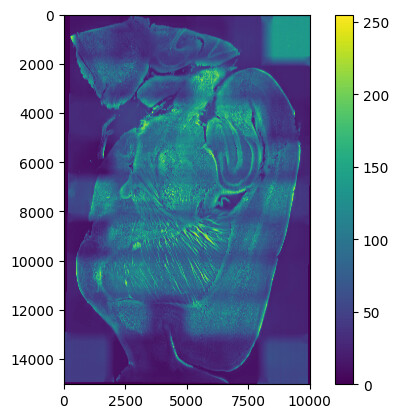
thanks this works but I had an question and problem. Why the resulted image has waves? is there a way to prevent this? @dzenanz
[Next page](https://discourse.itk.org/t/stacking-z-dimension-images-using-simpleitk/6623.md?page=2)