# save and write a .vtk polydata file
**URL:** https://discourse.itk.org/t/save-and-write-a-vtk-polydata-file/2516
**Category:** Engineering
**Tags:** python, vtk
**Created:** [December 12, 2019, 9:48am UTC](https://discourse.itk.org/t/save-and-write-a-vtk-polydata-file/2516 "2019-12-12T09:48:57Z")
**Posts on this page:** 13
**Page:** 1
### Author:  [@nour](https://discourse.itk.org/u/nour)
#### Post date: [December 12, 2019, 9:48am UTC](https://discourse.itk.org/t/save-and-write-a-vtk-polydata-file/2516/1 "2019-12-12T09:48:57Z")
I used this puyhon code to convert nifti file to .vtk polydata meshes
```auto
import itk
import vtk
input_filename = '/home/nour/Bureau/7ans/244/whatIneed/244seg_pve_2.nii.gz'
reader=itk.ImageFileReader[itk.Image[itk.UC,3]].New()
reader.SetFileName(input_filename)
reader.Update()
itkToVtkFilter = itk.ImageToVTKImageFilter[itk.Image[itk.UC,3]].New()
itkToVtkFilter.SetInput(reader.GetOutput())
myvtkImageData = itkToVtkFilter.GetOutput()
print("myvtkImageData")
```
and for saving and writing the .vtk file I used
```auto
writer = vtk.vtkPolyDataWriter()
writer.SetInputData()
writer.SetFileName("/home/nour/Bureau/7ans/244/whatIneed/Output.vtk")
writer.Write()
```
and here the error : ERROR: In /work/standalone-x64-build/VTK-source/Common/ExecutionModel/vtkDemandDrivenPipeline.cxx, line 809 vtkCompositeDataPipeline (0x4d9cac0): Input for connection index 0 on input port index 0 for algorithm vtkPolyDataWriter(0x4de3ea0) is of type vtkImageData, but a vtkPolyData is required.
I was wondering as to what would be a good way of writing a vtk Polydata file. thanks
---
### Author:  [@dzenanz](https://discourse.itk.org/u/dzenanz)
#### Post date: [December 12, 2019, 5:03pm UTC](https://discourse.itk.org/t/save-and-write-a-vtk-polydata-file/2516/2 "2019-12-12T17:03:09Z")
You are lacking the steps of segmenting your image, and converting that segmentation into polygonal mesh. Here is a discussion about it on the Slicer forum:
> **[Save volume rendering as STL file](https://discourse.slicer.org/t/save-volume-rendering-as-stl-file/524)**
>
> Hello, I am a new user on 3D slicer. I was using the display preset feature under volume rendering, and I was wondering if there is a way to save what I was viewing as an .stl or 3D printable file. For example, I was viewing a sample MRI using the...
There are many methods for segmentation, a quick one to start with is Otsu (this [2D example](https://itk.org/ITKExamples/src/Filtering/Thresholding/ThresholdAnImageUsingOtsu/Documentation.html) should not be hard to extend to 3D). You can use [BinaryMask3DMeshSource](https://itk.org/Doxygen/html/classitk_1_1BinaryMask3DMeshSource.html) to convert that into a mesh, and write using [MeshFileWriter](https://itk.org/Doxygen/html/classitk_1_1MeshFileWriter.html). You could start from this [3D example](https://itk.org/ITKExamples/src/Core/Mesh/ExtractIsoSurface/Documentation.html).
---
### Author:  [@nour](https://discourse.itk.org/u/nour)
#### Post date: [December 13, 2019, 12:14am UTC](https://discourse.itk.org/t/save-and-write-a-vtk-polydata-file/2516/4 "2019-12-13T00:14:14Z")
thank you very much. So as I understand :
1 reading nifti file (segmented file)
2 apply itktovtkfilter
3 creating meshes (using the vtkContourFilter)
4 and finaly convert it to polydata and save it to .vtk file
Is the diagram right ??
---
### Author:  [@dzenanz](https://discourse.itk.org/u/dzenanz)
#### Post date: [December 13, 2019, 2:20pm UTC](https://discourse.itk.org/t/save-and-write-a-vtk-polydata-file/2516/5 "2019-12-13T14:20:23Z")
You could start from this [3D example](https://itk.org/ITKExamples/src/Core/Mesh/ExtractIsoSurface/Documentation.html). It does all the basic conversions. Then you can improve the segmentation step, if needed.
---
### Author:  [@nour](https://discourse.itk.org/u/nour)
#### Post date: [December 16, 2019, 2:01pm UTC](https://discourse.itk.org/t/save-and-write-a-vtk-polydata-file/2516/6 "2019-12-16T14:01:20Z")
thank you very much, And sorry about bothering you
I have another error :
import itk
import vtk
#read input file
input\_filename = ‘/home/nour/Bureau/244seg\_pve\_2.nii.gz’
PixelType = itk.ctype(‘float’)
Dimension = 3
ImageType = itk.Image[PixelType, Dimension]
reader = itk.ImageFileReader[ImageType].New()
reader.SetFileName(input\_filename)
reader.Update()
#segmentation
thresholdFilter = itk.ThresholdImageFilter[ImageType].New()
thresholdFilter.SetInput(reader.GetOutput())
thresholdFilter.ThresholdBelow(0)
thresholdFilter.SetOutsideValue(0)
thresholdFilter.Update()
itkToVtkFilter = itk.ImageToVTKImageFilter[ImageType].New()
itkToVtkFilter.SetInput(thresholdFilter.GetOutput())
myvtkImageData = itkToVtkFilter.GetOutput()
itkToVtkFilter.Update()
# Generate an isosurface
contour=vtk.vtkMarchingCubes()
contour.SetInputData(itkToVtkFilter.GetOutput())
contour.ComputeNormalsOn()
contour.Update()
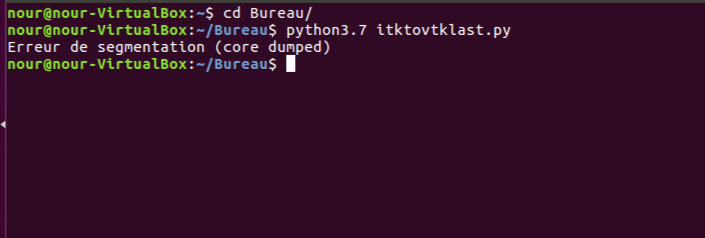
when I run it with itkToVtkFilter.Update() : Erreur de segmentation (core dumped)
but when I run it without itkToVtkFilter.Update() : vtkMarchingCubes (0x4d03f80): Scalars must be defined for contouring
---
### Author:  [@dzenanz](https://discourse.itk.org/u/dzenanz)
#### Post date: [December 16, 2019, 2:10pm UTC](https://discourse.itk.org/t/save-and-write-a-vtk-polydata-file/2516/7 "2019-12-16T14:10:51Z")
This might produce an empty image. Try setting `ThresholdBelow` to a value other than zero. Try 100, 300, and 1000.
> [@nour](#):
>
> without itkToVtkFilter.Update()
The `contour` filter’s input will be null pointer. Of course it complains.
Also, generating an isosurface should be done on the original volume, not a thresholded one. In essence you are trying to combine ITK’s and VTK’s way of extracting isosurface, but in a weird (improper) way.
For start, I suggest you stick either to [ITK’s example](https://itk.org/ITKExamples/src/Core/Mesh/ExtractIsoSurface/Documentation.html), or [VTK’s one](https://vtk.org/Wiki/VTK/Examples/Cxx/Modelling/ExtractLargestIsosurface).
---
### Author:  [@nour](https://discourse.itk.org/u/nour)
#### Post date: [December 16, 2019, 2:27pm UTC](https://discourse.itk.org/t/save-and-write-a-vtk-polydata-file/2516/8 "2019-12-16T14:27:41Z")
thank you sir for your quick answer :
#segmentation
thresholdFilter = itk.ThresholdImageFilter[ImageType].New()
thresholdFilter.SetInput(reader.GetOutput())
thresholdFilter.ThresholdBelow(0.1)
thresholdFilter.SetOutsideValue(0)
thresholdFilter.Update()
because I have done a normalization of the image pixel between 0 and 1
and it is the same error : Erreur de segmentation (core dumped)
---
### Author:  [@dzenanz](https://discourse.itk.org/u/dzenanz)
#### Post date: [December 16, 2019, 2:35pm UTC](https://discourse.itk.org/t/save-and-write-a-vtk-polydata-file/2516/9 "2019-12-16T14:35:27Z")
Wrap your code in a try/catch block and print the exception message to see what is going wrong.
---
### Author:  [@nour](https://discourse.itk.org/u/nour)
#### Post date: [December 16, 2019, 2:51pm UTC](https://discourse.itk.org/t/save-and-write-a-vtk-polydata-file/2516/10 "2019-12-16T14:51:10Z")
I m very sorry but I didn’t found how or where to wrap it
this my code
```auto
import itk
import vtk
#read input file
input_filename = '/home/nour/Bureau/244seg_pve_2.nii.gz'
PixelType = itk.ctype('float')
Dimension = 3
ImageType = itk.Image[PixelType, Dimension]
reader = itk.ImageFileReader[ImageType].New()
reader.SetFileName(input_filename)
reader.Update()
#print(reader)
#segmentation
thresholdFilter = itk.ThresholdImageFilter[ImageType].New()
thresholdFilter.SetInput(reader.GetOutput())
thresholdFilter.ThresholdBelow(0.1)
thresholdFilter.SetOutsideValue(0)
thresholdFilter.Update()
#itktovtk
itkToVtkFilter = itk.ImageToVTKImageFilter[ImageType].New()
itkToVtkFilter.SetInput(thresholdFilter.GetOutput())
myvtkImageData = itkToVtkFilter.GetOutput()
#print(myvtkImageData)
itkToVtkFilter.Update()
# Generate an isosurface
contour=vtk.vtkMarchingCubes()
contour.SetInputData(itkToVtkFilter.GetOutput())
contour.ComputeNormalsOn()
contour.ComputeGradientsOn()
contour.SetValue(0,1)
contour.Update()
# Take the isosurface data and create geometry
mapper = vtk.vtkPolyDataMapper()
mapper.SetInputConnection(contour.GetOutputPort())
mapper.ScalarVisibilityOff()
actor = vtk.vtkActor()
actor.SetMapper(mapper)
# Create renderer
renderer=vtk.vtkRenderer()
renderer.SetBackground([0.5, 0.5, 0.5])
renderer.AddActor(actor)
# Create a window for the renderer
window = vtk.vtkRenderWindow()
window.SetSize(500, 500)
window.AddRenderer(renderer)
# Create interactor, add window & add observers
interactor = vtk.vtkRenderWindowInteractor()
interactor.SetRenderWindow(window)
# Start renderer & interactor
window.Render()
interactor.Initialize()
interactor.Start()
```
---
### Author:  [@dzenanz](https://discourse.itk.org/u/dzenanz)
#### Post date: [December 16, 2019, 3:01pm UTC](https://discourse.itk.org/t/save-and-write-a-vtk-polydata-file/2516/11 "2019-12-16T15:01:05Z")
In Python it should be something like this:
```auto
try:
# your entire code here
except RuntimeError as e:
print('Got an exception\n' + str(e))
```
---
### Author:  [@nour](https://discourse.itk.org/u/nour)
#### Post date: [December 17, 2019, 11:29am UTC](https://discourse.itk.org/t/save-and-write-a-vtk-polydata-file/2516/12 "2019-12-17T11:29:36Z")
sorry sir I did try/except but it is the same error 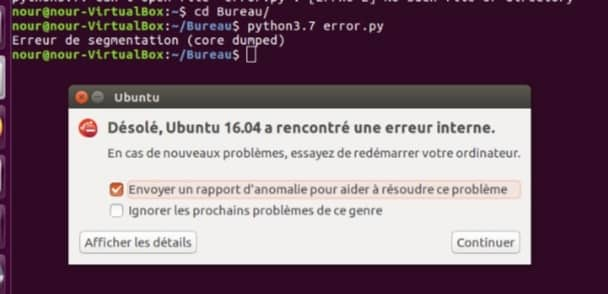
---
### Author:  [@dzenanz](https://discourse.itk.org/u/dzenanz)
#### Post date: [December 17, 2019, 2:01pm UTC](https://discourse.itk.org/t/save-and-write-a-vtk-polydata-file/2516/13 "2019-12-17T14:01:55Z")
Can you copy-paste the detail of the error from that “Ubuntu” error dialog? I am afraid that something is wrong with your Python or ITK installation.
---
### Author:  [@nour](https://discourse.itk.org/u/nour)
#### Post date: [December 19, 2019, 2:16pm UTC](https://discourse.itk.org/t/save-and-write-a-vtk-polydata-file/2516/14 "2019-12-19T14:16:29Z")
The working code:
```auto
import vtk
reader = vtk.vtkNIFTIImageReader()
reader.SetFileName('/home/nour/Bureau/244seg_pve_1.nii.gz')
reader.Update()
print(reader)
contour=vtk.vtkMarchingCubes()
contour.SetInputData(reader.GetOutput())
contour.ComputeNormalsOn()
contour.ComputeGradientsOn()
contour.SetValue(0,1)
contour.Update()
#Take the isosurface data and create geometry
mapper = vtk.vtkPolyDataMapper()
mapper.SetInputConnection(contour.GetOutputPort())
mapper.ScalarVisibilityOff()
actor = vtk.vtkActor()
actor.SetMapper(mapper)
# Create renderer
renderer=vtk.vtkRenderer()
renderer.SetBackground([0.5, 0.5, 0.5])
renderer.AddActor(actor)
# Create a window for the renderer
window = vtk.vtkRenderWindow()
window.SetSize(500, 500)
window.AddRenderer(renderer)
# Create interactor, add window & add observers
interactor = vtk.vtkRenderWindowInteractor()
interactor.SetRenderWindow(window)
# Start renderer & interactor
window.Render()
interactor.Initialize()
interactor.Start()
```