# Run examples from Windows command line
**URL:** https://discourse.itk.org/t/run-examples-from-windows-command-line/2105
**Category:** Beginner Questions
**Created:** [July 29, 2019, 12:37pm UTC](https://discourse.itk.org/t/run-examples-from-windows-command-line/2105 "2019-07-29T12:37:00Z")
**Posts on this page:** 11
**Page:** 1
### Author:  [@farhan\_009](https://discourse.itk.org/u/farhan_009)
#### Post date: [July 29, 2019, 12:37pm UTC](https://discourse.itk.org/t/run-examples-from-windows-command-line/2105/1 "2019-07-29T12:37:00Z")
Hello !I am just a beginner ,and want to know how to give command line input of images to .exe file created after building from cmake and visual studio?Like in ImageRegistration1.cxx there are six argc ,how to give input to that file?
---
### Author:  [@matt.mccormick](https://discourse.itk.org/u/matt.mccormick)
#### Post date: [July 29, 2019, 1:58pm UTC](https://discourse.itk.org/t/run-examples-from-windows-command-line/2105/2 "2019-07-29T13:58:01Z")
Welcome to ITK, Syed! ☀
The build examples can be called by opening a command prompt (run `cmd.exe`). Then, call the `.exe` file and pass command line arguments to the executable. You will likely need to change directories to the folder that contains the command with the `cd` command. The command line arguments become `argc` and `argv` to the `main` function.
See, for example:
[https://www.wikihow.com/Open-the-Command-Prompt-in-Windows](https://www.wikihow.com/Open-the-Command-Prompt-in-Windows)
---
### Author:  [@dzenanz](https://discourse.itk.org/u/dzenanz)
#### Post date: [July 29, 2019, 2:04pm UTC](https://discourse.itk.org/t/run-examples-from-windows-command-line/2105/3 "2019-07-29T14:04:47Z")
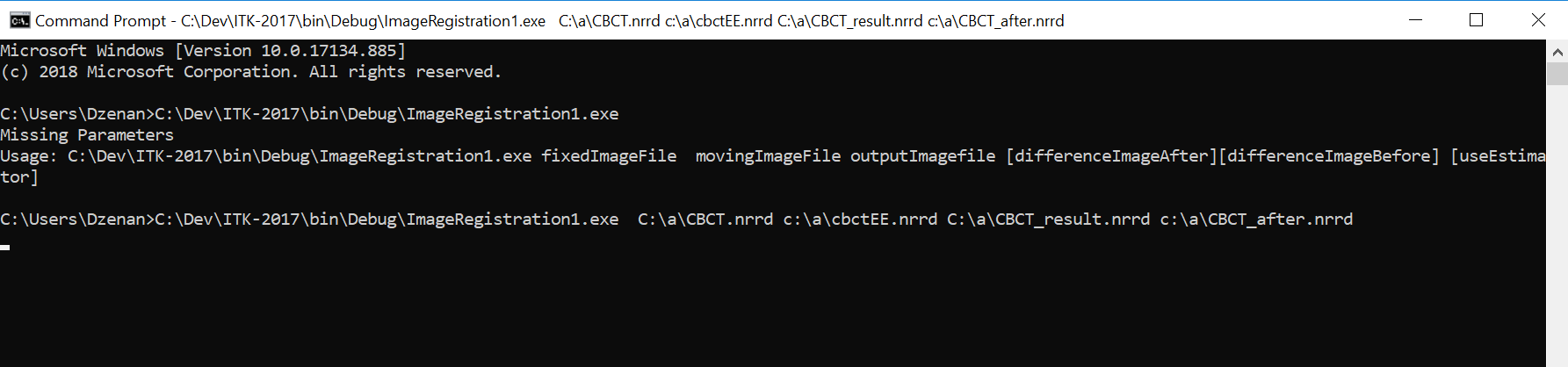
Here is an example of invoking it:
---
### Author:  [@farhan\_009](https://discourse.itk.org/u/farhan_009)
#### Post date: [August 2, 2019, 8:08am UTC](https://discourse.itk.org/t/run-examples-from-windows-command-line/2105/4 "2019-08-02T08:08:52Z")
Thank you for your response. Here the example is attached if I am using the single image multiple times its running fine but with different images, it’s throwing the error.

And another question is for visualization of the processed image we have to use to feed that image to vtk for visualization, right?
The bigger picture is, I want to register MRI and PET images together using ITK and visualization have to use VTK and make GUI for loading images and show register image on Visual Studio GUI.
Registration methods may be geometrical base or landmark base method.
If you people give your expert opinion I would be highly thankful to you.opinion on how to pipeline this task step by step.
I have make GUI in Visual Studio using Qt.
---
### Author:  [@dzenanz](https://discourse.itk.org/u/dzenanz)
#### Post date: [August 2, 2019, 1:05pm UTC](https://discourse.itk.org/t/run-examples-from-windows-command-line/2105/5 "2019-08-02T13:05:35Z")
> [@farhan\_009](#):
>
> with different images, it’s throwing the error
Can you show us the error? What you have shown is not an error. It says that registration finished after 0 steps, with perfect registration. Of course - fixed and moving images are identical.
While you could go the route of writing your own visualization code, using existing image viewers such as [Slicer](https://slicer.org/) and [ITK-SNAP](http://www.itksnap.org/) is much easier, faster and probably better. Just write the images to disk from your program and load them in a viewer. You could also use [QuickView](https://itk.org/Doxygen/html/classQuickView.html) for basic visualization.
---
### Author:  [@farhan\_009](https://discourse.itk.org/u/farhan_009)
#### Post date: [August 22, 2019, 6:29am UTC](https://discourse.itk.org/t/run-examples-from-windows-command-line/2105/6 "2019-08-22T06:29:11Z")
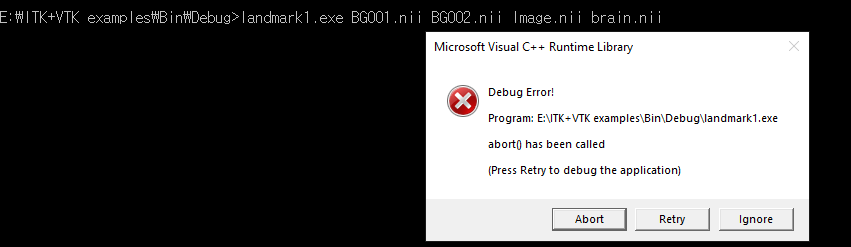
I am trying this example now through cmd and by changing the main function to void and enter the path in cxx file. By both ways following error is come along.
The second thing is there any example where we can do registration using landmark method b choosing landmarks and a thin plate or BSpline as an interpolator.Thanks
---
### Author:  [@dzenanz](https://discourse.itk.org/u/dzenanz)
#### Post date: [August 26, 2019, 6:45pm UTC](https://discourse.itk.org/t/run-examples-from-windows-command-line/2105/7 "2019-08-26T18:45:09Z")
Clicking Abort or Ignore might give a more detailed error. And clicking Retry should take you to the source code file where the error is occurring. And we might need you input images to reproduce this issue, it would be good if you shared them.
> [@farhan\_009](#):
>
> is there any example where we can do registration using landmark method b choosing landmarks
That is too much interaction for an example. But such a [module](https://www.slicer.org/wiki/Documentation/4.10/Modules/LandmarkRegistration) already exists in Slicer. You can also find some video tutorial such as [this one](https://www.youtube.com/watch?v=SL5i50M_V5Y). And ask for further help on [Slicer forum](https://discourse.slicer.org/).
---
### Author:  [@farhan\_009](https://discourse.itk.org/u/farhan_009)
#### Post date: [August 27, 2019, 4:25am UTC](https://discourse.itk.org/t/run-examples-from-windows-command-line/2105/8 "2019-08-27T04:25:45Z")
Sorry, there is error while uploading the image.You can choose any .nii image.
Original image(MRA-TOF). I just use itk snap for the distorted/rotated image.
Actually, we are making a small software in which different registration algorithms can be implemented.
I have to make an intensity base and geometry base algorithm in the software using ITK and QT integration.
I have seen that 3D slicer software examples already, Thank you for referring it.
But we have to create our own implementation so any suggestion for implementing landmark-based algorithms(thin plate and BSpline) or that which is similar to 3D slicer are more than welcome.
---
### Author:  [@dzenanz](https://discourse.itk.org/u/dzenanz)
#### Post date: [August 27, 2019, 1:48pm UTC](https://discourse.itk.org/t/run-examples-from-windows-command-line/2105/9 "2019-08-27T13:48:23Z")
> [@farhan\_009](#):
>
> there is error while uploading the image.
You could upload it to a file sharing site and put the link here.
---
### Author:  [@farhan\_009](https://discourse.itk.org/u/farhan_009)
#### Post date: [September 16, 2019, 1:39pm UTC](https://discourse.itk.org/t/run-examples-from-windows-command-line/2105/10 "2019-09-16T13:39:03Z")
> **[BG0001.nii](https://drive.google.com/file/d/1rOamMF8A4ltsr1hFCzONZbqcU7VGP-3i/view?usp=sharing)**
>
> Google Drive file.
above is the link for MRA image. The rotated version of it is other sample image for registration
---
### Author:  [@dzenanz](https://discourse.itk.org/u/dzenanz)
#### Post date: [September 23, 2019, 3:31pm UTC](https://discourse.itk.org/t/run-examples-from-windows-command-line/2105/11 "2019-09-23T15:31:28Z")
I tried running with this command line parameters: `C:/a/BG0001.nii C:/a/BG0001rai.nii C:/a/BG0001-reg.nii C:/a/BG0001-diff.nii`, and got the below output. No crash.
```nohighlight
0 = 353.203 : [-0.08833282321382449, -3.999024545103853]
1 = 389.336 : [-0.8521561221065328, -2.1506268692589985]
2 = 365.865 : [-1.0475214995661077, -3.131357397635717]
3 = 381.967 : [-1.3769273207334993, -2.755203433172977]
4 = 367.758 : [-1.5995028515895369, -2.307475688819164]
5 = 369.015 : [-1.6766604026142007, -2.5452712151014647]
6 = 371.448 : [-1.9248932458755132, -2.5749436859524852]
7 = 373.691 : [-2.1702335422481296, -2.5269005909668714]
8 = 371.7 : [-2.386170252280349, -2.6528820866734284]
9 = 372.164 : [-2.5593000518433695, -2.4725322252837723]
10 = 378.196 : [-2.632832054792494, -2.573616568988868]
11 = 371.994 : [-2.757201501590413, -2.586156134498871]
12 = 369.884 : [-2.882188995652429, -2.5879242770546353]
13 = 371.679 : [-3.0071705891460656, -2.5857792157987594]
14 = 374.836 : [-3.1317171593755933, -2.5751419302398704]
15 = 377.015 : [-3.2566403282012786, -2.579523926423044]
16 = 372.653 : [-3.378153162209411, -2.608843393868959]
17 = 370.192 : [-3.492128453572604, -2.557514718075838]
18 = 373.235 : [-3.5708699579184358, -2.6545960009956437]
19 = 372.38 : [-3.5915545443876384, -2.595618056960623]
20 = 374.23 : [-3.652715820539057, -2.5827514995527556]
21 = 376.651 : [-3.713984601228841, -2.5950959927698607]
22 = 378.757 : [-3.7558219574214515, -2.5486644773217018]
23 = 378.539 : [-3.764793233869998, -2.5785990509596166]
24 = 377.101 : [-3.7893811592105293, -2.597886259867296]
25 = 375.596 : [-3.796865592917489, -2.584170434077861]
26 = 375.741 : [-3.8032036278043715, -2.588738198303679]
27 = 375.39 : [-3.8110117276536943, -2.5884760285247075]
28 = 375.145 : [-3.8187169850662954, -2.589766053507239]
29 = 374.866 : [-3.8265259373664944, -2.5895306385051278]
30 = 374.639 : [-3.834088503038442, -2.591490933561358]
31 = 374.365 : [-3.8411192041726254, -2.588084410728352]
32 = 374.267 : [-3.842622686389892, -2.591689730448552]
33 = 374.125 : [-3.844326147313948, -2.590734262947357]
34 = 374.106 : [-3.8459957422300155, -2.5917477470774086]
35 = 374.034 : [-3.847655939319002, -2.5907189405400333]
36 = 374.019 : [-3.8488472544448165, -2.5922666696948378]
Optimizer stop condition: RegularStepGradientDescentOptimizerv4: Step too small after 37 iterations. Current step (0.000976563) is less than minimum step (0.001).
Result =
Translation X = -3.84885
Translation Y = -2.59227
Iterations = 38
Metric value = 373.945
C:\Dev\ITK-2019\bin\RelWithDebInfo\ImageRegistration1.exe (process 29996) exited with code 0.
```
If you built ITK as dynamic (shared) libraries, make sure DLLs are in the path, or in the same folder as your executable.
Also, your input image is 3D and `ImageRegistration1.cxx` is a 2D example. If you want to experiment properly, pick an example which deals with 3D images.