# Rigid + Affine registration 2D implementation with iteration
**URL:** https://discourse.itk.org/t/rigid-affine-registration-2d-implementation-with-iteration/5767
**Category:** Uncategorized
**Created:** [February 28, 2023, 12:46am UTC](https://discourse.itk.org/t/rigid-affine-registration-2d-implementation-with-iteration/5767 "2023-02-28T00:46:05Z")
**Posts on this page:** 7
**Page:** 1
### Author:  [@banikr](https://discourse.itk.org/u/banikr)
#### Post date: [February 28, 2023, 12:46am UTC](https://discourse.itk.org/t/rigid-affine-registration-2d-implementation-with-iteration/5767/1 "2023-02-28T00:46:06Z")
I am trying to apply Euler2D rotation with Affine registration in an iterative manner.
Something done here [https://itk.org/ITKSoftwareGuide/html/Book2/ITKSoftwareGuide-Book2ch3.html#x26-110175r30](https://itk.org/ITKSoftwareGuide/html/Book2/ITKSoftwareGuide-Book2ch3.html#x26-110175r30) at section 3.6.5.
Now I couldn’t find a python version of the example there.
This is the first Euler method:
```auto
all_orientations = np.linspace(-2*np.pi, 2*np.pi, 100)
# print(all_orientations)
# Evaluate the similarity metric using the rotation parameter space sampling, translation remains the same for all.
initial_transform = sitk.Euler2DTransform(sitk.CenteredTransformInitializer(fixed_image,
moving_image,
sitk.Euler2DTransform(),
sitk.CenteredTransformInitializerFilter.GEOMETRY))
# Registration framework setup.
registration_method = sitk.ImageRegistrationMethod()
registration_method.SetMetricAsMattesMutualInformation(numberOfHistogramBins=500)
registration_method.SetMetricSamplingStrategy(registration_method.RANDOM)
registration_method.SetMetricSamplingPercentage(0.001)
registration_method.SetInitialTransform(initial_transform, inPlace=False)
registration_method.SetOptimizerAsRegularStepGradientDescent(learningRate=2.0,
minStep=1e-4,
numberOfIterations=500,
gradientMagnitudeTolerance=1e-8)
registration_method.SetInterpolator(sitk.sitkNearestNeighbor)
registration_method.SetOptimizerScalesFromIndexShift()
# best_orientation = (0.0, 0.0)
best_similarity_value = registration_method.MetricEvaluate(fixed_image, moving_image)
similarity_value = []
# Iterate over all other rotation parameter settings.
for key, orientation in enumerate(all_orientations): # .items():
initial_transform.SetAngle(orientation)
registration_method.SetInitialTransform(initial_transform)
current_similarity_value = registration_method.MetricEvaluate(fixed_image, moving_image)
similarity_value.append(current_similarity_value)
# print("current similarity value: ", current_similarity_value)
if current_similarity_value <= best_similarity_value:
best_similarity_value = current_similarity_value
best_orientation = orientation
# else:
# best_orientation = orientation
print('best orientation is: ' + str(best_orientation))
print(current_similarity_value)
plt.plot(all_orientations, similarity_value, 'b')
plt.plot(best_orientation, best_similarity_value, 'rv')
plt.show()
initial_transform.SetAngle(best_orientation)
registration_method.SetInitialTransform(initial_transform, inPlace=False)
eulerTx = registration_method.Execute(fixed_image, moving_image)
resampler = sitk.ResampleImageFilter()
resampler.SetReferenceImage(fixed_image)
resampler.SetInterpolator(sitk.sitkNearestNeighbor)
resampler.SetDefaultPixelValue(0)
resampler.SetTransform(eulerTx)
out = resampler.Execute(moving_image)
del registration_method, initial_transform, eulerTx
moving_image = sitk.Cast(out, sitk.sitkFloat32)
```
The Euler2D orientation works.
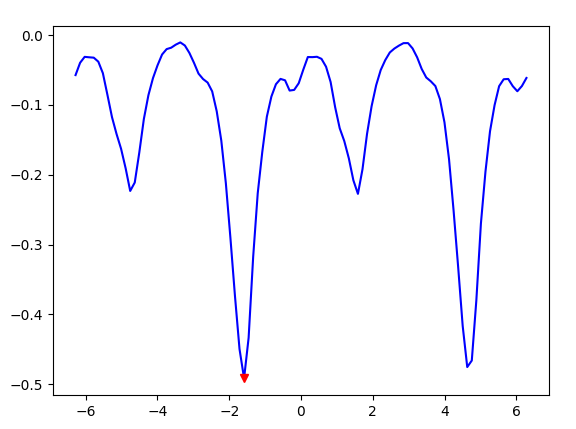
As the best orientation converges at lowest metric with satisfactory visual checkerboard result.
Now how do I run the Affine transformation from here?
I tried the following:
```auto
def command_iteration2(method):
global metric_values
print("metric value: {}".format(method.GetMetricValue()))
metric_values.append(method.GetMetricValue())
metric_values = []
initial_transform = sitk.CenteredTransformInitializer(fixed_image,
moving_image,
sitk.AffineTransform(2),
sitk.CenteredTransformInitializerFilter.GEOMETRY)
registration_method = sitk.ImageRegistrationMethod()
registration_method.SetInterpolator(sitk.sitkNearestNeighbor)
registration_method.SetInitialTransform(initial_transform, inPlace=True)
registration_method.SetMetricSamplingStrategy(registration_method.NONE)
# registration_method.SetOptimizerAsGradientDescent(lear)
translationScale = 1.0 / 100.0
registration_method.SetOptimizerAsRegularStepGradientDescent(learningRate=1.0, minStep=1e-4,
numberOfIterations=100)
registration_method.SetOptimizerScales(scales=[1.0, 1.0, 1.0, 1.0, translationScale, translationScale])
registration_method.AddCommand(sitk.sitkIterationEvent, lambda: command_iteration2(registration_method))
final_transform = registration_method.Execute(fixed_image, moving_image)
plt.plot(metric_values)
plt.show()
print('Optimizer\'s stopping condition, {0}'.format(registration_method.GetOptimizerStopConditionDescription()))
```
It gives me the following without any metric plot,
`Optimizer's stopping condition, RegularStepGradientDescentOptimizerv4: Gradient magnitude tolerance met after 0 iterations. Gradient magnitude (2.39075e-14) is less than gradient magnitude tolerance (0.0001).`
I am a new ITK user so knowing where I am going wrong would be helpful.
---
### Author:  [@zivy](https://discourse.itk.org/u/zivy)
#### Post date: [February 28, 2023, 1:06am UTC](https://discourse.itk.org/t/rigid-affine-registration-2d-implementation-with-iteration/5767/2 "2023-02-28T01:06:59Z")
Hello @banikr,
1. Don’t delete the `registration_method` reuse it in the second registration.
2. Not sure why you are using nearest neighbor as the interpolation method during registration, use linear when working with scalar images.
3. Take the `eulerTx` and promote it to an affine transformation ([this notebook](https://github.com/InsightSoftwareConsortium/SimpleITK-Notebooks/blob/master/Python/22_Transforms.ipynb) illustrates how to promote transformation from lower parameter spaces to higher ones).
4. Set this affine transformation as the initial transform for the existing registration method and call execute (use the original registration settings except for the initial transformation so most of your second portion of the code isn’t needed).
---
### Author:  [@banikr](https://discourse.itk.org/u/banikr)
#### Post date: [February 28, 2023, 11:30pm UTC](https://discourse.itk.org/t/rigid-affine-registration-2d-implementation-with-iteration/5767/3 "2023-02-28T23:30:06Z")
The moving image I am using has 3 segmentation labels, which is the reason to use `sitkNearestNeighbour`.
```auto
rotation_center = (100, 100, 100)
axis = (0, 0, 1)
angle = np.pi / 2.0
translation = (1, 2, 3)
scale_factor = 2.0
similarity = sitk.Similarity3DTransform(
scale_factor, axis, angle, translation, rotation_center
)
affine = sitk.AffineTransform(3)
affine.SetMatrix(similarity.GetMatrix())
affine.SetTranslation(similarity.GetTranslation())
affine.SetCenter(similarity.GetCenter())
```
from this cell of the notebook,
`affine = sitk.AffineTransform(2)` # 2D image
`affine.SetMatrix(eulerTx.GetMatrix())`
generates error:
`AttributeError: 'CompositeTransform' object has no attribute 'GetMatrix'`
Also `print(eulerTx)` prints:
```auto
itk::simple::CompositeTransform
CompositeTransform (0x289b420)
RTTI typeinfo: itk::CompositeTransform
Reference Count: 2
Modified Time: 33201
Debug: Off
Object Name:
Observers:
none
Transforms in queue, from begin to end:
>>>>>>>>>
Euler2DTransform (0x3c5d680)
RTTI typeinfo: itk::Euler2DTransform
Reference Count: 1
Modified Time: 33138
Debug: Off
Object Name:
Observers:
none
Matrix:
-0.015866 0.999874
-0.999874 -0.015866
Offset: [0.758165, 95.5652]
Center: [47.5, 36]
Translation: [-11.5, 11.5]
Inverse:
-0.015866 -0.999874
0.999874 -0.015866
Singular: 0
Angle = -1.58666
End of MultiTransform.
<<<<<<<<<<
TransformsToOptimizeFlags, begin() to end():
1
```
---
### Author:  [@zivy](https://discourse.itk.org/u/zivy)
#### Post date: [March 1, 2023, 12:52am UTC](https://discourse.itk.org/t/rigid-affine-registration-2d-implementation-with-iteration/5767/4 "2023-03-01T00:52:25Z")
Hello @banikr,
In your first step you have:
```auto
registration_method.SetInitialTransform(initial_transform, inPlace=False)
```
Change it to `inPlace=True`, you don’t care if the registration modifies the `initial_transform` and invoke the registration:
```auto
registration_method.Execute(fixed_image, moving_image)
```
Then you can access all the methods of the `Euler2DTransform` such as `initial_transform.GetMatrix()`.
---
### Author:  [@banikr](https://discourse.itk.org/u/banikr)
#### Post date: [March 1, 2023, 5:59pm UTC](https://discourse.itk.org/t/rigid-affine-registration-2d-implementation-with-iteration/5767/5 "2023-03-01T17:59:38Z")
Thanks, @zivy
I was wondering if I am doing it the wrong way. If I can perform AffineTransform instead of individual Euler2D rotation and then shear, scaling, translation, etc.
Now for this, I am rewriting the codes as follows:
```auto
def command_iteration2(method):
global metric_values
metric_values.append(method.GetMetricValue())
initialTx = sitk.CenteredTransformInitializer(fixed_image, moving_image,
sitk.AffineTransform(fixed_image.GetDimension()))
print("start of registration \n", initialTx)
metric_values = []
registration_method = sitk.ImageRegistrationMethod()
registration_method.SetMetricAsMeanSquares()
registration_method.SetMetricSamplingStrategy(registration_method.NONE)
registration_method.SetInitialTransform(initialTx, inPlace=True)
registration_method.SetOptimizerAsRegularStepGradientDescent(learningRate=20.0,
minStep=1e-10,
numberOfIterations=500,
gradientMagnitudeTolerance=1e-1)
registration_method.SetInterpolator(sitk.sitkNearestNeighbor)
registration_method.AddCommand(sitk.sitkIterationEvent, lambda: command_iteration2(registration_method))
tx = registration_method.Execute(fixed_image, moving_image)
resampler = sitk.ResampleImageFilter()
resampler.SetReferenceImage(fixed_image)
resampler.SetInterpolator(sitk.sitkNearestNeighbor)
resampler.SetDefaultPixelValue(0)
resampler.SetTransform(tx)
out = resampler.Execute(moving_image)
displayImage(sitk.GetArrayFromImage(moving_image), Title_='moving')
displayImage(sitk.GetArrayFromImage(fixed_image), Title_='fixed')
displayImage(sitk.GetArrayFromImage(out), Title_='registered Affine')
print("End of registration \n", initialTx)
plt.plot(metric_values)
plt.show()
```
I am getting the following:
```auto
start of registration
itk::simple::Transform
AffineTransform (0x3ea7150)
RTTI typeinfo: itk::AffineTransform
Reference Count: 1
Modified Time: 33411
Debug: Off
Object Name:
Observers:
none
Matrix:
1 0
0 1
Offset: [-9.11147, 12.2176]
Center: [47.0531, 37.9677]
Translation: [-9.11147, 12.2176]
Inverse:
1 0
0 1
Singular: 0
End of registration
itk::simple::Transform
AffineTransform (0x3ea7150)
RTTI typeinfo: itk::AffineTransform
Reference Count: 4
Modified Time: 33887
Debug: Off
Object Name:
Observers:
none
Matrix:
0.666918 -1.14173
-0.114074 -0.674555
Offset: [49.9, 81.1984]
Center: [47.0531, 37.9677]
Translation: [-9.12135, 12.2519]
Inverse:
1.1628 -1.96811
-0.196641 -1.14963
Singular: 0
```
I can see all the parameters(matrix and offset values) are changing in the `AffinceTransform` As the results also indicate:
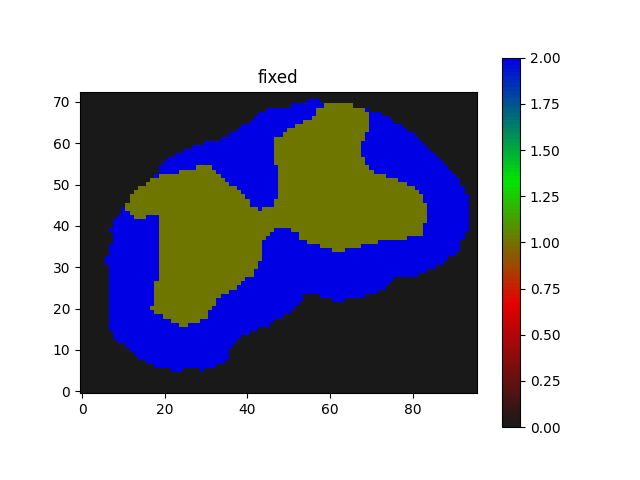
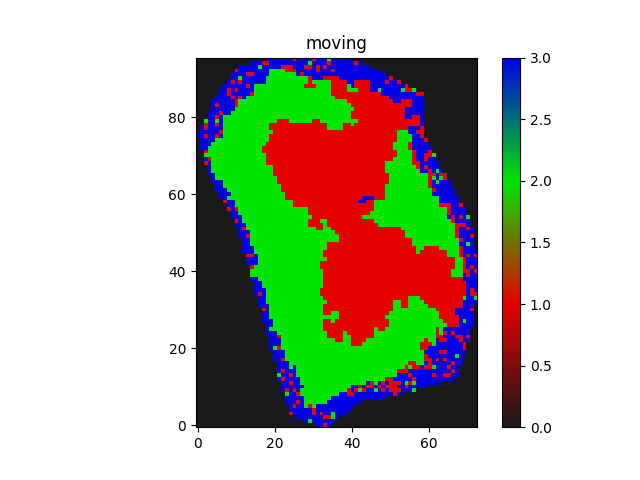
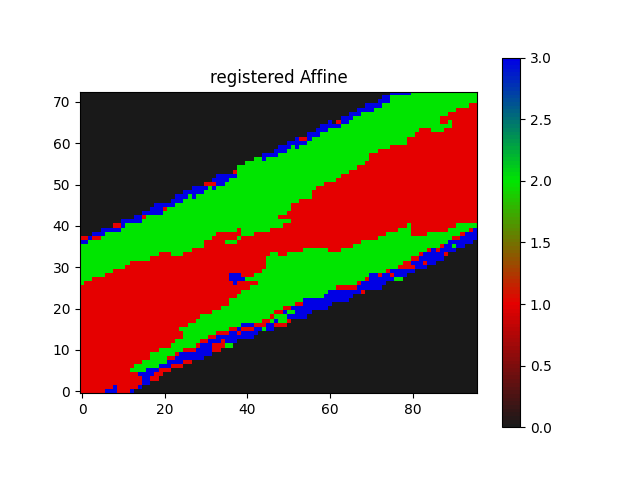
Also, the metric value seems to be static:
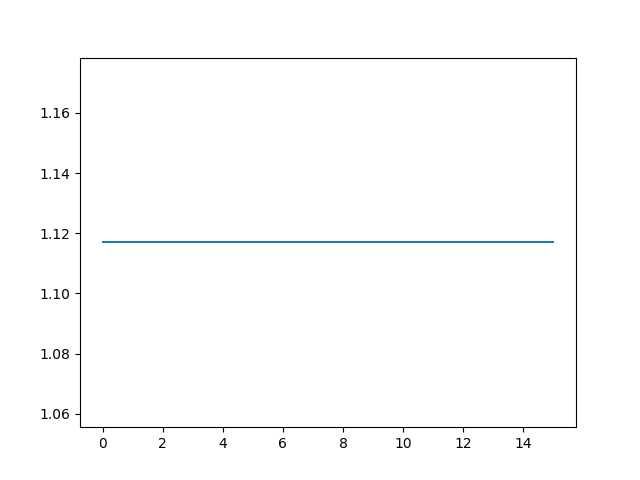
Any feedbacks?
Also just wanted to thank you and the altruists here in this forum, I learned a great deal about registration in general from here apart from reading about it from sources.
You guys are great!
---
### Author:  [@zivy](https://discourse.itk.org/u/zivy)
#### Post date: [March 1, 2023, 6:50pm UTC](https://discourse.itk.org/t/rigid-affine-registration-2d-implementation-with-iteration/5767/6 "2023-03-01T18:50:02Z")
Hello @banikr,
Nope, your previous approach was more appropriate because of the significant rotation between images. Large differences in parameter space reduce the probability of converging to the correct minima.
Your initial approach of sampling the parameter space gives you a better initialization for the optimization step. This exploration-exploitation strategy is a common theme in optimization where we first explore a broad range of parameters and then exploit the best k (you had k=1) results from these. In your case it also makes sense to explore the lower dimensional parameter space and then promote the results to the higher dimensional parameter space (3-\>6).
---
### Author:  [@banikr](https://discourse.itk.org/u/banikr)
#### Post date: [March 2, 2023, 12:15am UTC](https://discourse.itk.org/t/rigid-affine-registration-2d-implementation-with-iteration/5767/7 "2023-03-02T00:15:23Z")
Hello @zivy
The `Euler2DTransform` works, mentioning incase…
```auto
# +----------------+
# | Euler2DTx |
# +----------------+
degrees = np.linspace(0, 360, 1000)
radians = np.deg2rad(degrees)
initial_transform = sitk.Euler2DTransform(sitk.CenteredTransformInitializer(
fixed_image,
moving_image,
sitk.Euler2DTransform(),
sitk.CenteredTransformInitializerFilter.GEOMETRY))
registration_method = sitk.ImageRegistrationMethod()
registration_method.SetMetricAsMattesMutualInformation(numberOfHistogramBins=500)
registration_method.SetMetricSamplingStrategy(registration_method.RANDOM)
registration_method.SetMetricSamplingPercentage(0.001)
registration_method.SetInitialTransform(initial_transform, inPlace=False)
registration_method.SetOptimizerAsRegularStepGradientDescent(learningRate=2.0,
minStep=1e-4,
numberOfIterations=500,
gradientMagnitudeTolerance=1e-8)
registration_method.SetInterpolator(sitk.sitkNearestNeighbor)
registration_method.SetOptimizerScalesFromIndexShift()
best_similarity_value = registration_method.MetricEvaluate(fixed_image, moving_image)
similarity_value = []
for i, angle in enumerate(radians): # .items():
initial_transform.SetAngle(angle)
registration_method.SetInitialTransform(initial_transform)
current_similarity_value = registration_method.MetricEvaluate(fixed_image, moving_image)
similarity_value.append(current_similarity_value)
if current_similarity_value < best_similarity_value:
best_similarity_value = current_similarity_value
best_angle = np.rad2deg(angle)
print('best orientation is: ' + str(best_angle))
print("best similarity value", best_similarity_value)
plt.plot(degrees, similarity_value, 'b')
plt.plot(best_angle, best_similarity_value, 'r^')
plt.show()
initial_transform.SetAngle(np.deg2rad(best_angle))
registration_method.SetInitialTransform(initial_transform, inPlace=True)
eulerTx = registration_method.Execute(fixed_image, moving_image)
resampler = sitk.ResampleImageFilter()
resampler.SetReferenceImage(fixed_image)
resampler.SetInterpolator(sitk.sitkNearestNeighbor)
resampler.SetDefaultPixelValue(0)
resampler.SetTransform(eulerTx)
out = resampler.Execute(moving_image)
```
Following your first instruction:
> Take the `eulerTx` and promote it to an affine transformation…
```auto
metric_values = []
affine = sitk.AffineTransform(2)
affine.SetMatrix(initial_transform.GetMatrix())
affine.SetTranslation(initial_transform.GetTranslation())
affine.SetCenter(initial_transform.GetCenter())
```
> Set this affine transformation as the initial transform for the existing registration method…
```auto
registration_method.SetInitialTransform(affine, inPlace=True)
print("before affine: \n", affine)
registration_method.AddCommand(sitk.sitkIterationEvent, lambda: command_iteration2(registration_method))
```
> and call execute …
```auto
affine_tx = registration_method.Execute(fixed_image, moving_image)
resampler.SetTransform(affine_tx)
out = resampler.Execute(moving_image)
print("after affine \n", affine_tx)
plt.plot(metric_values)
plt.show()
```
This doesn’t change the Euler2D output results… which means affine wasn’t performed. See the before and after affine param below:
```auto
before affine
itk::simple::AffineTransform
AffineTransform (0x4929ed0)
RTTI typeinfo: itk::AffineTransform
Reference Count: 2
Modified Time: 3075748
Debug: Off
Object Name:
Observers:
none
Matrix:
-0.0141508 0.9999
-0.9999 -0.0141508
Offset: [0.67577, 95.5047]
Center: [47.5, 36]
Translation: [-11.5, 11.5]
Inverse:
-0.0141508 -0.9999
0.9999 -0.0141508
Singular: 0
after affine
itk::simple::AffineTransform
AffineTransform (0x4929ed0)
RTTI typeinfo: itk::AffineTransform
Reference Count: 4
Modified Time: 3075748
Debug: Off
Object Name:
Observers:
none
Matrix:
-0.0141508 0.9999
-0.9999 -0.0141508
Offset: [0.67577, 95.5047]
Center: [47.5, 36]
Translation: [-11.5, 11.5]
Inverse:
-0.0141508 -0.9999
0.9999 -0.0141508
Singular: 0
```
which are same.
Also, the `metric_values` plot is empty as well.
Looks like there was no iteration of the affine.