# Reading DICOM-RT files
**URL:** https://discourse.itk.org/t/reading-dicom-rt-files/960
**Category:** Beginner Questions
**Created:** [May 29, 2018, 5:54pm UTC](https://discourse.itk.org/t/reading-dicom-rt-files/960 "2018-05-29T17:54:46Z")
**Posts on this page:** 14
**Page:** 1
### Author:  [@Fijoy\_Vadakkumpadan](https://discourse.itk.org/u/Fijoy_Vadakkumpadan)
#### Post date: [May 29, 2018, 5:54pm UTC](https://discourse.itk.org/t/reading-dicom-rt-files/960/1 "2018-05-29T17:54:47Z")
Hello,
I’d like to read DICOM-RT Structure Set files in my application. Is the method described in the paper below the best way to do this using ITK?
[http://www.insight-journal.org/browse/publication/887](http://www.insight-journal.org/browse/publication/887)
The paper uses some basic GDCM APIs to convert DICOM-RT files into images. I just want to confirm that this is still the best way, and there are no higher-level filters or classes for the task in ITK.
Thanks,
–Fijoy
---
### Author:  [@lassoan](https://discourse.itk.org/u/lassoan)
#### Post date: [May 30, 2018, 3:20pm UTC](https://discourse.itk.org/t/reading-dicom-rt-files/960/2 "2018-05-30T15:20:55Z")
I don’t think ITK can create high-quality surfaces from the usual poor-quality RT contours (planar contours with large spacing, potentially with branches, keyholes, etc). There is a contour converter class in [3D Slicer’s SlicerRT extension](http://www.slicerrt.org) that you may use: either take the parts that you need (mostly in [this class](https://github.com/SlicerRt/SlicerRT/blob/master/DicomRtImportExport/ConversionRules/vtkPlanarContourToClosedSurfaceConversionRule.cxx)) or use 3D Slicer’s end-to-end solution for DICOM RT structure set, dose map, plan, and image import/export, visualization, and analysis. 3D Slicer contains ITK (accessible from both C++ and Python), so you should be able to use ITK within Slicer to do any kind of processing or analysis.
---
### Author:  [@fedorov](https://discourse.itk.org/u/fedorov)
#### Post date: [June 5, 2018, 4:34pm UTC](https://discourse.itk.org/t/reading-dicom-rt-files/960/3 "2018-06-05T16:34:22Z")
You can also consider command line converter provided in Plastimatch: [http://plastimatch.org/plastimatch.html](http://plastimatch.org/plastimatch.html).
If you compare both approaches, it would be good if you could share your experience!
---
### Author:  [@moeez](https://discourse.itk.org/u/moeez)
#### Post date: [March 12, 2020, 3:42pm UTC](https://discourse.itk.org/t/reading-dicom-rt-files/960/4 "2020-03-12T15:42:55Z")
Hello
I reopen that topic because I am in a similar case.
I also want to read my DICOM-RT structure set files with sitk, but I don t know how.
Could you explain how can I use Plastimatch on python to convert RT and read them
I am a beginner in using python and sitk
---
### Author:  [@moeez](https://discourse.itk.org/u/moeez)
#### Post date: [March 13, 2020, 1:44pm UTC](https://discourse.itk.org/t/reading-dicom-rt-files/960/5 "2020-03-13T13:44:02Z")
I figure it out how to do it but still facing some issues…
i run :
“plastimatch convert
–input structures.dcm
–output-ss-img outfile.nrrd
–output-ss-list outfile.txt”
and that s the error they are showing me :
[nrrd] nrrdSave: couldn’t fopen(“outfile.nrrd”,“wb”): Permission denied
save\_ss\_img: save\_ss\_list
Could not open ss\_list file for write: outfile.txt
Why isn t it working ?
---
### Author:  [@dzenanz](https://discourse.itk.org/u/dzenanz)
#### Post date: [March 13, 2020, 2:44pm UTC](https://discourse.itk.org/t/reading-dicom-rt-files/960/6 "2020-03-13T14:44:54Z")
Try putting full paths there, such as `C:/image/outfile.nrrd`. You might be running as ordinary user, and might not have permission to write to whatever is the current directory.
---
### Author:  [@moeez](https://discourse.itk.org/u/moeez)
#### Post date: [March 13, 2020, 3:55pm UTC](https://discourse.itk.org/t/reading-dicom-rt-files/960/7 "2020-03-13T15:55:55Z")
> C:\Program Files\Plastimatch\>plastimatch convert --input RT\_essai.dcm --output-ss-img C:/Program Files/Plastimatch/outfile.nrrd --output-ss-list outfile.txt
> Error. Unknown option Files/Plastimatch/outfile.nrrd
---
### Author:  [@dzenanz](https://discourse.itk.org/u/dzenanz)
#### Post date: [March 13, 2020, 4:29pm UTC](https://discourse.itk.org/t/reading-dicom-rt-files/960/8 "2020-03-13T16:29:12Z")
> [@moeez](#):
>
> C:/Program Files/Plastimatch/outfile.nrrd
When the path has spaces, you need to put it in quotes `... --output-ss-img "C:/Program Files/Plastimatch/outfile.nrrd" --output-ss-list ...`
---
### Author:  [@moeez](https://discourse.itk.org/u/moeez)
#### Post date: [April 7, 2020, 3:06pm UTC](https://discourse.itk.org/t/reading-dicom-rt-files/960/9 "2020-04-07T15:06:11Z")
Hello,
now it works, it convert the RT file but don t know why it cannot save it ??
```
Preformatted textitk::ExceptionObject (000000646C4FE2B0)
Location: "unknown"
File: C:\Users\grego\build\src\InsightToolkit-4.13.2\Modules\IO\NRRD\src\itkNrrdImageIO.cxx
Line: 1123
Description: itk::ERROR: NrrdImageIO(0000018EE9CE9480): Write: Error writing C:/Program Files/Plastimatch/_11F06DD_Y5_M6_P50_/outfile.nrrd:
[nrrd] nrrdSave: couldn't fopen("C:/Program Files/Plastimatch/_11F06DD_Y5_M6_P50_/outfile.nrrd","wb"): Permission denied
save_ss_img: save_ss_list
Could not open ss_list file for write: outfile.txt
```
this is what it says
---
### Author:  [@dzenanz](https://discourse.itk.org/u/dzenanz)
#### Post date: [April 7, 2020, 3:27pm UTC](https://discourse.itk.org/t/reading-dicom-rt-files/960/10 "2020-04-07T15:27:06Z")
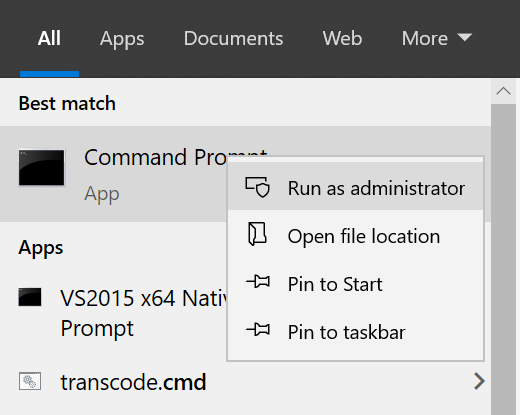
You should be running the program as an administrator in order to write to `C:/Program Files/`, as it is a known system directory. Also possible reason: the path `C:/Program Files/Plastimatch/_11F06DD_Y5_M6_P50_/` does not exist, so no file in it could be written.
---
### Author:  [@moeez](https://discourse.itk.org/u/moeez)
#### Post date: [April 7, 2020, 3:32pm UTC](https://discourse.itk.org/t/reading-dicom-rt-files/960/11 "2020-04-07T15:32:28Z")
The path do exist and i am the administrator.
Even if i remove the path, it says the same thing
---
### Author:  [@dzenanz](https://discourse.itk.org/u/dzenanz)
#### Post date: [April 7, 2020, 4:07pm UTC](https://discourse.itk.org/t/reading-dicom-rt-files/960/12 "2020-04-07T16:07:50Z")
Maybe pick another path? I am administrator too, and I can’t write into some folders e.g. `C:\`, so I write into `C:\a\`, as a short path which is easy to type.
By “running the program as an administrator” I meant invoke it from a command prompt which was started as an administrator:
---
### Author:  [@moeez](https://discourse.itk.org/u/moeez)
#### Post date: [April 7, 2020, 4:34pm UTC](https://discourse.itk.org/t/reading-dicom-rt-files/960/13 "2020-04-07T16:34:37Z")
I ran the prompt as an Administrator and it worked.
Apparently I wasn t the admin before…
Thank you
---
### Author:  [@dzenanz](https://discourse.itk.org/u/dzenanz)
#### Post date: [April 7, 2020, 5:11pm UTC](https://discourse.itk.org/t/reading-dicom-rt-files/960/14 "2020-04-07T17:11:54Z")
Being a user with administrative privileges is not the same as special account “Administrator”.
I guess Microsoft’s programmers concluded that people are mostly having administrator privileges and reserved a few operations for “Administrator” account only.