# Overlaying Segmented mask with color over Input Vtkimagedata 3D (Dicom series)

**URL:** https://discourse.itk.org/t/overlaying-segmented-mask-with-color-over-input-vtkimagedata-3d-dicom-series/4912
**Category:** Algorithms
**Tags:** dicom
**Created:** [April 14, 2022, 9:36am UTC](https://discourse.itk.org/t/overlaying-segmented-mask-with-color-over-input-vtkimagedata-3d-dicom-series/4912 "2022-04-14T09:36:30Z")
**Posts on this page:** 15
**Page:** 1

<div class="post-metadata">

### Author: ![SREERAG\_H](https://discourse.itk.org/user_avatar/discourse.itk.org/sreerag_h/32/2486_2.png) [@SREERAG\_H](https://discourse.itk.org/u/SREERAG_H)
#### Post date: [April 14, 2022, 9:36am UTC](https://discourse.itk.org/t/overlaying-segmented-mask-with-color-over-input-vtkimagedata-3d-dicom-series/4912/1 "2022-04-14T09:36:30Z")

</div>

Hi all ,  
I am working with ITK Segmentation algorithm’s. My input is a Dicom series and I used VtkDicomReader to get the vtkimagedata and then I converted to itkimage(Short, dmension=3) and I used connected threshold region growing algorithm and I am having the segmented output(itk::image\<short,3) . I need to give red color to this segmented output and need to overlay this mask over Input data. I have tried different methods … Everywhere it is saying to convert to 2D slice and then to RGBimagetype… Is there any way to give color to 3D segmented output(vtkimagedata) and overlay over the input without any type conversion and loss of information…

Could Anyone please help with this?

---

<div class="post-metadata">

### Author: ![dzenanz](https://discourse.itk.org/user_avatar/discourse.itk.org/dzenanz/32/1093_2.png) [@dzenanz](https://discourse.itk.org/u/dzenanz)
#### Post date: [April 14, 2022, 1:00pm UTC](https://discourse.itk.org/t/overlaying-segmented-mask-with-color-over-input-vtkimagedata-3d-dicom-series/4912/2 "2022-04-14T13:00:07Z")

</div>

Take a look at these examples:  
[https://itk.org/ITKExamples/src/Filtering/ImageFusion/OverlayLabelMapOnTopOfAnImage/Documentation.html](https://itk.org/ITKExamples/src/Filtering/ImageFusion/OverlayLabelMapOnTopOfAnImage/Documentation.html)  
[https://itk.org/ITKExamples/src/Filtering/ImageFusion/OverlayLabelMapOnImage/Documentation.html](https://itk.org/ITKExamples/src/Filtering/ImageFusion/OverlayLabelMapOnImage/Documentation.html)  
and this notebook (which was written in SimpleITK, but should be easy to translate into ITK):  
[http://insightsoftwareconsortium.github.io/SimpleITK-Notebooks/Python\_html/05\_Results\_Visualization.html](http://insightsoftwareconsortium.github.io/SimpleITK-Notebooks/Python_html/05_Results_Visualization.html)

---

<div class="post-metadata">

### Author: ![SREERAG\_H](https://discourse.itk.org/user_avatar/discourse.itk.org/sreerag_h/32/2486_2.png) [@SREERAG\_H](https://discourse.itk.org/u/SREERAG_H)
#### Post date: [April 18, 2022, 6:06am UTC](https://discourse.itk.org/t/overlaying-segmented-mask-with-color-over-input-vtkimagedata-3d-dicom-series/4912/3 "2022-04-18T06:06:02Z")

</div>

Hi Thank you so much for your reply…

I have already tried LabelMapOverlayImageFilter. The problem is my input is a dicom data having around 300 slices . This filter is only accepting 2d images … Also for adding color I had to convert the type from short to unsigned char and the rescale the data to 0-255 which will cause a lot of information loss. I am not sure if it is the correct way of doing . Is there any other way to overlay the mask with color without changing my original input.

I also tried doing this for each slice. Please see the code below

```cpp
    myitkImageDatasegUshort = connectedThresholdFilterUshort->GetOutput();
	inputRegion = myitkImageDatasegUshort->GetLargestPossibleRegion();
	size = inputRegion.GetSize();
	auto slice = size[2];
	size[2] = 0;
	start = inputRegion.GetIndex();
	for (int slices = 0; slices < slice; ++slices)
	{
		start[2] = slices;
		desiredRegion.SetSize(size);
		desiredRegion.SetIndex(start);
		
		
		ExtractFilterM->SetInput(connectedThresholdFilterUshort->GetOutput());
		ExtractFilterM->InPlaceOn();
		ExtractFilterM->SetDirectionCollapseToSubmatrix();
		ExtractFilterM->SetExtractionRegion(desiredRegion);
		ExtractFilterM->UpdateOutputInformation();
        rescalefilterrrM->SetInput(ExtractFilterM->GetOutput());
		rescalefilterrrM->Update();

		ExtractFilterIn->SetInput(myitkImageDataUshort);
		ExtractFilterIn->InPlaceOn();
		ExtractFilterIn->SetDirectionCollapseToSubmatrix();
		ExtractFilterIn->SetExtractionRegion(desiredRegion);
		ExtractFilterIn->UpdateOutputInformation();
		
		rescalefilterrrIn->SetInput(ExtractFilterIn->GetOutput());
		rescalefilterrrIn->SetOutputMinimum(0);
		rescalefilterrrIn->SetOutputMaximum(255);
		rescalefilterrrIn->Update();
		RGBFilter->SetInput(rescalefilterrrM->GetOutput());
		RGBFilter->SetColormap(FilterScalartoRGB::Red);
		RGBFilter->Update();

		RGBFilter1->SetInput(rescalefilterrrIn->GetOutput());
		//RGBFilter1->SetColormap(FilterScalartoRGB::Blue);
		RGBFilter1->Update();

		vtkImageData* colormask = mitkVtkConnector->Itk_Connect_Vtk3(RGBFilter->GetOutput());
		vtkImageData* FeatureImage = mitkVtkConnector->Itk_Connect_Vtk3(RGBFilter1->GetOutput());

		vtkSmartPointer<vtkImageBlend> imgBlender =
			vtkSmartPointer<vtkImageBlend>::New();
		imgBlender->AddInputData(FeatureImage);
		imgBlender->AddInputData(colormask);
		imgBlender->SetOpacity(1, 0.3);
		imgBlender->SetOpacity(0, 0.5);
		imgBlender->Update();
    }

```

Now this imgBlender output is having the overlayed data with color. But this is a single slice… Now for visualisation I need a Vtkimagedata having all the slices … Is there a way to generate a single 3D data from all these slices. ?  
Also Is there any alternate approach for doing this without rescaling the original input ?

---

<div class="post-metadata">

### Author: ![dzenanz](https://discourse.itk.org/user_avatar/discourse.itk.org/dzenanz/32/1093_2.png) [@dzenanz](https://discourse.itk.org/u/dzenanz)
#### Post date: [April 18, 2022, 1:52pm UTC](https://discourse.itk.org/t/overlaying-segmented-mask-with-color-over-input-vtkimagedata-3d-dicom-series/4912/4 "2022-04-18T13:52:43Z")

</div>

If you change

```cpp
constexpr unsigned int Dimension = 2;
using PixelType = unsigned char;

```

from C++ example to match your case (d=3 and ushort), does it work? All of the filters involved should work with 3D case, too.

---

<div class="post-metadata">

### Author: ![SREERAG\_H](https://discourse.itk.org/user_avatar/discourse.itk.org/sreerag_h/32/2486_2.png) [@SREERAG\_H](https://discourse.itk.org/u/SREERAG_H)
#### Post date: [April 19, 2022, 6:16am UTC](https://discourse.itk.org/t/overlaying-segmented-mask-with-color-over-input-vtkimagedata-3d-dicom-series/4912/5 "2022-04-19T06:16:05Z")

</div>

Hi ,  
All the filters is working except the one which are using itkRGBpixel which is the one used for coloring. itk:scalartoRGBcolormap filter only works for 2d images… (dimension = 2 , type = unsigned char).  
If I changed the imagetype to 3 dimension I am getting an error

---

<div class="post-metadata">

### Author: ![dzenanz](https://discourse.itk.org/user_avatar/discourse.itk.org/dzenanz/32/1093_2.png) [@dzenanz](https://discourse.itk.org/u/dzenanz)
#### Post date: [April 19, 2022, 1:03pm UTC](https://discourse.itk.org/t/overlaying-segmented-mask-with-color-over-input-vtkimagedata-3d-dicom-series/4912/6 "2022-04-19T13:03:40Z")

</div>

What is the error message? `ScalarToRGBColormapImageFilter` should work for 3D and nD images.

---

<div class="post-metadata">

### Author: ![SREERAG\_H](https://discourse.itk.org/user_avatar/discourse.itk.org/sreerag_h/32/2486_2.png) [@SREERAG\_H](https://discourse.itk.org/u/SREERAG_H)
#### Post date: [April 19, 2022, 5:28pm UTC](https://discourse.itk.org/t/overlaying-segmented-mask-with-color-over-input-vtkimagedata-3d-dicom-series/4912/7 "2022-04-19T17:28:44Z")
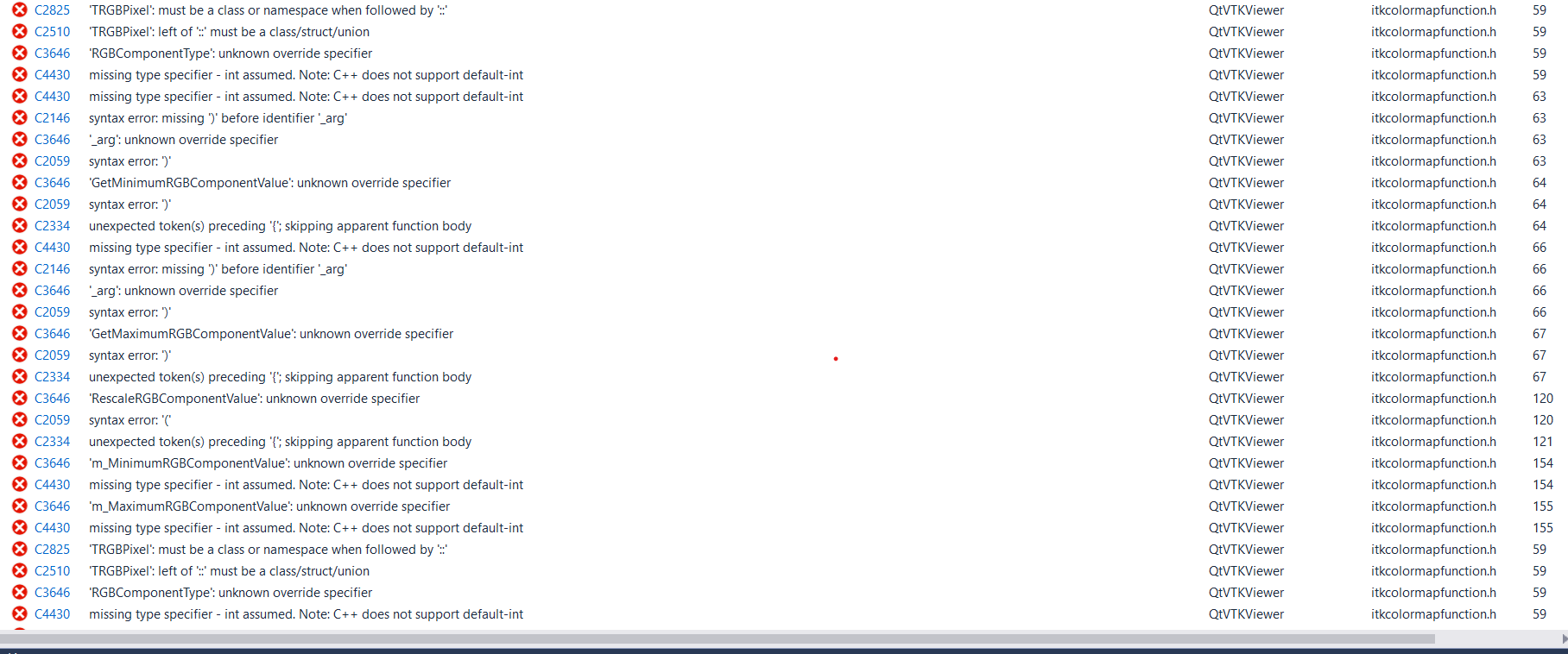
</div>

![image](https://discourse.itk.org/uploads/default/original/2X/c/cf88217f30c8db73b54b06ed6f27e269a3f71a62.png)

When I am trying for dimension 3 … I am getting these errors …

---

<div class="post-metadata">

### Author: ![dzenanz](https://discourse.itk.org/user_avatar/discourse.itk.org/dzenanz/32/1093_2.png) [@dzenanz](https://discourse.itk.org/u/dzenanz)
#### Post date: [April 19, 2022, 5:33pm UTC](https://discourse.itk.org/t/overlaying-segmented-mask-with-color-over-input-vtkimagedata-3d-dicom-series/4912/8 "2022-04-19T17:33:03Z")

</div>

> [@SREERAG\_H](#):
>
> `mitkVtkConnector->Itk_Connect_Vtk3`

I guess the error is coming from here. But that is probably an MITK class, and you should probably ask for help on [their mailing list](https://www.mitk.org/wiki/MITK_Mailinglist).

---

<div class="post-metadata">

### Author: ![SREERAG\_H](https://discourse.itk.org/user_avatar/discourse.itk.org/sreerag_h/32/2486_2.png) [@SREERAG\_H](https://discourse.itk.org/u/SREERAG_H)
#### Post date: [April 19, 2022, 7:01pm UTC](https://discourse.itk.org/t/overlaying-segmented-mask-with-color-over-input-vtkimagedata-3d-dicom-series/4912/9 "2022-04-19T19:01:15Z")

</div>

Hi ,  
That is not an mitk class… That is a custom class I have written for itk-vtk conversion… The error is coming only when I change the dimension of RGB filter type to 3…  
Please see the declaration below  
using FilterScalartoRGB1 = itk::ScalarToRGBColormapImageFilter\<ImageTypeUchar, ImageTypeUchar\>;  
FilterScalartoRGB1::Pointer RGBFilter2 = FilterScalartoRGB1::New();  
Here ImageTypeUchar = itk::Image\<unsigned char, 3\>;  
If I used ImageTypeUchar = itk::RGBPixel   
Then I am not getting an error…

---

<div class="post-metadata">

### Author: ![dzenanz](https://discourse.itk.org/user_avatar/discourse.itk.org/dzenanz/32/1093_2.png) [@dzenanz](https://discourse.itk.org/u/dzenanz)
#### Post date: [April 19, 2022, 7:25pm UTC](https://discourse.itk.org/t/overlaying-segmented-mask-with-color-over-input-vtkimagedata-3d-dicom-series/4912/10 "2022-04-19T19:25:27Z")

</div>

```cpp
using FilterScalartoRGB1 = itk::ScalarToRGBColormapImageFilter<ImageTypeUchar, ImageTypeUchar>;

```

should be changed into

```cpp
ImageTypeRGB = itk::Image<itk::RGBPixel<unsigned char>, 3>;
using FilterScalartoRGB1 = itk::ScalarToRGBColormapImageFilter<ImageTypeUchar, ImageTypeRGB>;

```

---

<div class="post-metadata">

### Author: ![SREERAG\_H](https://discourse.itk.org/user_avatar/discourse.itk.org/sreerag_h/32/2486_2.png) [@SREERAG\_H](https://discourse.itk.org/u/SREERAG_H)
#### Post date: [April 20, 2022, 7:19am UTC](https://discourse.itk.org/t/overlaying-segmented-mask-with-color-over-input-vtkimagedata-3d-dicom-series/4912/11 "2022-04-20T07:19:50Z")

</div>

Thank you so much … It worked …

I have one more doubt. This colored mask I was able to overlay over input data using vtkimageblender.  
The only problem is , only after rescaling the input data [short(0-65000)] to [ImagetypeRGB(0-255)] . I was able to see the output…  
Is there any other way to overlay this colored mask over the original input without any changes in the datatype or scalar range of the input.

---

<div class="post-metadata">

### Author: ![dzenanz](https://discourse.itk.org/user_avatar/discourse.itk.org/dzenanz/32/1093_2.png) [@dzenanz](https://discourse.itk.org/u/dzenanz)
#### Post date: [April 20, 2022, 2:02pm UTC](https://discourse.itk.org/t/overlaying-segmented-mask-with-color-over-input-vtkimagedata-3d-dicom-series/4912/12 "2022-04-20T14:02:37Z")

</div>

Have you tried `FilterScalartoRGB1->UseInputImageExtremaForScalingOn();`? If that does not work, the solution is probably in setting a custom [colormap function](https://itk.org/Doxygen/html/classitk_1_1Function_1_1ColormapFunction.html) via [SetColormap()](https://itk.org/Doxygen/html/classitk_1_1ScalarToRGBColormapImageFilter.html#a6818615b2ddec85d2a9c4bf2123ad4bb) and fiddling with it.

---

<div class="post-metadata">

### Author: ![SREERAG\_H](https://discourse.itk.org/user_avatar/discourse.itk.org/sreerag_h/32/2486_2.png) [@SREERAG\_H](https://discourse.itk.org/u/SREERAG_H)
#### Post date: [April 29, 2022, 10:05am UTC](https://discourse.itk.org/t/overlaying-segmented-mask-with-color-over-input-vtkimagedata-3d-dicom-series/4912/13 "2022-04-29T10:05:55Z")

</div>

Hi,  
I tried UseInputImageExtremaForScalingOn(). It is not working… Only after rescaling the data to 0-255 … I am able to see the color mask overlayed over the input.

Can you help me for getting the intensity value of a particular point from indexCoordinates?

---

<div class="post-metadata">

### Author: ![matt.mccormick](https://discourse.itk.org/user_avatar/discourse.itk.org/matt.mccormick/32/7_2.png) [@matt.mccormick](https://discourse.itk.org/u/matt.mccormick)
#### Post date: [May 2, 2022, 9:12pm UTC](https://discourse.itk.org/t/overlaying-segmented-mask-with-color-over-input-vtkimagedata-3d-dicom-series/4912/14 "2022-05-02T21:12:27Z")

</div>

> [@SREERAG\_H](#):
>
> Can you help me for getting the intensity value of a particular point from indexCoordinates?

This can be obtained with [`Image::GetPixel`](https://itk.org/ITKExamples/search.html?q=GetPixel&check_keywords=yes&area=default).

---

<div class="post-metadata">

### Author: ![SREERAG\_H](https://discourse.itk.org/user_avatar/discourse.itk.org/sreerag_h/32/2486_2.png) [@SREERAG\_H](https://discourse.itk.org/u/SREERAG_H)
#### Post date: [May 9, 2022, 6:18am UTC](https://discourse.itk.org/t/overlaying-segmented-mask-with-color-over-input-vtkimagedata-3d-dicom-series/4912/15 "2022-05-09T06:18:51Z")

</div>

Thank you so much for helping.
