# nifti to dicom conversion introduces negative intensities

**URL:** https://discourse.itk.org/t/nifti-to-dicom-conversion-introduces-negative-intensities/4798
**Category:** Algorithms
**Tags:** itk, dicom, nifti, cpp
**Created:** [February 9, 2022, 10:37pm UTC](https://discourse.itk.org/t/nifti-to-dicom-conversion-introduces-negative-intensities/4798 "2022-02-09T22:37:21Z")
**Posts on this page:** 20
**Page:** 1

<div class="post-metadata">

### Author: ![Keyn34](https://discourse.itk.org/letter_avatar_proxy/v4/letter/k/9fc29f/32.png) [@Keyn34](https://discourse.itk.org/u/Keyn34)
#### Post date: [February 9, 2022, 10:37pm UTC](https://discourse.itk.org/t/nifti-to-dicom-conversion-introduces-negative-intensities/4798/1 "2022-02-09T22:37:21Z")

</div>

Hello everyone!

When I try to convert a nifti file to a dicom series with [ImageSeriesWriter](https://itk.org/Doxygen/html/classitk_1_1ImageSeriesWriter.html), I encounter weird behavior when inspecting the results with ITK-SNAP. For a few cases the intensity range shifts from only positive double values in the nifti image to containing negative integer values in the dicom series. (datatypes are also defined as `double` and `unsigned int` for the image templates)

The only steps I take are reading the image, flipping it along y, and writing the dicom files.

Below is an image of the layer inspector, where you can see the same dataset, one time in nifti (on the right) and one time in dicom (on the left).

 ![image](https://discourse.itk.org/uploads/default/original/2X/2/2cb37e419d0514e5aa89aa8cb3ee64d86a4ef5d2.png)

Additionally, here is an image from the datasets themselves. Again, nifti is on the right and dicom on the left. Here the intensity cut off in the bladder is obvious, but why does it occur when I don’t do any processing on it? Do I need to set the data types for reading and writing differently?

 ![image](https://discourse.itk.org/uploads/default/original/2X/f/f4aaa328992e2f73298a95f01938b77d60111bd2.png)

Shouldn’t the values be the same? I tried to compensate with [RescaleIntensityImageFilter](https://itk.org/Doxygen/html/classitk_1_1RescaleIntensityImageFilter.html), but that doesn’t help, unfortunately.

Help would be appreciated, thank you in advance!

---

<div class="post-metadata">

### Author: ![dzenanz](https://discourse.itk.org/user_avatar/discourse.itk.org/dzenanz/32/1093_2.png) [@dzenanz](https://discourse.itk.org/u/dzenanz)
#### Post date: [February 9, 2022, 11:11pm UTC](https://discourse.itk.org/t/nifti-to-dicom-conversion-introduces-negative-intensities/4798/2 "2022-02-09T23:11:54Z")

</div>

That definitely looks like overflow. It would be explained if you used 16-bit signed int for output. But rescale intensity filter should help. Maybe DICOM does not like types other than 8-bit or 16-bit ints? Can you try rescaling to 16-bit unsigned and writing that to DICOM?

---

<div class="post-metadata">

### Author: ![zivy](https://discourse.itk.org/user_avatar/discourse.itk.org/zivy/32/1726_2.png) [@zivy](https://discourse.itk.org/u/zivy)
#### Post date: [February 9, 2022, 11:59pm UTC](https://discourse.itk.org/t/nifti-to-dicom-conversion-introduces-negative-intensities/4798/3 "2022-02-09T23:59:22Z")

</div>

Hello @Keyn34,

These are PET images and the “native” pixel data type for PET images is float. When you want to store these back in DICOM you need to use the rescale slope (‘0028|1053’) and rescale intercept (‘0028|1052’) to select the number of digits after the decimal point you want to keep. SimpleITK code illustrating this is [shown here](https://github.com/SimpleITK/SimpleITK/blob/565307e39c0a6efe5c3466afea86f004f5a0bba2/Examples/DicomSeriesFromArray/DicomSeriesFromArray.py#L114-L126). I suspect that if you follow a similar approach in ITK you’ll get the expected results.

---

<div class="post-metadata">

### Author: ![Keyn34](https://discourse.itk.org/letter_avatar_proxy/v4/letter/k/9fc29f/32.png) [@Keyn34](https://discourse.itk.org/u/Keyn34)
#### Post date: [February 10, 2022, 8:51am UTC](https://discourse.itk.org/t/nifti-to-dicom-conversion-introduces-negative-intensities/4798/4 "2022-02-10T08:51:25Z")

</div>

Thank you @dzenanz and @zivy,

> [@dzenanz](#):
>
> That definitely looks like overflow. It would be explained if you used 16-bit signed int for output.

I am for sure using `unsigned short` as input image pixel type:  
(Before it was `unsigned int`)

```auto
// Pixel types
using InputImagePixelType = double;
using OutputImagePixelType = unsigned short;

```

> [@dzenanz](#):
>
> But rescale intensity filter should help. Maybe DICOM does not like types other than 8-bit or 16-bit ints? Can you try rescaling to 16-bit unsigned and writing that to DICOM?

When I do this, the result is the following:

 ![image](https://discourse.itk.org/uploads/default/original/2X/1/15a87f6bc05786cb30091ab3097a39eae9f4ca56.jpeg)

The rescales is defined as

```auto
using RescaleFilter = itk::RescaleIntensityImageFilter<NIFTIInputImageType, NIFTIInputImageType>;

...

// Rescale Image
RescaleFilter::Pointer rescale = RescaleFilter::New();
rescale->SetInput(flip->GetOutput());
rescale->SetOutputMinimum(0);
rescale->SetOutputMaximum(itk::NumericTraits<OutputImagePixelType>::max());

```

with the in- and output images being double as pixel type and four-dimensional. Is this wrong? I mean in theory, I just want to rescale the intensity range, so the double type should not be the issue I suppose?

@zivy, thank you for pointing me to that script, I will test that one. For the DICOM series, I have already created a header accounting for the Bit-related tags:

```auto
// Creation of minimal DICOM directory 
std::cout << "Creating minimal dictionary..." << std::endl;

itk::MetaDataDictionary& sliceDictionary = gdcmIO->GetMetaDataDictionary();
itk::EncapsulateMetaData<std::string>(sliceDictionary, DICOMTag::Modality, "PT");
itk::EncapsulateMetaData<std::string>(sliceDictionary, DICOMTag::ImageType, "DERIVED\\SECONDARY");
itk::EncapsulateMetaData<std::string>(sliceDictionary, DICOMTag::PhotometricInterpretation, "MONOCHROME2");
itk::EncapsulateMetaData<std::string>(sliceDictionary, DICOMTag::PatientOrientation, "1\\0\\0\\0\\1\\0");
itk::EncapsulateMetaData<unsigned short>(sliceDictionary, DICOMTag::BitsAllocated, 16);
itk::EncapsulateMetaData<unsigned short>(sliceDictionary, DICOMTag::BitsStored, 16);
itk::EncapsulateMetaData<unsigned short>(sliceDictionary, DICOMTag::PixelRepresentation, 0);
itk::EncapsulateMetaData<unsigned short>(sliceDictionary, DICOMTag::HighBit, 15);

```

(`DICOMTag` is a custom-created namespace for storing DICOM tags)

I’ll report back if I find something new by testing further. Thank you so much again!

---

<div class="post-metadata">

### Author: ![Keyn34](https://discourse.itk.org/letter_avatar_proxy/v4/letter/k/9fc29f/32.png) [@Keyn34](https://discourse.itk.org/u/Keyn34)
#### Post date: [February 10, 2022, 10:19am UTC](https://discourse.itk.org/t/nifti-to-dicom-conversion-introduces-negative-intensities/4798/5 "2022-02-10T10:19:40Z")

</div>

Hello @zivy,

I tried what you proposed, but when I try to set the slope to 0.001, I get an assertion failed Error from GDCM:

```auto
Assertion failed: slope == (int)slope, file C:\toolchain\libs\ITK\5.2.1\source\ITK\Modules\ThirdParty\GDCM\src\gdcm\Source\MediaStorageAndFileFormat\gdcmRescaler.cxx, line 67

```

Is there an alternative?

Thanks again!

---

<div class="post-metadata">

### Author: ![zivy](https://discourse.itk.org/user_avatar/discourse.itk.org/zivy/32/1726_2.png) [@zivy](https://discourse.itk.org/u/zivy)
#### Post date: [February 10, 2022, 2:15pm UTC](https://discourse.itk.org/t/nifti-to-dicom-conversion-introduces-negative-intensities/4798/6 "2022-02-10T14:15:46Z")

</div>

Hi @Keyn34,

Not sure why that isn’t working as you are exercising the same functionality as the SimpleITK example (it’s just one wrapping layer over ITK/GDCM). One thing to clarify, the DICOM dictionary based approach should be applied to the original data, no need to apply the `RescaleFilter`.

Code snippet doesn’t show how the slope and intercept are set in the dictionary. When looking at the [specific line](https://github.com/InsightSoftwareConsortium/ITK/blob/107384b11a26cb862772c24d9b7cce3db521a2fd/Modules/ThirdParty/GDCM/src/gdcm/Source/MediaStorageAndFileFormat/gdcmRescaler.cxx#L67) reported in the error, it appears we shouldn’t have reached it as the parameter there is `int` and there is [another method](https://github.com/InsightSoftwareConsortium/ITK/blob/107384b11a26cb862772c24d9b7cce3db521a2fd/Modules/ThirdParty/GDCM/src/gdcm/Source/MediaStorageAndFileFormat/gdcmRescaler.cxx#L89) that deals with `float`. So possibly something in the way the values were set in the dictionary?

---

<div class="post-metadata">

### Author: ![Keyn34](https://discourse.itk.org/letter_avatar_proxy/v4/letter/k/9fc29f/32.png) [@Keyn34](https://discourse.itk.org/u/Keyn34)
#### Post date: [February 10, 2022, 2:47pm UTC](https://discourse.itk.org/t/nifti-to-dicom-conversion-introduces-negative-intensities/4798/7 "2022-02-10T14:47:07Z")

</div>

Hey @zivy and thanks again,

> [@zivy](#):
>
> Not sure why that isn’t working as you are exercising the same functionality as the SimpleITK example (it’s just one wrapping layer over ITK/GDCM). One thing to clarify, the DICOM dictionary based approach should be applied to the original data, no need to apply the `RescaleFilter`.

That is what I am wondering about as well, it should be the same as in SimpleITK. And thanks, I was aware of that and just to confirm that I am not using the rescaling together with the dictionary approach.

I originally set the slope and intercept as

```auto
itk::EncapsulateMetaData<std::string>(sliceDictionary, DICOMTag::Slope, "0.001");
itk::EncapsulateMetaData<std::string>(sliceDictionary, DICOMTag::Intercept, "0.0");

```

and this caused the above mentioned Error.

When I set it as

```auto
itk::EncapsulateMetaData<float>(sliceDictionary, DICOMTag::Slope, 0.001);
itk::EncapsulateMetaData<float>(sliceDictionary, DICOMTag::Intercept, 0.0);

```

I don’t get errors, but the slope and intercept are not applied, it seems?

 ![image](https://discourse.itk.org/uploads/default/original/2X/6/6a1b202a6be205d214c75fbdb88d067aa79c2cd2.png)

Am I misunderstanding something?  
Thanks again!

---

<div class="post-metadata">

### Author: ![zivy](https://discourse.itk.org/user_avatar/discourse.itk.org/zivy/32/1726_2.png) [@zivy](https://discourse.itk.org/u/zivy)
#### Post date: [February 10, 2022, 3:07pm UTC](https://discourse.itk.org/t/nifti-to-dicom-conversion-introduces-negative-intensities/4798/8 "2022-02-10T15:07:24Z")

</div>

Hi @Keyn34,

Not sure why the rescale slope and intercept are ignored when set as float.

Before we dig any deeper, can you try and slightly modify the SimpleITK script (read the nifti image instead of the array creation) and confirm that the script does what you want. Once that is done, we can try to work backwards and see where the settings differ.

---

<div class="post-metadata">

### Author: ![dzenanz](https://discourse.itk.org/user_avatar/discourse.itk.org/dzenanz/32/1093_2.png) [@dzenanz](https://discourse.itk.org/u/dzenanz)
#### Post date: [February 10, 2022, 4:00pm UTC](https://discourse.itk.org/t/nifti-to-dicom-conversion-introduces-negative-intensities/4798/9 "2022-02-10T16:00:55Z")

</div>

What happens if you set slope to 1000? The meaning might be inverse of what you seem to be trying.

If you do `itk.WriteImage<itk::Image<unsigned short, 3>>(rescale->GetOutput(), "debug.nrrd");` or `itk.WriteImage<itk::Image<double, 3>>(rescale->GetOutput(), "debug.nrrd");`? It is better to visualize in Slicer, as ITK-SNAP converts intensities to short internally.

---

<div class="post-metadata">

### Author: ![Keyn34](https://discourse.itk.org/letter_avatar_proxy/v4/letter/k/9fc29f/32.png) [@Keyn34](https://discourse.itk.org/u/Keyn34)
#### Post date: [February 10, 2022, 5:39pm UTC](https://discourse.itk.org/t/nifti-to-dicom-conversion-introduces-negative-intensities/4798/10 "2022-02-10T17:39:48Z")

</div>

Hello @zivy,

I modified the script to read the nifti 4D volume and removed the reading, because I just needed the output. In case it helps, below the script:

```auto
import SimpleITK as sitk
import sys
import time
import os

nifti_path = "path to nifti file"
output_path = "path to output folder"

def writeSlices(series_tag_values, new_img, out_dir, slice, volume):
    image_slice = new_img[:, :, slice, volume]

    # Tags shared by the series.
    list(map(lambda tag_value: image_slice.SetMetaData(tag_value[0], tag_value[1]), series_tag_values))

    # Slice specific tags.
    # Instance Creation Date
    image_slice.SetMetaData("0008|0012", time.strftime("%Y%m%d"))
    # Instance Creation Time
    image_slice.SetMetaData("0008|0013", time.strftime("%H%M%S"))

    # Setting the type to CT so that the slice location is preserved and
    # the thickness is carried over.
    image_slice.SetMetaData("0008|0060", "PT")

    # (0020, 0032) image position patient determines the 3D spacing between
    # slices.
    # Image Position (Patient)
    image_slice.SetMetaData("0020|0032", '\\'.join(map(str, new_img.TransformIndexToPhysicalPoint((0, 0, slice, volume)))))
    # Instance Number
    image_slice.SetMetaData("0020,0013", str(slice))

    # Write to the output directory and add the extension dcm, to force
    # writing in DICOM format.
    image_name = str(volume) + '_' + str(slice) + '.dcm'
    print(image_name)
    writer.SetFileName(os.path.join(out_dir, image_name))

    writer.Execute(image_slice)

if __name__ == ' __main__':

    # Read nifti file
    niftiReader = sitk.ImageFileReader()
    niftiReader.SetFileName(nifti_path)
    img_new = niftiReader.Execute()

    number_of_volumes = img_new.GetSize()[3]
    number_of_slices = img_new.GetSize()[2]

    print(str(number_of_slices)+"/"+str(number_of_volumes))

    writer = sitk.ImageFileWriter()
    # Use the study/series/frame of reference information given in the meta-data
    # dictionary and not the automatically generated information from the file IO
    writer.KeepOriginalImageUIDOn()

    modification_time = time.strftime("%H%M%S")
    modification_date = time.strftime("%Y%m%d")

    # Copy some of the tags and add the relevant tags indicating the change.
    # For the series instance UID (0020|000e), each of the components is a number,
    # cannot start with zero, and separated by a '.' We create a unique series ID
    # using the date and time. Tags of interest:
    direction = img_new.GetDirection()
    series_tag_values = [
        ("0008|0031", modification_time), # Series Time
        ("0008|0021", modification_date), # Series Date
        ("0008|0008", "DERIVED\\SECONDARY"), # Image Type
        ("0020|000e", "1.2.826.0.1.3680043.2.1125."
         + modification_date + ".1" + modification_time), # Series Instance UID
        ("0020|0037", '\\'.join(map(str, (direction[0], direction[3], direction[6],
                                          direction[1], direction[4],
                                          direction[7])))), # Image Orientation
        # (Patient)
        ("0008|103e", "Created-SimpleITK") # Series Description
    ]

    rescale_slope = 0.001 # keep three digits after the decimal point
    series_tag_values = series_tag_values + [
        ('0028|1053', str(rescale_slope)), # rescale slope
        ('0028|1052', '0'), # rescale intercept
        ('0028|0100', '16'), # bits allocated
        ('0028|0101', '16'), # bits stored
        ('0028|0102', '15'), # high bit
        ('0028|0103', '1')] # pixel representation

    # Write slices to output directory
    print(range(number_of_slices))
    print(range(number_of_volumes))

    for v in range(number_of_volumes):
        for s in range(number_of_slices):
            writeSlices(series_tag_values, img_new, output_path, s, v)

    sys.exit(0)

```

The results are not really… useable I would say, but I can imagine that this is my fault due to potential errors I made when editing the script:

 ![image](https://discourse.itk.org/uploads/default/original/2X/e/e5d8a086bbc3ae6ec415ab9b1802536438d702c0.png)

Although, when I look at one slice, I can see that the DICOM tags are written correctly:

 ![image](https://discourse.itk.org/uploads/default/original/2X/1/1829d72c5b972d54aa2effa58e9e64e0af431b3b.png)

Does this give a hint, or is there anything else I can try?

@dzenanz, thank you, but when I set the slope to 1000, nothing changes as it gets ignored again.

> [@dzenanz](#):
>
> If you do `itk.WriteImage<itk::Image<unsigned short, 3>>(rescale->GetOutput(), "debug.nrrd");` or `itk.WriteImage<itk::Image<double, 3>>(rescale->GetOutput(), "debug.nrrd");`?

What exactly do you mean by that?

> [@dzenanz](#):
>
> It is better to visualize in Slicer, as ITK-SNAP converts intensities to short internally.

The same visual errors occur when I open the images with slicer, unfortunately.

Thank you again!

---

<div class="post-metadata">

### Author: ![dzenanz](https://discourse.itk.org/user_avatar/discourse.itk.org/dzenanz/32/1093_2.png) [@dzenanz](https://discourse.itk.org/u/dzenanz)
#### Post date: [February 10, 2022, 6:29pm UTC](https://discourse.itk.org/t/nifti-to-dicom-conversion-introduces-negative-intensities/4798/11 "2022-02-10T18:29:18Z")

</div>

> [@Keyn34](#):
>
> The same visual errors occur when I open the images with slicer

When you examine the images with Slicer, that eliminates ITK-SNAP’s reduction to 16-bit signed as a potential source of errors.

What I meant by `itk.WriteImage` is to check how the image looks like after intensity rescaling, but before converting/writing it to DICOM format.

---

<div class="post-metadata">

### Author: ![Keyn34](https://discourse.itk.org/letter_avatar_proxy/v4/letter/k/9fc29f/32.png) [@Keyn34](https://discourse.itk.org/u/Keyn34)
#### Post date: [February 11, 2022, 9:56am UTC](https://discourse.itk.org/t/nifti-to-dicom-conversion-introduces-negative-intensities/4798/12 "2022-02-11T09:56:53Z")

</div>

Thank you @dzenanz for clearing that up for me!

Good, so it is clear that the images themselves are cropped when it comes to their intensity.  
I got it working now with the rescaler as well, which confirms that additionally. The result is shown below:
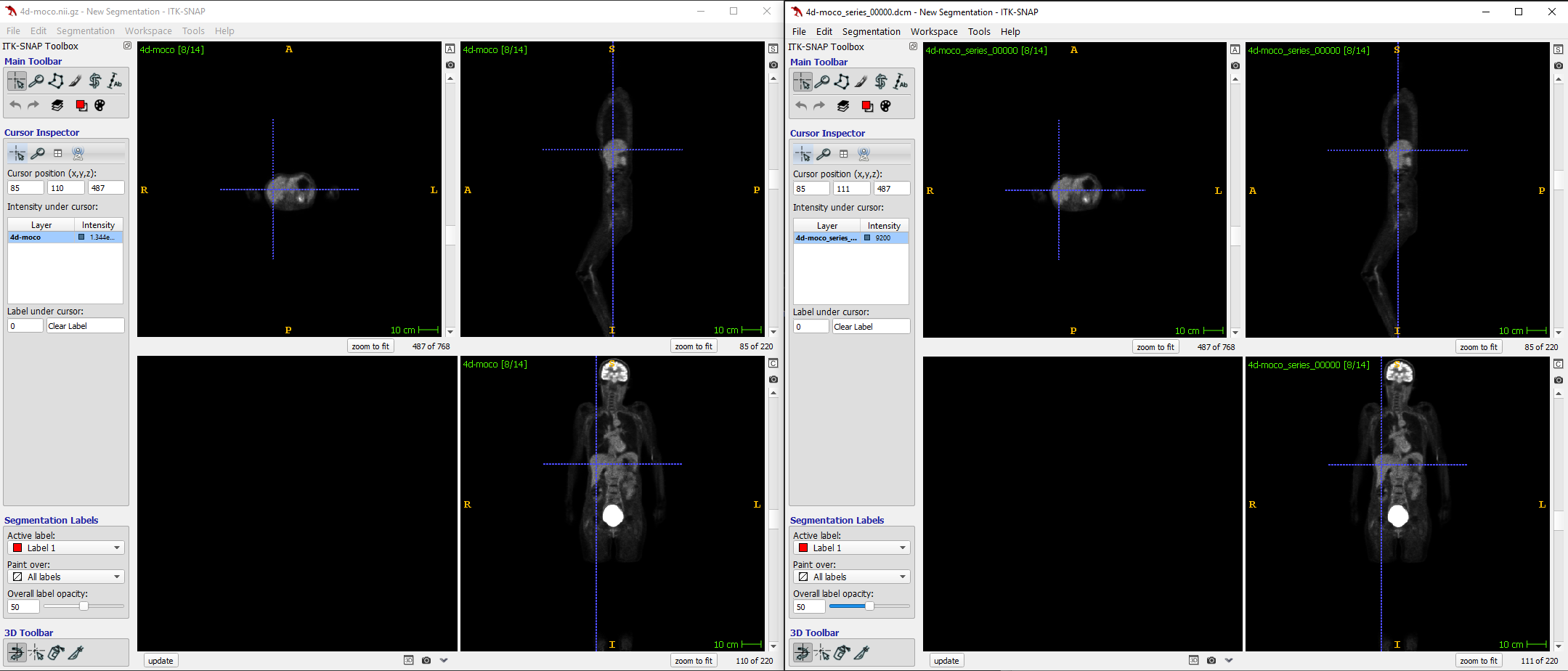
 ![image](https://discourse.itk.org/uploads/default/original/2X/1/1285568acdb02e80cf9a408624de7a5848022695.png)

The speckles are gone, and the image looks good now. The issue I face now is that the intensity values are altered (obviously) and not the same anymore between the two datasets for the same cursor position. There is no way to retain the intensities and do the conversion without the speckle issue, I suppose?

Also, when I do the following:

```auto
std::cout << "Input image intensity range is " << rescaler->GetInputMinimum() << " to " << rescaler->GetInputMaximum() << std::endl;

```

I get as output: `Input image intensity range is 3.40282e+38 to 0`, which is kinda unexpected.

Thanks!

---

<div class="post-metadata">

### Author: ![dzenanz](https://discourse.itk.org/user_avatar/discourse.itk.org/dzenanz/32/1093_2.png) [@dzenanz](https://discourse.itk.org/u/dzenanz)
#### Post date: [February 11, 2022, 1:50pm UTC](https://discourse.itk.org/t/nifti-to-dicom-conversion-introduces-negative-intensities/4798/13 "2022-02-11T13:50:29Z")

</div>

> [@Keyn34](#):
>
> `rescaler->GetInputMinimum()`

This will not work properly before `rescaler->Update()`, which might be called implicitly via `writer->Update()`.

> [@Keyn34](#):
>
> retain the intensities and do the conversion

It is probably possible, but you must not use rescaling. Going via setting DICOM tags rescale slope (and rescale intercept) is your best bet. Whoever wrote [this page](http://gdcm.sourceforge.net/wiki/index.php/Pixel_Type) in 2008 thought that writing float pixels with GDCM was impossible. I am not sure whether that has changed.

But looking at [the DICOM standard](https://dicom.nema.org/medical/dicom/2017c/output/chtml/part03/sect_C.7.6.25.html), it should be possible. You might have to use [DCMTK](https://itk.org/Doxygen/html/group__ITKDCMTK.html) instead of GDCM.

---

<div class="post-metadata">

### Author: ![Keyn34](https://discourse.itk.org/letter_avatar_proxy/v4/letter/k/9fc29f/32.png) [@Keyn34](https://discourse.itk.org/u/Keyn34)
#### Post date: [February 12, 2022, 8:57pm UTC](https://discourse.itk.org/t/nifti-to-dicom-conversion-introduces-negative-intensities/4798/14 "2022-02-12T20:57:10Z")

</div>

As far as I know, writing float with GDCM is still not possible. At least for me, it crashes every time I try to set the pixel type to float.

I tried to build ITK with DCMTK, but I get the same errors as in [here](https://github.com/InsightSoftwareConsortium/ITK/issues/2872). Is there any workaround, building DCMTK by itself, or applying the “patch” manually?  
Edit: It was possible to first build DCMTK and afterwords set the flag in ITK to use system DCMTK.

Are there any examples on writing DICOM with DCMTK as ImageIO within and Series Writer? Because I tried replacing the GDCM IO by DCMTK IO and now no files get written.

Thanks!

---

<div class="post-metadata">

### Author: ![Keyn34](https://discourse.itk.org/letter_avatar_proxy/v4/letter/k/9fc29f/32.png) [@Keyn34](https://discourse.itk.org/u/Keyn34)
#### Post date: [February 14, 2022, 8:28am UTC](https://discourse.itk.org/t/nifti-to-dicom-conversion-introduces-negative-intensities/4798/15 "2022-02-14T08:28:25Z")

</div>

@zivy, sorry to bump you again directly, but I also found [this post](https://discourse.itk.org/t/unable-to-write-dicom-file-with-double-values/2299/10) about the same issue, where the intercept and slope won’t get updated. Maybe this issue wasn’t resolved till now?

Thank you again!

---

<div class="post-metadata">

### Author: ![zivy](https://discourse.itk.org/user_avatar/discourse.itk.org/zivy/32/1726_2.png) [@zivy](https://discourse.itk.org/u/zivy)
#### Post date: [February 14, 2022, 1:45pm UTC](https://discourse.itk.org/t/nifti-to-dicom-conversion-introduces-negative-intensities/4798/16 "2022-02-14T13:45:51Z")

</div>

Hi @Keyn34,

SimpleITK/ITK can write float pixels to DICOM via GDCM using float values for slope, intercept. The [DicomSeriesFromArray](https://simpleitk.readthedocs.io/en/master/link_DicomSeriesFromArray_docs.html) example illustrates this:

```auto
python DicomSeriesFromArray.py output_dir float64

```

Can you share the original nifti file? If yes, I’ll try and see what settings enable saving it as DICOM with float values, what modifications need to be done to your current SimpleITK script. Once we figure that out you’ll be able to set your ITK code accordingly.

---

<div class="post-metadata">

### Author: ![Keyn34](https://discourse.itk.org/letter_avatar_proxy/v4/letter/k/9fc29f/32.png) [@Keyn34](https://discourse.itk.org/u/Keyn34)
#### Post date: [February 14, 2022, 2:08pm UTC](https://discourse.itk.org/t/nifti-to-dicom-conversion-introduces-negative-intensities/4798/17 "2022-02-14T14:08:19Z")

</div>

@zivy,

Thank you so much. I send you a private message with a download link to access the nifti file.

---

<div class="post-metadata">

### Author: ![zivy](https://discourse.itk.org/user_avatar/discourse.itk.org/zivy/32/1726_2.png) [@zivy](https://discourse.itk.org/u/zivy)
#### Post date: [February 14, 2022, 6:00pm UTC](https://discourse.itk.org/t/nifti-to-dicom-conversion-introduces-negative-intensities/4798/18 "2022-02-14T18:00:17Z")

</div>

Hello @Keyn34,

The rescale slope/intercept in the original script were not appropriate for your data. Please try the following script (does not retain the exact values, but nearly, you’ll have to play with this if you want an exact copy):

```auto
import SimpleITK as sitk

import sys
import time
import os

def writeSlices(series_tag_values, new_img, out_dir, i):
    image_slice = new_img[:, :, i]

    # Tags shared by the series.
    list(map(lambda tag_value: image_slice.SetMetaData(tag_value[0],
                                                       tag_value[1]),
             series_tag_values))

    # Slice specific tags.
    # Instance Creation Date
    image_slice.SetMetaData("0008|0012", time.strftime("%Y%m%d"))
    # Instance Creation Time
    image_slice.SetMetaData("0008|0013", time.strftime("%H%M%S"))

    # Setting the type to CT so that the slice location is preserved and
    # the thickness is carried over.
    image_slice.SetMetaData("0008|0060", "PT")

    # (0020, 0032) image position patient determines the 3D spacing between
    # slices.
    # Image Position (Patient)
    image_slice.SetMetaData("0020|0032", '\\'.join(
        map(str, new_img.TransformIndexToPhysicalPoint((0, 0, i)))))
    # Instance Number
    image_slice.SetMetaData("0020,0013", str(i))

    # Write to the output directory and add the extension dcm, to force
    # writing in DICOM format.
    writer.SetFileName(os.path.join(out_dir, str(i) + '.dcm'))
    writer.Execute(image_slice)

if len(sys.argv) < 3:
    print("Usage: python " + __file__ + " <input_file> <output_directory>")
    sys.exit(1)

new_img = sitk.ReadImage(sys.argv[1])

# Write the 3D image as a series
# IMPORTANT: There are many DICOM tags that need to be updated when you modify
# an original image. This is a delicate opration and requires
# knowledge of the DICOM standard. This example only modifies some.
# For a more complete list of tags that need to be modified see:
# http://gdcm.sourceforge.net/wiki/index.php/Writing_DICOM
# If it is critical for your work to generate valid DICOM files,
# It is recommended to use David Clunie's Dicom3tools to validate
# the files:
# http://www.dclunie.com/dicom3tools.html

writer = sitk.ImageFileWriter()
# Use the study/series/frame of reference information given in the meta-data
# dictionary and not the automatically generated information from the file IO
writer.KeepOriginalImageUIDOn()

modification_time = time.strftime("%H%M%S")
modification_date = time.strftime("%Y%m%d")

# Copy some of the tags and add the relevant tags indicating the change.
# For the series instance UID (0020|000e), each of the components is a number,
# cannot start with zero, and separated by a '.' We create a unique series ID
# using the date and time. Tags of interest:
direction = new_img.GetDirection()
series_tag_values = [
    ("0008|0031", modification_time), # Series Time
    ("0008|0021", modification_date), # Series Date
    ("0008|0008", "DERIVED\\SECONDARY"), # Image Type
    ("0020|000e", "1.2.826.0.1.3680043.2.1125."
     + modification_date + ".1" + modification_time), # Series Instance UID
    ("0020|0037", '\\'.join(map(str, (direction[0], direction[3], direction[6],
                                      direction[1], direction[4],
                                      direction[7])))), # Image Orientation
    # (Patient)
    ("0008|103e", "Created-SimpleITK") # Series Description
]

# If we want to write floating point values, we need to use the rescale
# slope, "0028|1053", to select the number of digits we want to keep. We
# also need to specify additional pixel storage and representation
# information.
arr_view = sitk.GetArrayViewFromImage(new_img)
i_min = arr_view.min()
i_max = arr_view.max()

# the bulk intensity data range is [-2^15,+2^15], stored using 2's complement
# we rescale the actual data to fit in this discrete range.
rescale_slope = (i_min-i_max)/65536
rescale_intercept = i_min
series_tag_values = series_tag_values + [
        ('0028|1053', str(rescale_slope)), # rescale slope
        ('0028|1052', str(rescale_intercept)), # rescale intercept
        ('0028|0100', '16'), # bits allocated
        ('0028|0101', '16'), # bits stored, 
        ('0028|0102', '15'), # high bit
        ('0028|0103', '1')] # pixel representation

# Write slices to output directory
list(map(lambda i: writeSlices(series_tag_values, new_img, sys.argv[2], i),
         range(new_img.GetDepth())))
sys.exit(0)

```

---

<div class="post-metadata">

### Author: ![Keyn34](https://discourse.itk.org/letter_avatar_proxy/v4/letter/k/9fc29f/32.png) [@Keyn34](https://discourse.itk.org/u/Keyn34)
#### Post date: [February 15, 2022, 9:30am UTC](https://discourse.itk.org/t/nifti-to-dicom-conversion-introduces-negative-intensities/4798/19 "2022-02-15T09:30:21Z")

</div>

Thank you @zivy, I just tested your script with the slight modification to just take the first volume for a quick run and the results look very good already. Really thank you very much for that - very helpful.

The remaining question would be how to apply the rescale and intercept to the written series within ITK for C++? Because here I still face the issue that the slope and intercept do not get applied.

---

<div class="post-metadata">

### Author: ![zivy](https://discourse.itk.org/user_avatar/discourse.itk.org/zivy/32/1726_2.png) [@zivy](https://discourse.itk.org/u/zivy)
#### Post date: [February 15, 2022, 1:59pm UTC](https://discourse.itk.org/t/nifti-to-dicom-conversion-introduces-negative-intensities/4798/20 "2022-02-15T13:59:47Z")

</div>

Hello @Keyn34,

Happy to hear that you’re closer to solving the problem.

So, I don’t think there is much you need to do beyond a correct configuration of the meta-data information. Going over the C++ snippets above I already identified one difference. The C++ code has PixelRepresentation as 0 and the SimpleITK code has it as 1.

My advice is that you run the SimpleITK code and print out the contents of the meta-data dictionary and do the same for the C++ code. Compare the two and you’ll see what you need to set to get the C++ code to work.

[Next page](https://discourse.itk.org/t/nifti-to-dicom-conversion-introduces-negative-intensities/4798.md?page=2)
