# LNK2019 error in ITK DicomImageReadWrite.cxx example
**URL:** https://discourse.itk.org/t/lnk2019-error-in-itk-dicomimagereadwrite-cxx-example/2132
**Category:** Beginner Questions
**Created:** [August 8, 2019, 12:35pm UTC](https://discourse.itk.org/t/lnk2019-error-in-itk-dicomimagereadwrite-cxx-example/2132 "2019-08-08T12:35:31Z")
**Posts on this page:** 12
**Page:** 1
### Author:  [@Pooja\_Virkar](https://discourse.itk.org/u/Pooja_Virkar)
#### Post date: [August 8, 2019, 12:35pm UTC](https://discourse.itk.org/t/lnk2019-error-in-itk-dicomimagereadwrite-cxx-example/2132/1 "2019-08-08T12:35:31Z")
Hello,
I am trying to run DicomImageReadWrite.cxx example mentioned on ITK website on Visual Studio 2019. I have compiled ITK with CMake Visual studio 2019 compiler.
But I am getting following errors :
Error1 - LNK2019 unresolved external symbol gethostname referenced in function “public: static bool \_\_cdecl gdcm::System::GetHostName(char \* const)” (?GetHostName@System@gdcm@@SA\_NQEAD@Z) ITKProgram E:\ITK examples\ITKProgram\ITKProgram\itkgdcmCommon-4.13.lib(gdcmSystem.obj)
Error2 - LNK2019 unresolved external symbol WSAStartup referenced in function “public: static bool \_\_cdecl gdcm::System::GetHostName(char \* const)” (?GetHostName@System@gdcm@@SA\_NQEAD@Z) ITKProgram E:\ITK examples\ITKProgram\ITKProgram\itkgdcmCommon-4.13.lib(gdcmSystem.obj) 1
Error3 - LNK2019 unresolved external symbol WSACleanup referenced in function “public: static bool \_\_cdecl gdcm::System::GetHostName(char \* const)” (?GetHostName@System@gdcm@@SA\_NQEAD@Z) ITKProgram E:\ITK examples\ITKProgram\ITKProgram\itkgdcmCommon-4.13.lib(gdcmSystem.obj) 1
Error4 - LNK2019 unresolved external symbol \_\_imp\_UuidCreate referenced in function “protected: static bool \_\_cdecl gdcm::UIDGenerator::GenerateUUID(unsigned char \*)” (?GenerateUUID@UIDGenerator@gdcm@@KA\_NPEAE@Z) ITKProgram E:\ITK examples\ITKProgram\ITKProgram\itkgdcmMSFF-4.13.lib(gdcmUIDGenerator.obj) 1
Error5 - LNK1120 4 unresolved externals ITKProgram E:\ITK examples\ITKProgram\x64\Debug\ITKProgram.exe 1
I have provided include files and linked all libraries also.
I don’t understand what these errors are about?
Kindly provide the solution to solve these errors.
Thanks in advance.
---
### Author:  [@dzenanz](https://discourse.itk.org/u/dzenanz)
#### Post date: [August 8, 2019, 1:37pm UTC](https://discourse.itk.org/t/lnk2019-error-in-itk-dicomimagereadwrite-cxx-example/2132/2 "2019-08-08T13:37:28Z")
It looks like you are not linking [Ws2\_32.lib](https://docs.microsoft.com/en-us/windows/win32/api/winsock/nf-winsock-gethostname). Are you configuring your example using CMake? If so, can you share your example’s `CMakeLists.txt` file?
---
### Author:  [@Pooja\_Virkar](https://discourse.itk.org/u/Pooja_Virkar)
#### Post date: [August 8, 2019, 1:52pm UTC](https://discourse.itk.org/t/lnk2019-error-in-itk-dicomimagereadwrite-cxx-example/2132/3 "2019-08-08T13:52:02Z")
I installed ITK with CMake using Visual Studio Generator in debug mode.
But I am not configuring my example using CMake. How to do that?
I just copied code from ITK website and running it in Visual Studio. In properties, I linked include and library files.
What is this Ws2\_32.lib? Where can I get that? And do I need to link into linker?
---
### Author:  [@dzenanz](https://discourse.itk.org/u/dzenanz)
#### Post date: [August 8, 2019, 3:12pm UTC](https://discourse.itk.org/t/lnk2019-error-in-itk-dicomimagereadwrite-cxx-example/2132/4 "2019-08-08T15:12:52Z")
`Ws2_32.lib` exists in many places on my computer:
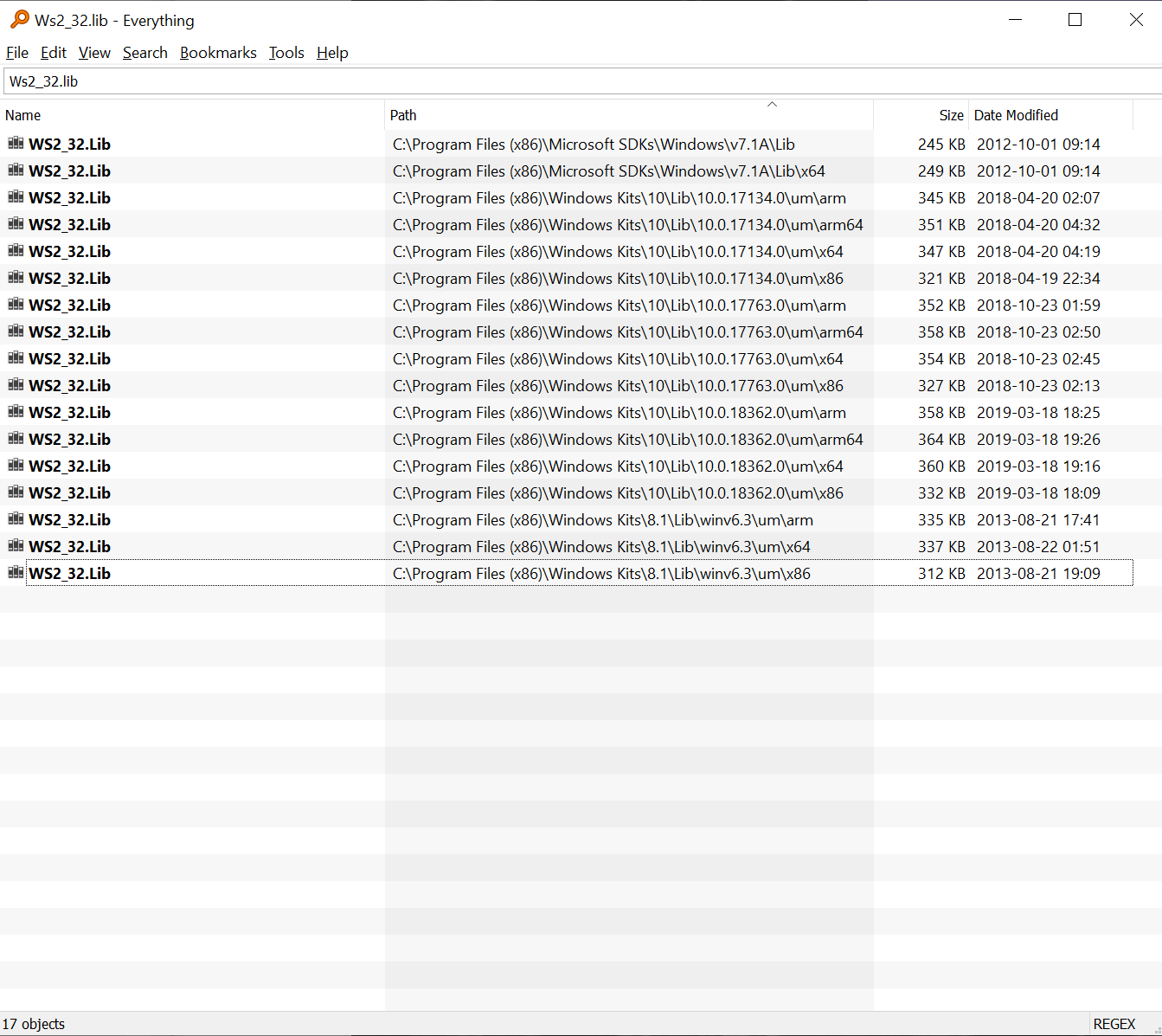
It is one of the well-known Windows libraries. When compiling with Visual Studio, you don’t need to supply the full path to the library, just the file name should be enough.
But you should not be dealing with that. [Here](https://itk.org/Wiki/ITK/HelloInsight) is how to configure an example using CMake. Just replacing `HelloInsight.cxx` by `DicomImageReadWrite.cxx` should be enough. If you run into issues, let us know.
---
### Author:  [@Pooja\_Virkar](https://discourse.itk.org/u/Pooja_Virkar)
#### Post date: [August 13, 2019, 5:15pm UTC](https://discourse.itk.org/t/lnk2019-error-in-itk-dicomimagereadwrite-cxx-example/2132/5 "2019-08-13T17:15:09Z")
thank you for the details.
I configured DicomImageReadWrite.cxx example according to the link you provide.
But I don’t understand the last step which is “to run the executable (in my case it should be ./DicomImageReadWrite)”.
Should I run it in command prompt? Like other steps.
If I did, it is showing wrong command for ‘.’
How should I do it?
And also, for this example it needs input dicom image. So should I put my dicom image in build directory or other else? and while executing it, it needs 4 arguments. How to give it? with .dcm extension?
and is there no other way to open my program in Visual studio and run it there only, so I can debug my code there.
Please provide me answer for it.
---
### Author:  [@dzenanz](https://discourse.itk.org/u/dzenanz)
#### Post date: [August 13, 2019, 8:57pm UTC](https://discourse.itk.org/t/lnk2019-error-in-itk-dicomimagereadwrite-cxx-example/2132/6 "2019-08-13T20:57:44Z")
Of course you can run it in Visual Studio. Set the _Command Arguments_ property:
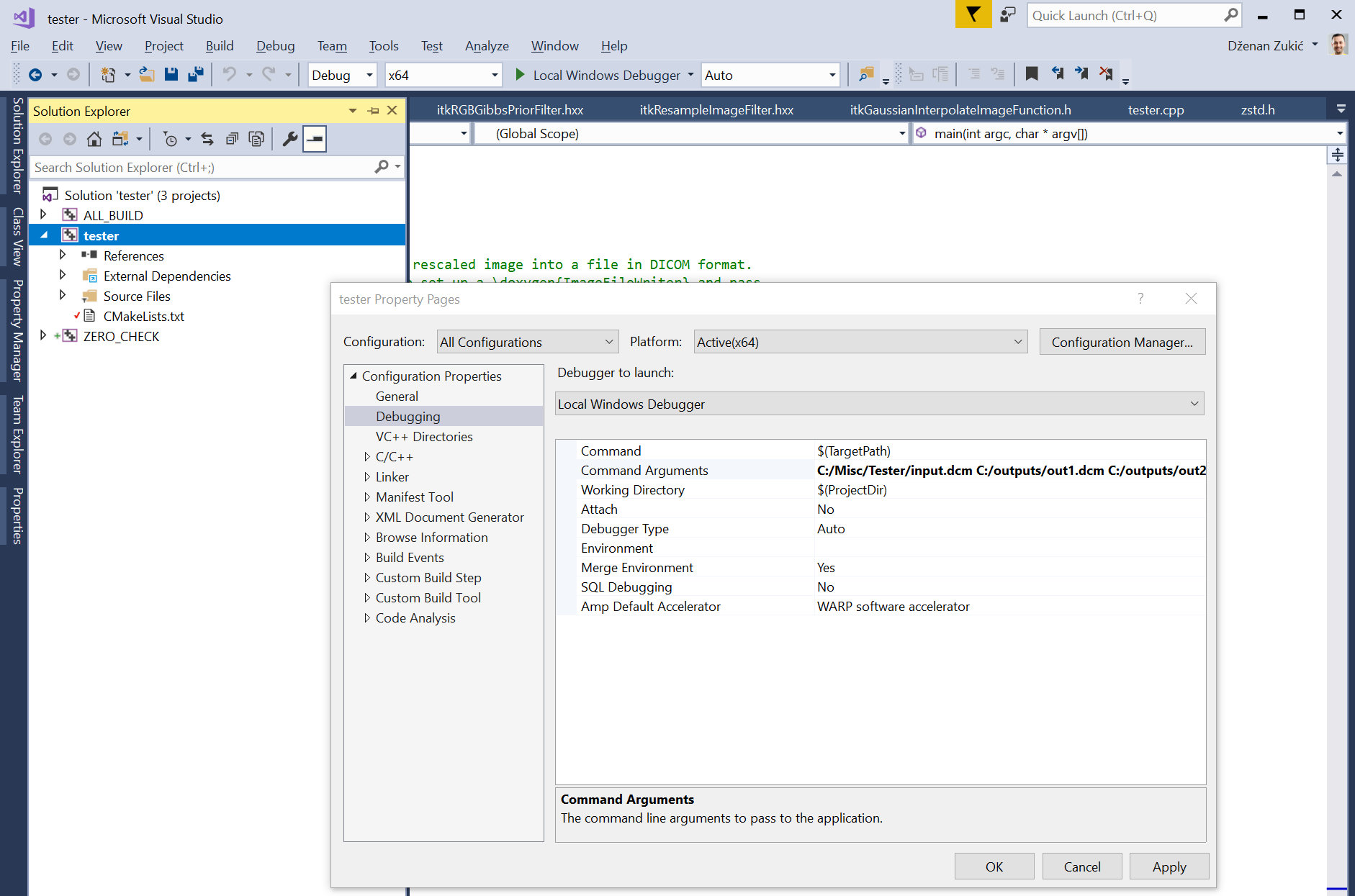
You can then run the program under debugger.
If you provide a full path to the input, it does not matter where it is. With filename only, it needs to be in the _Working Directory_. And yes, file names should be given with extensions.
---
### Author:  [@Pooja\_Virkar](https://discourse.itk.org/u/Pooja_Virkar)
#### Post date: [August 14, 2019, 8:37am UTC](https://discourse.itk.org/t/lnk2019-error-in-itk-dicomimagereadwrite-cxx-example/2132/7 "2019-08-14T08:37:41Z")
1. I opened the DicomImageReadWrite.sln file and as you said I give path of input and outputs in command arguments. 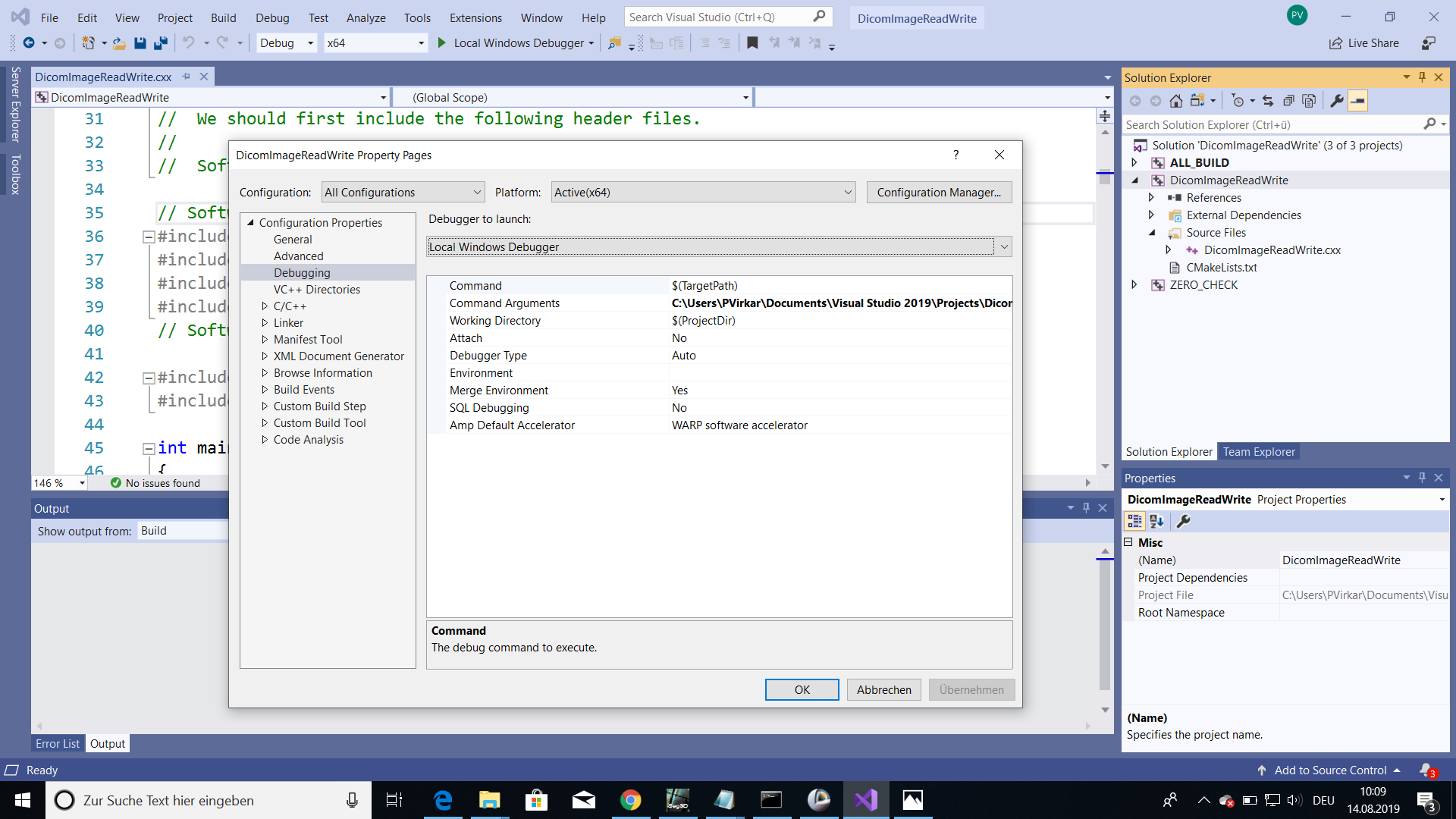
So when I run the program it is showing following box.

So What is exact way to run this file?
1. I tried it another way also. I opened my .sln file and here also I give same command arguments. But when I run it, it is showing following GDCMImageIO error. 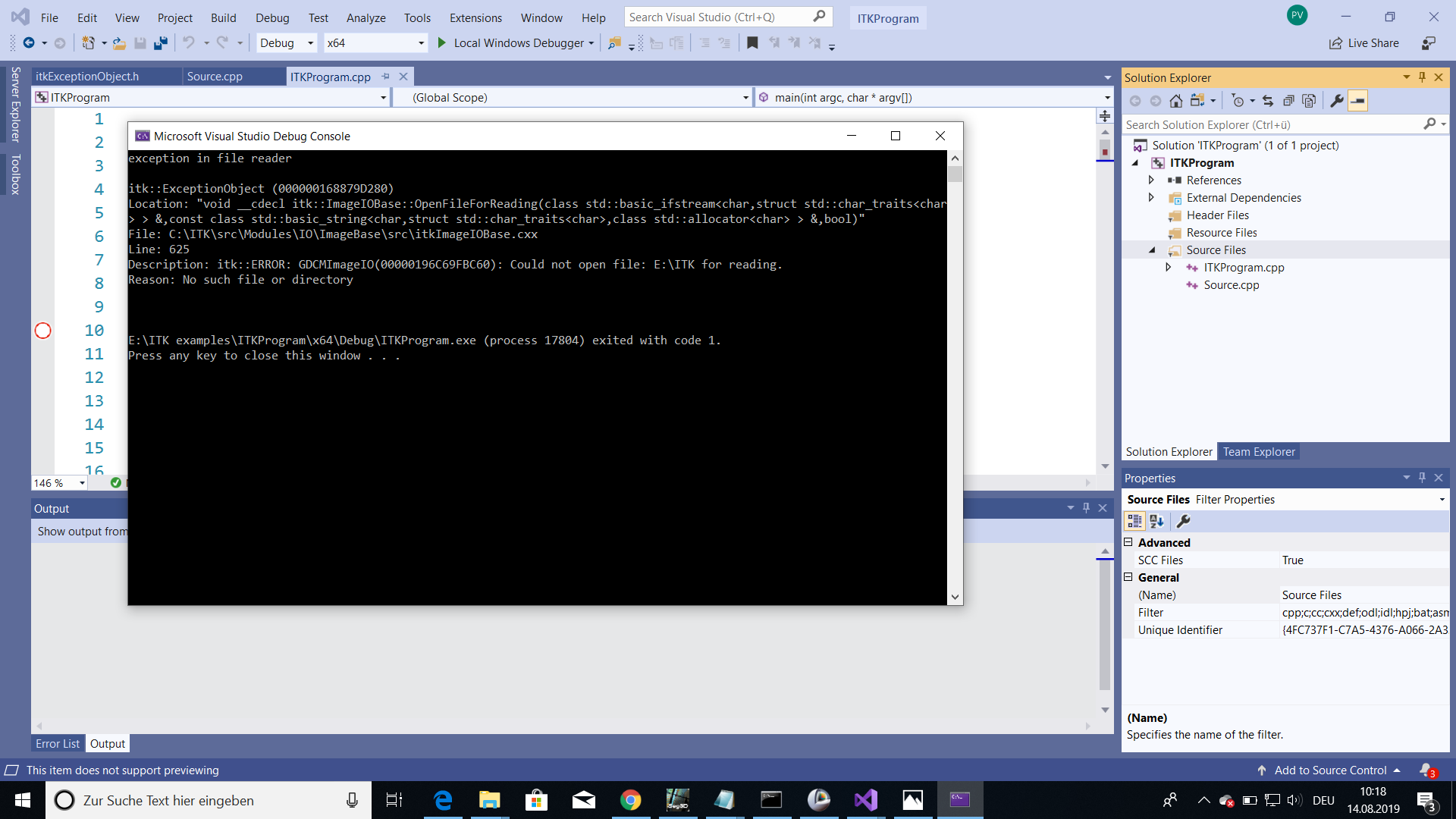
In both cases my input image is in working directory.
Sorry but i don’t understand anything.
Could you please provide me step by step procedure?
And also last time I was working with Linux and all these ITK programs were working fine and after running any example I was getting output image showing immediately. But in windows, will it show my output image directly or it will only save it in that particular directory ? and then i have to open it in dicom viewer?
Please help me.
---
### Author:  [@dzenanz](https://discourse.itk.org/u/dzenanz)
#### Post date: [August 14, 2019, 2:10pm UTC](https://discourse.itk.org/t/lnk2019-error-in-itk-dicomimagereadwrite-cxx-example/2132/8 "2019-08-14T14:10:05Z")
> [@Pooja\_Virkar](#):
>
> DicomImageReadWrite.sln
In this case, you need to change startup project from `ALL_BUILD` to `DicomImageReadWrite`. Right click on `DicomImageReadWrite` and choose `Set as StartUp project`.
In second case, you need to put quotes around path which has spaces, e.g. `ITKProgram.exe "E:\ITK projects\blabla\image.nrrd" out1.mha out2.dcm out3.tif`. Without quotes, `E:\ITK` gets interpreted as first argument, and `projects\blabla\image.nrrd` as the second.
This example just writes the outputs to disk. You will need to load them in an image viewer (e.g. [Slicer](https://slicer.org/)). The same would have been true on Linux, given the same source code.
---
### Author:  [@Pooja\_Virkar](https://discourse.itk.org/u/Pooja_Virkar)
#### Post date: [August 15, 2019, 10:07am UTC](https://discourse.itk.org/t/lnk2019-error-in-itk-dicomimagereadwrite-cxx-example/2132/9 "2019-08-15T10:07:39Z")
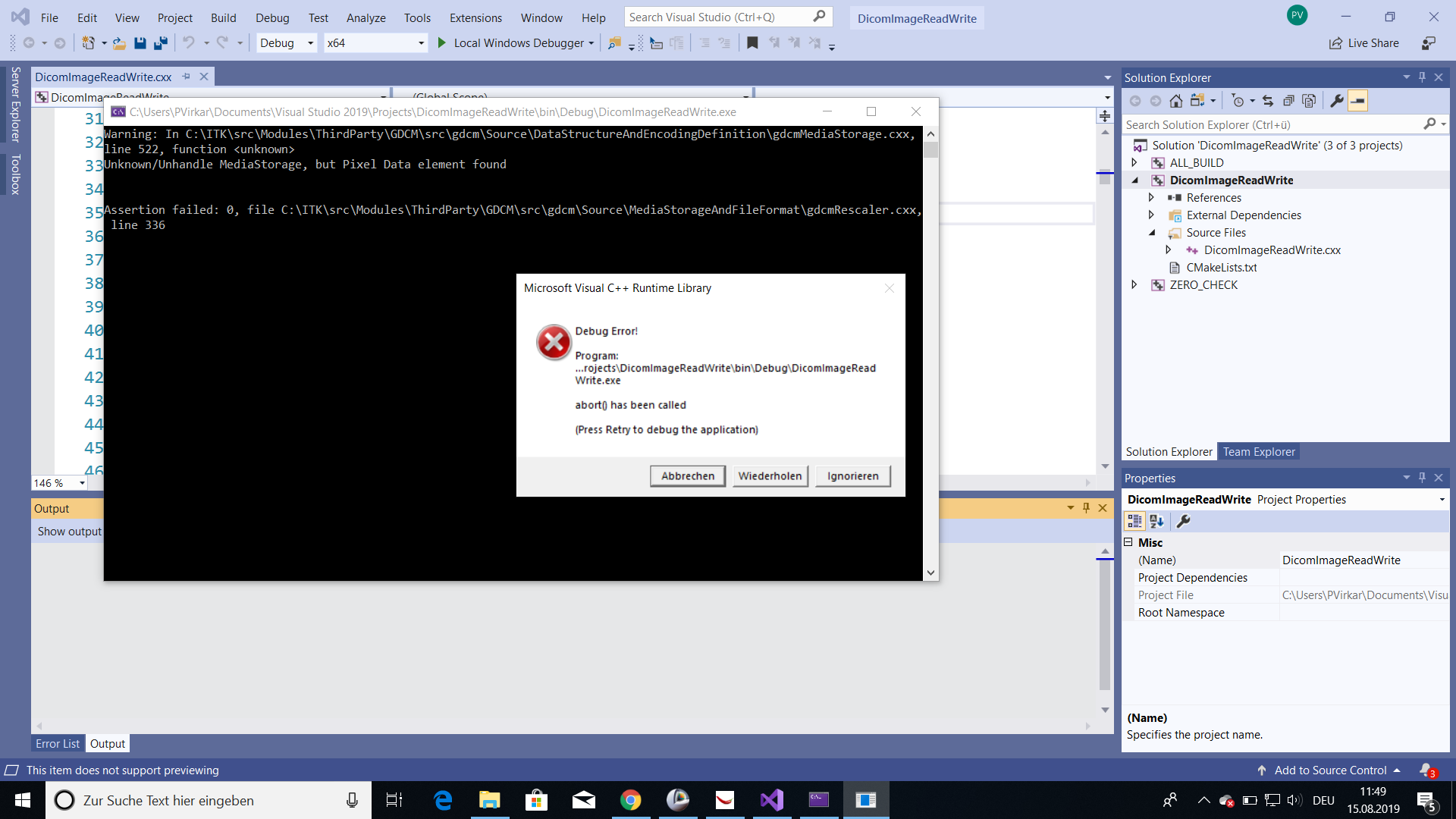
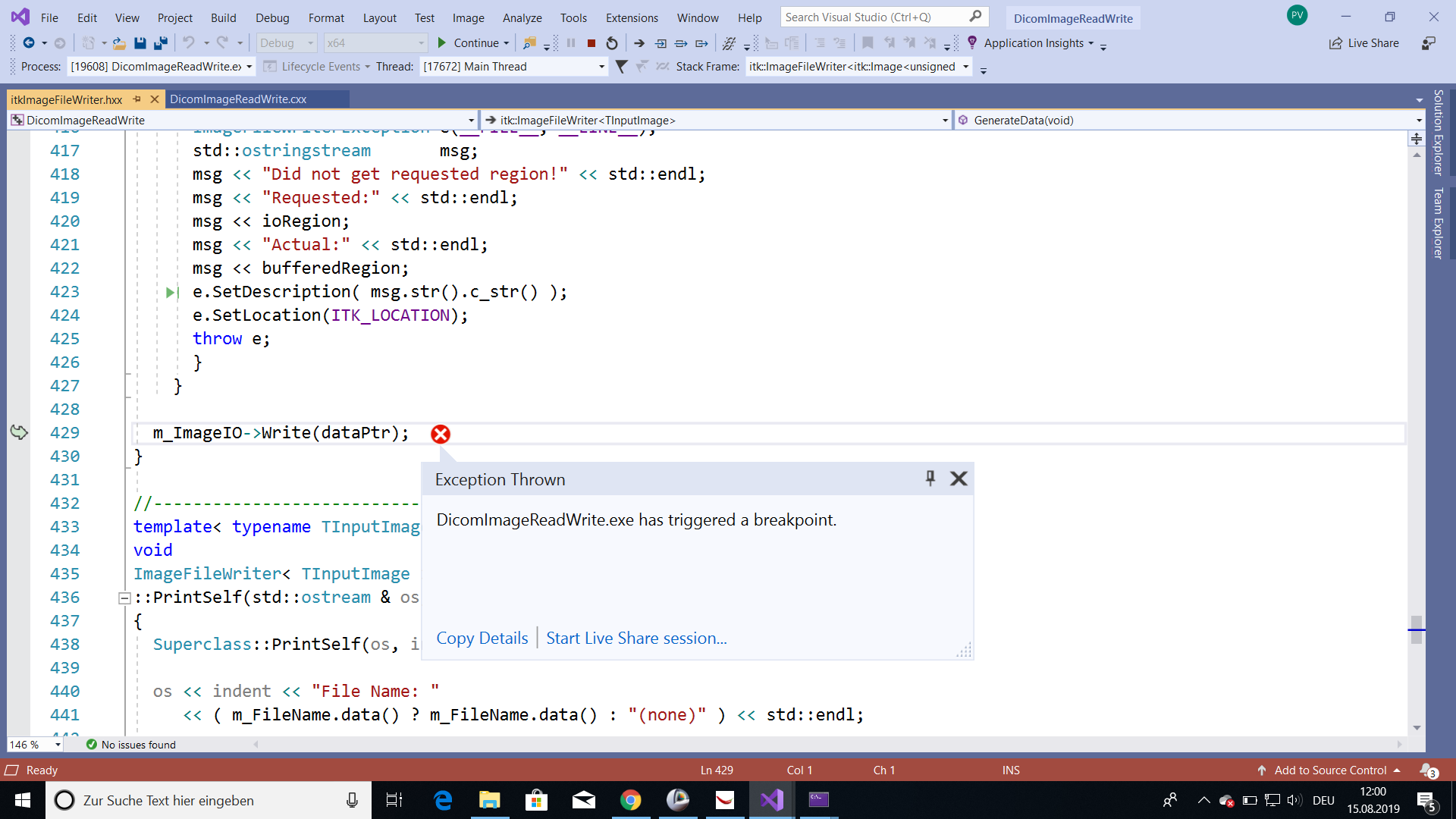
In my first case, I did as you said. But when it is showing following debug error.
It saying “DicomImageReadWrite.exe has triggered a breakpoint.”
what is meant by it? And how to solve it?
And I also want to ask you that, is it always need to load output in an image viewer? Is there any way to show it directly after running the example?
---
### Author:  [@dzenanz](https://discourse.itk.org/u/dzenanz)
#### Post date: [August 15, 2019, 12:56pm UTC](https://discourse.itk.org/t/lnk2019-error-in-itk-dicomimagereadwrite-cxx-example/2132/10 "2019-08-15T12:56:09Z")
The exception means that GDCM (part of ITK) cannot read the DICOM file you are trying to read.
To avoid a separate viewer, you could try [QuickView](https://itk.org/Wiki/ITK/Examples/QuickViewDemo).
---
### Author:  [@Pooja\_Virkar](https://discourse.itk.org/u/Pooja_Virkar)
#### Post date: [August 15, 2019, 1:39pm UTC](https://discourse.itk.org/t/lnk2019-error-in-itk-dicomimagereadwrite-cxx-example/2132/11 "2019-08-15T13:39:26Z")
But why is it not reading the DICOM image?
what should I do to solve this error?
I tried different examples. but none of those examples are working.
I am using code which is mentioned on website.
Last time it was working with my Linux system.
Please let me know the solution.
---
### Author:  [@dzenanz](https://discourse.itk.org/u/dzenanz)
#### Post date: [August 15, 2019, 3:10pm UTC](https://discourse.itk.org/t/lnk2019-error-in-itk-dicomimagereadwrite-cxx-example/2132/12 "2019-08-15T15:10:49Z")
> [@Pooja\_Virkar](#):
>
> But why is it not reading the DICOM image?
Can you start a new forum discussion with this topic? This has nothing to do with _LNK2019 error in ITK DicomImageReadWrite.cxx example_.