# ITK wrap python compile error
**URL:** https://discourse.itk.org/t/itk-wrap-python-compile-error/2606
**Category:** Uncategorized
**Created:** [January 11, 2020, 10:34am UTC](https://discourse.itk.org/t/itk-wrap-python-compile-error/2606 "2020-01-11T10:34:52Z")
**Posts on this page:** 3
**Page:** 1
### Author:  [@zhang-qiang-github](https://discourse.itk.org/u/zhang-qiang-github)
#### Post date: [January 11, 2020, 10:34am UTC](https://discourse.itk.org/t/itk-wrap-python-compile-error/2606/1 "2020-01-11T10:34:52Z")
I want to compile ITK from source and wrap with python. But the following bug happen:
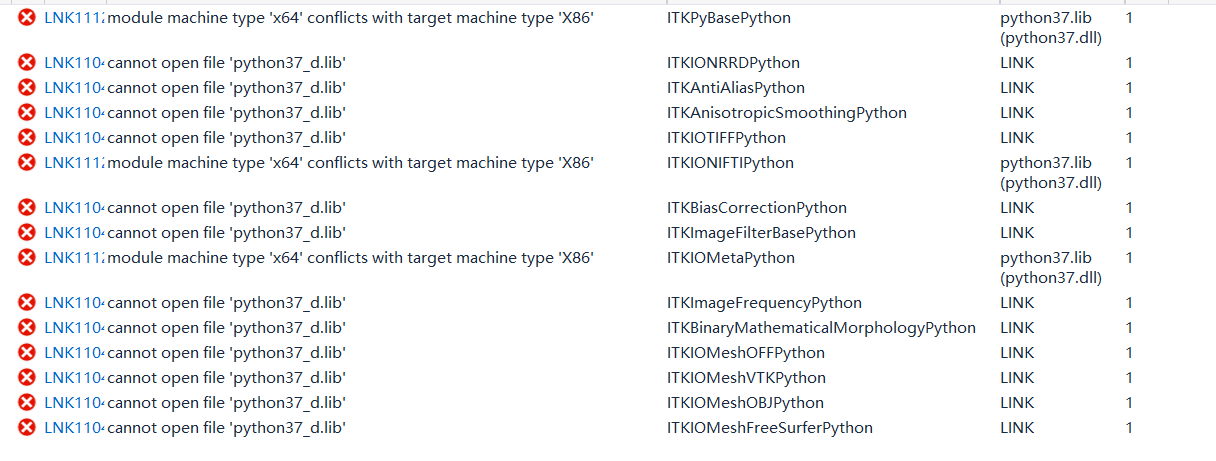
My environment is:
window 10 64 bit
vs 2015 64 bit
Python 3.7.6 (default, Jan 8 2020, 20:23:39) [MSC v.1916 64 bit (AMD64)] :: Anaconda, Inc. on win32
cmake 3.16.0-rc4
Any suggestion is appreciated!
---
### Author:  [@dzenanz](https://discourse.itk.org/u/dzenanz)
#### Post date: [January 11, 2020, 2:59pm UTC](https://discourse.itk.org/t/itk-wrap-python-compile-error/2606/2 "2020-01-11T14:59:02Z")
You need 64-bit Python. Also [answered on GitHub](https://github.com/InsightSoftwareConsortium/ITK/issues/1558).
---
### Author:  [@matt.mccormick](https://discourse.itk.org/u/matt.mccormick)
#### Post date: [January 11, 2020, 10:45pm UTC](https://discourse.itk.org/t/itk-wrap-python-compile-error/2606/3 "2020-01-11T22:45:18Z")
> Python 3.7.6 (default, Jan 8 2020, 20:23:39) [MSC v.1916 64 bit (AMD64)] ::
This means it is a 64 bit Python.
> LNK111: module machine ‘x64’ conflicts with target machine type ‘X86’
This means that the ITK Visual Studio is building for 32-bit system: since we are building against 64 bit Python, we want to build for a 64-bit system.
Delete the ITK build tree, then run the initial CMake configuration again. On the first CMake configuration, the target build generator is selected; change to a 64-bit Visual Studio generator.
> LNK110: cannot open file ‘python37\_d.lib’
This indicates a debug build and linking against the `_d` debug library; you probably do not want that. Select the _Release_ versus the _Debug_ build configuration in Visual Studio. Also, check the `PYTHON_LIBRARY` setting in the CMake configuration and make sure it is not pointing to the `_d` library.