# ITK not working in Python
**URL:** https://discourse.itk.org/t/itk-not-working-in-python/4733
**Category:** Beginner Questions
**Created:** [January 16, 2022, 2:37am UTC](https://discourse.itk.org/t/itk-not-working-in-python/4733 "2022-01-16T02:37:14Z")
**Posts on this page:** 20
**Page:** 1
### Author:  [@ogdenk](https://discourse.itk.org/u/ogdenk)
#### Post date: [January 16, 2022, 2:37am UTC](https://discourse.itk.org/t/itk-not-working-in-python/4733/1 "2022-01-16T02:37:14Z")
Hi all, I have a very basic question. I am learning to use ITK in Python, and I can’t seem to get it to work. In a simple example, I am just trying to use a median image filter, but copying online examples doesn’t work. Here is the code:
import itk
input\_filename = “d:/ctchest.dcm”
output\_filename = “d:/processedCT.png”
image = itk.imread(input\_filename)
median = itk.median\_image\_filter.New(image, Radius = 2)
itk.imwrite(median, output\_filename)
My image I am processing is a single slice of a CT sequence. I am using Python 3.8.8, Pycharm is my editor (latest version), and Anaconda is the set up for Python. ITK and VTK seemed to install just fine in the Anaconda prompt run in Administrator mode. I have the same problem on a newer Windows 10 computer as well as on an older Windows 7 computer. itk.imread looks ok, but itk.median\_image\_filter is not available. When I look at the functions available under itk, there are some functions but a lot is missing. Suggestions?
Kent
---
### Author:  [@dzenanz](https://discourse.itk.org/u/dzenanz)
#### Post date: [January 17, 2022, 3:35pm UTC](https://discourse.itk.org/t/itk-not-working-in-python/4733/2 "2022-01-17T15:35:00Z")
There shouldn’t be a `.New()` when you are using [procedural interface](https://itkpythonpackage.readthedocs.io/en/master/Quick_start_guide.html#basic-example).
---
### Author:  [@ogdenk](https://discourse.itk.org/u/ogdenk)
#### Post date: [January 18, 2022, 12:53am UTC](https://discourse.itk.org/t/itk-not-working-in-python/4733/3 "2022-01-18T00:53:50Z")
Thank you so much for your reply. My issue didn’t get fixed by your suggestion it appears. Here is my new code:
import itk
import sys
input\_filename = “d:/ctchest.dcm”
output\_filename = “d:/processedCT.dcm”
image = itk.imread(input\_filename)
median = itk.median\_image\_filter(image, radius=2)
itk.imwrite(median, output\_filename)
I see that imread, median\_image\_filter, and imwrite are all highlighted as they are not available. Can you suggest a correction for this problem?
Kent
---
### Author:  [@dzenanz](https://discourse.itk.org/u/dzenanz)
#### Post date: [January 18, 2022, 2:44pm UTC](https://discourse.itk.org/t/itk-not-working-in-python/4733/4 "2022-01-18T14:44:13Z")
Try a new conda enviroment? Try reinstalling conda? Try pip-installing ITK instead of using conda?
---
### Author:  [@ogdenk](https://discourse.itk.org/u/ogdenk)
#### Post date: [January 18, 2022, 9:46pm UTC](https://discourse.itk.org/t/itk-not-working-in-python/4733/5 "2022-01-18T21:46:31Z")
Thanks for the suggestions. I did try a new conda environment, no difference. I did not reinstall conda, as I got the same result on two different computers (Win7 and Win10 computers). I did try using both pip and conda with the same result.
This is very frustrating. I am going to build locally the Python versions of both ITK and VTK to see if that works. I used to do that a while ago and it worked ok for VTK but ITK Python support was just beginning. I will respond when I have some results.
Kent
---
### Author:  [@ogdenk](https://discourse.itk.org/u/ogdenk)
#### Post date: [January 19, 2022, 12:26am UTC](https://discourse.itk.org/t/itk-not-working-in-python/4733/6 "2022-01-19T00:26:41Z")
I’m building software, but I had a question. In the Anaconda Navigator, looking at the install I am using, I see itk, itk-core, itk-filtering, itk-io, itk-numerics, itk-registration, and itk-segmentation. Clearly the functionality that I need is in these other Python modules, but it is not being accessed via itk. Are these packages supposed to appear like this?
---
### Author:  [@dzenanz](https://discourse.itk.org/u/dzenanz)
#### Post date: [January 19, 2022, 3:51pm UTC](https://discourse.itk.org/t/itk-not-working-in-python/4733/7 "2022-01-19T15:51:13Z")
Yes, ITK’s Python packages are broken into such modules.
---
### Author:  [@ogdenk](https://discourse.itk.org/u/ogdenk)
#### Post date: [January 26, 2022, 9:16pm UTC](https://discourse.itk.org/t/itk-not-working-in-python/4733/8 "2022-01-26T21:16:45Z")
Thanks for the responses and help. I have given up for now, I will use C++ as always for ITK, I had just hoped it would be easier to make the transition to Python.
---
### Author:  [@matt.mccormick](https://discourse.itk.org/u/matt.mccormick)
#### Post date: [January 27, 2022, 3:19am UTC](https://discourse.itk.org/t/itk-not-working-in-python/4733/9 "2022-01-27T03:19:11Z")
> [@ogdenk](#):
>
> When I look at the functions available under itk, there are some functions but a lot is missing.
@ogdenk what do you mean by this? The hints in PyCharm?
Does the script run OK on the command line?
What version did you install via pip?
---
### Author:  [@ogdenk](https://discourse.itk.org/u/ogdenk)
#### Post date: [January 27, 2022, 2:27pm UTC](https://discourse.itk.org/t/itk-not-working-in-python/4733/10 "2022-01-27T14:27:21Z")
Matt,
I am running Python 3.8.3 in PyCharm 2021.2.1 (Professional Edition).
The hints in PyCharm that show the functions available don’t show much. I see a few pages of things such as data types (e.g. SS, UC, etc.) but none of the other functionality. For example, I am just trying to run a BinaryThresholdImageFilter example, but that function is not available.
When I try to run the script on the command line (in PyCharm), everything is ok until I get to this line:
inputImageType = itk.Image(inputPixelType,2)
where inputPixelType = itk.SS (this line runs fine).
I get a lot of output from this:
\*\*\*\*\*\*\*\*\*\*\*\*\*\*\*\*\*\*\*\*\*\*\*\*\*\*\*\*\*\*\*\*\*\*\*\*\*\*\*\*\*\*\*\*\*\*\*\*\*\*\*\*\*\*\*\*\* / to differentiate the output
Traceback (most recent call last):
File “”, line 1, in
File “C:\Users\ogdenk\anaconda3\envs\py38\lib\site-packages\itk\support\template\_class.py”, line 628, in **call**
filter = self.New(\*args, \*\*kwargs)
File “C:\Users\ogdenk\anaconda3\envs\py38\lib\site-packages\itk\support\template\_class.py”, line 733, in New
raise itk.TemplateTypeError(self, input\_type)
itk.support.extras.TemplateTypeError: itk.Image is not wrapped for input type `None`.
To limit the size of the package, only a limited number of
types are available in ITK Python. To print the supported
types, run the following command in your python environment:
itk.Image.GetTypes()
Possible solutions:
- If you are an application user:
\*\* Convert your input image into a supported format (see below).
\*\* Contact developer to report the issue.
- If you are an application developer, force input images to be
loaded in a supported pixel type.
e.g.: instance = itk.Image[itk.RGBPixel[itk.UC], int].New(my\_input)
- (Advanced) If you are an application developer, build ITK Python yourself and
turned to `ON` the corresponding CMake option to wrap the pixel type or image
dimension you need. When configuring ITK with CMake, you can set
`ITK_WRAP_${type}` (replace ${type} with appropriate pixel type such as
`double`). If you need to support images with 4 or 5 dimensions, you can add
these dimensions to the list of dimensions in the CMake variable
`ITK_WRAP_IMAGE_DIMS`.
Supported input types:
itk.RGBPixel[itk.UC]
itk.RGBAPixel[itk.UC]
itk.Vector[itk.F,2]
itk.Vector[itk.F,3]
itk.Vector[itk.F,4]
itk.CovariantVector[itk.F,2]
itk.CovariantVector[itk.F,3]
itk.CovariantVector[itk.F,4]
itk.SS
itk.UC
[itk.US](http://itk.US)
itk.F
itk.D
itk.complex[itk.D]
itk.complex[itk.F]
itk.Vector[itk.D,2]
itk.Vector[itk.D,3]
itk.Vector[itk.D,4]
itk.SI
itk.UI
itk.UL
itk.ULL
itk.B
itk.FixedArray[itk.F,2]
itk.FixedArray[itk.D,2]
itk.Offset[2]
itk.SymmetricSecondRankTensor[itk.D,2]
itk.SymmetricSecondRankTensor[itk.F,2]
itk.RGBPixel[itk.UC]
itk.RGBAPixel[itk.UC]
itk.Vector[itk.F,2]
itk.Vector[itk.F,3]
itk.Vector[itk.F,4]
itk.CovariantVector[itk.F,2]
itk.CovariantVector[itk.F,3]
itk.CovariantVector[itk.F,4]
itk.SS
itk.UC
[itk.US](http://itk.US)
itk.F
itk.D
itk.complex[itk.D]
itk.complex[itk.F]
itk.Vector[itk.D,2]
itk.Vector[itk.D,3]
itk.Vector[itk.D,4]
itk.SI
itk.UI
itk.UL
itk.ULL
itk.B
itk.FixedArray[itk.F,3]
itk.FixedArray[itk.D,3]
itk.Offset[3]
itk.SymmetricSecondRankTensor[itk.D,3]
itk.SymmetricSecondRankTensor[itk.F,3]
itk.RGBPixel[itk.UC]
itk.RGBAPixel[itk.UC]
itk.Vector[itk.F,2]
itk.Vector[itk.F,3]
itk.Vector[itk.F,4]
itk.CovariantVector[itk.F,2]
itk.CovariantVector[itk.F,3]
itk.CovariantVector[itk.F,4]
itk.SS
itk.UC
[itk.US](http://itk.US)
itk.F
itk.D
itk.complex[itk.D]
itk.complex[itk.F]
itk.Vector[itk.D,2]
itk.Vector[itk.D,3]
itk.Vector[itk.D,4]
itk.SI
itk.UI
itk.UL
itk.ULL
itk.B
itk.FixedArray[itk.F,4]
itk.FixedArray[itk.D,4]
itk.Offset[4]
itk.SymmetricSecondRankTensor[itk.D,4]
itk.SymmetricSecondRankTensor[itk.F,4]
itk.Vector[itk.F,1]
itk.Vector[itk.F,1]
itk.Vector[itk.D,2]
itk.Vector[itk.D,3]
itk.Vector[itk.D,4]
itk.Vector[itk.F,1]
itk.CovariantVector[itk.D,2]
itk.CovariantVector[itk.D,3]
itk.CovariantVector[itk.D,4]
itk.CovariantVector[itk.D,2]
itk.CovariantVector[itk.D,3]
itk.CovariantVector[itk.D,4]
itk.CovariantVector[itk.D,2]
itk.CovariantVector[itk.D,3]
itk.CovariantVector[itk.D,4]
\*\*\*\*\*\*\*\*\*\*\*\*\*\*\*\*\*\*\*\*\*\*\*\*\*\*\*\*\*\*\*\*\*\*\*\*\*\*\*\*\*\*\*\*\*\*\*\*\*/ End of output
I see that it says the template type is 'None", so that is likely the source of the error? Why would it say that though, I do have a SS template type specified?
To install ITK, I just used:
pip install itk
Is there something else I could try? I did try the conda version but the results were the same.
Thanks for your help!
Kent Ogden
---
### Author:  [@dzenanz](https://discourse.itk.org/u/dzenanz)
#### Post date: [January 27, 2022, 4:18pm UTC](https://discourse.itk.org/t/itk-not-working-in-python/4733/11 "2022-01-27T16:18:42Z")
You got the syntax wrong. You should use square brackets for template parameters:
```nohighlight
C:\Users\Dzenan>python
Python 3.7.9 (tags/v3.7.9:13c94747c7, Aug 17 2020, 18:58:18) [MSC v.1900 64 bit (AMD64)] on win32
Type "help", "copyright", "credits" or "license" for more information.
>>> import itk
>>> iType=itk.Image[itk.SS,2]
>>> xType=itk.Image(itk.SS,2)
Traceback (most recent call last):
File "", line 1, in
File "C:\Program Files\Python37\lib\site-packages\itk\support\template_class.py", line 628, in __call__
filter = self.New(*args, **kwargs)
File "C:\Program Files\Python37\lib\site-packages\itk\support\template_class.py", line 733, in New
raise itk.TemplateTypeError(self, input_type)
itk.support.extras.TemplateTypeError: itk.Image is not wrapped for input type `None`.
To limit the size of the package, only a limited number of
types are available in ITK Python. To print the supported
types, run the following command in your python environment:
itk.Image.GetTypes()
Possible solutions:
* If you are an application user:
** Convert your input image into a supported format (see below).
** Contact developer to report the issue.
* If you are an application developer, force input images to be
loaded in a supported pixel type.
e.g.: instance = itk.Image[itk.RGBPixel[itk.UC], int].New(my_input)
* (Advanced) If you are an application developer, build ITK Python yourself and
turned to `ON` the corresponding CMake option to wrap the pixel type or image
dimension you need. When configuring ITK with CMake, you can set
`ITK_WRAP_${type}` (replace ${type} with appropriate pixel type such as
`double`). If you need to support images with 4 or 5 dimensions, you can add
these dimensions to the list of dimensions in the CMake variable
`ITK_WRAP_IMAGE_DIMS`.
Supported input types:
itk.RGBPixel[itk.UC]
itk.RGBAPixel[itk.UC]
itk.Vector[itk.F,2]
itk.Vector[itk.F,3]
itk.Vector[itk.F,4]
itk.CovariantVector[itk.F,2]
itk.CovariantVector[itk.F,3]
itk.CovariantVector[itk.F,4]
itk.SS
itk.UC
...
```
---
### Author:  [@ogdenk](https://discourse.itk.org/u/ogdenk)
#### Post date: [January 27, 2022, 6:52pm UTC](https://discourse.itk.org/t/itk-not-working-in-python/4733/12 "2022-01-27T18:52:33Z")
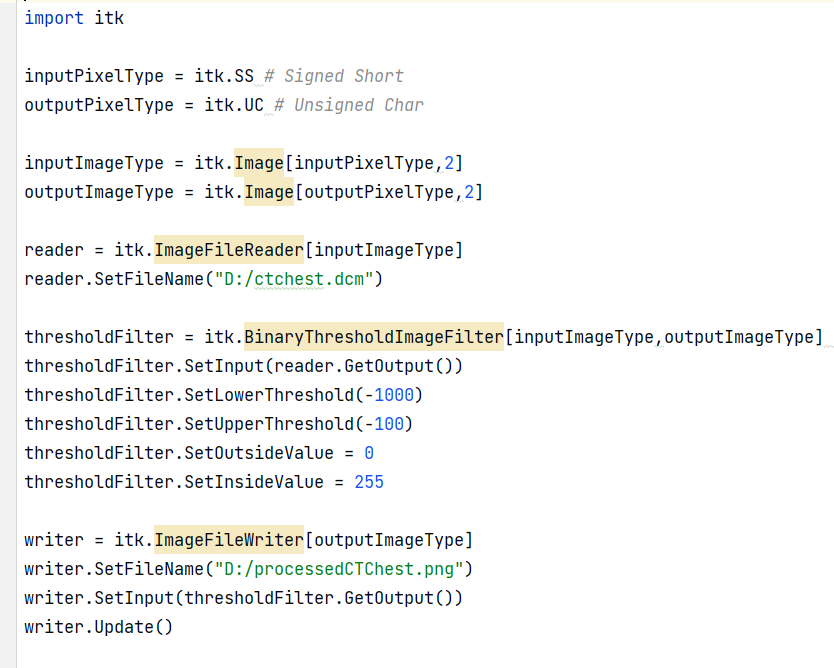
So, that was fixed, but the problem is still there. Here is a screen grab of the entire program, if this comes through.
---
### Author:  [@dzenanz](https://discourse.itk.org/u/dzenanz)
#### Post date: [January 27, 2022, 7:11pm UTC](https://discourse.itk.org/t/itk-not-working-in-python/4733/13 "2022-01-27T19:11:59Z")
That code looks fine. Does it produce the exact same error message as before?
It is highly recommended to share code using special [code formatting](https://discourse.stonehearth.net/t/discourse-guide-code-formatting/30587). That makes it easy for others to try it. I have some chest CT images on my computer, but I am not going to retype all that.
---
### Author:  [@ogdenk](https://discourse.itk.org/u/ogdenk)
#### Post date: [January 27, 2022, 8:06pm UTC](https://discourse.itk.org/t/itk-not-working-in-python/4733/14 "2022-01-27T20:06:05Z")
That was sent as an image so that the highlighted functions would show. Here is the text version:
```python
import itk
inputPixelType = itk.SS # Signed Short
outputPixelType = itk.UC # Unsigned Char
inputImageType = itk.Image[inputPixelType,2]
outputImageType = itk.Image[outputPixelType,2]
reader = itk.ImageFileReader[inputImageType]
reader.SetFileName("D:/ctchest.dcm")
thresholdFilter = itk.BinaryThresholdImageFilter[inputImageType,outputImageType] # Input and output Image Types
thresholdFilter.SetInput(reader.GetOutput())
thresholdFilter.SetLowerThreshold(-1000)
thresholdFilter.SetUpperThreshold(-100)
thresholdFilter.SetOutsideValue = 0
thresholdFilter.SetInsideValue = 255
writer = itk.ImageFileWriter[outputImageType]
writer.SetFileName("D:/processedCTChest.png")
writer.SetInput(thresholdFilter.GetOutput())
writer.Update()
```
---
### Author:  [@ogdenk](https://discourse.itk.org/u/ogdenk)
#### Post date: [January 27, 2022, 8:07pm UTC](https://discourse.itk.org/t/itk-not-working-in-python/4733/15 "2022-01-27T20:07:22Z")
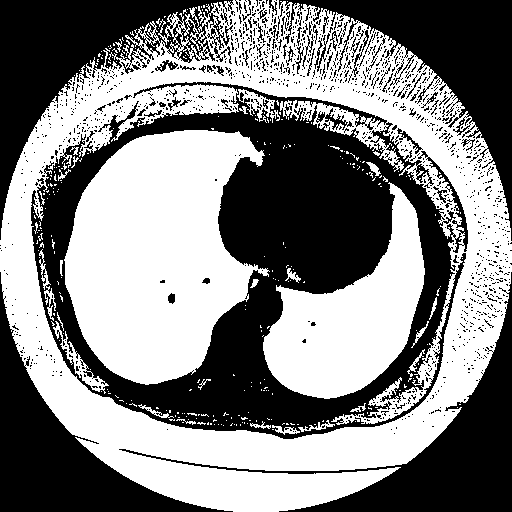
ctchest.dcm is just a single slice through the lungs.
---
### Author:  [@ogdenk](https://discourse.itk.org/u/ogdenk)
#### Post date: [January 27, 2022, 9:18pm UTC](https://discourse.itk.org/t/itk-not-working-in-python/4733/16 "2022-01-27T21:18:12Z")
Here is the output from the C++ version, which works just fine.
---
### Author:  [@dzenanz](https://discourse.itk.org/u/dzenanz)
#### Post date: [January 27, 2022, 11:07pm UTC](https://discourse.itk.org/t/itk-not-working-in-python/4733/17 "2022-01-27T23:07:33Z")
Running your program (with paths to my files) gives an error on my home computer:
```nohighlight
Traceback (most recent call last):
File "testBinaryThresholdImageFilter.py", line 23, in
reader.SetFileName("P:/Dropbox/Biometric/ChestXray/2013-01-28-AP.dcm")
TypeError: Wrong number or type of arguments for overloaded function 'itkImageFileReaderISS2_SetFileName'.
Possible C/C++ prototypes are:
itkImageFileReaderISS2::SetFileName(itkSimpleDataObjectDecoratorstring const *)
itkImageFileReaderISS2::SetFileName(std::string const &)
```
@matt.mccormick I guess the above should work?
However, the following program works for me:
```python
import itk
inputPixelType = itk.SS # Signed Short
outputPixelType = itk.UC # Unsigned Char
image = itk.imread("P:/Dropbox/Biometric/ChestXray/2013-01-28-AP.dcm", inputPixelType)
image_th = itk.binary_threshold_image_filter(image,
lower_threshold=-1000,
upper_threshold=+100,
outside_value=0,
inside_value=255)
image8 = image_th.astype(outputPixelType)
itk.imwrite(image8, "M:/a/testBinaryThresholdImageFilter.png", compression=True)
```
---
### Author:  [@matt.mccormick](https://discourse.itk.org/u/matt.mccormick)
#### Post date: [January 27, 2022, 11:12pm UTC](https://discourse.itk.org/t/itk-not-working-in-python/4733/18 "2022-01-27T23:12:36Z")
@dzenanz has a nice Pythonic version.
> [@ogdenk](#):
>
> `reader = itk.ImageFileReader[inputImageType]`
This is missing `.New()`:
```auto
reader = itk.ImageFileReader[inputImageType].New()
```
> The hints in PyCharm that show the functions available don’t show much.
There is work in progress to address this for itk-5.3rc4.
---
### Author:  [@ogdenk](https://discourse.itk.org/u/ogdenk)
#### Post date: [January 28, 2022, 2:55pm UTC](https://discourse.itk.org/t/itk-not-working-in-python/4733/19 "2022-01-28T14:55:38Z")
I tried this code, the imread function looks ok, but the binary\_threshold\_image\_filter gives the error "cannot find reference ‘binary\_threshold\_image\_filter’ in ‘ **init**.py | **init**.py’ "
I tried adding .New() to the ImageFileReader but it did not help.
---
### Author:  [@dzenanz](https://discourse.itk.org/u/dzenanz)
#### Post date: [January 28, 2022, 3:01pm UTC](https://discourse.itk.org/t/itk-not-working-in-python/4733/20 "2022-01-28T15:01:56Z")
There is something wrong with your ITK build or installation. Maybe do a clean build (build in a new folder) with 5.3RC3 tag?
[Next page](https://discourse.itk.org/t/itk-not-working-in-python/4733.md?page=2)