# ITK MATLAB Python Tutorial
**URL:** https://discourse.itk.org/t/itk-matlab-python-tutorial/5754
**Category:** Community
**Tags:** matlab, python
**Created:** [February 24, 2023, 4:16pm UTC](https://discourse.itk.org/t/itk-matlab-python-tutorial/5754 "2023-02-24T16:16:01Z")
**Posts on this page:** 1
**Page:** 1
### Author:  [@matt.mccormick](https://discourse.itk.org/u/matt.mccormick)
#### Post date: [February 24, 2023, 4:16pm UTC](https://discourse.itk.org/t/itk-matlab-python-tutorial/5754/1 "2023-02-24T16:16:01Z")
###### By: Matt McCormick [](https://orcid.org/0000-0001-9475-3756), Tom Birdsong, Brad Moore [](https://orcid.org/0000-0003-4322-8841), Jake McCall, Stephen Aylward [](https://orcid.org/0000-0002-7862-8856)
In recent years, [MathWork’s MATLAB](https://www.mathworks.com/products/matlab.html) added [Python support](https://www.mathworks.com/help/matlab/call-python-libraries.html). This unlocks the capabilities of the powerful open source scientific Python ecosystem inside MATLAB. This post provides a tutorial on how to use [Insight Toolkit (ITK)](https://itk.org) version 5.3 and newer and [itkwasm](https://wasm.itk.org) Python packages in MATLAB.
[ITK](https://itk.org) is an open-source, cross-platform library that provides developers with an extensive suite of software tools for image analysis. Developed through extreme programming methodologies, ITK builds on a proven, spatially-oriented architecture for processing, segmentation, and registration of scientific images in two, three, or more dimensions.
To interactively reproduce this tutorial, run the corresponding [MATLAB Live Script](https://www.mathworks.com/matlabcentral/fileexchange/125300-itk-matlab-python-tutorial) ([source](https://github.com/InsightSoftwareConsortium/itk-matlab-python-tutorial), [html](https://insightsoftwareconsortium.github.io/itk-matlab-python-tutorial/)).
# Installation
This section walks through how to install the `itk` Python package into the PythonEnvironment available in the MATLAB Online environment.
In general, you can install `itk` into your local Python environment by simply calling:
```auto
!python -m pip install itk
```
Since MATLAB Online uses Linux, we will use `python3 `to specify the MATLAB Python version. On Windows, you may want to specify a version with`'Version', '3.10'`or similar. For more information, see the [pyenv](https://www.mathworks.com/help/matlab/ref/pyenv.html) documentation.
```auto
pyenv("Version","python3")
```
```auto
ans =
PythonEnvironment with properties:
Version: "3.8"
Executable: "/usr/bin/python3"
Library: "libpython3.8.so.1.0"
Home: "/usr"
Status: Loaded
ExecutionMode: InProcess
ProcessID: "5004"
ProcessName: "MATLAB"
```
Next, we will Install `itk` via the Python package manager, `pip`. A standard Linux Python distribution is unusal in that it does not ship with `pip`, so we will download a self-contained version in this example.
```auto
websave("pip.pyz", "https://bootstrap.pypa.io/pip/pip.pyz");
```
For MATLAB Online, install the package into set the `user` packages and the `setuptools` package.
```auto
!python3 pip.pyz install --user itk setuptools
```
```auto
Collecting itk
Downloading itk-5.3.0-cp38-cp38-manylinux2014_x86_64.manylinux_2_17_x86_64.whl (8.3 kB)
Collecting setuptools
Downloading setuptools-67.4.0-py3-none-any.whl (1.1 MB)
━━━━━━━━━━━━━━━━━━━━━━━━━━━━━━━━━━━━━━━━ 1.1/1.1 MB 80.0 MB/s eta 0:00:00
Collecting numpy
Downloading numpy-1.24.2-cp38-cp38-manylinux_2_17_x86_64.manylinux2014_x86_64.whl (17.3 MB)
━━━━━━━━━━━━━━━━━━━━━━━━━━━━━━━━━━━━━━━ 17.3/17.3 MB 109.4 MB/s eta 0:00:00
Collecting itk-filtering==5.3.0
Downloading itk_filtering-5.3.0-cp38-cp38-manylinux_2_17_x86_64.manylinux2014_x86_64.whl (75.9 MB)
━━━━━━━━━━━━━━━━━━━━━━━━━━━━━━━━━━━━━━━━ 75.9/75.9 MB 39.0 MB/s eta 0:00:00
Collecting itk-registration==5.3.0
Downloading itk_registration-5.3.0-cp38-cp38-manylinux_2_17_x86_64.manylinux2014_x86_64.whl (27.3 MB)
━━━━━━━━━━━━━━━━━━━━━━━━━━━━━━━━━━━━━━━━ 27.3/27.3 MB 84.0 MB/s eta 0:00:00
Collecting itk-io==5.3.0
Downloading itk_io-5.3.0-cp38-cp38-manylinux_2_17_x86_64.manylinux2014_x86_64.whl (26.2 MB)
━━━━━━━━━━━━━━━━━━━━━━━━━━━━━━━━━━━━━━━━ 26.2/26.2 MB 73.7 MB/s eta 0:00:00
Collecting itk-numerics==5.3.0
Downloading itk_numerics-5.3.0-cp38-cp38-manylinux_2_17_x86_64.manylinux2014_x86_64.whl (60.0 MB)
━━━━━━━━━━━━━━━━━━━━━━━━━━━━━━━━━━━━━━━━ 60.0/60.0 MB 48.3 MB/s eta 0:00:00
Collecting itk-core==5.3.0
Downloading itk_core-5.3.0-cp38-cp38-manylinux_2_17_x86_64.manylinux2014_x86_64.whl (83.6 MB)
━━━━━━━━━━━━━━━━━━━━━━━━━━━━━━━━━━━━━━━━ 83.6/83.6 MB 35.1 MB/s eta 0:00:00
Collecting itk-segmentation==5.3.0
Downloading itk_segmentation-5.3.0-cp38-cp38-manylinux_2_17_x86_64.manylinux2014_x86_64.whl (17.2 MB)
━━━━━━━━━━━━━━━━━━━━━━━━━━━━━━━━━━━━━━━ 17.2/17.2 MB 106.7 MB/s eta 0:00:00
Installing collected packages: setuptools, numpy, itk-core, itk-numerics, itk-io, itk-filtering, itk-segmentation, itk-registration, itk
WARNING: The scripts f2py, f2py3 and f2py3.8 are installed in '/home/mluser/.local/bin' which is not on PATH.
Consider adding this directory to PATH or, if you prefer to suppress this warning, use --no-warn-script-location.
Successfully installed itk-5.3.0 itk-core-5.3.0 itk-filtering-5.3.0 itk-io-5.3.0 itk-numerics-5.3.0 itk-registration-5.3.0 itk-segmentation-5.3.0 numpy-1.24.2 setuptools-67.4.0
```
For MATLAB Online, we need to add the user site packages to `sys.path` so Python will find them.
```auto
usp = py.site.getusersitepackages();
pyrun(["import sys", "if usp not in sys.path: sys.path.append(usp)"], usp=usp);
py.sys.path;
```
If the Python interpreter has already been started, we would need to [manually import the Python package for MATLAB](https://www.mathworks.com/help/matlab/matlab_external/call-user-defined-custom-module.html?searchHighlight=importlib&s_tid=srchtitle_importlib_7).
Again, these steps are unnecessary for local installations where the `itk` Python package is simply installed before starting MATLAB.
# ITK to MATLAB
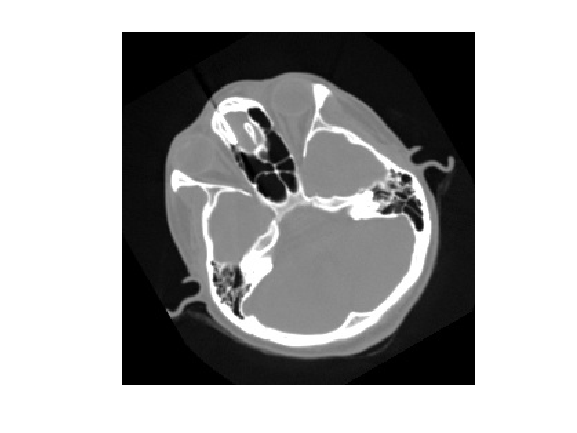
In this section, we will show how to load an image with ITK and display it with MATLAB.
```auto
% download a test image
websave("cthead1.png", "https://bafybeigja4wbultavomsvai433hln7uqabzl2mg24frxzqblx4y4cvd5am.ipfs.w3s.link/ipfs/bafybeigja4wbultavomsvai433hln7uqabzl2mg24frxzqblx4y4cvd5am/cthead1.png");
% load the image with itk
pyrun(["import itk", "image = itk.imread('cthead1.png')"])
% transfer python dict to matlab
image_dict = pyrun(["image_dict = itk.dict_from_image(image)"], "image_dict")
```
```auto
image_dict =
Python dict with no properties.
{'imageType': {'dimension': 2, 'componentType': 'uint8', 'pixelType': 'Scalar', 'components': 1}, 'name': '', 'origin': (0.0, 0.0), 'spacing': (1.0, 1.0), 'size': (256, 256), 'direction': array([[1., 0.],
[0., 1.]]), 'data': array([[0, 0, 0, ..., 0, 0, 0],
[0, 0, 0, ..., 0, 0, 0],
[0, 0, 0, ..., 0, 0, 0],
...,
[0, 0, 0, ..., 0, 0, 0],
[0, 0, 0, ..., 0, 0, 0],
[0, 0, 0, ..., 0, 0, 0]], dtype=uint8)}
```
```auto
% matlab struct
image_struct = struct(image_dict)
```
```auto
image_struct =
imageType: [1x1 py.dict]
name: [1x0 py.str]
origin: [1x2 py.tuple]
spacing: [1x2 py.tuple]
size: [1x2 py.tuple]
direction: [1x1 py.numpy.ndarray]
data: [1x1 py.numpy.ndarray]
```
```auto
spacing = double(image_struct.spacing)
```
```auto
spacing = 1x2
1 1
```
```auto
% equivalent
spacing = double(image_dict{'spacing'})
```
```auto
spacing = 1x2
1 1
```
```auto
pixels = double(image_struct.data);
imshow(pixels, [0, 255])
```
```auto
image_dict{'imageType'}
```
```auto
ans =
Python dict with no properties.
{'dimension': 2, 'componentType': 'uint8', 'pixelType': 'Scalar', 'components': 1}
```
```auto
% Keep pixel type
pixels = uint8(image_struct.data);
imshow(pixels)
```

# MATLAB to ITK
In this section, we will show how to load an image with MATLAB and transfer it to ITK.
```auto
pixels = imread("cthead1.png")
```
```auto
Warning: PNG library warning: sCAL: invalid unit.
pixels = 256x256 uint8 matrix
0 0 0 0 0 0 0 0 0 0 0 0 0 0 0 0 0 0 0 0 0 0 0 0 0 0 0 0 0 0 0 0 0 0 0 0 0 0 0 0 0 0 0 0 0 0 0 0 0 0
0 0 0 0 0 0 0 0 0 0 0 0 0 0 0 0 0 0 0 0 0 0 0 0 0 0 0 0 0 0 0 0 0 0 0 0 0 0 0 0 0 0 0 0 0 0 0 0 0 0
0 0 0 0 0 0 0 0 0 0 0 0 0 0 0 0 0 0 0 0 0 0 0 0 0 0 0 0 0 0 0 0 0 0 0 0 0 0 0 0 0 0 0 0 0 0 0 0 0 0
0 0 0 0 0 0 0 0 0 0 0 0 0 0 0 0 0 0 0 0 0 0 0 0 0 0 0 0 0 0 0 0 0 0 0 0 0 0 0 0 0 0 0 0 0 0 0 0 0 0
0 0 0 0 0 0 0 0 0 0 0 0 0 0 0 0 0 0 0 0 0 0 0 0 0 0 0 0 0 0 0 0 0 0 0 0 0 0 0 0 0 0 0 0 0 0 0 0 0 0
0 0 0 0 0 0 0 0 0 0 0 0 0 0 0 0 0 0 0 0 0 0 0 0 0 0 0 0 0 0 0 0 0 0 0 0 0 0 0 0 0 0 0 0 0 0 0 0 0 0
0 0 0 0 0 0 0 0 0 0 0 0 0 0 0 0 0 0 0 0 0 0 0 0 0 0 0 0 0 0 0 0 0 0 0 0 0 0 0 0 0 0 0 0 0 0 0 0 0 0
0 0 0 0 0 0 0 0 0 0 0 0 0 0 0 0 0 0 0 0 0 0 0 0 0 0 0 0 0 0 0 0 0 0 0 0 0 0 0 0 0 0 0 0 0 0 0 0 0 0
0 0 0 0 0 0 0 0 0 0 0 0 0 0 0 0 0 0 0 0 0 0 0 0 0 0 0 0 0 0 0 0 0 0 0 0 0 0 0 0 0 0 0 0 0 0 0 0 0 0
0 0 0 0 0 0 0 0 0 0 0 0 0 0 0 0 0 0 0 0 0 0 0 0 0 0 0 0 0 0 0 0 0 0 0 0 0 0 0 0 0 0 0 0 0 0 0 0 0 0
```
```auto
pyrun(["import numpy as np", "array = np.asarray(pixels)"], pixels=pixels)
pyrun(["image = itk.image_view_from_array(array)", "print(image)"])
```
```auto
Image (0x7f3aec3261e0)
RTTI typeinfo: itk::Image
Reference Count: 1
Modified Time: 402
Debug: Off
Object Name:
Observers:
none
Source: (none)
Source output name: (none)
Release Data: Off
Data Released: False
Global Release Data: Off
PipelineMTime: 0
UpdateMTime: 0
RealTimeStamp: 0 seconds
LargestPossibleRegion:
Dimension: 2
Index: [0, 0]
Size: [256, 256]
BufferedRegion:
Dimension: 2
Index: [0, 0]
Size: [256, 256]
RequestedRegion:
Dimension: 2
Index: [0, 0]
Size: [256, 256]
Spacing: [1, 1]
Origin: [0, 0]
Direction:
1 0
0 1
IndexToPointMatrix:
1 0
0 1
PointToIndexMatrix:
1 0
0 1
Inverse Direction:
1 0
0 1
PixelContainer:
ImportImageContainer (0x7f3aec3219f0)
RTTI typeinfo: itk::ImportImageContainer
Reference Count: 1
Modified Time: 397
Debug: Off
Object Name:
Observers:
none
Pointer: 0x7f3aec2a0d80
Container manages memory: false
Size: 65536
Capacity: 65536
```
# Call ITK filters
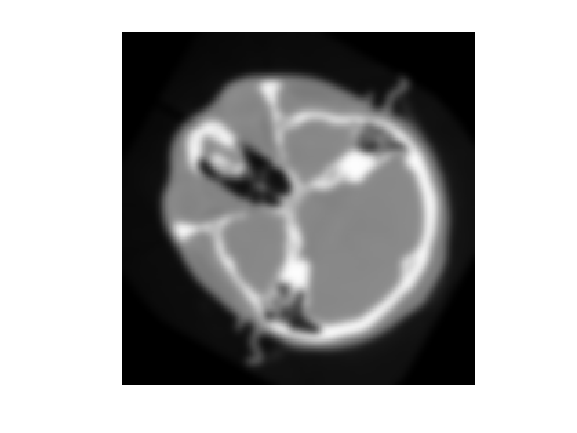
Let’s call an `itk` filter and look at the result.
```auto
pyrun(["smoothed = itk.discrete_gaussian_image_filter(image, sigma=sigma)"], sigma=3.0);
smoothed = pyrun(["smoothed = itk.dict_from_image(smoothed)"], "smoothed");
imshow(uint8(smoothed{"data"}))
```
```auto
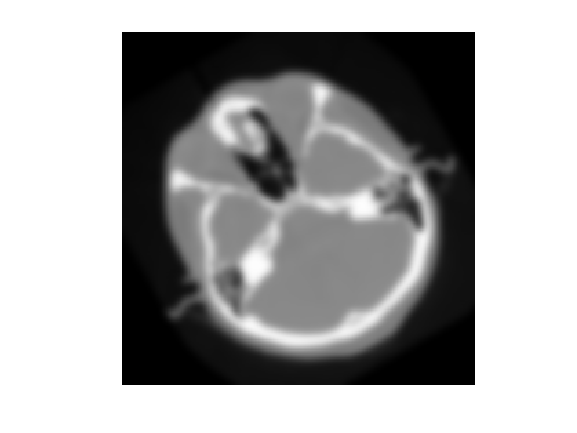
% equivalent
smoothed = py.itk.discrete_gaussian_image_filter(py.itk.image_from_dict(image_dict), sigma=3.0);
smoothed = py.itk.dict_from_image(smoothed);
imshow(uint8(smoothed{"data"}))
```
# Beyond images
ITK supports other data structures beyond images, including `Mesh`’s, `PointSet`’s, and spatial `Transform`’s.
```auto
websave("cow.vtk", "https://bafybeihqh2e2xyff5fzwygx4m2lmgqmnm3kv7gyzjgtcgv7kpfvvjy4rty.ipfs.w3s.link/ipfs/bafybeihqh2e2xyff5fzwygx4m2lmgqmnm3kv7gyzjgtcgv7kpfvvjy4rty/cow.vtk");
% load the mesh with itk
% pyrun(["mesh = itk.meshread('cow.vtk')"])
mesh = py.itk.meshread("cow.vtk")
```
```auto
mesh =
Python itkMeshF3 with properties:
thisown: 1
this: [1x1 py.SwigPyObject]
Mesh (0x7f3aee68b400)
RTTI typeinfo: itk::Mesh >
Reference Count: 1
Modified Time: 10117
Debug: Off
Object Name:
Observers:
none
Source: (none)
Source output name: (none)
Release Data: Off
Data Released: False
Global Release Data: Off
PipelineMTime: 669
UpdateMTime: 10116
RealTimeStamp: 0 seconds
Number Of Points: 2903
Requested Number Of Regions: 1
Requested Region: 0
Buffered Region: 0
Maximum Number Of Regions: 1
Point Data Container pointer: 0
Size of Point Data Container: 0
Number Of Points: 2903
Number Of Cell Links: 0
Number Of Cells: 3263
Cell Data Container pointer: 0
Size of Cell Data Container: 0
Number of explicit cell boundary assignments: 3
CellsAllocationMethod: itk::MeshEnums::MeshClassCellsAllocationMethod::CellsAllocatedDynamicallyCellByCell
```
```auto
% transfer python dict to matlab
mesh_dict = py.itk.dict_from_mesh(mesh)
```
```auto
mesh_dict =
Python dict with no properties.
{'meshType': {'dimension': 3, 'pointComponentType': 'float32', 'pointPixelComponentType': 'float32', 'pointPixelType': 'Scalar', 'pointPixelComponents': 1, 'cellComponentType': 'uint64', 'cellPixelComponentType': 'float32', 'cellPixelType': 'Scalar', 'cellPixelComponents': 1}, 'name': '', 'numberOfPoints': 2903, 'points': array([3.71636 , 2.34339 , 0. , ..., 4.23234 , 1.90308 , 0.534362],
dtype=float32), 'numberOfPointPixels': 0, 'pointData': array([], dtype=float32), 'numberOfCells': 3263, 'cells': array([4, 4, 250, ..., 966, 961, 970], dtype=uint64), 'numberOfCellPixels': 0, 'cellData': array([], dtype=float32), 'cellBufferSize': 18856}
```
```auto
% x,y,z point positions
points = double(mesh_dict{"points"})
```
```auto
points = 1x8709
3.7164 2.3434 0 4.1266 0.6420 0 3.4550 2.1699 0 3.9293 0.4117 0 3.2474 2.0733 0 3.7317 0.1864 0 2.9854 1.9827 0 3.4860 -0.1417 0 2.7235 1.8988 0 3.3352 -0.3758 0 2.3396 1.8077 0 3.1181 -0.7039 0 2.1281 1.7884 0 2.0422 1.7772 0 1.4567 1.7859 0 2.9709 -0.9597 0 2.9318 -1.1297
```
# WebAssembly packages with itkwasm
In addition to native Python packages, [`itkwasm`](https://wasm.itk.org/) Python packages can be used, which leverage universal [WebAssembly](https://webassembly.org) binaries.
Calls are similar, but we use Python’s builtin `dataclasses.asdict` for conversion.
```auto
!python3 pip.pyz install --user itkwasm
```
```auto
Collecting itkwasm
Downloading itkwasm-1.0b74-py3-none-any.whl (18 kB)
Collecting wasmer
Downloading wasmer-1.1.0-cp38-cp38-manylinux_2_24_x86_64.whl (1.6 MB)
━━━━━━━━━━━━━━━━━━━━━━━━━━━━━━━━━━━━━━━━ 1.6/1.6 MB 89.3 MB/s eta 0:00:00
Requirement already satisfied: numpy in /home/mluser/.local/lib/python3.8/site-packages (from itkwasm) (1.24.2)
Collecting wasmer-compiler-cranelift
Downloading wasmer_compiler_cranelift-1.1.0-cp38-cp38-manylinux_2_24_x86_64.whl (1.9 MB)
━━━━━━━━━━━━━━━━━━━━━━━━━━━━━━━━━━━━━━━━ 1.9/1.9 MB 115.2 MB/s eta 0:00:00
Collecting typing-extensions
Downloading typing_extensions-4.5.0-py3-none-any.whl (27 kB)
Installing collected packages: wasmer-compiler-cranelift, wasmer, typing-extensions, itkwasm
Successfully installed itkwasm-1.0b74 typing-extensions-4.5.0 wasmer-1.1.0 wasmer-compiler-cranelift-1.1.0
```
```auto
itk_image = py.itk.imread("cthead1.png");
itk_image_dict = py.itk.dict_from_image(itk_image)
```
```auto
itk_image_dict =
Python dict with no properties.
{'imageType': {'dimension': 2, 'componentType': 'uint8', 'pixelType': 'Scalar', 'components': 1}, 'name': '', 'origin': (0.0, 0.0), 'spacing': (1.0, 1.0), 'size': (256, 256), 'direction': array([[1., 0.],
[0., 1.]]), 'data': array([[0, 0, 0, ..., 0, 0, 0],
[0, 0, 0, ..., 0, 0, 0],
[0, 0, 0, ..., 0, 0, 0],
...,
[0, 0, 0, ..., 0, 0, 0],
[0, 0, 0, ..., 0, 0, 0],
[0, 0, 0, ..., 0, 0, 0]], dtype=uint8)}
```
```auto
itkwasm_image = pyrun(["from itkwasm import Image", "itkwasm_image = Image(**itk_image_dict)"], "itkwasm_image", itk_image_dict=itk_image_dict)
```
```auto
itkwasm_image =
Python Image with properties:
data: [1x1 py.numpy.ndarray]
size: [1x2 py.tuple]
origin: [1x2 py.tuple]
imageType: [1x1 py.itkwasm.image.ImageType]
name: [1x0 py.str]
spacing: [1x2 py.tuple]
metadata: [1x1 py.dict]
direction: [1x1 py.numpy.ndarray]
Image(imageType=ImageType(dimension=2, componentType='uint8', pixelType='Scalar', components=1), name='', origin=(0.0, 0.0), spacing=(1.0, 1.0), direction=array([[1., 0.],
[0., 1.]]), size=(256, 256), metadata={}, data=array([[0, 0, 0, ..., 0, 0, 0],
[0, 0, 0, ..., 0, 0, 0],
[0, 0, 0, ..., 0, 0, 0],
...,
[0, 0, 0, ..., 0, 0, 0],
[0, 0, 0, ..., 0, 0, 0],
[0, 0, 0, ..., 0, 0, 0]], dtype=uint8))
```
```auto
itkwasm_image_dict = py.dataclasses.asdict(itkwasm_image)
```
```auto
itkwasm_image_dict =
Python dict with no properties.
{'imageType': {'dimension': 2, 'componentType': 'uint8', 'pixelType': 'Scalar', 'components': 1}, 'name': '', 'origin': (0.0, 0.0), 'spacing': (1.0, 1.0), 'direction': array([[1., 0.],
[0., 1.]]), 'size': (256, 256), 'metadata': {}, 'data': array([[0, 0, 0, ..., 0, 0, 0],
[0, 0, 0, ..., 0, 0, 0],
[0, 0, 0, ..., 0, 0, 0],
...,
[0, 0, 0, ..., 0, 0, 0],
[0, 0, 0, ..., 0, 0, 0],
[0, 0, 0, ..., 0, 0, 0]], dtype=uint8)}
```
```auto
imshow(uint8(itkwasm_image_dict{"data"}))
```

**Enjoy ITK!**