;
auto colormapper = ColormapFilterType::New();
// Software Guide : EndCodeSnippet
auto writer = FileWriterType::New();
```
//sag check
writer-\>SetFileName(outputFileName);
```
// Software Guide : BeginLatex
//
// The filters are connected into a single pipeline, with readers and
// writers at each end.
//
// Software Guide : EndLatex
// Software Guide : BeginCodeSnippet
caster->SetInput(reader->GetOutput());
diffusion->SetInput(caster->GetOutput());
gradient->SetInput(diffusion->GetOutput());
watershed->SetInput(gradient->GetOutput());
colormapper->SetInput(watershed->GetOutput());
```
writer-\>SetInput(colormapper-\>GetOutput());
```
// Software Guide : EndCodeSnippet
try
{
writer->Update();
//sag outputImage.Set(colormapper->GetOutput());
}
catch (const itk::ExceptionObject & e)
{
std::cerr << e << std::endl;
return EXIT_FAILURE;
}
```
\*/
return EXIT\_SUCCESS;
}
`
here is the screen shot of the crash for the code listing above with all the comments in that.

I already appreciate your help.
BR
@sag
---
### Author:  [@dzenanz](https://discourse.itk.org/u/dzenanz)
#### Post date: [September 9, 2022, 12:59pm UTC](https://discourse.itk.org/t/insighttoolkit-brigejavascript-instruction-manual/5328/2 "2022-09-09T12:59:16Z")
`--flag --flag option option` seem strange to me. Have you tried `--flag option --flag option`? In your case, it would be: `--file VisibleWomeEyeSlice.png --file WatershedSegementation1Output1.png`.
---
### Author:  [@sag](https://discourse.itk.org/u/sag)
#### Post date: [September 9, 2022, 2:38pm UTC](https://discourse.itk.org/t/insighttoolkit-brigejavascript-instruction-manual/5328/3 "2022-09-09T14:38:51Z")
@dzenanz
HI,
Thanks, no I have not used --flag option. I will try that too. I solved it.
`pipeline.add_option("inputFile", inputFileName, "the input file name");`
and then in command line i used – – for each file and it worked.
`npx itk-wasm -b wasi-build run morphological.wasi.wasm -- -- VisibleWomanHeadSlice.png WatershedSegmentation1Output2.png`
the result is below:
`original image`
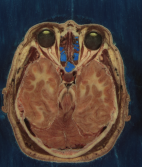
`Watershed image`

one question dzenan, do you know any example for 3D segmentation inside ITK, MAT told me you should do 3D segmentation as a whole not to segment each slice and then reconstruct slices to make the segmented volume? is there any example and algorithm you and the rest of the team has implemented? I want to work on it today.
Thank you again and i will take upon your advice and try --flag & --file
BR
@sag
---
### Author:  [@dzenanz](https://discourse.itk.org/u/dzenanz)
#### Post date: [September 9, 2022, 2:44pm UTC](https://discourse.itk.org/t/insighttoolkit-brigejavascript-instruction-manual/5328/4 "2022-09-09T14:44:59Z")
Why not try with 3D watershed segmentation? In your current code, change
```cpp
constexpr unsigned int Dimension = 2;
constexpr unsigned int VDimension = 3;
```
into
```cpp
constexpr unsigned int Dimension = 3;
constexpr unsigned int VDimension = 4;
```
and pass a 3D input image instead of 2D `VisibleWomanHeadSlice.png`.
---
### Author:  [@sag](https://discourse.itk.org/u/sag)
#### Post date: [September 9, 2022, 3:11pm UTC](https://discourse.itk.org/t/insighttoolkit-brigejavascript-instruction-manual/5328/5 "2022-09-09T15:11:08Z")
@dzenanz
thanks. I dont know any 3D image? you mean image3D.png?
BR
@sag
---
### Author:  [@dzenanz](https://discourse.itk.org/u/dzenanz)
#### Post date: [September 9, 2022, 3:14pm UTC](https://discourse.itk.org/t/insighttoolkit-brigejavascript-instruction-manual/5328/6 "2022-09-09T15:14:08Z")
If you don’t already have a 3D image .mha or .nrrd, you should read it as a series of slices, see [1.11.1 Reading Image Series](https://itk.org/ITKSoftwareGuide/html/Book2/ITKSoftwareGuide-Book2ch1.html).
---
### Author:  [@sag](https://discourse.itk.org/u/sag)
#### Post date: [September 9, 2022, 3:59pm UTC](https://discourse.itk.org/t/insighttoolkit-brigejavascript-instruction-manual/5328/7 "2022-09-09T15:59:08Z")
Thank you i will do that and if there is a problem i ask your assistance.
BR
@sag
---
### Author:  [@sag](https://discourse.itk.org/u/sag)
#### Post date: [September 20, 2022, 10:52am UTC](https://discourse.itk.org/t/insighttoolkit-brigejavascript-instruction-manual/5328/8 "2022-09-20T10:52:09Z")
Hi @dzenanz,
I did follow your instructions from last week but i failed to get the watershed segmentation work for 3D. I build the code in windows visual studio c++ with project generated in CMake GUI. Below is the code as you instructed.
`
/\*=========================================================================
\*
- Copyright NumFOCUS
-
- Licensed under the Apache License, Version 2.0 (the “License”);
- you may not use this file except in compliance with the License.
- You may obtain a copy of the License at
-
-
```
https://www.apache.org/licenses/LICENSE-2.0.txt
```
-
- Unless required by applicable law or agreed to in writing, software
- distributed under the License is distributed on an “AS IS” BASIS,
- WITHOUT WARRANTIES OR CONDITIONS OF ANY KIND, either express or implied.
- See the License for the specific language governing permissions and
- limitations under the License.
-
_=========================================================================_/
// Software Guide : BeginCommandLineArgs
// INPUTS: {VisibleWomanEyeSlice.png}
// OUTPUTS: {WatershedSegmentation1Output1.png}
// ARGUMENTS: 2 10 0 0.05 1
// Software Guide : EndCommandLineArgs
// Software Guide : BeginCommandLineArgs
// INPUTS: {VisibleWomanEyeSlice.png}
// OUTPUTS: {WatershedSegmentation1Output2.png}
// ARGUMENTS: 2 10 0.001 0.15 0
// Software Guide : EndCommandLineArgs
// Software Guide : BeginLatex
//
// The following example illustrates how to preprocess and segment images
// using the \doxygen{WatershedImageFilter}. Note that the care with which
// the data are preprocessed will greatly affect the quality of your result.
// Typically, the best results are obtained by preprocessing the original
// image with an edge-preserving diffusion filter, such as one of the
// anisotropic diffusion filters, or the bilateral image filter. As
// noted in Section~\ref{sec:AboutWatersheds}, the height function used as
// input should be created such that higher positive values correspond to
// object boundaries. A suitable height function for many applications can
// be generated as the gradient magnitude of the image to be segmented.
//
// The \doxygen{VectorGradientMagnitudeAnisotropicDiffusionImageFilter} class
// is used to smooth the image and the
// \doxygen{VectorGradientMagnitudeImageFilter} is used to generate the
// height function. We begin by including all preprocessing filter header
// files and the header file for the WatershedImageFilter. We
// use the vector versions of these filters because the input dataset is a
// color image.
//
//
// Software Guide : EndLatex
#include
// Software Guide : BeginCodeSnippet
#include “itkVectorGradientAnisotropicDiffusionImageFilter.h”
#include “itkVectorGradientMagnitudeImageFilter.h”
#include “itkWatershedImageFilter.h”
// Software Guide : EndCodeSnippet
#include “itkImageFileReader.h”
#include “itkImageFileWriter.h”
#include “itkCastImageFilter.h”
#include “itkScalarToRGBPixelFunctor.h”
int
main(int argc, char \* argv[])
{
if (argc \< 8)
{
std::cerr \<\< "Missing Parameters " \<\< std::endl;
std::cerr \<\< "Usage: " \<\< argv[0];
std::cerr
\<\< " inputImage outputImage conductanceTerm diffusionIterations "
"lowerThreshold outputScaleLevel gradientMode "
\<\< std::endl;
return EXIT\_FAILURE;
}
// Software Guide : BeginLatex
//
// We now declare the image and pixel types to use for instantiation of the
// filters. All of these filters expect real-valued pixel types in order to
// work properly. The preprocessing stages are applied directly to the
// vector-valued data and the segmentation uses floating point
// scalar data. Images are converted from RGB pixel type to
// numerical vector type using \doxygen{CastImageFilter}.
//
// Software Guide : EndLatex
// Software Guide : BeginCodeSnippet
using RGBPixelType = itk::RGBPixel;
using RGBImageType = itk::Image\;
using VectorPixelType = itk::Vector\;
using VectorImageType = itk::Image\;
using LabeledImageType = itk::Image\;
using ScalarImageType = itk::Image\;
// Software Guide : EndCodeSnippet
// Software Guide : BeginLatex
//
// The various image processing filters are declared using the types created
// above and eventually used in the pipeline.
//
// Software Guide : EndLatex
// Software Guide : BeginCodeSnippet
using FileReaderType = itk::ImageFileReader;
using CastFilterType = itk::CastImageFilter\;
using DiffusionFilterType =
itk::VectorGradientAnisotropicDiffusionImageFilter\;
using GradientMagnitudeFilterType =
itk::VectorGradientMagnitudeImageFilter;
using WatershedFilterType = itk::WatershedImageFilter;
// Software Guide : EndCodeSnippet
using FileWriterType = itk::ImageFileWriter;
auto reader = FileReaderType::New();
reader-\>SetFileName(argv[1]);
auto caster = CastFilterType::New();
// Software Guide : BeginLatex
//
// Next we instantiate the filters and set their parameters. The first
// step in the image processing pipeline is diffusion of the color input
// image using an anisotropic diffusion filter. For this class of filters,
// the CFL condition requires that the time step be no more than 0.25 for
// two-dimensional images, and no more than 0.125 for three-dimensional
// images. The number of iterations and the conductance term will be taken
// from the command line. See
// Section~\ref{sec:EdgePreservingSmoothingFilters} for more information on
// the ITK anisotropic diffusion filters.
//
// Software Guide : EndLatex
// Software Guide : BeginCodeSnippet
auto diffusion = DiffusionFilterType::New();
diffusion-\>SetNumberOfIterations(std::stoi(argv[4]));
diffusion-\>SetConductanceParameter(std::stod(argv[3]));
//sag diffusion-\>SetTimeStep(0.125);
diffusion-\>SetTimeStep(0.0585938);
// Software Guide : EndCodeSnippet
// Software Guide : BeginLatex
//
// The ITK gradient magnitude filter for vector-valued images can optionally
// take several parameters. Here we allow only enabling or disabling
// of principal component analysis.
//
// Software Guide : EndLatex
// Software Guide : BeginCodeSnippet
auto gradient = GradientMagnitudeFilterType::New();
gradient-\>SetUsePrincipleComponents(std::stoi(argv[7]));
// Software Guide : EndCodeSnippet
// Software Guide : BeginLatex
//
// Finally we set up the watershed filter. There are two parameters.
// \code{Level} controls watershed depth, and \code{Threshold} controls the
// lower thresholding of the input. Both parameters are set as a
// percentage (0.0 - 1.0) of the maximum depth in the input image.
//
// Software Guide : EndLatex
// Software Guide : BeginCodeSnippet
auto watershed = WatershedFilterType::New();
watershed-\>SetLevel(std::stod(argv[6]));
watershed-\>SetThreshold(std::stod(argv[5]));
// Software Guide : EndCodeSnippet
// Software Guide : BeginLatex
//
// The output of WatershedImageFilter is an image of unsigned long integer
// labels, where a label denotes membership of a pixel in a particular
// segmented region. This format is not practical for visualization, so
// for the purposes of this example, we will convert it to RGB pixels. RGB
// images have the advantage that they can be saved as a simple png file
// and viewed using any standard image viewer software. The
// \subdoxygen{Functor}{ScalarToRGBPixelFunctor} class is a special
// function object designed to hash a scalar value into an
// \doxygen{RGBPixel}. Plugging this functor into the
// \doxygen{UnaryFunctorImageFilter} creates an image filter which
// converts scalar images to RGB images.
//
// Software Guide : EndLatex
// Software Guide : BeginCodeSnippet
using ColormapFunctorType =
itk::Functor::ScalarToRGBPixelFunctor;
using ColormapFilterType =
itk::UnaryFunctorImageFilter\;
auto colormapper = ColormapFilterType::New();
// Software Guide : EndCodeSnippet
auto writer = FileWriterType::New();
writer-\>SetFileName(argv[2]);
// Software Guide : BeginLatex
//
// The filters are connected into a single pipeline, with readers and
// writers at each end.
//
// Software Guide : EndLatex
// Software Guide : BeginCodeSnippet
caster-\>SetInput(reader-\>GetOutput());
diffusion-\>SetInput(caster-\>GetOutput());
gradient-\>SetInput(diffusion-\>GetOutput());
watershed-\>SetInput(gradient-\>GetOutput());
colormapper-\>SetInput(watershed-\>GetOutput());
writer-\>SetInput(colormapper-\>GetOutput());
// Software Guide : EndCodeSnippet
try
{
writer-\>Update();
}
catch (const itk::ExceptionObject & e)
{
std::cerr \<\< e \<\< std::endl;
return EXIT\_FAILURE;
}
return EXIT\_SUCCESS;
}
//
// Software Guide : BeginLatex
//
// \begin{figure} \center
// \includegraphics[width=0.32\textwidth]{VisibleWomanEyeSlice}
// \includegraphics[width=0.32\textwidth]{WatershedSegmentation1Output1}
// \includegraphics[width=0.32\textwidth]{WatershedSegmentation1Output2}
// \itkcaption[Watershed segmentation output]{Segmented section of Visible
// Human female head and neck cryosection data. At left is the original
// image. The image in the middle was generated with parameters: conductance
// = 2.0, iterations = 10, threshold = 0.0, level = 0.05, principal components
// = on. The image on the right was generated with parameters: conductance
// = 2.0, iterations = 10, threshold = 0.001, level = 0.15, principal
// components = off. } \label{fig:outputWatersheds} \end{figure}
//
//
// Tuning the filter parameters for any particular application is a process
// of trial and error. The \emph{threshold} parameter can be used to great
// effect in controlling oversegmentation of the image. Raising the
// threshold will generally reduce computation time and produce output with
// fewer and larger regions. The trick in tuning parameters is to consider
// the scale level of the objects that you are trying to segment in the
// image. The best time/quality trade-off will be achieved when the image is
// smoothed and thresholded to eliminate features just below the desired
// scale.
//
// Figure~\ref{fig:outputWatersheds} shows output from the example code. The
// input image is taken from the Visible Human female data around the right
// eye. The images on the right are colorized watershed segmentations with
// parameters set to capture objects such as the optic nerve and
// lateral rectus muscles, which can be seen just above and to the left and
// right of the eyeball. Note that a critical difference between the two
// segmentations is the mode of the gradient magnitude calculation.
//
// A note on the computational complexity of the watershed algorithm is
// warranted. Most of the complexity of the ITK implementation lies in
// generating the hierarchy. Processing times for this stage are non-linear
// with respect to the number of catchment basins in the initial segmentation.
// This means that the amount of information contained in an image is more
// significant than the number of pixels in the image. A very large, but very
// flat input take less time to segment than a very small, but very detailed
// input.
//
// Software Guide : EndLatex
` `
following is the screen shot of the output at commandline along with the input and input volume FullHead.mhd
`
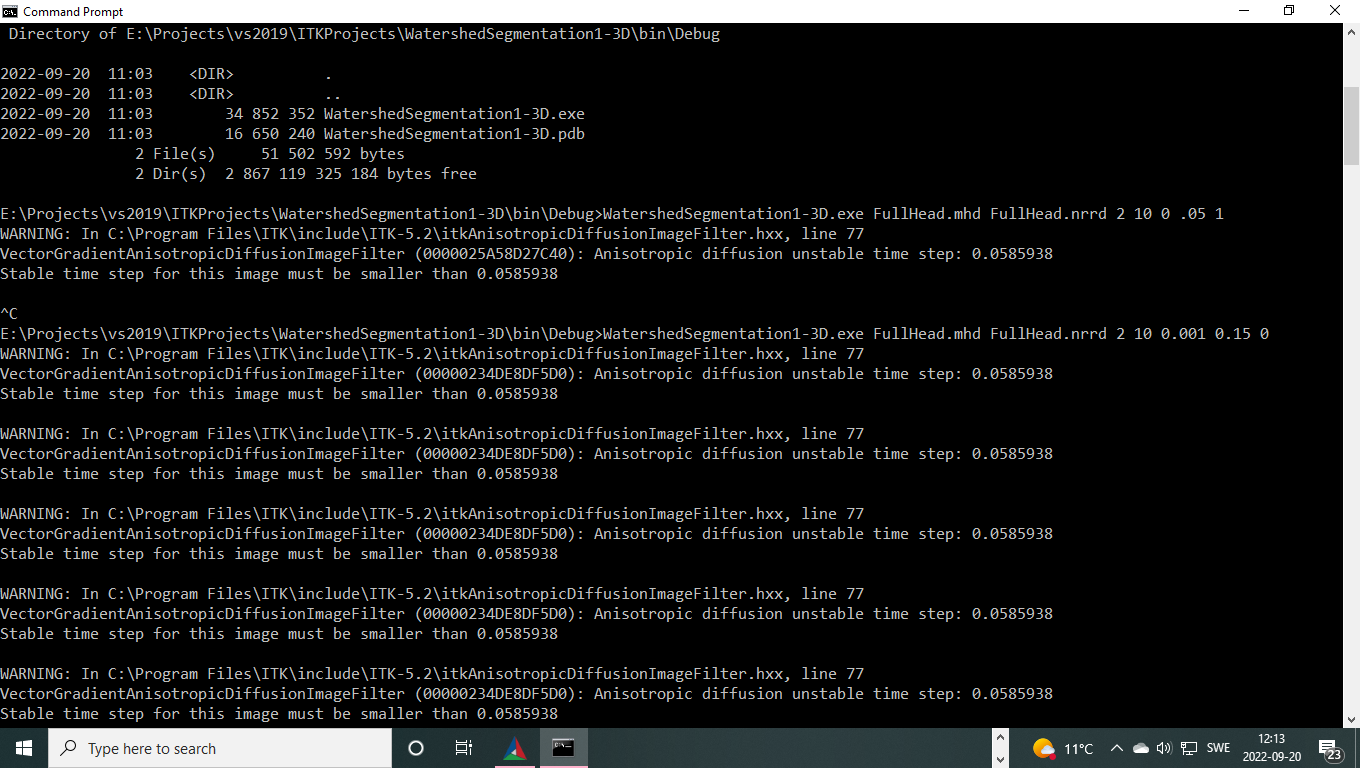
I get warning about the ` Anisotropic diffusion time step unstable, it must be less xxx` the original value is 0.125, as i decrease the value i get the same warning , and it takes forever and it hangs.
what am i doing wrong?
Thanks in advance for the help.