# Inappropriate output for rotating a volume using Euler transform in C++

**URL:** https://discourse.itk.org/t/inappropriate-output-for-rotating-a-volume-using-euler-transform-in-c/7644
**Category:** Beginner Questions
**Tags:** itk
**Created:** [October 10, 2025, 7:49am UTC](https://discourse.itk.org/t/inappropriate-output-for-rotating-a-volume-using-euler-transform-in-c/7644 "2025-10-10T07:49:52Z")
**Posts on this page:** 6
**Page:** 1

<div class="post-metadata">

### Author: ![purushothaman\_u](https://discourse.itk.org/user_avatar/discourse.itk.org/purushothaman_u/32/4593_2.png) [@purushothaman\_u](https://discourse.itk.org/u/purushothaman_u)
#### Post date: [October 10, 2025, 7:49am UTC](https://discourse.itk.org/t/inappropriate-output-for-rotating-a-volume-using-euler-transform-in-c/7644/1 "2025-10-10T07:49:52Z")

</div>

The below code takes the axial volume as input, applies a 90-degree rotation around the z-axis, and writes the output volume to a 90.nrrd file. In 90. When viewing the NRRD file in the ITK-SNAP app, we can see that certain pixels are black in both coronal and sagittal views. You can see this missing area in the attached output image where I have highlighted those regions using red boxes.

My C++ code:

```auto
typedef itk::Image<signed short, 3> ImageType; 
itk::Euler3DTransform<double>::Pointer transform = itk::Euler3DTransform<double>::New(); 
itk::ResampleImageFilter<ImageType, ImageType>::Pointer spinFilter = itk::ResampleImageFilter<ImageType3D, ImageType3D>::New();

auto spacing = image->GetSpacing();
auto origin = image->GetOrigin();
auto imageSize = image->GetLargestPossibleRegion().GetSize();
itk::Index<3> index{ imageSize[0] / 2, imageSize[1] / 2, imageSize[2] / 2 };
itk::Point<double, 3> center; image->TransformIndexToPhysicalPoint(index, center);

spinFilter->SetDefaultPixelValue(-32767);
spinFilter->SetOutputOrigin(origin);
spinFilter->SetSize(imageSize);
spinFilter->SetOutputSpacing(spacing);
spinFilter->SetOutputDirection(image->GetDirection());
transform->SetCenter(center);
transform->SetRotation(thetaX, thetaY, thetaZ);
spinFilter->SetTransform(transform);
spinFilter->SetInput(image);
itk::ImageFileWriter<ImageType>::Pointer writer = itk::ImageFileWriter<ImageType3D>::New();
writer->SetFileName("D:/outs/90.nrrd");
writer->SetInput(spinFilter->GetOutput());
writer->Update();

```

Code OUTPUT:
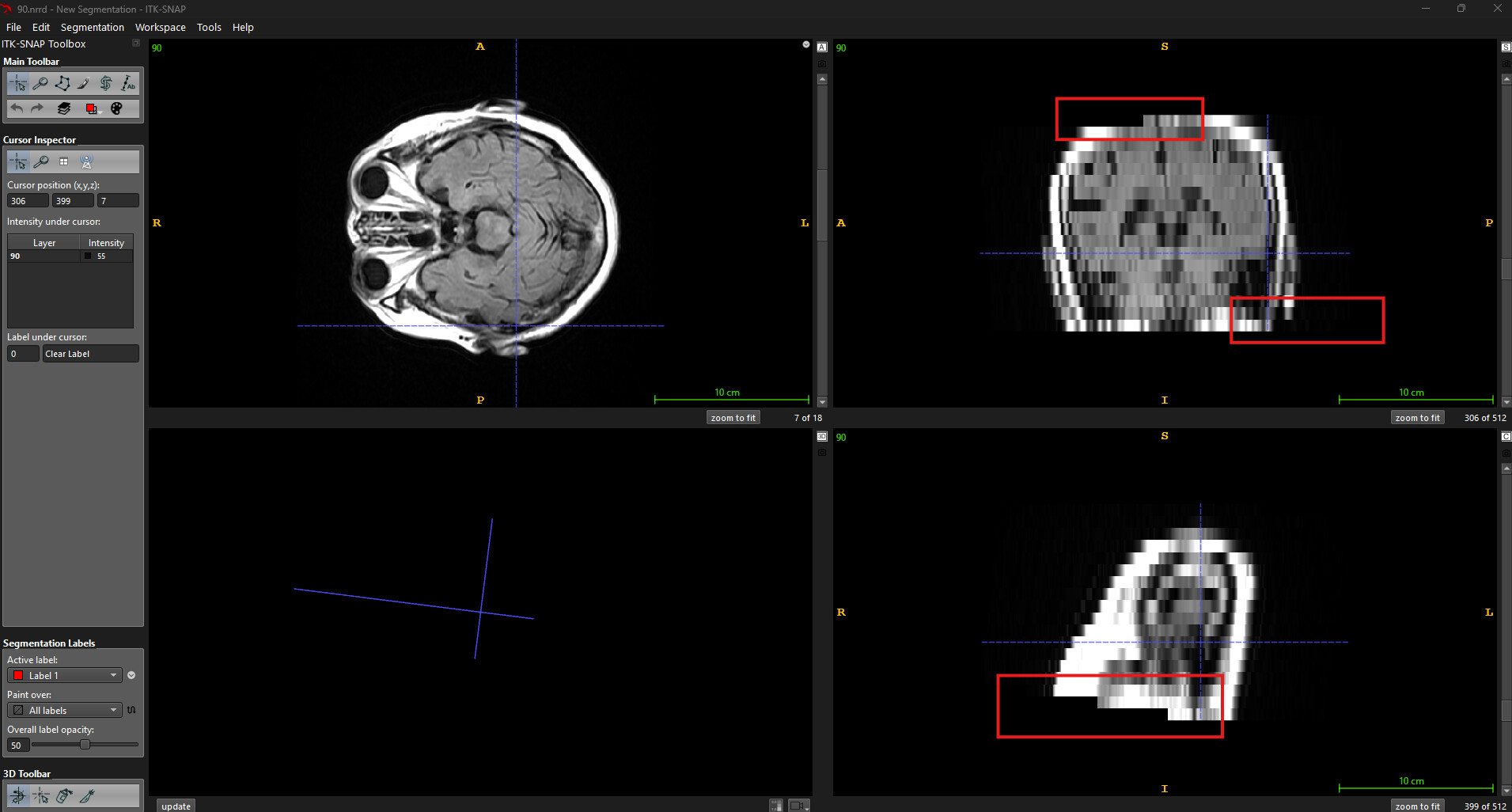
 ![image](https://discourse.itk.org/uploads/default/original/2X/c/c250215a589a8f00b1d98b64a3685bdfa860a901.jpeg)

But when, instead of rotating using C++ code, if I rotate my axial volume in the ITK-SNAP app, the image is proper, as we can see in the image below.

ITK-SNAP Rotate output:
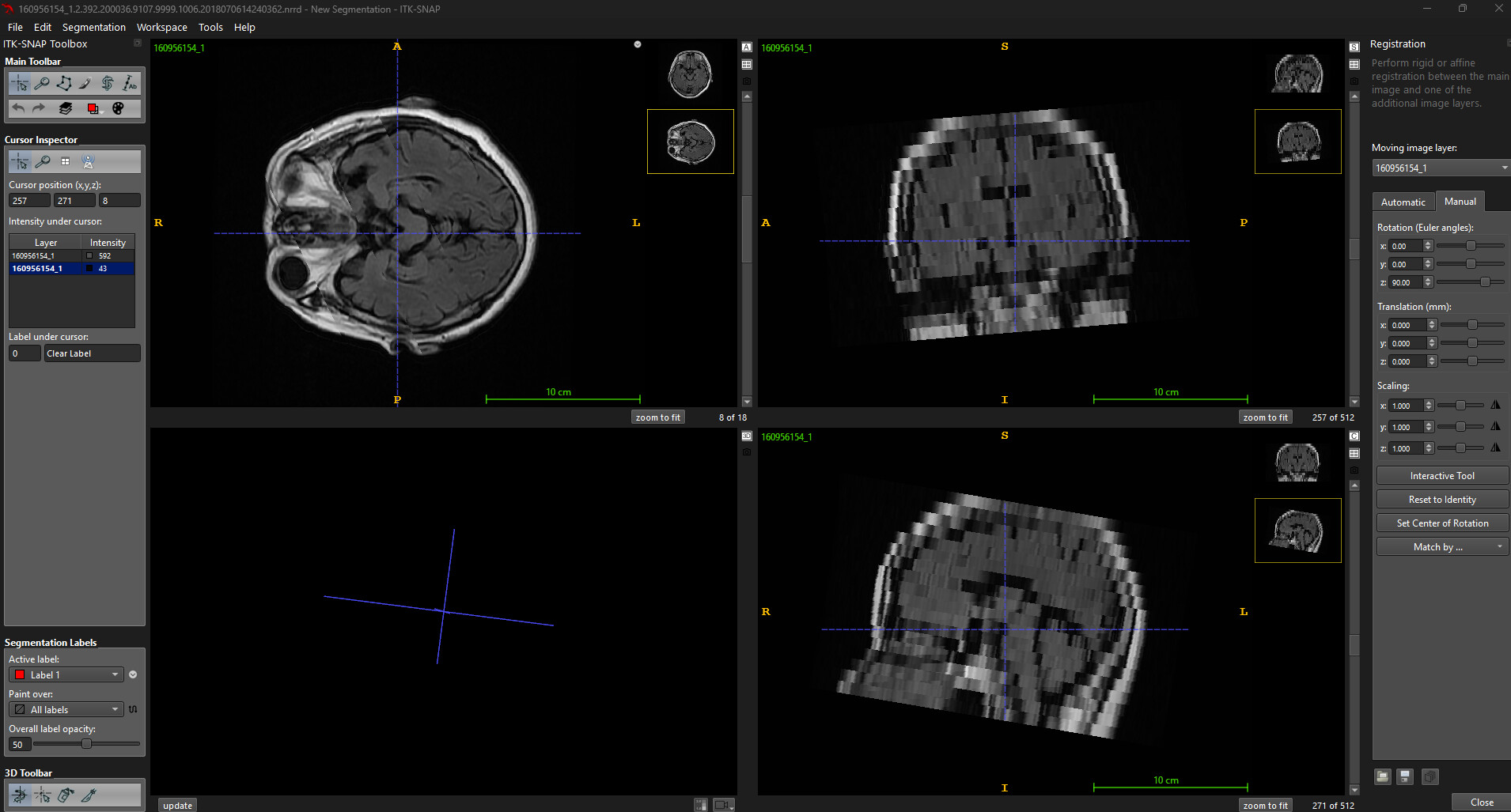
 ![image](https://discourse.itk.org/uploads/default/original/2X/e/e4de29569b23e019042b29388ea527d7f998510f.jpeg)

What might be the issue here.

---

<div class="post-metadata">

### Author: ![purushothaman\_u](https://discourse.itk.org/user_avatar/discourse.itk.org/purushothaman_u/32/4593_2.png) [@purushothaman\_u](https://discourse.itk.org/u/purushothaman_u)
#### Post date: [October 10, 2025, 7:52am UTC](https://discourse.itk.org/t/inappropriate-output-for-rotating-a-volume-using-euler-transform-in-c/7644/2 "2025-10-10T07:52:04Z")

</div>

Instead of _ **itk::ResampleImageFilter** _ I have also tried using _ **itk::TransformGeometryImageFilter.** _

While using TransformGeometry filter, It works fine for 0, 90, 180, and 270 degrees, but fails for all other intermediary angles

---

<div class="post-metadata">

### Author: ![dzenanz](https://discourse.itk.org/user_avatar/discourse.itk.org/dzenanz/32/1093_2.png) [@dzenanz](https://discourse.itk.org/u/dzenanz)
#### Post date: [October 10, 2025, 1:16pm UTC](https://discourse.itk.org/t/inappropriate-output-for-rotating-a-volume-using-euler-transform-in-c/7644/3 "2025-10-10T13:16:48Z")

</div>

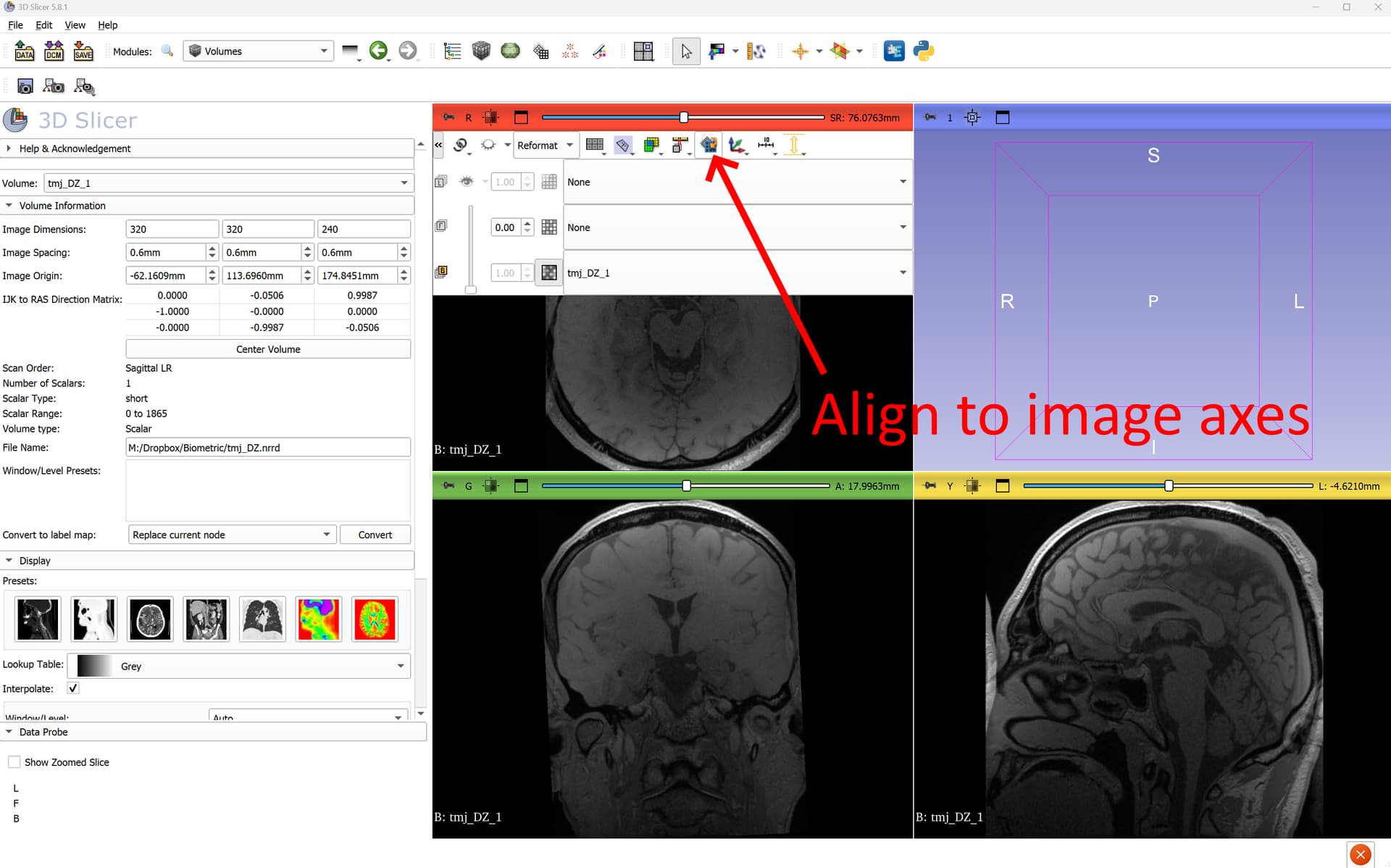
How does it fail? ITK-SNAP displays slices in an image-axis-aligned manner, so e.g. 5 or 30 degree rotation would not be displayed differently. Have you tried visualizing your images in [3D Slicer](https://www.slicer.org/)? While Slicer displays images in a grid which is image-aligned by default (at least in latest stable version, 5.8.1), you can easily switch that to world-aligned:
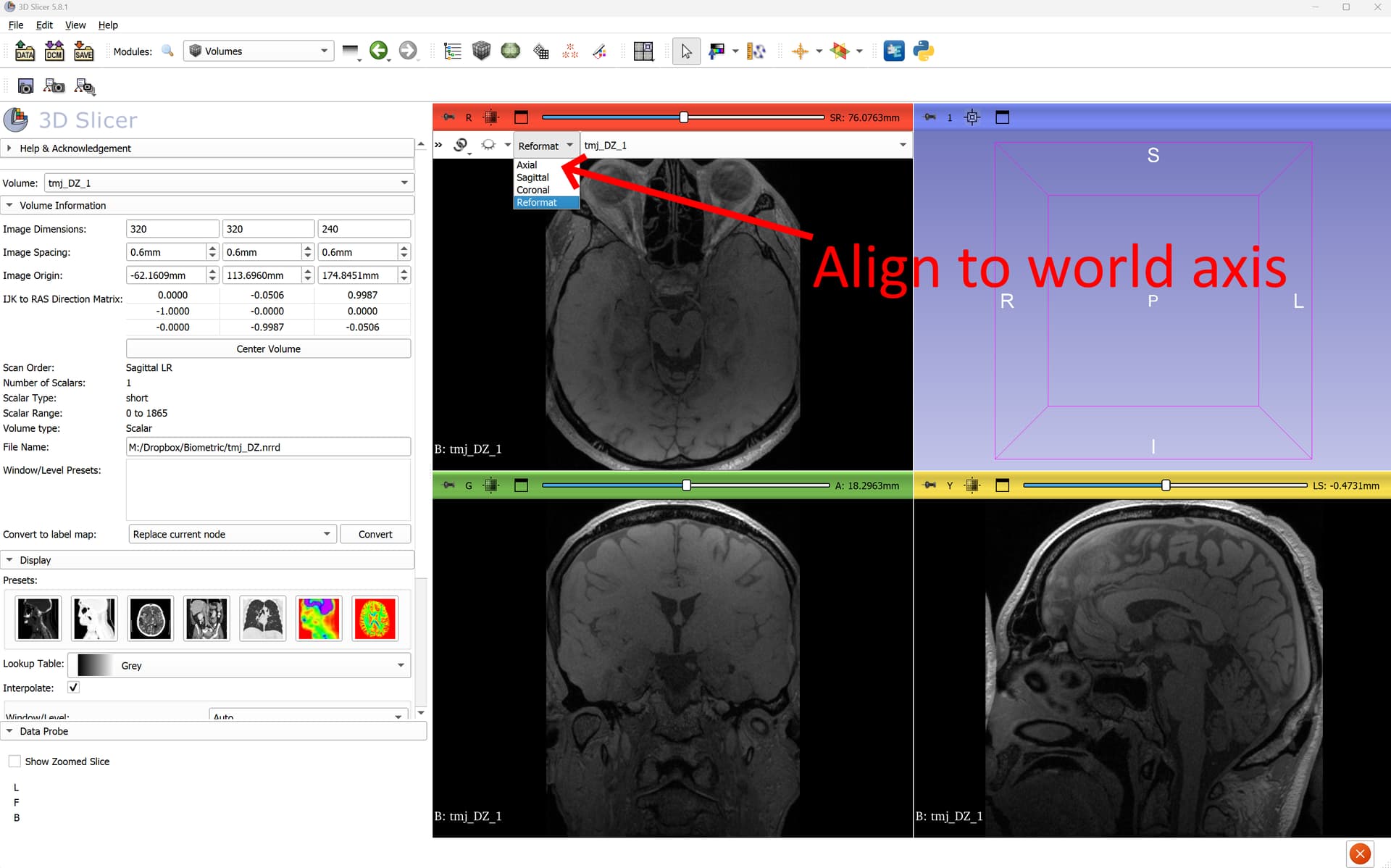
 ![Screenshot 2025-10-10 09.05.07](https://discourse.itk.org/uploads/default/original/2X/8/8b529ec22a0f34d27f2362b2798e70a81276991e.jpeg)

 ![Screenshot 2025-10-10 09.14.02](https://discourse.itk.org/uploads/default/original/2X/b/bdda00519270dcd2f374488aca4133319daf377d.jpeg)

---

<div class="post-metadata">

### Author: ![zivy](https://discourse.itk.org/user_avatar/discourse.itk.org/zivy/32/1726_2.png) [@zivy](https://discourse.itk.org/u/zivy)
#### Post date: [October 10, 2025, 1:30pm UTC](https://discourse.itk.org/t/inappropriate-output-for-rotating-a-volume-using-euler-transform-in-c/7644/4 "2025-10-10T13:30:04Z")

</div>

Hello @purushothaman_u,

There is a logical bug in the code, the definition of the grid to use for resampling is incorrect. This grid is defined by the paramters to the resample filter: origin, size, spacing and direction. In the code these are the original image’s values. Once that image is rotated portions of it will fall outside the original grid which is likely the reason for what you are seeing.

To resolve this you will need to compute new values for these parameters. Apply the inverse transformation to the vertices (physical space) of the original volume’s bounding box. Use the original image spacing and compute the new origin (minimum on all three axes of the transformed vertices) and size (maximum on all three axes minus new origin divided by spacing). Set the direction to identity.

---

<div class="post-metadata">

### Author: ![purushothaman\_u](https://discourse.itk.org/user_avatar/discourse.itk.org/purushothaman_u/32/4593_2.png) [@purushothaman\_u](https://discourse.itk.org/u/purushothaman_u)
#### Post date: [October 11, 2025, 9:50am UTC](https://discourse.itk.org/t/inappropriate-output-for-rotating-a-volume-using-euler-transform-in-c/7644/5 "2025-10-11T09:50:00Z")

</div>

@dzenanz  
When using 3d slicer I can see my volume being rotated. Thanks for your input, Its working fine

---

<div class="post-metadata">

### Author: ![purushothaman\_u](https://discourse.itk.org/user_avatar/discourse.itk.org/purushothaman_u/32/4593_2.png) [@purushothaman\_u](https://discourse.itk.org/u/purushothaman_u)
#### Post date: [October 11, 2025, 9:51am UTC](https://discourse.itk.org/t/inappropriate-output-for-rotating-a-volume-using-euler-transform-in-c/7644/6 "2025-10-11T09:51:28Z")

</div>

@zivy

I’ll correct this, Thanks for your input
