# Image with defective pixels while export in different image formats(.png, .tiff)
**URL:** https://discourse.itk.org/t/image-with-defective-pixels-while-export-in-different-image-formats-png-tiff/4340
**Category:** Beginner Questions
**Created:** [August 18, 2021, 9:16am UTC](https://discourse.itk.org/t/image-with-defective-pixels-while-export-in-different-image-formats-png-tiff/4340 "2021-08-18T09:16:10Z")
**Posts on this page:** 4
**Page:** 1
### Author:  [@rubellion](https://discourse.itk.org/u/rubellion)
#### Post date: [August 18, 2021, 9:16am UTC](https://discourse.itk.org/t/image-with-defective-pixels-while-export-in-different-image-formats-png-tiff/4340/1 "2021-08-18T09:16:10Z")
Good day, while i try to export single image from .nii file in result i get an image but with defective pixels. I also tried to cast image from sitkUInt8 to sitkUInt16 but it become worse.
```auto
import sys
import SimpleITK as sitk
if len(sys.argv) is 3:
inputImageName = sys.argv[1]
output = sys.argv[2]
reader = sitk.ReadImage(inputImageName)
image = reader[256, :, :]
filePath = output + "/image.tiff"
image = sitk.Cast(image, sitk.sitkUInt8)
sitk.WriteImage(image, filePath)
else:
print("Not enough arguments!")
```
sitkUInt8
[image.tiff](https://discourse.itk.org/uploads/short-url/3jZ63GNUlXchZYvTdmvNn9RBtos.tiff) (206.2 KB)
sitkUInt16
[image.tiff](https://discourse.itk.org/uploads/short-url/xbQ4HcW6Dpa9pxLxiEIf8ed8zcc.tiff) (412.2 KB)
But if i open same .nii for example in Slicer3D it looks:
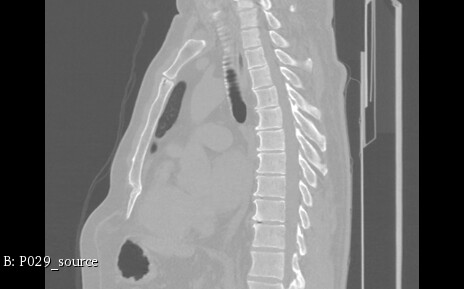
I can’t figure out what I’m doing wrong.
---
### Author:  [@dchen](https://discourse.itk.org/u/dchen)
#### Post date: [August 18, 2021, 1:18pm UTC](https://discourse.itk.org/t/image-with-defective-pixels-while-export-in-different-image-formats-png-tiff/4340/2 "2021-08-18T13:18:27Z")
Your input image is probably 16 bit. Certainly more than 8 bit. So when you are casting it to an 8 bit unsigned int, the pixel values are overflowing. If you really want 8-bit pixels, you’re going to have to re-map the intensities to the 0-255 range.
---
### Author:  [@zivy](https://discourse.itk.org/u/zivy)
#### Post date: [August 18, 2021, 1:20pm UTC](https://discourse.itk.org/t/image-with-defective-pixels-while-export-in-different-image-formats-png-tiff/4340/3 "2021-08-18T13:20:34Z")
Hello @rubellion,
Welcome to SimpleITK!
What you are seeing is overflow. The `Cast` operation does a simple cast between data types and that is not what you want. The original CT image has a high dynamic range, intensity values in [Hounsfield Units](https://en.wikipedia.org/wiki/Hounsfield_scale) outside the [0,255] range. Simple solution:
```auto
image = sitk.Cast(sitk.RescaleIntensity(image), sitk.sitkUInt8)
```
A solution with more fine grained control over mapping the intensities is provided by the [IntensityWindowingImageFilter](https://simpleitk.org/doxygen/latest/html/classitk_1_1simple_1_1IntensityWindowingImageFilter.html). As the example was showing a sagittal view, you will also need to make the image isotropic (see discussion and `make_isotropic` function in [this Jupyter notebook](https://github.com/InsightSoftwareConsortium/SimpleITK-Notebooks/blob/f28ade338390b8cd67dcb72717b5af05901316ea/Python/05_Results_Visualization.ipynb)).
---
### Author:  [@rubellion](https://discourse.itk.org/u/rubellion)
#### Post date: [August 19, 2021, 4:35am UTC](https://discourse.itk.org/t/image-with-defective-pixels-while-export-in-different-image-formats-png-tiff/4340/4 "2021-08-19T04:35:32Z")
Hello, @dchen and @zivy. Thank you for replies! Problem is resolved! Good day.