### Author:  [@allen](https://discourse.itk.org/u/allen)
#### Post date: [February 9, 2022, 11:46am UTC](https://discourse.itk.org/t/how-to-use-image-streaming-to-reduce-memory-usage-and-cpu-usage-in-image-stitching/4795/3 "2022-02-09T11:46:40Z")
to limit the cpu usage, this works for python
```auto
itk.MultiThreaderBase.SetGlobalMaximumNumberOfThreads(5)
itk.MultiThreaderBase.SetGlobalDefaultNumberOfThreads(5)
```
but even if the thread number setting is effective, the cpu usage still get to 100% for a few seconds while resampling

is there any way to limit the cpu usage in TileMergeImageFilter, or bind cpu core also a acceptable solution that spare other cpu core to be idle. now i add time.sleep() to limit the resample cpu usage like this
```auto
resampleF = itk.TileMergeImageFilter[type(color_images[0])].New()
resampleF.SetMontageSize(stage_tiles.GetAxisSizes())
# resampleF.SetNumberOfThreads(10)
for t in range(stage_tiles.LinearSize()):
resampleF.SetInputTile(t, color_images[t])
index = stage_tiles.LinearIndexToNDIndex(t)
transform = montage.GetOutputTransform(index)
resampleF.SetTileTransform(index, transform)
time.sleep(0.1)
resampleF.Update()
```
yet i think that’s not the best way to do it and will increase processing time significantly
by the way the TileMergeImageFilter does not support SetNumberOfThreads
```auto
Traceback (most recent call last):
File "E:\projects\ITKMontage\examples\SimpleMontage.py", line 122, in
resampleF.SetNumberOfThreads(10)
AttributeError: 'itkTileMergeImageFilterIRGBUS2' object has no attribute 'SetNumberOfThreads'
```
---
### Author:  [@dzenanz](https://discourse.itk.org/u/dzenanz)
#### Post date: [February 9, 2022, 2:19pm UTC](https://discourse.itk.org/t/how-to-use-image-streaming-to-reduce-memory-usage-and-cpu-usage-in-image-stitching/4795/4 "2022-02-09T14:19:08Z")
Try [SetNumberOfWorkUnits](https://itk.org/Doxygen/html/classitk_1_1ProcessObject.html#a07e1d0d435747ae65bfb213bd12053e8): `resampleF.SetNumberOfWorkUnits(10)`.
I wouldn’t expect that adding sleep in the for loop would reduce CPU use, as the computations happen when you invoke `resampleF.Update()`.
---
### Author:  [@dzenanz](https://discourse.itk.org/u/dzenanz)
#### Post date: [February 9, 2022, 2:26pm UTC](https://discourse.itk.org/t/how-to-use-image-streaming-to-reduce-memory-usage-and-cpu-usage-in-image-stitching/4795/5 "2022-02-09T14:26:06Z")
Maybe [this line](https://github.com/InsightSoftwareConsortium/ITKMontage/blob/v0.7.3/include/itkTileMergeImageFilter.hxx#L409) should have been `MultiThreaderBase::Pointer mt = this->GetMultiThreader();` for `resampleF.SetNumberOfWorkUnits(10)` to have the desired effect. But
```auto
itk.MultiThreaderBase.SetGlobalMaximumNumberOfThreads(5)
itk.MultiThreaderBase.SetGlobalDefaultNumberOfThreads(5)
```
should work.
---
### Author:  [@dzenanz](https://discourse.itk.org/u/dzenanz)
#### Post date: [February 9, 2022, 2:29pm UTC](https://discourse.itk.org/t/how-to-use-image-streaming-to-reduce-memory-usage-and-cpu-usage-in-image-stitching/4795/6 "2022-02-09T14:29:39Z")
If you don’t want your computer to “lock up”, you could give the process “itk\_test” priority lower than “normal”. Also, how many physical cores (not logical, hyper-threaded cores) does your CPU have? You need to set number of threads below that number to ensure CPU use does not reach 100%.
---
### Author:  [@allen](https://discourse.itk.org/u/allen)
#### Post date: [February 10, 2022, 3:57pm UTC](https://discourse.itk.org/t/how-to-use-image-streaming-to-reduce-memory-usage-and-cpu-usage-in-image-stitching/4795/7 "2022-02-10T15:57:49Z")
> [@dzenanz](#):
>
> resampleF.SetNumberOfWorkUnits(10)
my computer has 6 physical cores so i set the number 5, bu t it seems still reach 100% usage, yet resampleF.SetNumberOfWorkUnits(10) worked i think. i will update my results after test more times
---
### Author:  [@allen](https://discourse.itk.org/u/allen)
#### Post date: [February 16, 2022, 4:11pm UTC](https://discourse.itk.org/t/how-to-use-image-streaming-to-reduce-memory-usage-and-cpu-usage-in-image-stitching/4795/8 "2022-02-16T16:11:03Z")
the max cpu usage is under 70% now after hundreds times test these days
---
### Author:  [@allen](https://discourse.itk.org/u/allen)
#### Post date: [February 16, 2022, 4:24pm UTC](https://discourse.itk.org/t/how-to-use-image-streaming-to-reduce-memory-usage-and-cpu-usage-in-image-stitching/4795/9 "2022-02-16T16:24:12Z")
here I found a python version [link](https://github.com/InsightSoftwareConsortium/ScientificImageAnalysisVisualizationAndArtificialIntelligenceCourse/blob/34368360527a9f927106a7cfe9f8769c651ab8b9/solutions/2_Image_Filtering_Exercise4.py)
---
### Author:  [@allen](https://discourse.itk.org/u/allen)
#### Post date: [February 17, 2022, 11:12am UTC](https://discourse.itk.org/t/how-to-use-image-streaming-to-reduce-memory-usage-and-cpu-usage-in-image-stitching/4795/10 "2022-02-17T11:12:06Z")
replace
```auto
resampleF.Update()
```
by
```auto
writer = itk.ImageFileWriter.New(resampleF.GetOutput().astype(itk.RGBPixel[itk.UC]))
writer.SetFileName(out_file)
writer.SetNumberOfStreamDivisions(5)
writer.Update()
```
it works great for me, the memory usage line no waves like nothing happened
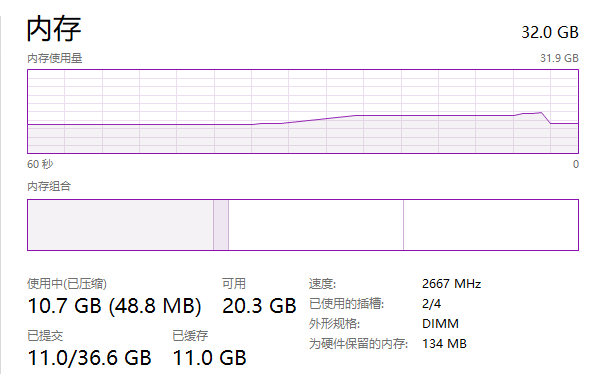
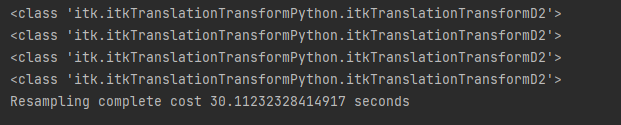
and the total process time is really quick, 160 tiles for 30.11 seconds
---
### Author:  [@dzenanz](https://discourse.itk.org/u/dzenanz)
#### Post date: [February 17, 2022, 2:52pm UTC](https://discourse.itk.org/t/how-to-use-image-streaming-to-reduce-memory-usage-and-cpu-usage-in-image-stitching/4795/11 "2022-02-17T14:52:15Z")
I guess that lower memory use leads to no use of swap file on hard disk, hence the overall processing is faster.