# How to remove CT bed from 3D CT image?
**URL:** https://discourse.itk.org/t/how-to-remove-ct-bed-from-3d-ct-image/6219
**Category:** Beginner Questions
**Tags:** python, dicom, simpleitk
**Created:** [September 21, 2023, 7:58am UTC](https://discourse.itk.org/t/how-to-remove-ct-bed-from-3d-ct-image/6219 "2023-09-21T07:58:27Z")
**Posts on this page:** 7
**Page:** 1
### Author:  [@debapriya](https://discourse.itk.org/u/debapriya)
#### Post date: [September 21, 2023, 7:58am UTC](https://discourse.itk.org/t/how-to-remove-ct-bed-from-3d-ct-image/6219/1 "2023-09-21T07:58:27Z")
I have 3D CT image of the head (DICOM image). It looks like the following.
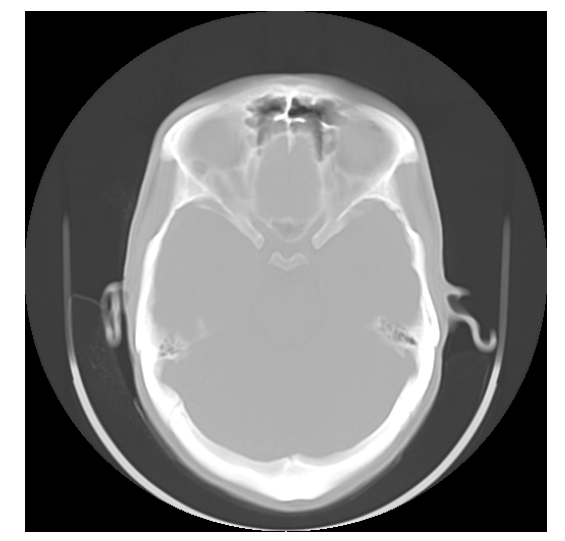
I want to remove the imaging machine from the image. Is there any function in SimpleITK, which does this?
I saw a previous query similar to this and tried to implement it, but it did not work.
[https://discourse.itk.org/t/how-to-remove-ct-bed-shadows-in-a-ct-image/5162](https://discourse.itk.org/t/how-to-remove-ct-bed-shadows-in-a-ct-image/5162)
The `remove_noise` method showed the following error:
```auto
AttributeError: module 'morphology' has no attribute 'dilation'
```
---
### Author:  [@zivy](https://discourse.itk.org/u/zivy)
#### Post date: [September 21, 2023, 3:44pm UTC](https://discourse.itk.org/t/how-to-remove-ct-bed-from-3d-ct-image/6219/2 "2023-09-21T15:44:22Z")
Hello @debapriya,
There is no specific function in ITK/SimpleITK to remove the bed from the image. This usually involves multiple steps. I highly recommend you follow @lassoan’s [advice](https://discourse.itk.org/t/how-to-remove-ct-bed-shadows-in-a-ct-image/5162/2) and use the module from 3D Slicer.
p.s. The [morphology module](https://scikit-image.org/docs/stable/api/skimage.morphology.html), is an skimage module, not ITK/SimpleITK. Its documentation does say it has a `dilation` method (the code in the other post did not include all the imports).
---
### Author:  [@debapriya](https://discourse.itk.org/u/debapriya)
#### Post date: [September 22, 2023, 6:18am UTC](https://discourse.itk.org/t/how-to-remove-ct-bed-from-3d-ct-image/6219/3 "2023-09-22T06:18:32Z")
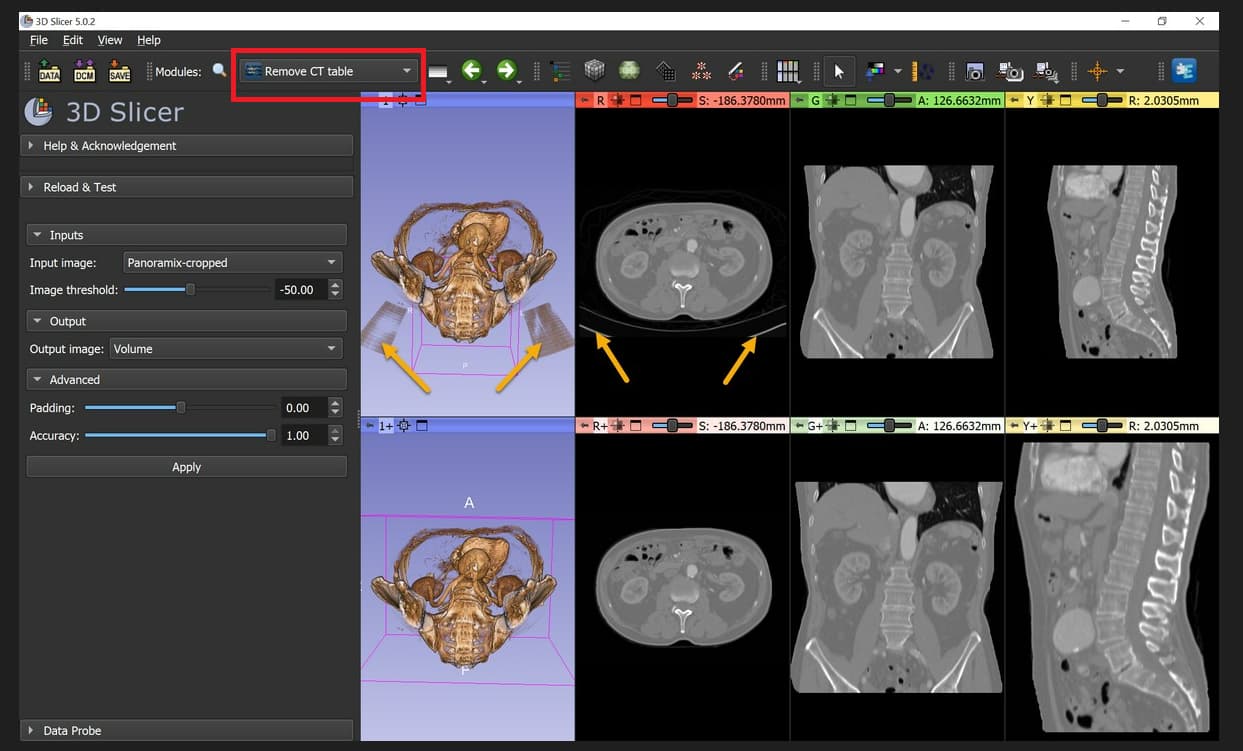
Thank you @zivy . I tried 3D Slicer using the GUI. In the Segment Editor module, I used scissors to remove the table. However, in the screenshot given in @lassoan 's advice, there is a separate module named `Remove CT table` (RED rectangle in the below screenshot), which I could not find. Please help.
---
### Author:  [@lassoan](https://discourse.itk.org/u/lassoan)
#### Post date: [September 22, 2023, 11:37am UTC](https://discourse.itk.org/t/how-to-remove-ct-bed-from-3d-ct-image/6219/4 "2023-09-22T11:37:01Z")
The [“Remove CT table” module](https://github.com/PerkLab/SlicerSandbox#remove-ct-table) is available in Slicer after you install the “Sandbox” extension.
---
### Author:  [@debapriya](https://discourse.itk.org/u/debapriya)
#### Post date: [September 22, 2023, 1:16pm UTC](https://discourse.itk.org/t/how-to-remove-ct-bed-from-3d-ct-image/6219/5 "2023-09-22T13:16:36Z")
Thank you @lassoan . I could remove CT Table using the Sandbox extension. However, I cannot save the resulting DICOM series. I am trying to do `Export to Dicom`, but I cannot proceed. The below screenshot shows where I am stuck.
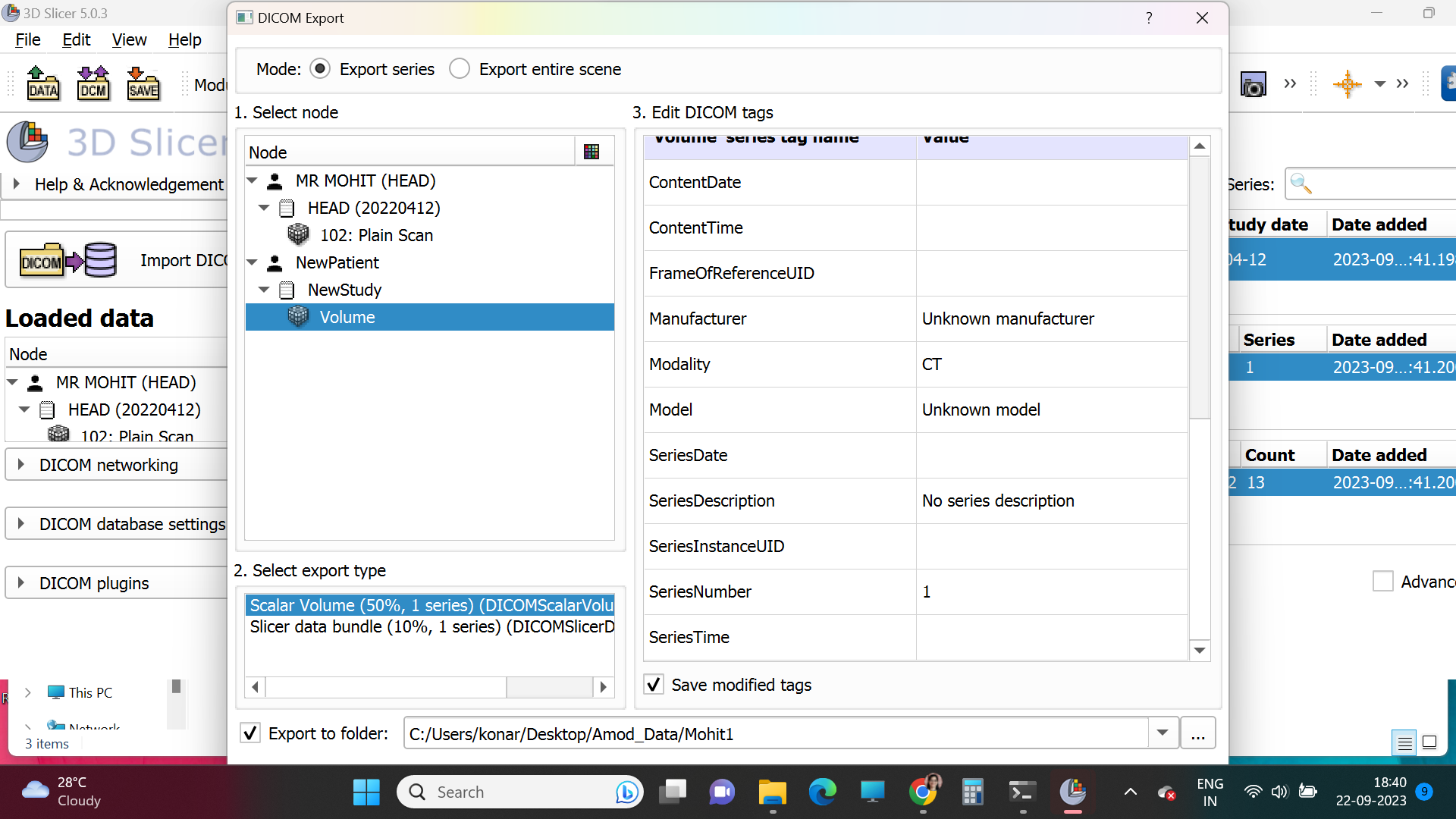
There is no `Start Export` button to start the process.
---
### Author:  [@lassoan](https://discourse.itk.org/u/lassoan)
#### Post date: [September 22, 2023, 1:19pm UTC](https://discourse.itk.org/t/how-to-remove-ct-bed-from-3d-ct-image/6219/6 "2023-09-22T13:19:39Z")
You are using a very old Slicer version. Please update to the latest Slicer Stable Release. If you still have problems with DICOM export then please ask on the [Slicer Forum](https://discourse.slicer.org).
---
### Author:  [@debapriya](https://discourse.itk.org/u/debapriya)
#### Post date: [September 22, 2023, 3:52pm UTC](https://discourse.itk.org/t/how-to-remove-ct-bed-from-3d-ct-image/6219/7 "2023-09-22T15:52:01Z")
Yes, it is working with the latest version. Thank you @lassoan