### Author:  [@aliabidi](https://discourse.itk.org/u/aliabidi)
#### Post date: [June 5, 2022, 10:01pm UTC](https://discourse.itk.org/t/how-to-get-slic-visualisation-using-simpleitk-slicimagefilter/4992/4 "2022-06-05T22:01:17Z")
Unfortunately, I am unable to get the visualisations using this method. Please note that my images are 3D, but I do not mind just using one slice for this visualisation. I get the following error:
```auto
RuntimeError Traceback (most recent call last)
Input In [72], in
4 seg = slic.Execute(denoised_img)
6 overlay_filter = sitk.LabelMapContourOverlayImageFilter()
----> 7 overlay = overlay_filter.Execute(seg, image)
File /env/lib/python3.8/site-packages/SimpleITK/SimpleITK.py:34934, in LabelMapContourOverlayImageFilter.Execute(self, labelMapImage, featureImage)
34925 def Execute(self, labelMapImage, featureImage):
34926 r"""
34927 Execute(LabelMapContourOverlayImageFilter self, Image labelMapImage, Image featureImage) -> Image
34928
(...)
34932
34933 """
> 34934 return _SimpleITK.LabelMapContourOverlayImageFilter_Execute(self, labelMapImage, featureImage)
RuntimeError: Exception thrown in SimpleITK LabelMapContourOverlayImageFilter_Execute: /tmp/SimpleITK/Code/Common/include/sitkDualMemberFunctionFactory.hxx:193:
sitk::ERROR: Pixel type: 32-bit unsigned integer is not supported in 3D byN3itk6simple33LabelMapContourOverlayImageFilterE
```
My code is as follows:
```auto
image = sitk.ReadImage("3d_t2_mri_scan.nii.gz")
slic = sitk.SLICImageFilter()
seg = slic.Execute(denoised_img)
overlay_filter = sitk.LabelMapContourOverlayImageFilter()
overlay = overlay_filter.Execute(seg, image)
```
---
### Author:  [@mauigna06](https://discourse.itk.org/u/mauigna06)
#### Post date: [June 6, 2022, 8:33am UTC](https://discourse.itk.org/t/how-to-get-slic-visualisation-using-simpleitk-slicimagefilter/4992/5 "2022-06-06T08:33:08Z")
You just need to use the cast filter first, as your new input for your intended filter
[https://simpleitk.org/doxygen/latest/html/classitk\_1\_1simple\_1\_1CastImageFilter.html](https://simpleitk.org/doxygen/latest/html/classitk_1_1simple_1_1CastImageFilter.html)
---
### Author:  [@aliabidi](https://discourse.itk.org/u/aliabidi)
#### Post date: [June 6, 2022, 11:38am UTC](https://discourse.itk.org/t/how-to-get-slic-visualisation-using-simpleitk-slicimagefilter/4992/6 "2022-06-06T11:38:19Z")
Hi, I have tried this but I can’t find out which type of image I should cast to?
---
### Author:  [@dzenanz](https://discourse.itk.org/u/dzenanz)
#### Post date: [June 6, 2022, 11:54am UTC](https://discourse.itk.org/t/how-to-get-slic-visualisation-using-simpleitk-slicimagefilter/4992/7 "2022-06-06T11:54:34Z")
Probably unsigned char, or possibly unsigned short. If `cast` clips intensities, you should consider [rescale intensity](https://itk.org/Doxygen/html/classitk_1_1RescaleIntensityImageFilter.html).
---
### Author:  [@mauigna06](https://discourse.itk.org/u/mauigna06)
#### Post date: [June 6, 2022, 12:17pm UTC](https://discourse.itk.org/t/how-to-get-slic-visualisation-using-simpleitk-slicimagefilter/4992/8 "2022-06-06T12:17:48Z")
You should cast to float
Get [Outlook para Android](https://aka.ms/AAb9ysg)
---
### Author:  [@blowekamp](https://discourse.itk.org/u/blowekamp)
#### Post date: [June 6, 2022, 2:05pm UTC](https://discourse.itk.org/t/how-to-get-slic-visualisation-using-simpleitk-slicimagefilter/4992/9 "2022-06-06T14:05:49Z")
The `LabelMapContourOverlayImageFilter` works with the “LabelMap” Pixel types. The `seg` image would need to be cast with something like `sitk.Cast(seg, sitk.sitkLabelUInt16)`.
---
### Author:  [@aliabidi](https://discourse.itk.org/u/aliabidi)
#### Post date: [June 6, 2022, 3:57pm UTC](https://discourse.itk.org/t/how-to-get-slic-visualisation-using-simpleitk-slicimagefilter/4992/10 "2022-06-06T15:57:02Z")
Unfortunately I get the same error with casting to any of: `sitkLabelUInt8`, `sitkLabelUInt16`, `sitkLabelUInt32`, `sitkLabelUInt64`. Depending on which one:
```auto
sitk::ERROR: Pixel type: label of 64-bit unsigned integer is not supported in 3D byN3itk6simple33LabelMapContourOverlayImageFilterE
```
I am doing:
```auto
image = sitk.Cast(image, sitk.sitkLabelUInt64)
seg = sitk.Cast(seg, sitk.sitkLabelUInt64)
```
---
### Author:  [@aliabidi](https://discourse.itk.org/u/aliabidi)
#### Post date: [June 6, 2022, 3:58pm UTC](https://discourse.itk.org/t/how-to-get-slic-visualisation-using-simpleitk-slicimagefilter/4992/11 "2022-06-06T15:58:37Z")
I get the same error for sitkFloat32 and sitkFloat64:
```auto
RuntimeError: Exception thrown in SimpleITK LabelMapContourOverlayImageFilter_Execute: /tmp/SimpleITK/Code/Common/include/sitkDualMemberFunctionFactory.hxx:193:
sitk::ERROR: Pixel type: 64-bit float is not supported in 3D byN3itk6simple33LabelMapContourOverlayImageFilterE
```
---
### Author:  [@aliabidi](https://discourse.itk.org/u/aliabidi)
#### Post date: [June 6, 2022, 4:07pm UTC](https://discourse.itk.org/t/how-to-get-slic-visualisation-using-simpleitk-slicimagefilter/4992/13 "2022-06-06T16:07:16Z")
Unfortunately, I have tried all of the pixel types on the list for SimpleITK ([see here](https://simpleitk.org/SimpleITK-Notebooks/01_Image_Basics.html)), and none of them work. I get the same error:
```auto
RuntimeError: Exception thrown in SimpleITK LabelMapContourOverlayImageFilter_Execute: /tmp/SimpleITK/Code/Common/include/sitkDualMemberFunctionFactory.hxx:193:
sitk::ERROR: Pixel type: [the pixel type] is not supported in 3D byN3itk6simple33LabelMapContourOverlayImageFilterE
```
What could I be doing wrong? My full code is simply, for `sitkLabelUInt64`, for example:
```auto
image = sitk.ReadImage("3D_T2_MRI_scan.nii.gz")
slic = sitk.SLICImageFilter()
seg = slic.Execute(denoised_img)
image = sitk.Cast(image, sitk.sitkLabelUInt64)
seg = sitk.Cast(seg, sitk.sitkLabelUInt64)
overlay_filter = sitk.LabelMapContourOverlayImageFilter()
overlay = overlay_filter.Execute(seg, image)
```
The properties for `image` are (before casting):
```auto
Image (0x18f50190)
RTTI typeinfo: itk::Image
Reference Count: 1
Modified Time: 12110844
Debug: Off
Object Name:
Observers:
none
Source: (none)
Source output name: (none)
Release Data: Off
Data Released: False
Global Release Data: Off
PipelineMTime: 12110821
UpdateMTime: 12110843
RealTimeStamp: 0 seconds
LargestPossibleRegion:
Dimension: 3
Index: [0, 0, 0]
Size: [250, 138, 30]
BufferedRegion:
Dimension: 3
Index: [0, 0, 0]
Size: [250, 138, 30]
RequestedRegion:
Dimension: 3
Index: [0, 0, 0]
Size: [250, 138, 30]
Spacing: [0.791016, 0.791016, 3.85]
Origin: [-85.1901, -66.4408, 31.3689]
Direction:
0.99998 5.66689e-06 0.00628384
-0.00628174 -0.0249818 0.999668
0.000162647 -0.999688 -0.0249813
IndexToPointMatrix:
0.791 4.4826e-06 0.0241928
-0.00496895 -0.019761 3.84872
0.000128656 -0.790769 -0.0961781
PointToIndexMatrix:
1.26417 -0.00794136 0.000205618
7.16407e-06 -0.031582 -1.2638
0.00163217 0.259654 -0.00648865
Inverse Direction:
0.99998 -0.00628174 0.000162647
5.66689e-06 -0.0249818 -0.999688
0.00628384 0.999668 -0.0249813
PixelContainer:
ImportImageContainer (0xa468a20)
RTTI typeinfo: itk::ImportImageContainer
Reference Count: 1
Modified Time: 12110840
Debug: Off
Object Name:
Observers:
none
Pointer: 0x2059ebb0
Container manages memory: true
Size: 1035000
Capacity: 1035000
```
And for `seg` (before casting):
```auto
Image (0xbb15780)
RTTI typeinfo: itk::Image
Reference Count: 2
Modified Time: 12111150
Debug: Off
Object Name:
Observers:
none
Source: (0x6010380)
Source output name: Primary
Release Data: Off
Data Released: False
Global Release Data: Off
PipelineMTime: 12111083
UpdateMTime: 12111151
RealTimeStamp: 0 seconds
LargestPossibleRegion:
Dimension: 3
Index: [0, 0, 0]
Size: [250, 138, 30]
BufferedRegion:
Dimension: 3
Index: [0, 0, 0]
Size: [250, 138, 30]
RequestedRegion:
Dimension: 3
Index: [0, 0, 0]
Size: [250, 138, 30]
Spacing: [0.791016, 0.791016, 3.85]
Origin: [-85.1901, -66.4408, 31.3689]
Direction:
0.99998 5.66689e-06 0.00628384
-0.00628174 -0.0249818 0.999668
0.000162647 -0.999688 -0.0249813
IndexToPointMatrix:
0.791 4.4826e-06 0.0241928
-0.00496895 -0.019761 3.84872
0.000128656 -0.790769 -0.0961781
PointToIndexMatrix:
1.26417 -0.00794136 0.000205618
7.16407e-06 -0.031582 -1.2638
0.00163217 0.259654 -0.00648865
Inverse Direction:
0.99998 -0.00628174 0.000162647
5.66689e-06 -0.0249818 -0.999688
0.00628384 0.999668 -0.0249813
PixelContainer:
ImportImageContainer (0x17114ea0)
RTTI typeinfo: itk::ImportImageContainer
Reference Count: 1
Modified Time: 12111092
Debug: Off
Object Name:
Observers:
none
Pointer: 0xd5164f0
Container manages memory: true
Size: 1035000
Capacity: 1035000
```
I am very confused. The image I’m using is simply a cropped 3D T2 MRI file. It is not corrupted, as I am able to open and view it clearly, and apply filters on it.
---
### Author:  [@blowekamp](https://discourse.itk.org/u/blowekamp)
#### Post date: [June 6, 2022, 4:38pm UTC](https://discourse.itk.org/t/how-to-get-slic-visualisation-using-simpleitk-slicimagefilter/4992/14 "2022-06-06T16:38:26Z")
Only Cast seg to a label map type.
---
### Author:  [@aliabidi](https://discourse.itk.org/u/aliabidi)
#### Post date: [June 6, 2022, 5:43pm UTC](https://discourse.itk.org/t/how-to-get-slic-visualisation-using-simpleitk-slicimagefilter/4992/15 "2022-06-06T17:43:42Z")
This works, thank you. @blowekamp
```auto
image = sitk.ReadImage("3D_T2_MRI_scan.nii.gz")
slic = sitk.SLICImageFilter()
seg = slic.Execute(image)
seg = sitk.Cast(seg, sitk.sitkLabelUInt8)
overlay_filter = sitk.LabelMapContourOverlayImageFilter()
overlay = overlay_filter.Execute(seg, image)
```
---
### Author:  [@aliabidi](https://discourse.itk.org/u/aliabidi)
#### Post date: [June 6, 2022, 5:50pm UTC](https://discourse.itk.org/t/how-to-get-slic-visualisation-using-simpleitk-slicimagefilter/4992/16 "2022-06-06T17:50:50Z")
I would also like to ask how to save the colours and the overlayed image locally. In Jupyter Notebook, I see the following, using this code:
```auto
overlay = sitk.LabelMapContourOverlay(
seg,
image,
opacity=0.75,
contourThickness=[1]*3,
dilationRadius=[3]*3,
colormap=red+blue+green,
)
gui.MultiImageDisplay(
image_list=[overlay]
)
```
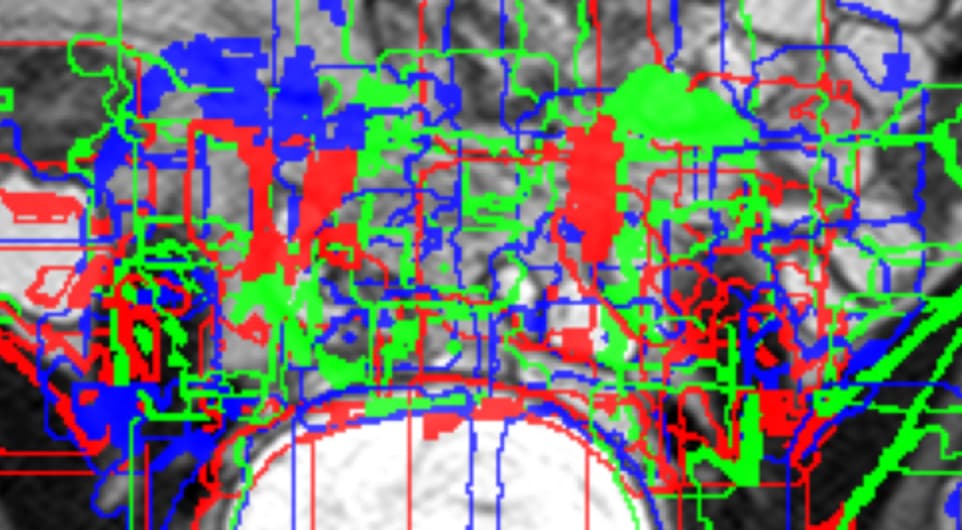
However, when I save the file by doing:
```auto
sitk.WriteImage(overlay, "overlay.nii.gz")
```
I see the following:
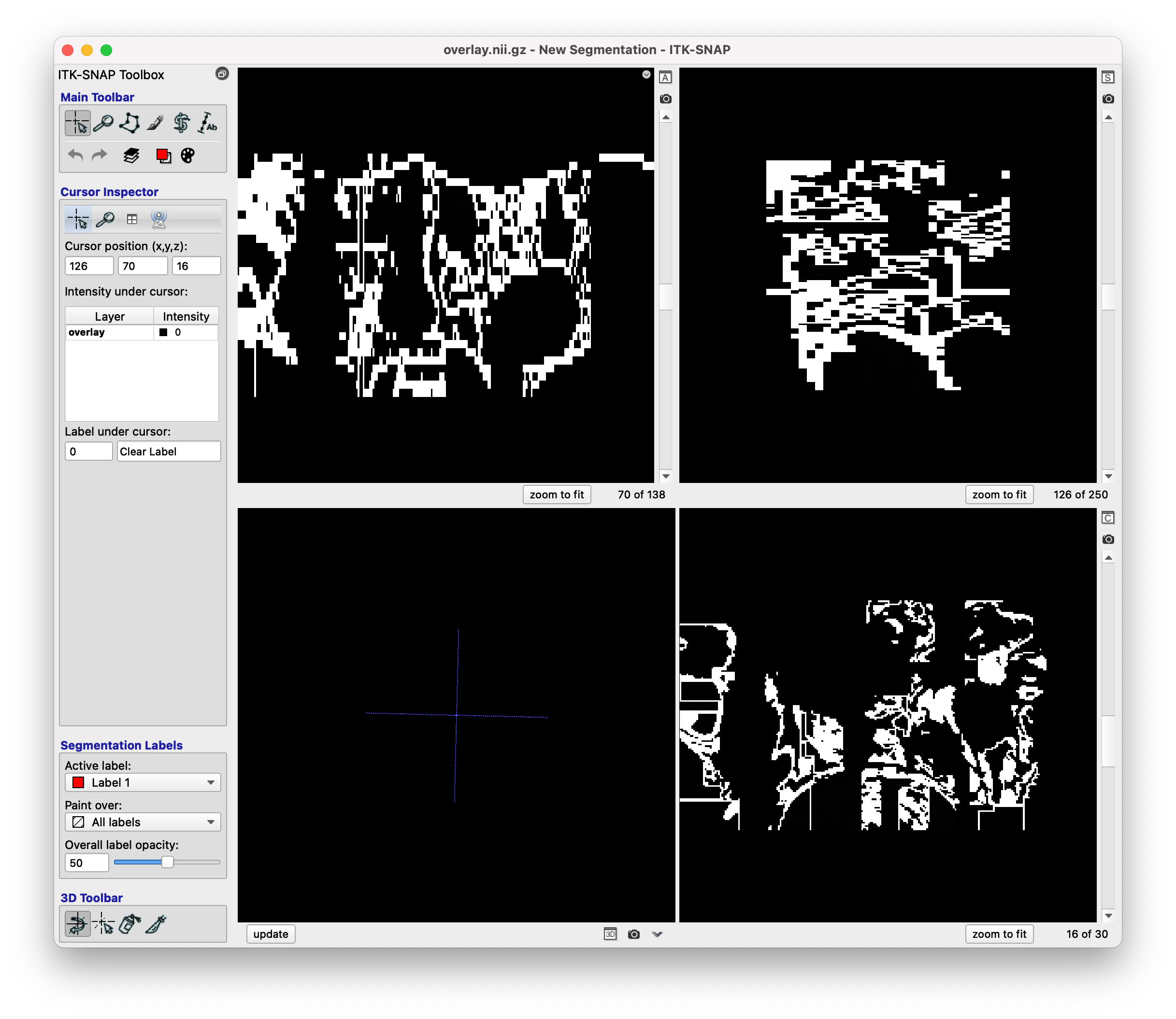
Where the overlayed MRI scan, and the colours, are not present. This is using ITK-SNAP. How could I retain the overlayed MRI scan and colours I see in Jupyter Notebook?
---
### Author:  [@zivy](https://discourse.itk.org/u/zivy)
#### Post date: [June 6, 2022, 5:53pm UTC](https://discourse.itk.org/t/how-to-get-slic-visualisation-using-simpleitk-slicimagefilter/4992/17 "2022-06-06T17:53:12Z")
Hello @aliabidi,
I believe that’s an ITK-SNAP constraint, doesn’t do color, open the image in Slicer.