# How to check disconnected vertices in a triangular mesh
**URL:** https://discourse.itk.org/t/how-to-check-disconnected-vertices-in-a-triangular-mesh/2710
**Category:** Algorithms
**Created:** [February 12, 2020, 4:05pm UTC](https://discourse.itk.org/t/how-to-check-disconnected-vertices-in-a-triangular-mesh/2710 "2020-02-12T16:05:59Z")
**Posts on this page:** 7
**Page:** 1
### Author:  [@srbn.ghosh89](https://discourse.itk.org/u/srbn.ghosh89)
#### Post date: [February 12, 2020, 4:05pm UTC](https://discourse.itk.org/t/how-to-check-disconnected-vertices-in-a-triangular-mesh/2710/1 "2020-02-12T16:05:59Z")
Hello Everyone,
I have a triangular mesh that has 1038458 polygons, 517817 points, 1557687 edges. During the simplification process, I am getting the message that there are 1092 disconnected vertices, 516725 connected vertices. Because of disconnected components, the simplification is not improving as expected Using ITK how can I check which vertices are disconnected and color them so I can visualize them clearly and can dig into them.
Any suggestions will be helpful.
I have attached the mesh file here.
[https://drive.google.com/open?id=1rRVLig6sSpAzXCkI5CDNKFaWeK2Cpw9N](https://drive.google.com/open?id=1rRVLig6sSpAzXCkI5CDNKFaWeK2Cpw9N)
Regards
Shrabani Ghosh
---
### Author:  [@dzenanz](https://discourse.itk.org/u/dzenanz)
#### Post date: [February 12, 2020, 5:44pm UTC](https://discourse.itk.org/t/how-to-check-disconnected-vertices-in-a-triangular-mesh/2710/2 "2020-02-12T17:44:43Z")
I do not have permission to open the file in your Google Drive.
You should consider using [vtkCleanPolyData](https://vtk.org/doc/nightly/html/classvtkCleanPolyData.html#details), as it seems to do what you want.
---
### Author:  [@srbn.ghosh89](https://discourse.itk.org/u/srbn.ghosh89)
#### Post date: [February 12, 2020, 6:11pm UTC](https://discourse.itk.org/t/how-to-check-disconnected-vertices-in-a-triangular-mesh/2710/3 "2020-02-12T18:11:32Z")
I have availed the permission now. Could you please check it now.
Regards
Shrabani Ghosh
---
### Author:  [@srbn.ghosh89](https://discourse.itk.org/u/srbn.ghosh89)
#### Post date: [February 13, 2020, 7:59pm UTC](https://discourse.itk.org/t/how-to-check-disconnected-vertices-in-a-triangular-mesh/2710/4 "2020-02-13T19:59:48Z")
Hi,
After removing disconnected vertices, I can see there are still some problems for simplification. I have shared the data with you here.
> **[labeled\_volume\_Labels\_185\_150\_SmoothedRecombined.vtk](https://drive.google.com/file/d/1s8S3k9MF24ks9-E8HWby-z1OJayn_SwV/view?usp=drive_open)**
>
> Google Drive file.
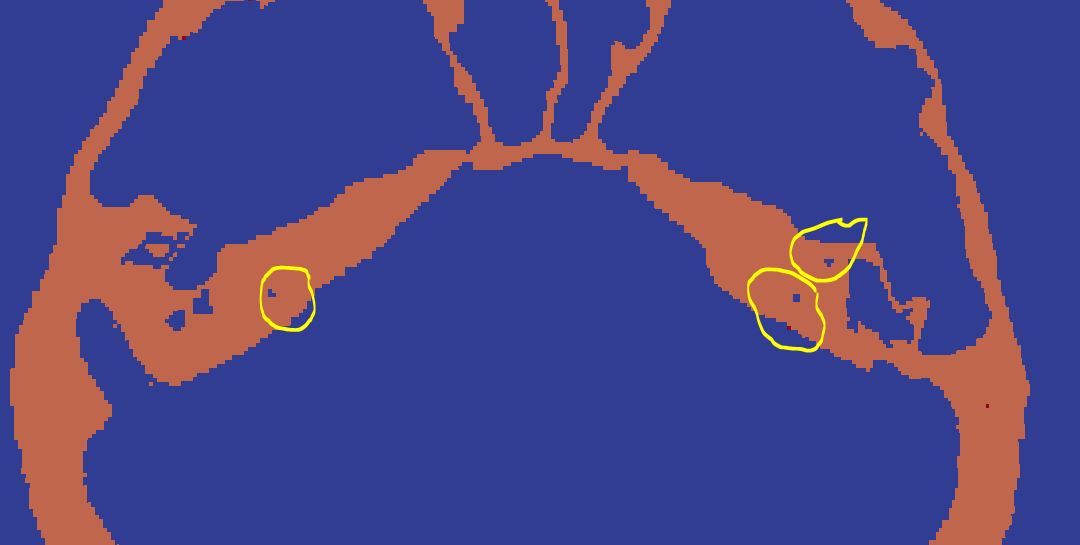
I have generated the volume by labeling with two values. I have done Gaussian smoothing on it. After that by using dual contouring, I have created the triangular surface mesh from the labeled volume. I think there are some very small holes were created while generating the surface mesh from volume.
If I look closely into the volume slice by slice, I can see in the labeling, there are remained some gaps that are unintentional during the labeling process, later on creating the small holes in the surface mesh.
The yellow circles are some labeled issues.
How can I resolve this issue. Any suggestions will be helpful.
Regards
Shrabani Ghosh
---
### Author:  [@dzenanz](https://discourse.itk.org/u/dzenanz)
#### Post date: [February 13, 2020, 8:06pm UTC](https://discourse.itk.org/t/how-to-check-disconnected-vertices-in-a-triangular-mesh/2710/5 "2020-02-13T20:06:06Z")
Are you aware of [BinaryFillholeImageFilter](https://itk.org/Doxygen/html/classitk_1_1https://itk.org/Doxygen/html/classitk_1_1BinaryFillholeImageFilter.html.html)? It sounds like it should do the trick.
---
### Author:  [@srbn.ghosh89](https://discourse.itk.org/u/srbn.ghosh89)
#### Post date: [February 13, 2020, 9:52pm UTC](https://discourse.itk.org/t/how-to-check-disconnected-vertices-in-a-triangular-mesh/2710/6 "2020-02-13T21:52:51Z")
Thank You. But still, it’s showing 70 percent vertices are irregular vertices. Is there any way to regularize those?
Regards
Shrabani Ghosh
---
### Author:  [@dzenanz](https://discourse.itk.org/u/dzenanz)
#### Post date: [February 13, 2020, 11:03pm UTC](https://discourse.itk.org/t/how-to-check-disconnected-vertices-in-a-triangular-mesh/2710/7 "2020-02-13T23:03:13Z")
Regular vertices are the ones which have 6 neighbors. All other vertices are irregular.
You could look at this [PR](https://github.com/InsightSoftwareConsortium/ITKCuberille/pull/51) for explanation, and use [CuberilleImageToMeshFilter](https://itk.org/Doxygen/html/classitk_1_1CuberilleImageToMeshFilter.html) with the latest git master version to create your mesh.