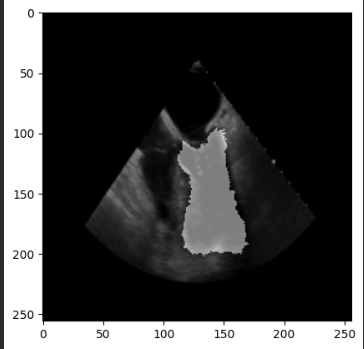
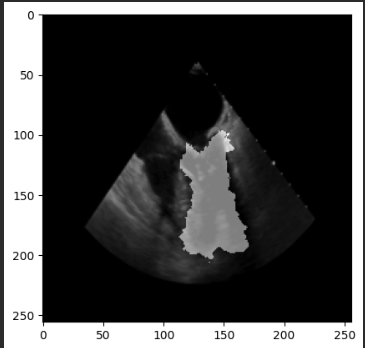
# How to automatically refine segmentation warped by deformation field (from voxelmorph).

**URL:** https://discourse.itk.org/t/how-to-automatically-refine-segmentation-warped-by-deformation-field-from-voxelmorph/5901
**Category:** Beginner Questions
**Tags:** registration, python, segmentation, simpleitk
**Created:** [April 26, 2023, 4:09pm UTC](https://discourse.itk.org/t/how-to-automatically-refine-segmentation-warped-by-deformation-field-from-voxelmorph/5901 "2023-04-26T16:09:41Z")
**Posts on this page:** 13
**Page:** 1

<div class="post-metadata">

### Author: ![BraveDistribution](https://discourse.itk.org/letter_avatar_proxy/v4/letter/b/ce7236/32.png) [@BraveDistribution](https://discourse.itk.org/u/BraveDistribution)
#### Post date: [April 26, 2023, 4:09pm UTC](https://discourse.itk.org/t/how-to-automatically-refine-segmentation-warped-by-deformation-field-from-voxelmorph/5901/1 "2023-04-26T16:09:42Z")

</div>

Hello,

I work on cardiac cycle analysis (TEE). We want to obtain a mask of the left ventricle (or any other region of interest) during the whole cycle based on the mask manually annotated in ED/ES (end of diastole/systole). I tried examples based on SimpleITK methods. However, they were a bit slow and not real-time applicable.

I trained voxelmorph model on our dataset, and the deformed image looks quite good (almost exactly the same as the moving one). One problem is that the mask I obtain by warping the original mask with the deformation field is kind of “edgy” (see i.e. [Antialiasing for labels · Issue #3178 · Project-MONAI/MONAI · GitHub](https://github.com/Project-MONAI/MONAI/issues/3178)). I can “smooth” the mask by applying Median Filter, however median filter often breaks the area with the same intensity, and the error is then propagated in the later sequences (after I warp the next deformation field etc.).

I would like to ask the community if there is a better way to handle this. I thought that maybe there is a method to refine segmentation in ITK or some kind of ‘seed algorithm’ that could start with the mask instead.

TLDR; I’d like to get a mask of a region of interest in the whole sequence based on the mask from the first image in the sequence.

thanks,

[LV example 2CH heart:  
 ![image](https://discourse.itk.org/uploads/default/original/2X/5/51dd4521cd50cab6258d50d8847ef040c3d7a462.png)]

---

<div class="post-metadata">

### Author: ![zivy](https://discourse.itk.org/user_avatar/discourse.itk.org/zivy/32/1726_2.png) [@zivy](https://discourse.itk.org/u/zivy)
#### Post date: [April 27, 2023, 1:43pm UTC](https://discourse.itk.org/t/how-to-automatically-refine-segmentation-warped-by-deformation-field-from-voxelmorph/5901/2 "2023-04-27T13:43:37Z")

</div>

Hello @BraveDistribution,

Below is the problem formulation as I understood it from your description and pseudo-code which should address your issue. Note that it is pseudo-code so you need to modify it to conform with Python syntax and your specific naming scheme.

Input: Temporal set of images image\_0 \ldots image\_{n-1}, binary segmentation of first image seg\_0 and transformations between consecutive images T\_1^0 \ldots T\_{n-1}^{n-2}.  
Output: Set of segmentations seg\_1 \ldots set\_{n-1}

Note the direction of the transformations, T\_1^0 maps points from image\_1 onto image\_0. You need to select the fixed and moving images in the registration to obtain the desired result (In ITK/SimpleITK nomenclature image\_1 is the fixed image, image\_0 the moving).

```auto
# Convert binary segmentation to distance map
seg_distance_map = sitk.SignedMaurerDistanceMap(seg_0, squaredDistance=False, useImageSpacing=True)

# Resample distance map onto each of the images using the appropriate transformation.
# Start with the identity and obtain the relevant transformation via composition. 
tx = sitk.Transform(2, sitk.sitkIdentity)
for i in range(1,n):
   T_i^{i-1} = sitk.ReadTransform(file_i^{i-1})
    # Compute the deformation between image i and image 0, composition of displacement fields
    tx = sitk.DisplacementFieldTransform(sitk.TransformToDisplacementField(sitk.CompositeTransform([tx, T_i^{i-1}]),
                                                                           size = seg_0.GetSize(),
                                                                           outputOrigin = seg_0.GetOrigin(),
                                                                           outputSpacing = seg_0.GetSpacing()))
                                 
    # Resample the original distance map and take the values that are inside the object (<=0)
    seg_i = sitk.Resample(seg_distance_map, tx) <= 0
    sitk.WriteImage(sitk.Cast(seg_i, sitk.sitkUInt8), "segmentation_i.nrrd")

```

---

<div class="post-metadata">

### Author: ![BraveDistribution](https://discourse.itk.org/letter_avatar_proxy/v4/letter/b/ce7236/32.png) [@BraveDistribution](https://discourse.itk.org/u/BraveDistribution)
#### Post date: [April 27, 2023, 2:28pm UTC](https://discourse.itk.org/t/how-to-automatically-refine-segmentation-warped-by-deformation-field-from-voxelmorph/5901/3 "2023-04-27T14:28:33Z")

</div>

Dear @zivy,

Thanks for your suggestion. Would you be so kind as to elaborate on how is this (sitk) approach better than the one from the VoxelMorph and their [SpatialTransformer](https://github.com/voxelmorph/voxelmorph/blob/9fa9cd7631741a73a374d22d6a62ef63afdd23b4/voxelmorph/torch/layers.py#L6)?

The spatial transformer warps the mask with the deformation field. Should I expect any kind of performance boost from using SimpleITK (your solution) instead? If yes, why? I want to learn something new :-).

My pseudocode:

```auto
1. Train VoxelMorph model for unsupervised 2D image registration
2. Obtain recordings of new patients, videos 4CH of 50 frames
3. Create a segmentation S_0 for the first image I_0

segmentations = [S_0]
for i in range(50):
    deformation_field = voxelmorph(I_i, I_+1)
    deformed_mask = warp(S[-1], deformation_field)
    segmentations.append(deformed_mask)

```

I am uploading two examples (the legend is, image with mask (either true, or infered from deformation), image i want mask to, inferred mask, overlay of the obtained mask and deformed image, deformation fields, last one is deformed image), the first one is from t=0, the second one is from t=10 (so 10 separate warpings, from t0 to t1, t1-\>t2, t2-\>t3 etc).

You can see that the mask is not smooth and therefore the further registration goes, the wronger it gets (deformed image (last col) looks good though)

thanks

 ![image](https://discourse.itk.org/uploads/default/original/2X/2/22963e409af8b169ef16c987eaae3c12ca909eaf.jpeg)  
 ![image](https://discourse.itk.org/uploads/default/original/2X/2/20af290cb34cff53158d6413b57b0d1122bb37db.jpeg)

---

<div class="post-metadata">

### Author: ![zivy](https://discourse.itk.org/user_avatar/discourse.itk.org/zivy/32/1726_2.png) [@zivy](https://discourse.itk.org/u/zivy)
#### Post date: [April 27, 2023, 3:03pm UTC](https://discourse.itk.org/t/how-to-automatically-refine-segmentation-warped-by-deformation-field-from-voxelmorph/5901/4 "2023-04-27T15:03:16Z")

</div>

Hello @BraveDistribution,

Let me clarify, the pseudo-code I provided does not deal with registration, it assumes that registration was done somehow (voxelmorph/sitk/…) and the registration transformations are read from file. What the code highlights is:

1. Do not perform incremental warps of the segmentation as done in your code. Always warp the original segmentation, `S_0` to the current image via transformation composition.
2. Do not warp the binary representation of the segmentation, warp the distance map representation of the segmentation.

---

<div class="post-metadata">

### Author: ![BraveDistribution](https://discourse.itk.org/letter_avatar_proxy/v4/letter/b/ce7236/32.png) [@BraveDistribution](https://discourse.itk.org/u/BraveDistribution)
#### Post date: [April 27, 2023, 3:13pm UTC](https://discourse.itk.org/t/how-to-automatically-refine-segmentation-warped-by-deformation-field-from-voxelmorph/5901/5 "2023-04-27T15:13:14Z")

</div>

Thanks. I get it now. I will give it a go tonight and let you know. It honestly doesnt make sense that the deformed image looks great however the mask does not. I thought that nearest neighbor interpolation in SpatialTransformer does it…

---

<div class="post-metadata">

### Author: ![BraveDistribution](https://discourse.itk.org/letter_avatar_proxy/v4/letter/b/ce7236/32.png) [@BraveDistribution](https://discourse.itk.org/u/BraveDistribution)
#### Post date: [April 27, 2023, 4:55pm UTC](https://discourse.itk.org/t/how-to-automatically-refine-segmentation-warped-by-deformation-field-from-voxelmorph/5901/6 "2023-04-27T16:55:02Z")

</div>

I am wondering how can we create the DisplacementFieldTransform from the output of VoxelMorph. Do we need to change the values/ranges somehow before?

I have this code:

```auto

def numpy_to_displacement_field_transform(displacement_field_np):
    # Ensure the displacement field is in the correct format: (2, H, W) or (3, H, W, D)
    assert len(displacement_field_np.shape) in [3, 4] and displacement_field_np.shape[0] in [2, 3], "Invalid displacement field shape."

    # Get the dimension of the displacement field
    dimension = displacement_field_np.shape[0]

    # Convert the NumPy array to a SimpleITK image
    if dimension == 2:
        displacement_field_sitk = sitk.GetImageFromArray(np.transpose(displacement_field_np, (1, 2, 0)))
    elif dimension == 3:
        displacement_field_sitk = sitk.GetImageFromArray(np.transpose(displacement_field_np, (2, 3, 1, 0)))

    # Set the pixel type to vector of 64-bit floats
    displacement_field_sitk = sitk.Compose(*[sitk.Cast(displacement_field_sitk[:, :, i], sitk.sitkFloat64) for i in range(dimension)])

    # Create the DisplacementFieldTransform
    displacement_field_transform = sitk.DisplacementFieldTransform(displacement_field_sitk)

    return displacement_field_transform

# first segmentation converted as distance map
seg_distance_map = sitk.SignedMaurerDistanceMap(mask_image, squaredDistance=False, useImageSpacing=True)

tx = sitk.Transform(2, sitk.sitkIdentity)

for image_index in range(len(image_paths)): 
    print(image_index)
    next_image = sitk.ReadImage(image_paths[image_index])
    moved, displacement_field = model.forward(transform(sitk.GetArrayFromImage(image_with_mask)).to('cuda').unsqueeze(0), 
                                              transform(sitk.GetArrayFromImage(next_image)).to('cuda').unsqueeze(0))
    
    latest_displacement_Field_transform = sitk.DisplacementFieldTransform(numpy_to_displacement_field_transform(displacement_field.squeeze(0).squeeze(0).detach().cpu().numpy()))
    
    tx = sitk.DisplacementFieldTransform(sitk.TransformToDisplacementField(sitk.CompositeTransform([tx, latest_displacement_Field_transform]),
                                                                           size = image_with_mask.GetSize(),
                                                                           outputOrigin=image_with_mask.GetOrigin(),
                                                                           outputSpacing = image_with_mask.GetSpacing()))
    
    seg_i = sitk.Resample(seg_distance_map, tx) <= 0
    seg_image = sitk.GetArrayFromImage(sitk.Cast(seg_i, sitk.sitkUInt8))
    plt.imshow(seg_image)
    plt.show()

```

However the output masks are still the same (no changes at all).

Example output from voxelmorph:

```auto
tensor([[[[-0.0706, 0.0176, 0.0546, ..., 0.0542, 0.0315, 0.0334],
          [-0.0071, 0.0186, 0.0420, ..., 0.0507, 0.0440, 0.0361],
          [0.0049, -0.0102, -0.0079, ..., 0.0351, 0.0241, 0.0057],
          ...,
          [-0.0484, -0.0361, -0.0431, ..., -0.0435, -0.0262, -0.0348],
          [-0.0004, -0.0436, -0.0345, ..., -0.0339, 0.0021, -0.0172],
          [-0.0403, -0.0330, -0.0731, ..., -0.0470, -0.0218, -0.0514]],

         [[0.0106, 0.0601, 0.0193, ..., 0.0139, 0.0019, 0.0044],
          [0.0086, 0.0362, 0.0331, ..., 0.0609, 0.0225, 0.0146],
          [0.0224, 0.0382, 0.0524, ..., 0.0538, 0.0156, 0.0011],
          ...,
          [0.0170, 0.0226, 0.0176, ..., -0.0324, -0.0620, -0.0514],
          [-0.0039, -0.0075, -0.0010, ..., -0.0253, -0.0645, -0.0503],
          [-0.0311, 0.0211, -0.0075, ..., -0.0388, -0.0689, -0.0073]]]],
       device='cuda:0', grad_fn=<AliasBackward0>)

max displacement: tensor(9.1939, device='cuda:0', grad_fn=<AliasBackward0>)
min displacement: tensor(-10.1772, device='cuda:0', grad_fn=<AliasBackward0>)

```

example npy def. field attached:  
[test.npy](https://discourse.itk.org/uploads/short-url/gt5wFAMSyznGruIMPXA9VB8MFJm.npy) (512.1 KB)

---

<div class="post-metadata">

### Author: ![lassoan](https://discourse.itk.org/user_avatar/discourse.itk.org/lassoan/32/27_2.png) [@lassoan](https://discourse.itk.org/u/lassoan)
#### Post date: [April 28, 2023, 2:46am UTC](https://discourse.itk.org/t/how-to-automatically-refine-segmentation-warped-by-deformation-field-from-voxelmorph/5901/7 "2023-04-28T02:46:36Z")

</div>

For your information, with [this code snippet](https://github.com/voxelmorph/voxelmorph/issues/438#issuecomment-1399188388) you can save the displacement field correctly, so that you can load it into ITK as a displacement field and use it for warping.

You can also load this file as a transform into recent preview releases of 3D Slicer and visualize the displacement field or apply to segmentations, grayscale or binary images, or meshes. If you apply it to a mesh (or segmentation with “closed surface” representation) then the boundaries remain smooth.

---

<div class="post-metadata">

### Author: ![BraveDistribution](https://discourse.itk.org/letter_avatar_proxy/v4/letter/b/ce7236/32.png) [@BraveDistribution](https://discourse.itk.org/u/BraveDistribution)
#### Post date: [April 28, 2023, 4:17am UTC](https://discourse.itk.org/t/how-to-automatically-refine-segmentation-warped-by-deformation-field-from-voxelmorph/5901/8 "2023-04-28T04:17:49Z")

</div>

Thanks @lassoan for your help! My images are 2D, so hopefully this detail won’t change the effectivity of the github code you provided (I know that I need to change it for 2 dimensions). I am going to try this in 2 hours. I will let you know :).

---

<div class="post-metadata">

### Author: ![BraveDistribution](https://discourse.itk.org/letter_avatar_proxy/v4/letter/b/ce7236/32.png) [@BraveDistribution](https://discourse.itk.org/u/BraveDistribution)
#### Post date: [April 28, 2023, 8:41am UTC](https://discourse.itk.org/t/how-to-automatically-refine-segmentation-warped-by-deformation-field-from-voxelmorph/5901/10 "2023-04-28T08:41:23Z")

</div>

I have been able to incorporate the code proposed by @lassoan into my pipeline.

```auto

def np_to_dvf(displacement_field, reference_image):
    affine_matrix = np.eye(3)
    affine_matrix[0, 0] = reference_image.GetSpacing()[0]
    affine_matrix[1, 1] = reference_image.GetSpacing()[1]
    affine_matrix[0, 2] = reference_image.GetOrigin()[0]
    affine_matrix[1, 2] = reference_image.GetOrigin()[1]
    
    print('Last max from deformation field voxelmorph: {}'.format(np.max(displacement_field)))
    print('Last min from deformation field voxelmorph: {}'.format(np.min(displacement_field)))
    
    # Calculate the ITK format displacement field
    reshaped = np.reshape(displacement_field, (2, -1))
    stacked = np.vstack([reshaped, np.zeros(reshaped.shape[1])])
    multiplied = np.matmul(affine_matrix, stacked)[:2,]
    last = np.reshape(multiplied, displacement_field.shape).transpose(1, 2, 0)

    displacement_image = sitk.GetImageFromArray(last, isVector=True)
    displacement_image = sitk.Cast(displacement_image, sitk.sitkVectorFloat64)
    # Set the displacement image's origin and spacing to relevant values
    displacement_image.SetOrigin(reference_image.GetOrigin())
    displacement_image.SetSpacing(reference_image.GetSpacing())
    tx = sitk.DisplacementFieldTransform(displacement_image)
    return tx

```

This changes DVF generated to voxelmorph into sitk DisplacementFieldTransform.

My code is now like this:

```auto
image_paths = [os.path.join('/home/*/Projects/registration_dataset/images/*/', image) for image in os.listdir('/home/*/Projects/registration_dataset/images/*/')]
image_paths = natsorted(image_paths)
image_paths = [image for image in image_paths if 'DCM0045' in image]
image_paths = image_paths[2:25] # filter out before ones...

image_with_mask_path = '/home/*/Projects/registration_dataset/images/*/DCM0045_002.png'
mask_path = '/home/*/Projects/registration_dataset/masks/*/LV/DCM0045_002.tif'
image_with_mask = sitk.ReadImage(image_with_mask_path)
mask_image = sitk.ReadImage(mask_path)

input_size = mask_image.GetSize()
input_spacing = mask_image.GetSpacing()
output_spacing = [input_spacing[i] * (input_size[i] / (256, 256)[i]) for i in range(len(input_size))]

sitk_mask_transformer = sitk.GetImageFromArray((transform_mask(sitk.GetArrayFromImage(mask_image)).squeeze(0).squeeze().detach().cpu().numpy() * 255).astype(np.uint8))

reference_image = sitk.GetImageFromArray(transform(sitk.GetArrayFromImage(sitk.ReadImage(image_with_mask_path))).squeeze(0).squeeze(0).detach().cpu().numpy())

# first segmentation converted as distance map
seg_distance_map = sitk.SignedMaurerDistanceMap(sitk_mask_transformer, squaredDistance=False, useImageSpacing=True)

tx = sitk.Transform(2, sitk.sitkIdentity)
seg_masks = []

for image_index in range(len(image_paths) - 1): 
    print('Image index: {}'.format(image_index))
    first_image = sitk.ReadImage(image_paths[image_index])
    second_image = sitk.ReadImage(image_paths[image_index+1])
    moved, displacement_field = model.forward(transform(sitk.GetArrayFromImage(first_image)).to('cuda').unsqueeze(0), 
                                              transform(sitk.GetArrayFromImage(second_image)).to('cuda').unsqueeze(0))
    
    latest_displacement_field_transform = np_to_dvf(displacement_field.squeeze(0).squeeze(0).detach().cpu().numpy(), reference_image)    
 
    tx = sitk.DisplacementFieldTransform(sitk.TransformToDisplacementField(sitk.CompositeTransform([tx, latest_displacement_field_transform]),
                                                                           size = image_with_mask.GetSize(),
                                                                           outputOrigin=image_with_mask.GetOrigin(),
                                                                           outputSpacing = image_with_mask.GetSpacing()))

    seg_i = sitk.Resample(seg_distance_map, tx) <= 0

    seg_image = sitk.GetArrayFromImage(sitk.Cast(seg_i, sitk.sitkUInt8)) 
    seg_masks.append(seg_image)

    plt.imshow(moved.squeeze(0).squeeze(0).detach().cpu().numpy(), cmap='gray')
    plt.imshow(seg_image, alpha=0.5, cmap='gray')
    plt.show()

```

The problem is that the results are even worse than when I used SpatialTransformer from voxelmorph, see the following pictures:

first registration:  
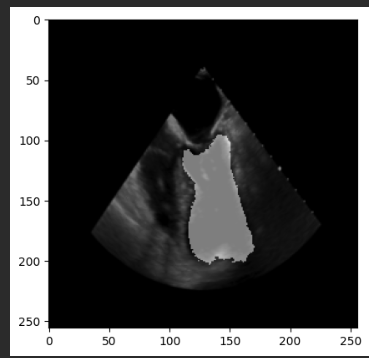
 ![image](https://discourse.itk.org/uploads/default/original/2X/c/cb674fd945a8e69022a00f3343d86dfd1e8a6fc0.png)

seventh:  
 ![image](https://discourse.itk.org/uploads/default/original/2X/d/df58c7e14a583d6aa107066a4627fb197f5d2648.png)

tenth:  
 ![image](https://discourse.itk.org/uploads/default/original/2X/0/06529a946170618280ae5b51b481f6dd6fef51a8.png)

and it is getting worse… The underlying “moved” image from voxelmorph looks great. Any tips?

* * *

@lassoan, I have also saved the displacement field and loaded it in Slicer. It looks really weird and just breaks the volume and segmentation completely.
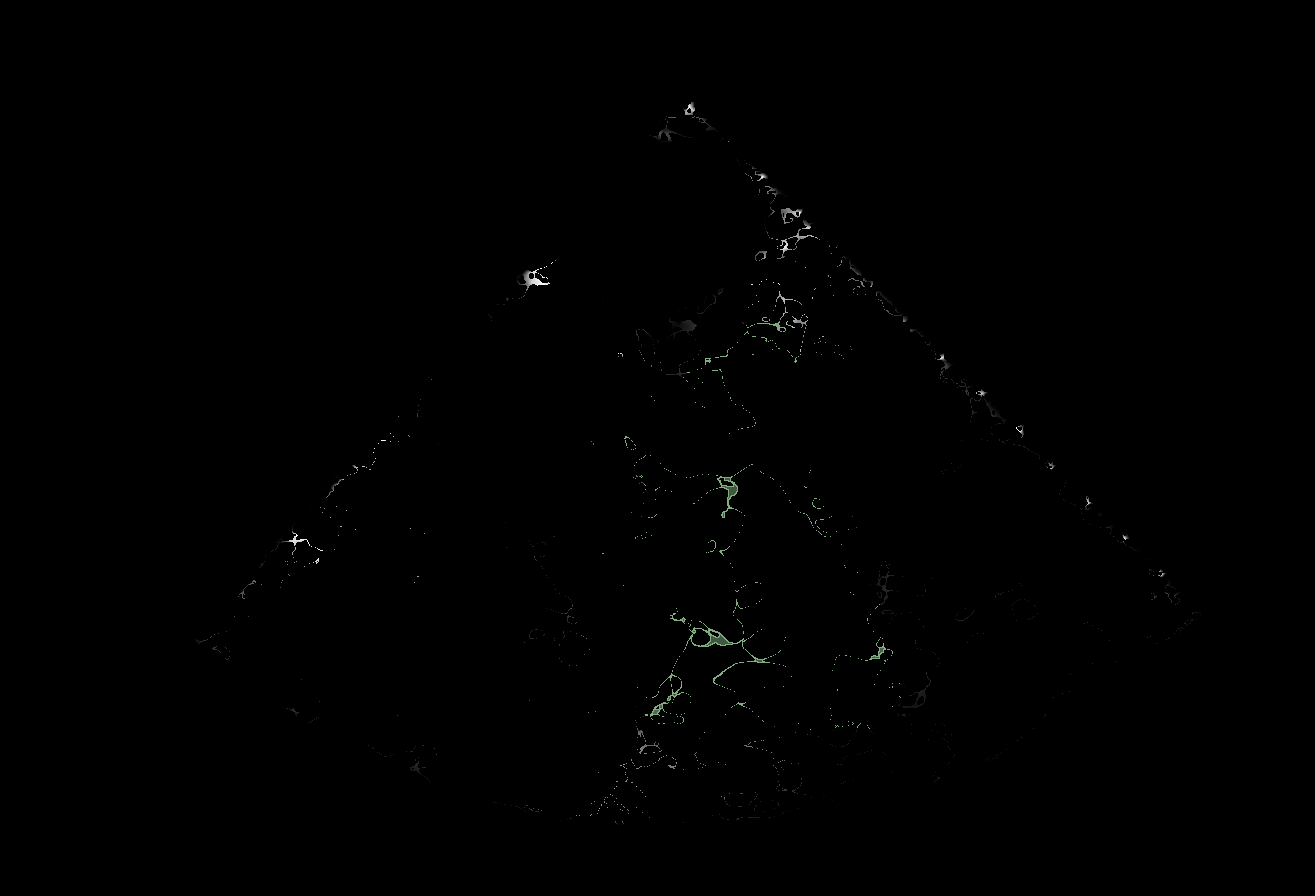
 ![image](https://discourse.itk.org/uploads/default/original/2X/0/01dd3445a0dc7cfc50b1cf82fb152137087fd62f.png)

---

<div class="post-metadata">

### Author: ![lassoan](https://discourse.itk.org/user_avatar/discourse.itk.org/lassoan/32/27_2.png) [@lassoan](https://discourse.itk.org/u/lassoan)
#### Post date: [April 29, 2023, 3:06am UTC](https://discourse.itk.org/t/how-to-automatically-refine-segmentation-warped-by-deformation-field-from-voxelmorph/5901/11 "2023-04-29T03:06:04Z")

</div>

The code snippet in the referenced github issue can be used for saving displacement field in 3D. If you have a 2D image then you can treat it as a single-slice 3D volume. A clinical image is never really 2D anyway, as even if it contains a single slice, that slice is located in 3D space (e.g., its position and orientation is always in patient space, which is real world, which is 3D).

The “wavy” pattern looks similar to what we saw when used VoxelMorph on 3D cardiac ultrasound images. It may be a limitation of VoxelMorph that it does not sufficiently regularize the displacement field. The zigzags in the displacement field field may not be noticeable when that displacement is applied to the moving image that it is computed from (the field may be wavy exactly in homogeneous regions of the moving image).

Results may get progressively worse if you propagate the transformations between neighbor slices (instead of registering all moving images to the same fixed frame that you segmented). It may also make results much worse if you resample the segmentation for each frame (instead of concatenating all the transforms and apply this resampling transform at once, idirectly on the original segmentation).

---

<div class="post-metadata">

### Author: ![BraveDistribution](https://discourse.itk.org/letter_avatar_proxy/v4/letter/b/ce7236/32.png) [@BraveDistribution](https://discourse.itk.org/u/BraveDistribution)
#### Post date: [April 29, 2023, 12:16pm UTC](https://discourse.itk.org/t/how-to-automatically-refine-segmentation-warped-by-deformation-field-from-voxelmorph/5901/12 "2023-04-29T12:16:28Z")

</div>

Dear @lassoan,

thank you for sharing your knowledge :-).

> Results may get progressively worse if you propagate the transformations between neighbor slices (instead of registering all moving images to the same fixed frame that you segmented)

I am going to try remove sequential registration and just register each image to the one with segmentation.

> t may also make results much worse if you resample the segmentation for each frame (instead of concatenating all the transforms and apply this resampling transform at once, idirectly on the original segmentation).

I think that @zivy already suggested that and I fixed the code accordingly. However, the impact on results was negligible (it is still bad).

If you have any other suggestions, I am glad to try them out!

---

<div class="post-metadata">

### Author: ![lassoan](https://discourse.itk.org/user_avatar/discourse.itk.org/lassoan/32/27_2.png) [@lassoan](https://discourse.itk.org/u/lassoan)
#### Post date: [April 29, 2023, 10:28pm UTC](https://discourse.itk.org/t/how-to-automatically-refine-segmentation-warped-by-deformation-field-from-voxelmorph/5901/13 "2023-04-29T22:28:24Z")

</div>

We are just guessing based on our experience what things often go wrong. To get definitive answer on what is going on, you would need to inspect the computed displacement field. For visual assessment probably [3D Slicer’s transform display feature](https://slicer.readthedocs.io/en/latest/user_guide/modules/transforms.html#display) is the most sophisticated interactive tool, but if you have difficulties creating a 3D displacement field from a 2D registration then you can probably use SimpleITK for some basic transform visualizations (e.g., warp a grid).

---

<div class="post-metadata">

### Author: ![BraveDistribution](https://discourse.itk.org/letter_avatar_proxy/v4/letter/b/ce7236/32.png) [@BraveDistribution](https://discourse.itk.org/u/BraveDistribution)
#### Post date: [June 15, 2023, 5:22am UTC](https://discourse.itk.org/t/how-to-automatically-refine-segmentation-warped-by-deformation-field-from-voxelmorph/5901/14 "2023-06-15T05:22:56Z")

</div>

Thanks. The VoxelMorph didn’t work that well. I had to use one-to-all registration instead of sequential ones. They were better. Smoothening the deformation field (in voxelmorph) helped a bit as well.