# How do you compose transforms after registration to perform resampling?
**URL:** https://discourse.itk.org/t/how-do-you-compose-transforms-after-registration-to-perform-resampling/6401
**Category:** Beginner Questions
**Tags:** python, transforms, simpleitk
**Created:** [January 18, 2024, 11:28am UTC](https://discourse.itk.org/t/how-do-you-compose-transforms-after-registration-to-perform-resampling/6401 "2024-01-18T11:28:16Z")
**Posts on this page:** 7
**Page:** 1
### Author:  [@sdiebolt](https://discourse.itk.org/u/sdiebolt)
#### Post date: [January 18, 2024, 11:28am UTC](https://discourse.itk.org/t/how-do-you-compose-transforms-after-registration-to-perform-resampling/6401/1 "2024-01-18T11:28:16Z")
I have a question that has already been asked at least twice ([here](https://discourse.itk.org/t/is-order-of-transforms-in-a-composite-transform-reversed-relative-to-transform-order-during-registration/3829) and [here](https://discourse.itk.org/t/image-registration-method-displacement-1-example-composite-transform-order/3920)) but got no explicit answer. Like their original authors, I’m struggling to understand how to compose the fixed initial, moving initial, and optimized transforms after registration to then resample the moving image. I’ll explain below everything that I understood, please tell me where I made a mistake.
From the [documentation of SimpleITK](https://simpleitk.readthedocs.io/en/release/registrationOverview.html), we can read that the final transform that maps points from the fixed to moving image domains is: T\_{\text{opt}}\circ T\_\text{m}\circ T\_\text{f}^{-1}. Indeed, this is confirmed by [one of SimpleITK tutorial notebooks](https://simpleitk.org/SPIE2019_COURSE/04_basic_registration.html) that illustrates the different transformations using the following image:

From that, I understand that T\_\text{f} goes from virtual to fixed image domains, T\_\text{m} goes from virtual to moving image domains, and T\_\text{opt} goes from moving to moving image domains.
Now, SimpleITK’s documentation also explains the following about `CompositeTransform`:
> represents multiple transformations applied one after the other T\_0(T\_1(T\_2(... T\_n(p) ...))). The semantics are stack based, that is, first in last applied:
>
> ```python
> composite_transform = CompositeTransform([T0, T1])
> composite_transform.AddTransform(T2)
>
> ```
If I follow this correctly, after registration of two images, creating the final transform from T\_\text{f}, T\_\text{m}, and T\_\text{opt} using a `CompositeTransform` would be simply:
```auto
composite_transform = CompositeTransform(registration_method.GetInitialTransform())
composite_transform.AddTransform(registration_method.GetMovingInitialTransform())
composite_transform.AddTransform(registration_method.GetFixedInitialTransform().GetInverse())
```
The optimized transform was added first in the stack, so it will be applied last, as described in the documentation. We should thus obtain T\_{\text{opt}}\circ T\_\text{m}\circ T\_\text{f}^{-1}. The following [example notebook](https://github.com/InsightSoftwareConsortium/SimpleITK-Notebooks/blob/master/Python/61_Registration_Introduction_Continued.ipynb) also confirms that the transforms should be composed in this order.
In theory, all is well! Problems arise when you dive a bit deeper into the documentation and try to apply all of this on actual images.
- First, reading [section 3.2 of the ITK software guide](https://itk.org/ITKSoftwareGuide/html/Book2/ITKSoftwareGuide-Book2ch3.html#x26-1000003.2) and [one of ITK’s examples](https://examples.itk.org/src/registration/common/perform2dtranslationregistrationwithmeansquares/documentation?highlight=compositetransform), we find contradicting code:
- Using actual images, composing transforms like described in SimpleITK’s documentation does not work when using a moving initial transform that contains a flip (negative zoom) along one axis. This is fixed by composing them like described in ITK’s documentation. I’ll post a reproducible example ASAP.
Could you please help me figure out where I go wrong?
---
### Author:  [@sdiebolt](https://discourse.itk.org/u/sdiebolt)
#### Post date: [January 18, 2024, 3:11pm UTC](https://discourse.itk.org/t/how-do-you-compose-transforms-after-registration-to-perform-resampling/6401/2 "2024-01-18T15:11:42Z")
Here’s a reproducible example.
I have one 3D image consisting of 6 slices. I will perform the registration of this image on itself while adding artificial fixed and moving initial transforms that will make the initial overlap pretty poor: the affine registration will then try to fix this misalignment. These artificial transforms consists in simple translations, **and a flip along one axis for the moving image**.
Below is the code for loading the images, defining the artificial initial transforms, and comparing the misaligned images in the fixed physical space:
```python
import numpy as np
import SimpleITK as sitk
import matplotlib.pyplot as plt
def compare_images(fixed, moving):
"""Plot fixed image, moving image, and checkerboard comparison."""
fig = plt.figure(layout="tight", figsize=(10, 4), dpi=200)
subfigs = fig.subfigures(1, 3, wspace=0.2)
axes = subfigs[0].subplots(3, 2)
subfigs[0].suptitle("Fixed", y=1.02)
for index, ax in enumerate(axes.ravel()):
ax.imshow(
np.rot90(sitk.GetArrayFromImage(fixed).T[:, index]),
aspect=.5
)
ax.axis(False)
axes = subfigs[1].subplots(3, 2)
subfigs[1].suptitle("Moving", y=1.02)
for index, ax in enumerate(axes.ravel()):
ax.imshow(
np.rot90(sitk.GetArrayFromImage(moving).T[:, index]),
aspect=.5
)
ax.axis(False)
axes = subfigs[2].subplots(3, 2)
subfigs[2].suptitle("Comparison", y=1.02)
for index, ax in enumerate(axes.ravel()):
chekerboard_image = sitk.CheckerBoard(moving, fixed, (4,4,4))
ax.imshow(
np.rot90(sitk.GetArrayFromImage(chekerboard_image).T[:, index]),
aspect=.5
)
ax.axis(False)
fixed_image = sitk.ReadImage("image.nii")
fixed_image.SetDirection(np.eye(3).flatten())
fixed_image.SetOrigin((0, 0, 0))
moving_image = sitk.ReadImage("image.nii")
moving_image.SetDirection(np.eye(3).flatten())
moving_image.SetOrigin((0, 0, 0))
initialization = np.eye(4)
initialization[2, 3] = -2
fixed_initial_transform = sitk.AffineTransform(
initialization[:3, :3].flatten(), initialization[:3, 3], (0,) * 3
)
resampled_fixed_image = sitk.Resample(
fixed_image,
referenceImage=fixed_image,
transform=fixed_initial_transform,
interpolator=sitk.sitkLinear,
outputPixelType=fixed_image.GetPixelID(),
)
initialization = np.eye(4)
initialization[0, 0] = -1
initialization[0, 3] = 50 * moving_image.GetSpacing()[0]
initialization[2, 3] = 2
moving_initial_transform = sitk.AffineTransform(
initialization[:3, :3].flatten(), initialization[:3, 3], (0,) * 3
)
resampled_moving_image = sitk.Resample(
moving_image,
referenceImage=fixed_image,
transform=moving_initial_transform,
interpolator=sitk.sitkLinear,
outputPixelType=moving_image.GetPixelID(),
)
compare_images(resampled_fixed_image, resampled_moving_image)
```
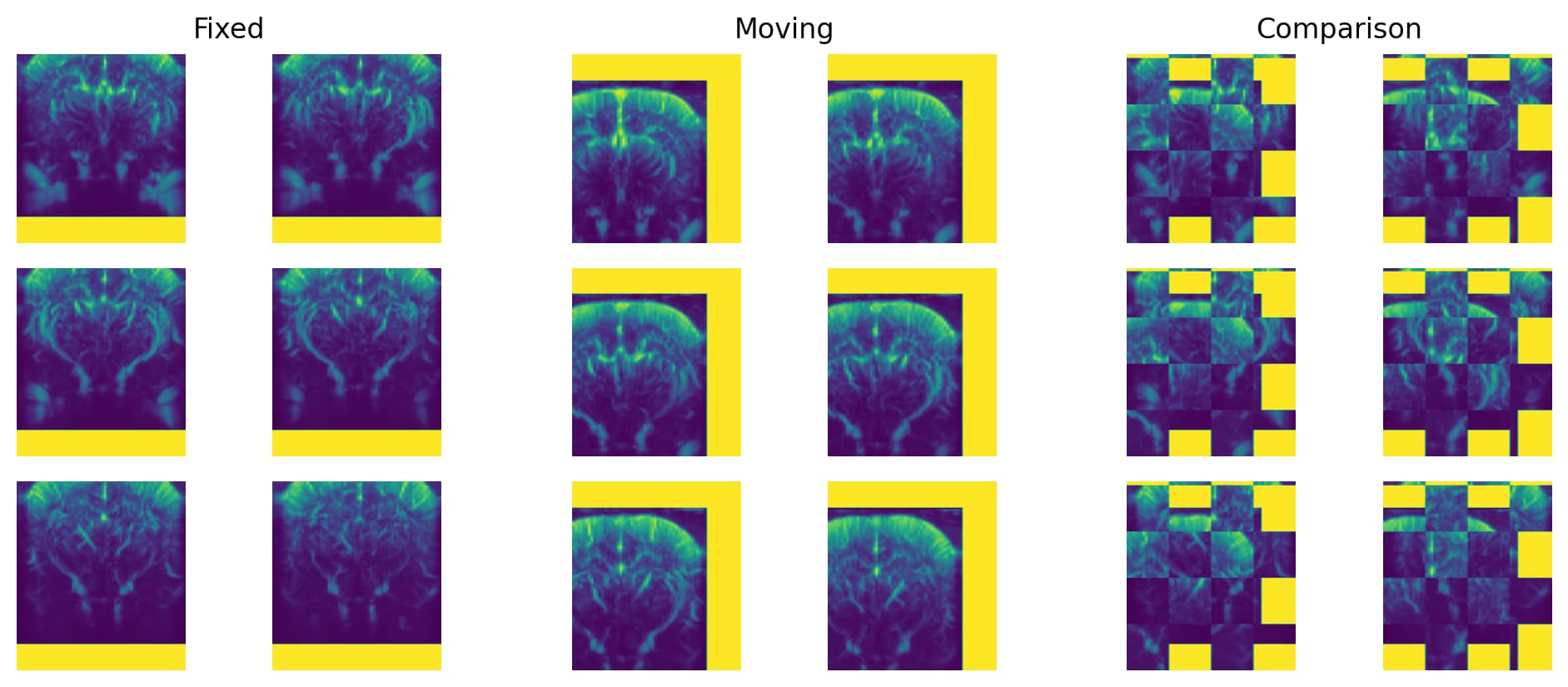
Now comes the actual registration. I’m optimizing a simple affine transforms and using the artificial moving and fixed initial transforms:
```python
registration_method = sitk.ImageRegistrationMethod()
optimized_transform = sitk.AffineTransform(3)
registration_method.SetFixedInitialTransform(fixed_initial_transform)
registration_method.SetMovingInitialTransform(moving_initial_transform)
registration_method.SetMetricAsCorrelation()
registration_method.SetInterpolator(sitk.sitkLinear)
registration_method.SetOptimizerAsGradientDescent(
learningRate=1,
numberOfIterations=500,
convergenceMinimumValue=1e-6,
convergenceWindowSize=50,
estimateLearningRate=registration_method.EachIteration,
)
registration_method.SetOptimizerScalesFromPhysicalShift()
registration_method.SetInitialTransform(optimized_transform)
registration_method.Execute(fixed_image, moving_image)
print(registration_method.GetMetricValue())
```
The registration ends with a final metric value of -0.75, which is satisfactory. Note that I don’t expect the optimized transform to fix the flip that I introduced in the moving initial transform.
Now to the resampling. Creating a composite transform from the initial and optimized transforms like described in SimpleITK’s documentation leads to this:
```python
composite_transform = sitk.CompositeTransform(
[
optimized_transform,
registration_method.GetMovingInitialTransform(),
registration_method.GetFixedInitialTransform().GetInverse(),
]
)
resampled_moving_image = sitk.Resample(
moving_image,
referenceImage=fixed_image,
transform=composite_transform,
interpolator=sitk.sitkLinear,
outputPixelType=moving_image.GetPixelID(),
)
compare_images(fixed_image, resampled_moving_image)
```
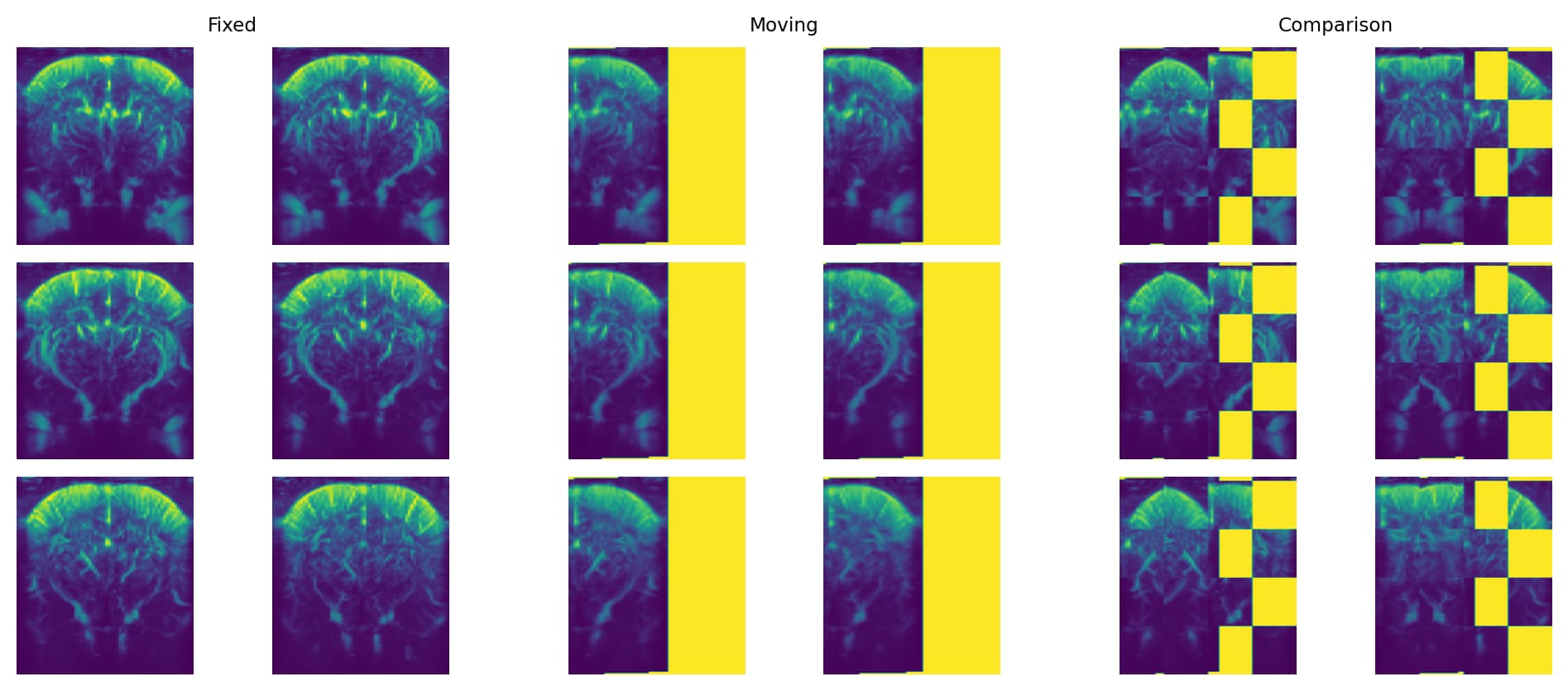
There’s something obviously wrong here. Now, let’s try reversing the order of the transforms in the `CompositeTransforms` to match what’s described in ITK’s documentation:
```python
composite_transform = sitk.CompositeTransform(
[
registration_method.GetFixedInitialTransform().GetInverse(),
registration_method.GetMovingInitialTransform(),
optimized_transform
]
)
resampled_moving_image = sitk.Resample(
moving_image,
referenceImage=fixed_image,
transform=composite_transform,
interpolator=sitk.sitkLinear,
outputPixelType=moving_image.GetPixelID(),
)
compare_images(fixed_image, resampled_moving_image)
```
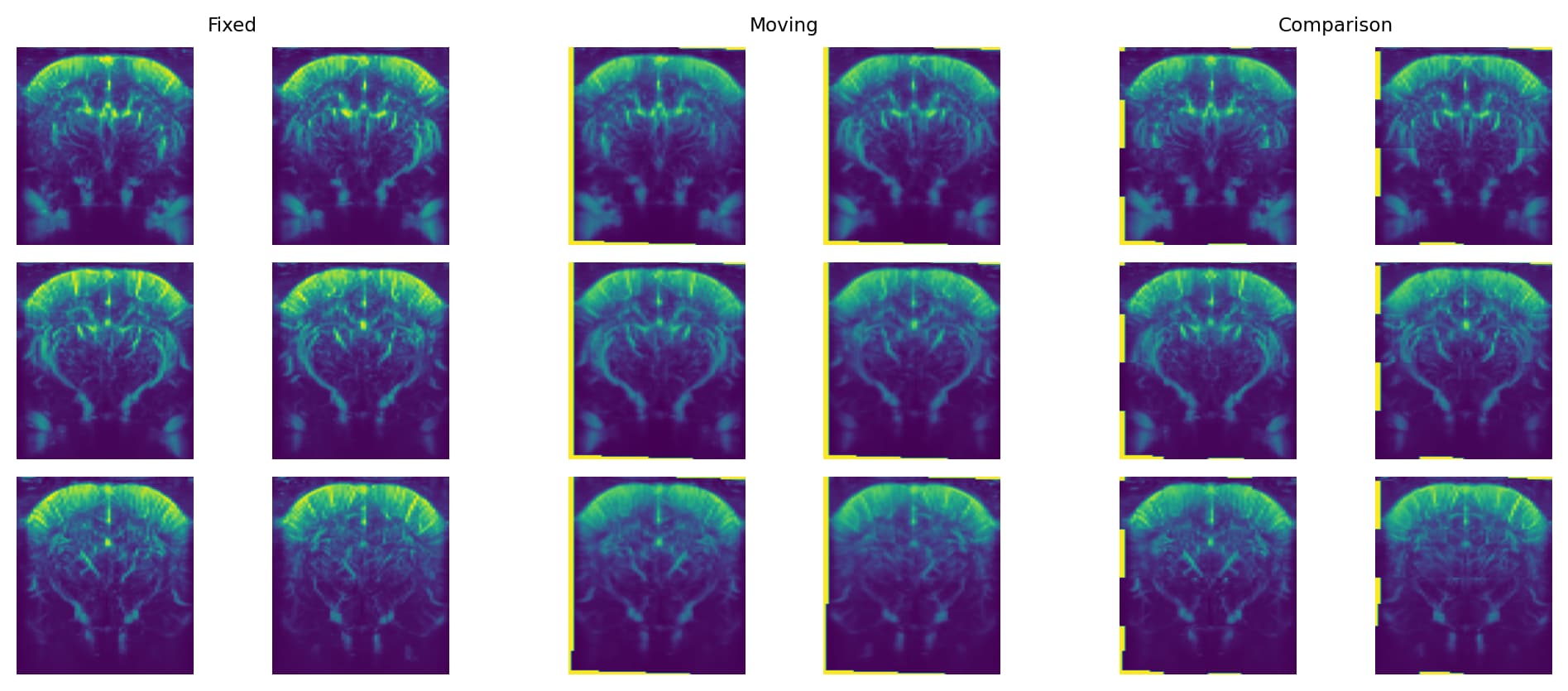
Way better! But where did I go wrong? Why can’t I follow SimpleITK’s documentation on how to compose transforms?
[image.nii](https://discourse.itk.org/uploads/short-url/mJT7AtlMS03byhTO5RJHBn758zH.nii) (429.3 KB)
---
### Author:  [@sdiebolt](https://discourse.itk.org/u/sdiebolt)
#### Post date: [January 18, 2024, 3:39pm UTC](https://discourse.itk.org/t/how-do-you-compose-transforms-after-registration-to-perform-resampling/6401/3 "2024-01-18T15:39:55Z")
One final point that confuses me even more: the documentation of `sitk.CompositeTransform` reads:
> The only parameters of the transform at the back of the queue are exposed and optimizable for registration.
Also,
> Transforms are added via [AddTransform()](https://simpleitk.org/doxygen/latest/html/classitk_1_1simple_1_1CompositeTransform.html#a24f967744063024d165afb60ebef0dad). This adds the transforms to the back of the queue.
If we go back to my initial message and SimpleITK’s way of creating the composite transform after registration:
```python
composite_transform = CompositeTransform(registration_method.GetInitialTransform())
composite_transform.AddTransform(registration_method.GetMovingInitialTransform())
composite_transform.AddTransform(registration_method.GetFixedInitialTransform().GetInverse())
```
We see a problem here. If I had created this composite transform myself _before_ registration and passed it as initial transform, the fixed initial transform would get optimized since it was added last and is therefore at the back of the queue!
Now I’m even more at a loss. Could someone please help me solve my misunderstandings?
---
### Author:  [@sdiebolt](https://discourse.itk.org/u/sdiebolt)
#### Post date: [January 22, 2024, 9:32am UTC](https://discourse.itk.org/t/how-do-you-compose-transforms-after-registration-to-perform-resampling/6401/4 "2024-01-22T09:32:13Z")
After some further research, I think there might be an error in most of SimpleITK’s documentation and courses: the order of transform composition after registration is wrong. It was actually already noticed by the two Discourse posts I linked above ([here](https://discourse.itk.org/t/is-order-of-transforms-in-a-composite-transform-reversed-relative-to-transform-order-during-registration/3829) and [here](https://discourse.itk.org/t/image-registration-method-displacement-1-example-composite-transform-order/3920)). I’ve opened an issue on [SimpleITK’s repo](https://github.com/SimpleITK/SimpleITK/issues/2043) about this error.
---
### Author:  [@blowekamp](https://discourse.itk.org/u/blowekamp)
#### Post date: [January 23, 2024, 3:45pm UTC](https://discourse.itk.org/t/how-do-you-compose-transforms-after-registration-to-perform-resampling/6401/5 "2024-01-23T15:45:07Z")
In the above example does the following also result in good visual results:
```auto
composite_transform = sitk.CompositeTransform(
[
registration_method.GetMovingInitialTransform(),
optimized_transform,
registration_method.GetFixedInitialTransform().GetInverse(),
]
)
```
---
### Author:  [@sdiebolt](https://discourse.itk.org/u/sdiebolt)
#### Post date: [January 23, 2024, 3:59pm UTC](https://discourse.itk.org/t/how-do-you-compose-transforms-after-registration-to-perform-resampling/6401/6 "2024-01-23T15:59:40Z")
This gives even better results. Actually, I was still a bit confused about the correct ordering of transforms when I wrote my initial post, but the order you propose, i.e.
```python
composite_transform = sitk.CompositeTransform(
[
registration_method.GetMovingInitialTransform(),
optimized_transform,
registration_method.GetFixedInitialTransform().GetInverse(),
]
)
```
is actually the correct one, since it corresponds to T\_\text{m}\circ T\_\text{opt}\circ T^{-1}\_\text{f}, which is the order described in ITK’s book. The one I used in my example above, i.e.
```python
composite_transform = sitk.CompositeTransform(
[
registration_method.GetFixedInitialTransform().GetInverse(),
registration_method.GetMovingInitialTransform(),
optimized_transform,
]
)
```
corresponds to T^{-1}\_\text{f}\circ T\_\text{m}\circ T\_\text{opt} and does not really make sense. It works because the fixed initial transform T\_\text{f} is only a small translation, but it would fail if `fixed_initial_transform` was set to something more complex (ie. scaling and/or rotation).
---
### Author:  [@sdiebolt](https://discourse.itk.org/u/sdiebolt)
#### Post date: [January 23, 2024, 4:10pm UTC](https://discourse.itk.org/t/how-do-you-compose-transforms-after-registration-to-perform-resampling/6401/7 "2024-01-23T16:10:11Z")
For completeness, here’s a few examples using the following initial transforms, both fixed and moving containing zooms and translations:
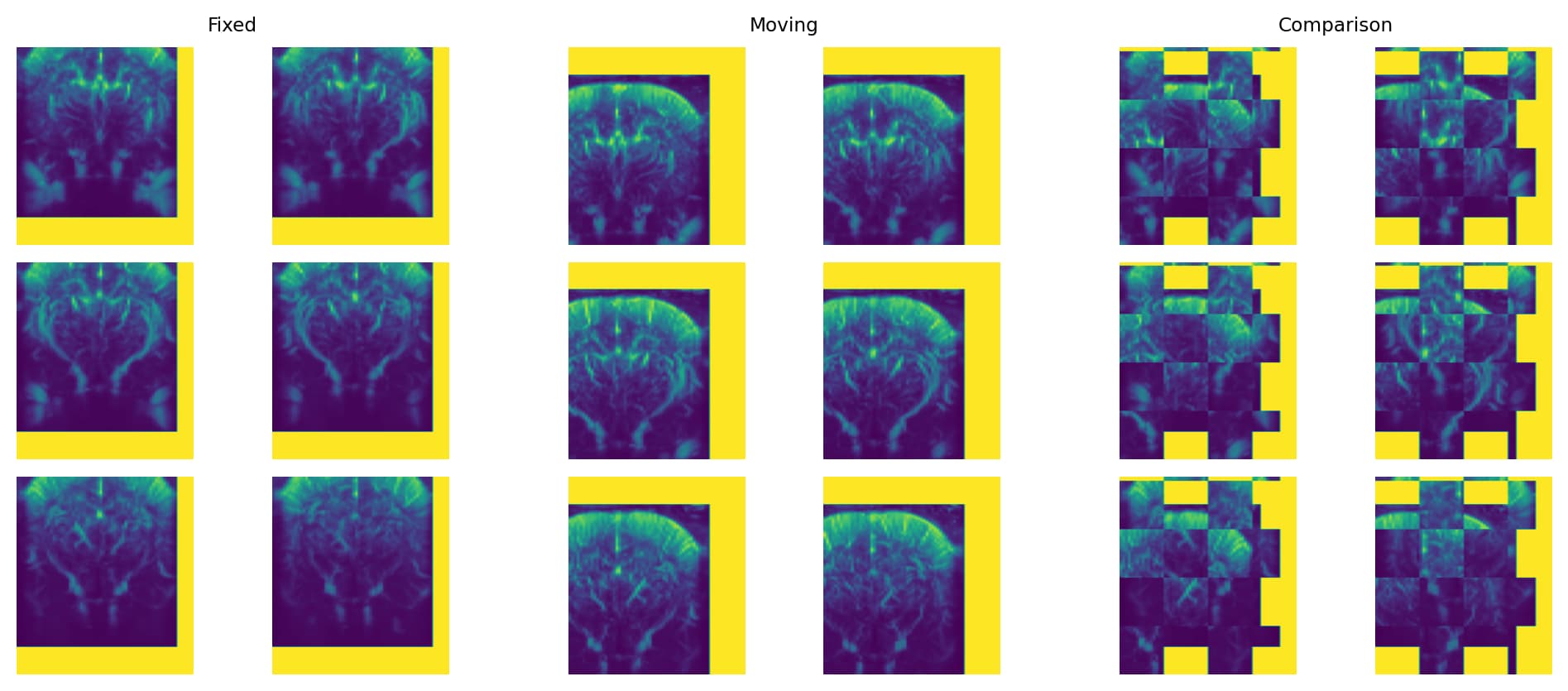
The registration is still successful with a final metric of -0.77.
Composition using T\_\text{opt}\circ T\_\text{m}\circ T\_\text{f}^{-1}, i.e. as specified in [SimpleITK’s docs](https://simpleitk.readthedocs.io/en/master/registrationOverview.html#transforms-and-image-spaces) leads to:
```python
composite_transform = sitk.CompositeTransform(
[
optimized_transform,
registration_method.GetMovingInitialTransform(),
registration_method.GetFixedInitialTransform().GetInverse(),
]
)
```
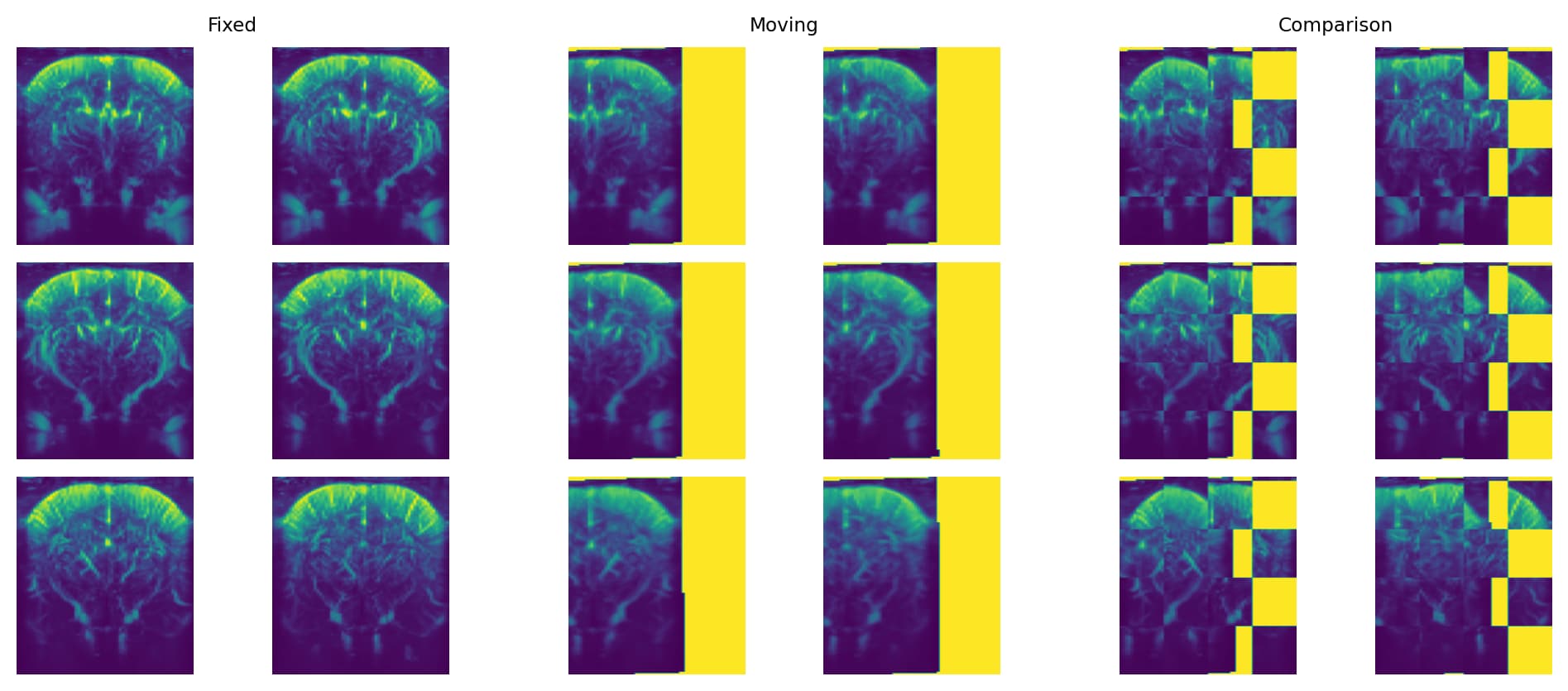
Composition like my previous example using T\_\text{f}^{-1}\circ T\_\text{m}\circ T\_\text{opt}, which does not really make sense, leads to
```python
composite_transform = sitk.CompositeTransform(
[
registration_method.GetFixedInitialTransform().GetInverse(),
registration_method.GetMovingInitialTransform(),
optimized_transform
]
)
```
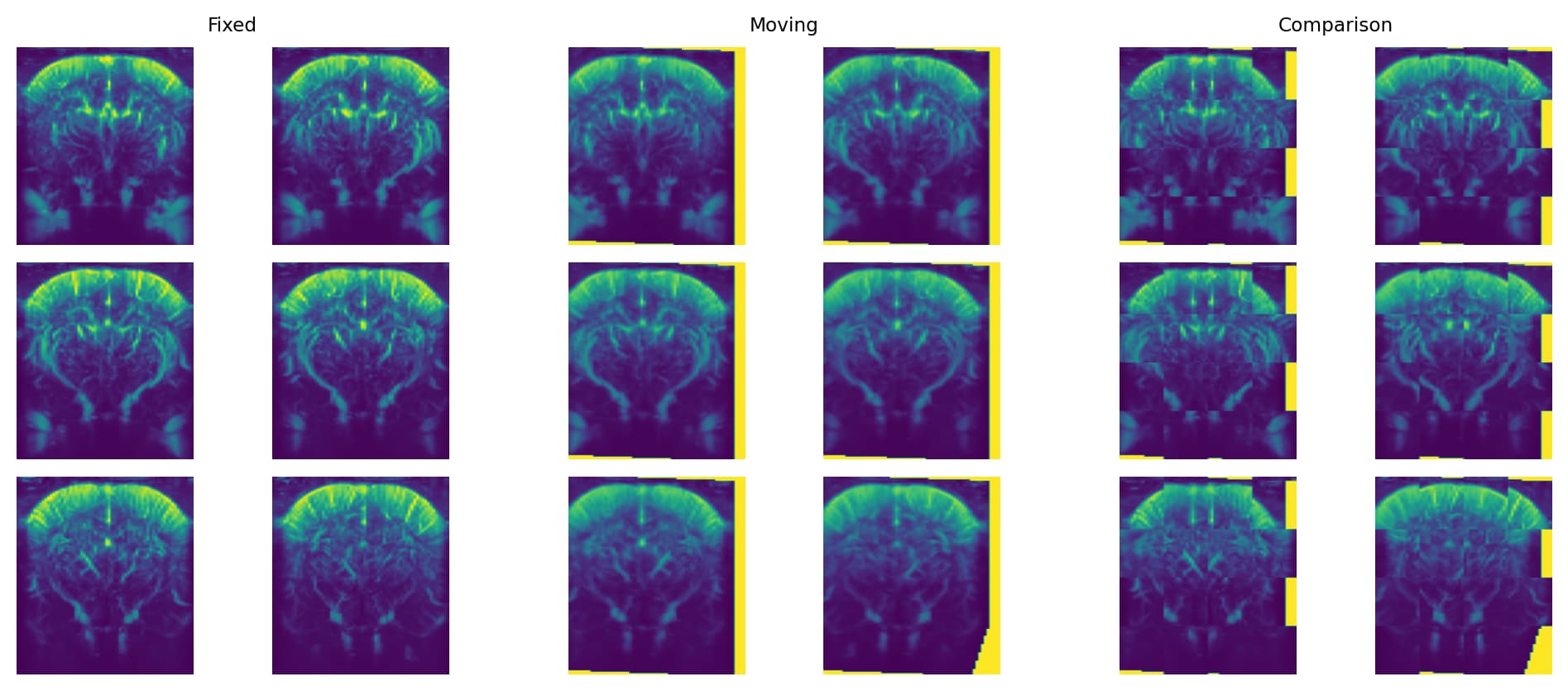
And composition using T\_\text{m}\circ T\_\text{opt}\circ T\_\text{f}^{-1}, i.e. like you proposed (and given in ITK’s book 2, page 208), leads to
```python
composite_transform = sitk.CompositeTransform(
[
registration_method.GetMovingInitialTransform(),
optimized_transform,
registration_method.GetFixedInitialTransform().GetInverse(),
]
)
```
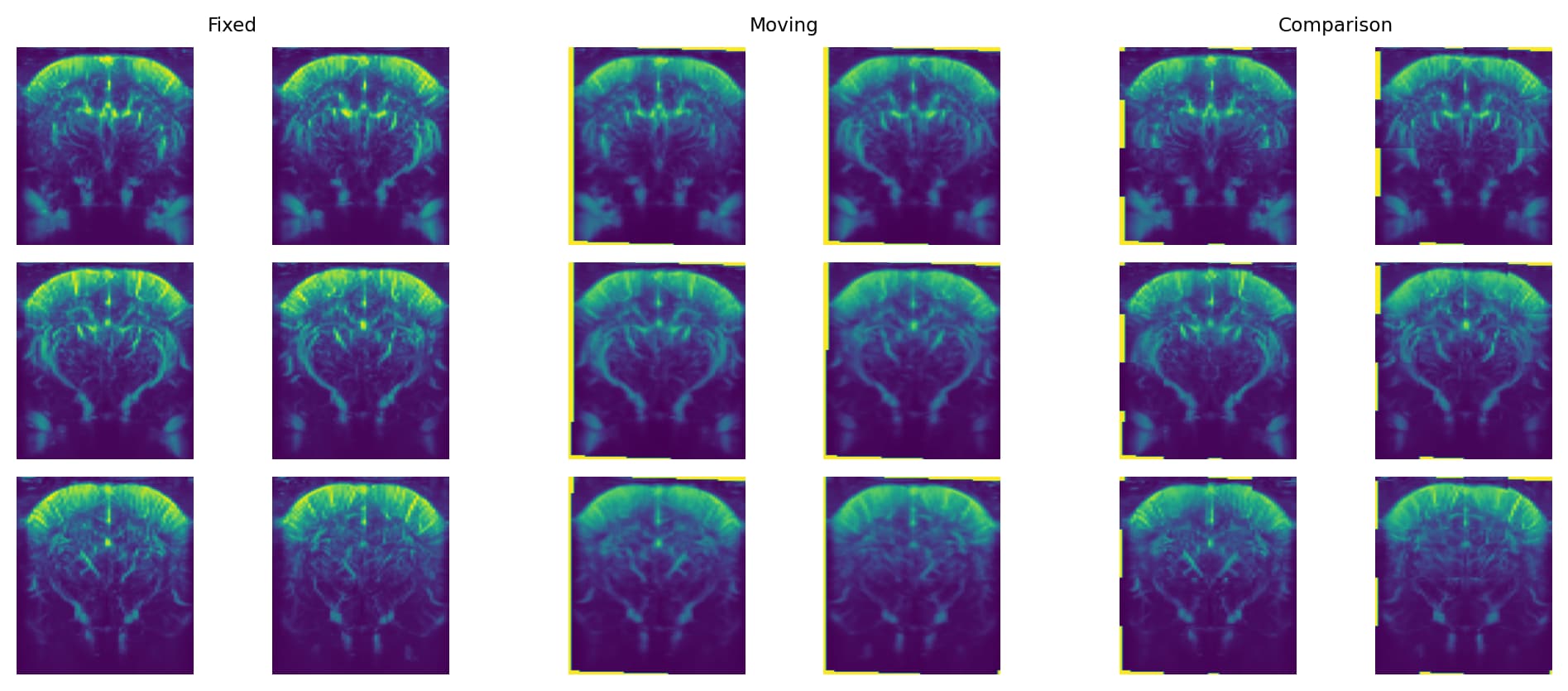
The latter seems to me like the correct resampling.