# Hello Wasm World!
**URL:** https://discourse.itk.org/t/hello-wasm-world/5617
**Category:** Engineering
**Tags:** itk-wasm
**Created:** [January 9, 2023, 4:19am UTC](https://discourse.itk.org/t/hello-wasm-world/5617 "2023-01-09T04:19:12Z")
**Posts on this page:** 1
**Page:** 1
### Author:  [@matt.mccormick](https://discourse.itk.org/u/matt.mccormick)
#### Post date: [January 9, 2023, 4:19am UTC](https://discourse.itk.org/t/hello-wasm-world/5617/1 "2023-01-09T04:19:12Z")
In modern computing, the [Web Platform](https://en.wikipedia.org/wiki/Web_platform) has transformed _web browsers_ into a **powerful** and **accessible** _application interface_. Applications built on open web standards work, with no installation, across operating system and hardware platforms. [WebAssembly](https://en.wikipedia.org/wiki/WebAssembly), also known as _Wasm_, is a portable, binary format for high-performance applications on the web. Wasm has additional properties critical for the web: tiny binary sizes and strong, security-driven sandboxed execution. Wasm’s capabilities became even more universal with with the creation of the [WebAssembly System Interface, WASI](https://github.com/WebAssembly/WASI), open standard. WASI enables Wasm to run outside the browser in contexts such as the command line, embedded environments, and within higher level programming languages.
[_itk-wasm_](https://wasm.itk.org) combines [the Insight Toolkit (ITK)](https://www.itk.org/) and WebAssembly to enable _high-performance spatial analysis_ in a web browser, Node.js, and reproducible execution across programming languages and hardware architectures.
In this post, adapted from itk-wasm’s documentation, we provide a C++ Wasm [Hello World](https://en.wikipedia.org/wiki/%22Hello,_World!%22_program) tutorial. At the end of this tutorial you will have built and executed C++ code to Wasm for standalone execution on the command line and in the browser.
Let’s get started! 🚀
## Preliminaries
Before getting started, make sure [Node.js](https://nodejs.org/en/download/) and [Docker](https://docs.docker.com/install/) are installed. On Linux, make sure you can run [`docker` without `sudo`](https://askubuntu.com/questions/477551/how-can-i-use-docker-without-sudo). On Windows, we recommend [WSL 2 with Docker enabled](https://docs.docker.com/desktop/windows/wsl/).
While we recommend following along step-by-step, the complete example can also be found in the [`examples/` directory of the project repository](https://github.com/InsightSoftwareConsortium/itk-wasm/tree/main/examples).
## Write the code
First, let’s create a new directory to house our project.
```sh
mkdir HelloWorld
cd HelloWorld
```
Let’s write some code! Populate _hello.cxx_ with our Hello World program:
```c++
#include
int main() {
std::cout << "Hello Wasm world!" << std::endl;
return 0;
}
```
Next, provide a [CMake](https://cmake.org/) build configuration at _CMakeLists.txt_:
```cmake
cmake_minimum_required(VERSION 3.16)
project(HelloWorld)
add_executable(hello hello.cxx)
```
## Install itk-wasm
We use the `add_executable` command to build executables with itk-wasm. The [Emscripten](https://kripken.github.io/emscripten-site/) and [WASI](https://github.com/WebAssembly/wasi-sdk) toolchains along with itk-wasm build and execution configurations are contained in itk-wasm [dockcross](https://github.com/dockcross/dockcross) Docker images invoked by the itk-wasm command line interface (CLI). Note that the same code can also be built and tested with native operating system toolchains. This is useful for development and debugging.
Build the program with the itk-wasm CLI, `itk-wasm`. This is shipped with the `itk-wasm` Node.js package. First install _itk-wasm_ with the Node Package Manager, `npm`, the CLI that ships with Node.js.
```sh
# Initialize an empty project in the current directory
❯ npm init --yes
❯ npm install itk-wasm@1.0.0-b.70
```
## Run on the command line
Build the project with the WASI `itkwasm/wasi` toolchain in the `./wasi-build/` directory:
```sh
❯ npx itk-wasm -i itkwasm/wasi -b ./wasi-build/ build
```
A `hello.wasi.wasm` WebAssembly binary is built in the `./wasi-build/` directory.
```sh
❯ ls wasi-build
build.ninja CMakeFiles libwasi-exception-shim.a
cmake_install.cmake hello.wasi.wasm
```
Execute the binary with the `run` `itk-wasm` subcommand.
```sh
❯ npx itk-wasm -b ./wasi-build/ run hello.wasi.wasm
Hello Wasm world!
```
Congratulations! You just executed a C++ program compiled to WebAssembly. 🎉
The binary can also be executed with other [WASI runtimes](https://github.com/mbasso/awesome-wasm#non-web-embeddings).
## Run in the browser
For Node.js or the Browser, build the project with the default [Emscripten](https://emscripten.org/) toolchain.
```sh
❯ npx itk-wasm -b ./emscripten-build build
```
The same Emscripten Wasm module can be executed in a web browser.
Create an HTML file that will call the Wasm module through JavaScript and display
its output in the HTML DOM:
```html
itk-wasm Browser Hello World!
```
Serve the web page and Wasm module with an http server:
```sh
❯ npm install http-server
❯ npx http-server .
```
And point your browser to `http://127.0.0.1:8080/`.
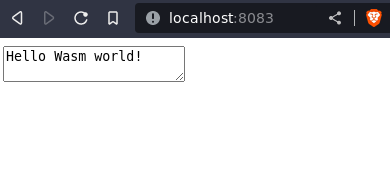
Congratulations! You just executed a C++ program in your web browser. 🎉
## What’s Next
Well done!
As you build more advanced C++ projects into WebAssembly, you will find that many CMake-configured projects will _just work_ with [itk-wasm](https://wasm.itk.org) since it handles details required for CMake `try_run` commands, C++ exception handling, optimization of Wasm binary size, etc.
In the next tutorial, we will introduces itk-wasm’s ability to elegantly transform standalone C++ command line programs into powerful Wasm modules with a simple, efficient interface.