# Edit a segmentation programatically in simpleitk
**URL:** https://discourse.itk.org/t/edit-a-segmentation-programatically-in-simpleitk/4512
**Category:** Algorithms
**Tags:** segmentation, simpleitk
**Created:** [October 19, 2021, 6:27am UTC](https://discourse.itk.org/t/edit-a-segmentation-programatically-in-simpleitk/4512 "2021-10-19T06:27:21Z")
**Posts on this page:** 7
**Page:** 1
### Author:  [@kliron](https://discourse.itk.org/u/kliron)
#### Post date: [October 19, 2021, 6:27am UTC](https://discourse.itk.org/t/edit-a-segmentation-programatically-in-simpleitk/4512/1 "2021-10-19T06:27:21Z")
Hello,
I’m very new to itk/simpleitk. What I need to do is:
1. Segment a volume in an image A (I do this in 3D Slicer, manually).
2. In simpleitk, apply the segmentation in another image, B (assume A and B are different frames in a 4D series with no movement between so no registration is needed)
3. Compare the segmented volumes from A and B voxel by voxel and depending on certain properties of their intensities, either keep or remove the corresponding voxel from the initial segmentation.
My questions are:
a) How do I use a segmentation to select a specific volume from a larger volume? I can load the nrrd file as a SimpleITK.Image object and visualise it. How do I “apply” it on the new volume to extract a new sub-volume? (sorry if this is a very basic question)
b) How do I edit a segmentation by removing specific voxels programatically?
If these are covered in an existing tutorial, please point me to the right resource.
---
### Author:  [@zivy](https://discourse.itk.org/u/zivy)
#### Post date: [October 19, 2021, 1:59pm UTC](https://discourse.itk.org/t/edit-a-segmentation-programatically-in-simpleitk/4512/2 "2021-10-19T13:59:20Z")
Hello @kliron,
This is more of a numpy answer, but hopefully this does what you were thinking of (not sure):
```auto
impor SimpleITK as sitk
import numpy as np
#Potentially resample image_b onto image_'s grid
#image_b = sitk.Resample(image_b, image_a)
#image_a_view = image_a.GetArrayViewFromImage(image_a)
#image_b_view = image_b.GetArrayViewFromImage(image_b)
#segmentation_arr = segmentation.GetArrayFromImage(segmentation)
image_a_view = np.array([[2,3],[4,5]])
image_b_view = np.array([[6,6],[7,7]])
segmentation_arr = np.array([[0,1],[1,0]])
mask_indexes = list(zip(*np.where(segmentation_arr == 1)))
remove_condition = list(np.logical_and(image_a_view[segmentation_arr==1]>2,
image_b_view[segmentation_arr==1]==6))
for mi,rc in zip(mask_indexes, remove_condition):
if rc:
segmentation_arr[mi] = 0
new_segmentation = sitk.GetImageFromArray(segmentation_arr)
new_segmentation.CopyInformation(segmentation)
```
---
### Author:  [@kliron](https://discourse.itk.org/u/kliron)
#### Post date: [October 19, 2021, 7:42pm UTC](https://discourse.itk.org/t/edit-a-segmentation-programatically-in-simpleitk/4512/3 "2021-10-19T19:42:08Z")
Thank you Ziv, I will try to implement this approach. I am still unclear on how to extract a sub-volume from the initial 3D volume by using a segmentation. I looked into the RegionOfInterestImageFilter but if I understand correctly this can only define rectangular ROIs and that will not do for what I need to do.
---
### Author:  [@zivy](https://discourse.itk.org/u/zivy)
#### Post date: [October 19, 2021, 8:38pm UTC](https://discourse.itk.org/t/edit-a-segmentation-programatically-in-simpleitk/4512/4 "2021-10-19T20:38:45Z")
Hello @kliron,
What do you mean when you say “extract a sub-volume”?
As the basic structure of an image is a rectangular grid, no matter what you want, you’ll get a rectangle 😉 . The question is, what do you want that rectangle to be and what do you want it to contain. You can easily zero out all of the pixels/voxels outside the mask.
It would help if you provided some drawings to illustrate what it is you are trying to do.
---
### Author:  [@kliron](https://discourse.itk.org/u/kliron)
#### Post date: [October 20, 2021, 8:19am UTC](https://discourse.itk.org/t/edit-a-segmentation-programatically-in-simpleitk/4512/5 "2021-10-20T08:19:45Z")
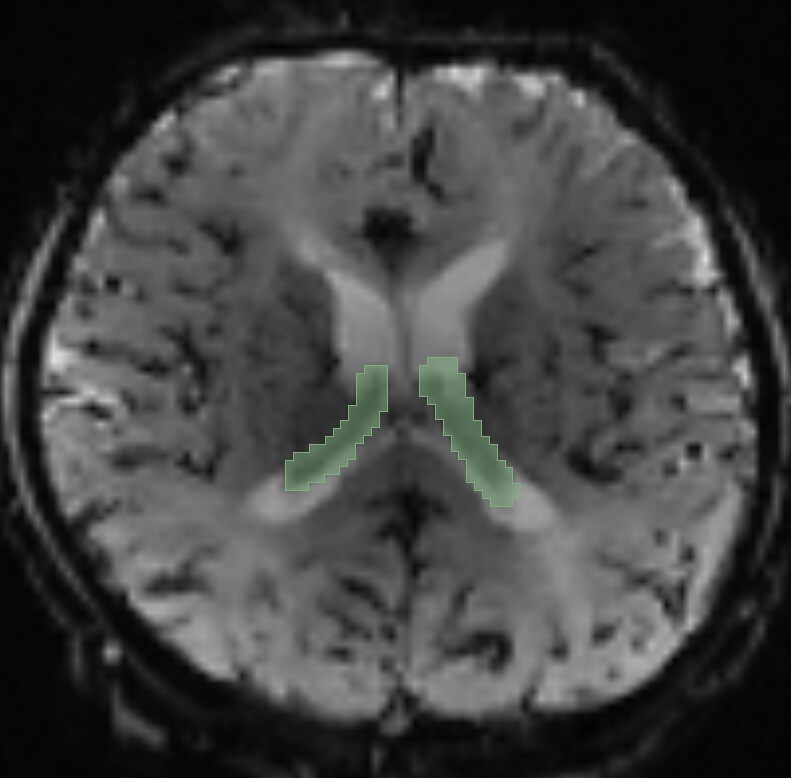
Here is an example.
This is a slice of a 3D volume where I’ve segmented the choroid plexus in slicer. From python and simpleitk, I load the segmentation and the original volume and create a LabelOverlay which results in the image you see below. My goal in the first part of my problem is to **get the actual voxel intensities of the choroid plexus** from the initial image as a separate volume that does not contain anything else but those voxels. I tried to go by way of defining a `shape` by using my segmentation as the input of LabelShapeStatisticsImageFilter and then getting a RegionOfInterest using the initial volume and this shape but what I get is a rectangular volume that contains brain tissue, not plexus.
Here is one single slice from the overlay volume:
Here is my code:
```auto
segm = sitk.ReadImage(os.path.join(segmentations_dir, 'Plexus.nrrd'))
shape = sitk.LabelShapeStatisticsImageFilter()
shape.ComputeOrientedBoundingBoxOn()
shape.Execute(segm)
result = sitk.RegionOfInterest(orig, shape.GetRegion())
```
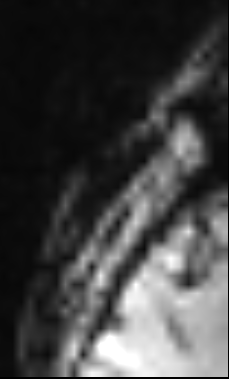
The resulting region not only is a rectangular volume (not the complex anatomy I segmented), it seems to also be completely wrong, does not contain any of the plexus volumes on either side, just skull and some brain parenchyma. Here is a slice:
---
### Author:  [@zivy](https://discourse.itk.org/u/zivy)
#### Post date: [October 20, 2021, 1:28pm UTC](https://discourse.itk.org/t/edit-a-segmentation-programatically-in-simpleitk/4512/6 "2021-10-20T13:28:48Z")
Hello @kliron,
Please try this (don’t forget to set the `label_of_interest` to the correct value):
```auto
segm = sitk.ReadImage(os.path.join(segmentations_dir, 'Plexus.nrrd'))
shape = sitk.LabelShapeStatisticsImageFilter()
shape.Execute(segm)
bounding_box = shape.GetBoundingBox(label_of_interest_value)
# The bounding box's first "dim" entries are the starting index and last "dim" entries the size
result = sitk.RegionOfInterest(orig, bounding_box[int(len(bounding_box)/2):], bounding_box[0:int(len(bounding_box)/2)])
```
The code above will yield an image that bounds the segmentation, crop-to-segmentation.
If you just want to **get the actual voxel intensities of the choroid plexus** , a list of the intensity values, then you don’t need the operation above. Just use the code previously posted (i.e. `image_a_view[segmentation_arr==label_of_interest_value]` will give you the list of values).
---
### Author:  [@kliron](https://discourse.itk.org/u/kliron)
#### Post date: [October 20, 2021, 7:07pm UTC](https://discourse.itk.org/t/edit-a-segmentation-programatically-in-simpleitk/4512/7 "2021-10-20T19:07:57Z")
Hello @Ziv,
Your solution works perfectly 🙂. Thank you!