# Create Elegant C++ Spatial Processing Pipelines in WebAssembly
**URL:** https://discourse.itk.org/t/create-elegant-c-spatial-processing-pipelines-in-webassembly/5692
**Category:** Engineering
**Tags:** cli11, webassembly, itk-wasm
**Created:** [February 10, 2023, 9:08pm UTC](https://discourse.itk.org/t/create-elegant-c-spatial-processing-pipelines-in-webassembly/5692 "2023-02-10T21:08:17Z")
**Posts on this page:** 1
**Page:** 1
### Author:  [@matt.mccormick](https://discourse.itk.org/u/matt.mccormick)
#### Post date: [February 10, 2023, 9:08pm UTC](https://discourse.itk.org/t/create-elegant-c-spatial-processing-pipelines-in-webassembly/5692/1 "2023-02-10T21:08:17Z")
###### By: Matt McCormick , Mary Elise Dedicke , Henry Schreiner ,
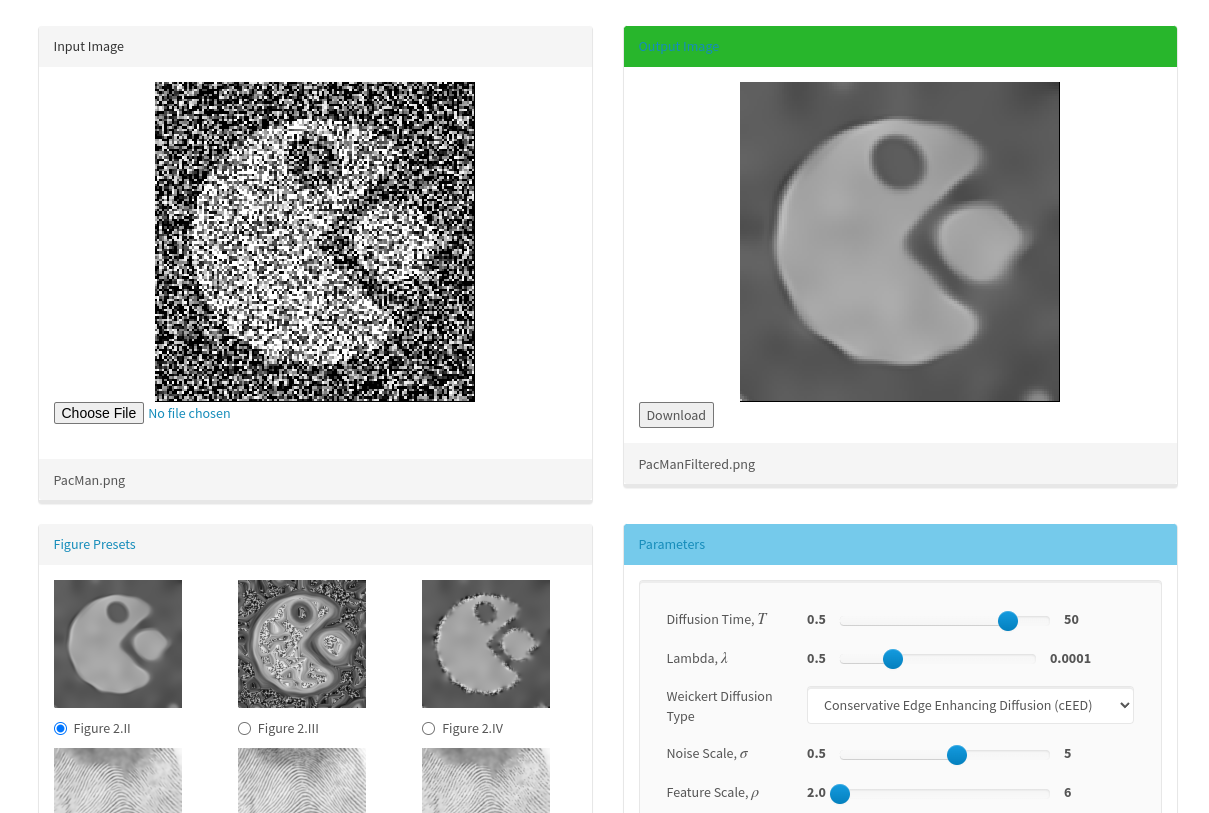
[WebAssembly](https://webassembly.org/)’s origins date back to [Alon Zakai](https://emscripten.org)’s incredible effort to build C++ to JavaScript. In 2015, we demonstrated the power of this technology to make scientific computational sustainable and accessible. [Try it](https://insightsoftwareconsortium.github.io/ITKAnisotropicDiffusionLBR/) – reproducibility is still possible all these years later, with no installation (or maintenance!) required.
[](https://insightsoftwareconsortium.github.io/ITKAnisotropicDiffusionLBR/)
_An interactive, accessible and sustainable open science publication on anisotropic diffusion where C++ is built into JavaScript for browser execution._
Since that time, Emscripten’s capabilities have advanced and been standardized with WebAssembly (Wasm) in the [Web Platform](https://en.wikipedia.org/wiki/Web_platform). Moreover, Wasm’s scope has expanded dramatically with the advent of the [WebAssembly System Interface, WASI](https://github.com/WebAssembly/WASI), and [The Component Model](https://github.com/WebAssembly/component-model).
However, there was a **significant gap** in capabilites for research software developers who aimed to create **data and computationally intense scientific processing pipelines** for applications like spatial analysis and visualization. Namely,
- **An elegant, simple way to write processing pipelines in C++.**
- Handling of non-trivial spatial data structures (Wasm natively only supports integers and floats 😮).
- Easy-to-use, reproducible tools to build Wasm modules.
- Safe and efficient memory handling.
- Parallelism, whether multi-module, multi-threading, or SIMD.
- Provide bindings for the command line and functional interfaces for languages like JavaScript, Typescript, Python, Rust, C#, R, and Java.
- Debugging support.
In this post, adapted from [itk-wasm](https://wasm.itk.org)’s documentation, we provide a C++ Wasm processing pipeline tutorial that demonstrates how we can **write elegant processing pipelines in C++ via itk-wasm’s [CLI11](https://github.com/CLIUtils/CLI11) command line parser, which provides a rich feature set with a simple and intuitive interface**. At the end of this tutorial, you will have built and executed C++ code to Wasm for standalone execution on the command line and in the browser.
[_itk-wasm_](https://wasm.itk.org) combines [the Insight Toolkit (ITK)](https://www.itk.org/) and WebAssembly to enable _high-performance spatial analysis_ in a web browser, Node.js, and reproducible execution across programming languages and hardware architectures.
[CLI11](https://cliutils.github.io/CLI11/book/) provides all the features you expect in a powerful command line parser, with a beautiful, minimal syntax and no dependencies beyond C++11. itk-wasm enhances CLI11 with a `itk::wasm::Pipeline` wrapper to support efficient execution in multiple Wasm contexts, scientific data structures, and lovely colorized help output 🥰.
Let’s get started! 🚀
## 0. Preliminaries
Before starting this tutorial, check out our [Hello Wasm World](https://www.kitware.com/hello-wasm-world/) tutorial.
## 1. Write the code
First, let’s create a new directory to house our project.
```sh
mkdir hello-pipeline
cd hello-pipeline
```
Let’s write some code! Populate _hello-pipeline.cxx_ first with the headers we need:
```cpp
#include "itkPipeline.h"
#include "itkInputImage.h"
#include "itkImage.h"
```
The _itkPipeline.h_ and _itkInputImage.h_ headers come from the itk-wasm _WebAssemblyInterface_ [ITK module](https://www.kitware.com/advance-itk-with-modules/).
The _itkImage.h_ header is [ITK](https://itk.org)’s standard n-dimensional image data structure.
Next, create a standard `main` C command line interface function and an `itk::wasm::Pipeline`:
```cpp
int main(int argc, char * argv[]) {
// Create the pipeline for parsing arguments. Provide a description.
itk::wasm::Pipeline pipeline("hello-pipeline", "A hello world itk::wasm::Pipeline", argc, argv);
return EXIT_SUCCESS;
}
```
The `itk::wasm::Pipeline` extends the [CLI11 modern C++ command line parser](https://github.com/CLIUtils/CLI11). In addition to all of CLI11’s functionality, `itk::wasm::Pipeline`’s adds:
- Support for execution in Wasm modules along with command line execution
- Support for spatial data structures such as `Image`, `Mesh`, `PolyData`, and `Transform`
- Support for multiple dimensions and pixel types
- Colored help output
Add a standard CLI11 flag to the pipeline:
```cpp
itk::wasm::Pipeline pipeline("hello-pipeline", "A hello world itk::wasm::Pipeline", argc, argv);
bool quiet = false;
pipeline.add_flag("-q,--quiet", quiet, "Do not print image information");
```
Add an input image argument to the pipeline:
```cpp
pipeline.add_flag("-q,--quiet", quiet, "Do not print image information");
constexpr unsigned int Dimension = 2;
using PixelType = unsigned char;
using ImageType = itk::Image;
// Add a input image argument.
using InputImageType = itk::wasm::InputImage;
InputImageType inputImage;
pipeline.add_option("input-image", inputImage,
"The input image")->required()->type_name("INPUT_IMAGE");
```
The `inputImage` variable is populated from the filesystem if built as a native executable or a WASI binary run from the command line. When running in the browser or in a wrapped language, `inputImage` is read from WebAssembly memory without file IO.
Parse the command line arguments with the `ITK_WASM_PARSE` macro:
```cpp
pipeline.add_option("InputImage", inputImage,
"The input image")->required()->type_name("INPUT_IMAGE");
ITK_WASM_PARSE(pipeline);
```
If `-q` or `--quiet` is set, the `quiet` variable will be set to `true`. Missing or invalid arguments will print an error and exit. The `-h` and `--help` flags are automatically generated from pipeline arguments to print usage information.
Finally, run the pipeline:
```cpp
std::cout << "Hello pipeline world!\n" << std::endl;
if (!quiet)
{
// Obtain the itk::Image * from the itk::wasm::InputImage with `.Get()`.
std::cout << "Input image: " << *inputImage.Get() << std::endl;
}
return EXIT_SUCCESS;
```
Next, provide a [CMake](https://cmake.org/) build configuration in _CMakeLists.txt_:
```cmake
cmake_minimum_required(VERSION 3.16)
project(hello-pipeline)
# Use C++17 or newer with itk-wasm
set(CMAKE_CXX_STANDARD 17)
# We always want to build against the WebAssemblyInterface module.
set(itk_components
WebAssemblyInterface
)
# WASI or native binaries
if (NOT EMSCRIPTEN)
# WebAssemblyInterface supports the .iwi, .iwi.cbor itk-wasm format.
# We can list other ITK IO modules to build against to support other
# formats when building native executable or WASI WebAssembly.
# However, this will bloat the size of the WASI WebAssembly binary, so
# add them judiciously.
set(itk_components
WebAssemblyInterface
ITKIOPNG
# ITKImageIO # Adds support for all available image IO modules
)
endif()
find_package(ITK REQUIRED
COMPONENTS ${itk_components}
)
include(${ITK_USE_FILE})
add_executable(hello-pipeline hello-pipeline.cxx)
target_link_libraries(hello-pipeline PUBLIC ${ITK_LIBRARIES})
```
## 2. Create and Run WebAssembly binary
[Build the WASI binary](https://www.kitware.com/hello-wasm-world/):
```sh
npx itk-wasm@1.0.0-b.70 -i itkwasm/wasi build
```
And check the generated help output:
```sh
npx itk-wasm@1.0.0-b.70 run hello-pipeline.wasi.wasm -- -- --help
```
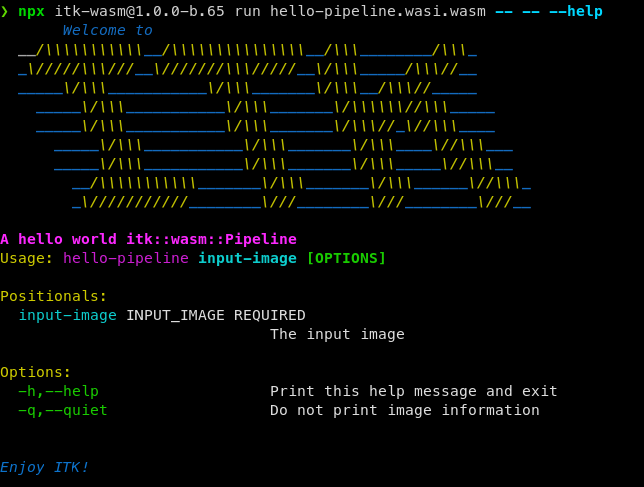
The two `--`'s are to separate arguments for the Wasm module from arguments to the `itk-wasm` CLI and the WebAssembly interpreter.
Try running on an [example image](https://data.kitware.com/api/v1/file/63041ac8f64de9b9501e5a22/download).
```auto
> npx itk-wasm@1.0.0-b.65 run hello-pipeline.wasi.wasm -- -- cthead1.png
Hello pipeline world!
Input image: Image (0x2b910)
RTTI typeinfo: itk::Image
Reference Count: 1
Modified Time: 54
Debug: Off
Object Name:
Observers:
none
Source: (none)
Source output name: (none)
Release Data: Off
Data Released: False
Global Release Data: Off
PipelineMTime: 22
UpdateMTime: 53
RealTimeStamp: 0 seconds
LargestPossibleRegion:
Dimension: 2
Index: [0, 0]
Size: [256, 256]
BufferedRegion:
Dimension: 2
Index: [0, 0]
Size: [256, 256]
RequestedRegion:
Dimension: 2
Index: [0, 0]
Size: [256, 256]
Spacing: [1, 1]
Origin: [0, 0]
Direction:
1 0
0 1
IndexToPointMatrix:
1 0
0 1
PointToIndexMatrix:
1 0
0 1
Inverse Direction:
1 0
0 1
PixelContainer:
ImportImageContainer (0x2ba60)
RTTI typeinfo: itk::ImportImageContainer
Reference Count: 1
Modified Time: 50
Debug: Off
Object Name:
Observers:
none
Pointer: 0x2c070
Container manages memory: true
Size: 65536
Capacity: 65536
```
And with the `--quiet` flag:
```auto
> npx itk-wasm@1.0.0-b.65 run hello-pipeline.wasi.wasm -- -- --quiet cthead1.png
Hello pipeline world!
```
Congratulations! You just executed a C++ pipeline capable of processsing a scientific image in WebAssembly. 🎉
## What’s next
We created a processing pipeline that works with real data – exciting! When creating these pipelines, however, we will sometimes need a more detailed understanding of their execution. In our next post, we will address this need by describing how to debug itk-wasm WASI modules.