# Building GATE with ITKImageIO support
**URL:** https://discourse.itk.org/t/building-gate-with-itkimageio-support/3005
**Category:** Beginner Questions
**Tags:** github, itk-releases, simpleitk
**Created:** [April 24, 2020, 10:35pm UTC](https://discourse.itk.org/t/building-gate-with-itkimageio-support/3005 "2020-04-24T22:35:31Z")
**Posts on this page:** 19
**Page:** 1
### Author:  [@somayehasadi](https://discourse.itk.org/u/somayehasadi)
#### Post date: [April 24, 2020, 10:35pm UTC](https://discourse.itk.org/t/building-gate-with-itkimageio-support/3005/1 "2020-04-24T22:35:31Z")
Dear ITK users
I work with the Monte Carlo based Code of GATE and work on hyperthermia. So I need to use the ITK for running the program related to the optic and thermal output and take the output with the format of .mhd or .hdr.
Unfortunately, after running the program, I take this error:
```nohighlight
terminate called after throwing an instance of 'itk::ImageFileReaderException'
what(): /home/BuildFiles/ITK/InsightToolkit-5.1.0-Source/Modules/IO/ImageBase/include/itkImageFileReader.hxx:136:
Could not create IO object for reading file output/Mobydose-AbsorptionMap.mhd
Tried to create one of the following:
GDCMImageIO
You probably failed to set a file suffix, or
set the suffix to an unsupported type.
Aborted (core dumped)
```
I use three versions of ITK (4.13, 5.0.1 and 5.1), I have installed ITK in a correct way and all the packages have been installed. I compiled the Gate with ITK too.
I don’t know how to solve this problem.
Has any person had the same problem or is there any person who knows this error.
Thank you very much for your reading and suggestion.
Respectfully
Somayeh Asadi
---
### Author:  [@dzenanz](https://discourse.itk.org/u/dzenanz)
#### Post date: [April 24, 2020, 10:41pm UTC](https://discourse.itk.org/t/building-gate-with-itkimageio-support/3005/2 "2020-04-24T22:41:29Z")
You might not be requesting all the IO modules, nor MetaIO specifically. How does your `CMakeLists.txt` look like?
---
### Author:  [@somayehasadi](https://discourse.itk.org/u/somayehasadi)
#### Post date: [April 25, 2020, 11:28am UTC](https://discourse.itk.org/t/building-gate-with-itkimageio-support/3005/3 "2020-04-25T11:28:33Z")
## Dear Zukic Thank you very much for your reply. I downloaded the ITK from the link in bellow: [https://itk.org/ITK/resources/software.html](https://itk.org/ITK/resources/software.html) [https://itk.org/download/](https://itk.org/download/) I followed this instructor to install the downloaded ITK:
First, download the ITK library sources at this address:
[https://itk.org/ITK/resources/software.html](https://itk.org/ITK/resources/software.html)
Unzip and tar the downloaded file:
tar -xzf InsightToolkit-4.10.xx.tar.gz
Move into the InsightToolkit-4.10.xx directory:
cd InsightToolkit-4.10.xx
In this directory, create a bin/ sub-directory:
mkdir bin
Move into the bin/ sub-directory:
cd bin
Run ccmake as follows:
ccmake -DITK\_USE\_REVIEW=ON …
You will obtain the following screen and you need to configure the different options as follows:
```nohighlight
BUILD_EXAMPLES ON
BUILD_TESTING ON
ITKV3_COMPATIBILITY OFF
ITK_BUILD_DEFAULT_MODULES ON
ITK_WRAP_PYTHON OFF
Press 'c' to configure and 'g' to generate the compilation environment.
After this step you will automatically back to the prompt terminal and then, you can launch the compilation:
make -jN (N is the number of processor(s) in your PC)
make install.
-----------------------------------------------------------------------------
```
I enclosed send you the CMakeLists.txt [CMakeLists.txt](https://discourse.itk.org/uploads/short-url/20gwesP1XN1iRhqG560ImBCJZsK.txt) (23.2 KB)
I don’t know what else I should do. I would be so grateful if you do me a favor and provide me with your guidance.
Respectfully
Somayeh Asadi
---
### Author:  [@dzenanz](https://discourse.itk.org/u/dzenanz)
#### Post date: [April 27, 2020, 1:53pm UTC](https://discourse.itk.org/t/building-gate-with-itkimageio-support/3005/4 "2020-04-27T13:53:31Z")
This is ITK’s `CMakeLists.txt`. I meant GATE’s (your program’s) `CMakeLists.txt`.
---
### Author:  [@somayehasadi](https://discourse.itk.org/u/somayehasadi)
#### Post date: [May 1, 2020, 4:52pm UTC](https://discourse.itk.org/t/building-gate-with-itkimageio-support/3005/5 "2020-05-01T16:52:52Z")
Dear Dzenanz
Hope you are well. If you remember last week I asked about the problem for the error related to ITK for running the Gate program. You asked me about CMakeLists.txt.
Because I sent you for ITK you asked me about the CMakeLists.txt for the Gate.
I don’t know why my response was not sent. Since I have still the problem with running my program with Gate, hereby I wanted to send the file again and ask you if you do me a favor and help me to solve this problem. Enclose please find the CMakeLists.txt for Gate.
[CMakeLists.txt](https://discourse.itk.org/uploads/short-url/y3K8beFvn7ZoW5W7GESkOzzDJtt.txt) (12.3 KB)
I would be so grateful if you kindly guide me on how to solve this problem.
Respectfully
Somayeh
---
### Author:  [@dzenanz](https://discourse.itk.org/u/dzenanz)
#### Post date: [May 1, 2020, 5:25pm UTC](https://discourse.itk.org/t/building-gate-with-itkimageio-support/3005/6 "2020-05-01T17:25:39Z")
If you are using `ccmake`, the normal way is to change options, then press `c` to configure, then `g` to generate, then maybe `q` to quit. Then run `make` or `ninja`, depending on your chosen generator. Alternatively, you could use `cmake` (not `ccmake`) or `cmake-gui`. See [a tutorial on using CMake](https://preshing.com/20170511/how-to-build-a-cmake-based-project/).
---
### Author:  [@somayehasadi](https://discourse.itk.org/u/somayehasadi)
#### Post date: [May 1, 2020, 6:26pm UTC](https://discourse.itk.org/t/building-gate-with-itkimageio-support/3005/7 "2020-05-01T18:26:05Z")
Thank you very much for your reply, I use ccmake and did exactly what you said.
Is there anything else that you think may solve this problem if I do?
Thank you again for you time in advance
Best
---
### Author:  [@phcerdan](https://discourse.itk.org/u/phcerdan)
#### Post date: [May 1, 2020, 6:46pm UTC](https://discourse.itk.org/t/building-gate-with-itkimageio-support/3005/8 "2020-05-01T18:46:04Z")
```auto
IF(GATE_USE_RTK OR GATE_USE_ITK)
SET(ITK_MINIMAL_VERSION 4.9)
SET(ITK_COMPONENTS ITKIOImageBase;ITKIOGDCM;ITKThresholding;ITKFFT;ITKImageCompose;ITKSmoothing)
```
You are not enabling `ITKIOMeta` in the set of `ITK_COMPONENTS`
Add it:
```auto
SET(ITK_COMPONENTS ITKIOImageBase;ITKIOGDCM;ITKIOMeta;ITKThresholding;ITKFFT;ITKImageCompose;ITKSmoothing)
```
---
### Author:  [@blowekamp](https://discourse.itk.org/u/blowekamp)
#### Post date: [May 1, 2020, 6:55pm UTC](https://discourse.itk.org/t/building-gate-with-itkimageio-support/3005/9 "2020-05-01T18:55:57Z")
You need to add the `ITKImageIO` module to automatically register the ImageIO factories.
---
### Author:  [@phcerdan](https://discourse.itk.org/u/phcerdan)
#### Post date: [May 1, 2020, 7:02pm UTC](https://discourse.itk.org/t/building-gate-with-itkimageio-support/3005/10 "2020-05-01T19:02:45Z")
> [@blowekamp](#):
>
> You need to add the `ITKImageIO` module to automatically register the ImageIO factories.
@somayehasadi You would need to increase the minimun ITK version to 4.13 to add ITKImageIO as @blowekamp suggested, but it is indeed much better than adding individual IO modules.
```cmake
SET(ITK_COMPONENTS ITKImageIO;ITKThresholding;ITKFFT;ITKImageCompose;ITKSmoothing)
```
---
### Author:  [@somayehasadi](https://discourse.itk.org/u/somayehasadi)
#### Post date: [May 3, 2020, 11:11am UTC](https://discourse.itk.org/t/building-gate-with-itkimageio-support/3005/11 "2020-05-03T11:11:04Z")
Thank you very very much for your response and time.
I have downloaded the ITK version 4.13 from the link in bellow:
[https://itk.org/ITK/resources/software.html](https://itk.org/ITK/resources/software.html)
In the folder of the source, there are ITK modules so I don’t know what anything else could be wrong in this regard. Maybe I didn’t understand well because I thought when you download the full package of ITK and install it you will have the modules in the source folder and I should say that I also check in the folder of source and found there is ITKImageIO inside. I would be so grateful if you kindly let me know and guide me if I am making a mistake or misunderstood.
I am eagerly waiting to have your comment.
Respectfully
Somayeh
---
### Author:  [@phcerdan](https://discourse.itk.org/u/phcerdan)
#### Post date: [May 3, 2020, 6:51pm UTC](https://discourse.itk.org/t/building-gate-with-itkimageio-support/3005/12 "2020-05-03T18:51:51Z")
The problem is in YOUR project `CMakeLists.txt` (GATE) using ITK, not in ITK itself. Please re-read the answers.
You will need to **re-build** your project (GATE) with the modification of CMakeLists.txt suggested before:
```auto
SET(ITK_COMPONENTS ITKImageIO;ITKThresholding;ITKFFT;ITKImageCompose;ITKSmoothing)
```
And run again the script reading the `.mhd` image.
You are doing the build of ITK well, so no worries about it.
But you are using that ITK recently built in other project (GATE), you have to modify GATE `CMakeLists.txt` to read your `mhd` image. And re-build GATE after the modification.
---
### Author:  [@somayehasadi](https://discourse.itk.org/u/somayehasadi)
#### Post date: [May 8, 2020, 9:22am UTC](https://discourse.itk.org/t/building-gate-with-itkimageio-support/3005/13 "2020-05-08T09:22:51Z")
Dear Pablo
Thank you very very much for your clear explanation. According to the instructor for installing the Gate and ITK that I followed it from the link in bellow:
[http://wiki.opengatecollaboration.org/index.php/Compilation\_Instructions\_V8.0](http://wiki.opengatecollaboration.org/index.php/Compilation_Instructions_V8.0)
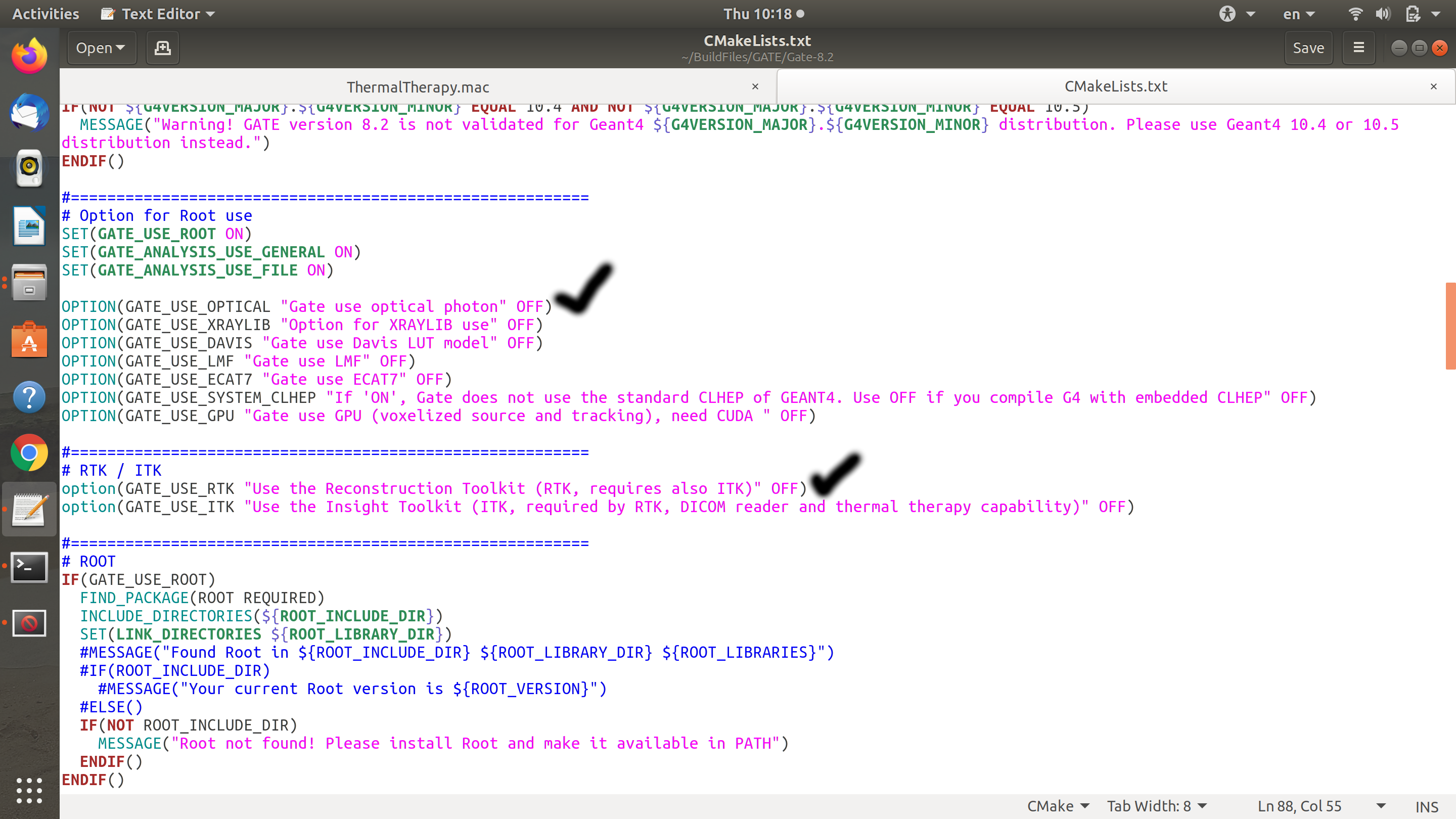
I installed the Gate then installed the ITK and compile the Gate with that. I checked the CMakeList.txt for Gate and you are right I saw the part related to ITK is set to OFF.
I enclosed send you an image that can show you what I am mean.
Although when I was installing and compiling the Gate, there is an icon in which we can set the part for ITK to ON and I did it, after installing the Gate and then after installing the ITK, when I check the CMakeList of GATE I find it still being set to off.
I wanted to consult with you whether you think it might be because of installing the Gate first then installing the ITK? This order recommends in the instructor but It might be the opposite.
I would be so grateful if you kindly provide me with your suggestion and idea.
Respectfully
Somayeh
---
### Author:  [@phcerdan](https://discourse.itk.org/u/phcerdan)
#### Post date: [May 8, 2020, 9:48am UTC](https://discourse.itk.org/t/building-gate-with-itkimageio-support/3005/14 "2020-05-08T09:48:22Z")
Hi @somayehasadi, the `CMakeList.txt` is fixed, it does not change when you build/install the project.
To see the options enabled for your current build of Gate, go to your build folder of `Gate` and type `ccmake .` or open `CMakeCache.txt` file in an editor, you can find it in the build folder as well.
This question is more about basic usage of `CMake` now, I would recommend you ask your instructor, or read some docs about `CMake` usage.
If you decide that GATE uses ITK, you need to build ITK first. It seems you have done it already.
```bash
# Build ITK (if not done already)
# Modify CMakeLists.txt in Gate source folder:
# SET(ITK_COMPONENTS ITKImageIO;ITKThresholding;ITKFFT;ITKImageCompose;ITKSmoothing)
cd /path/to/build_gate
cmake -DGATE_USE_ITK:BOOL=ON -DITK_DIR:PATH=/path/to/build_itk /path/to/gate_source_dir
# You can also use ccmake . and choose options with a graphical interface.
```
If you have installed ITK in your system, you might not need the `ITK_DIR` option.
But, again, read about how CMake works and ask your instructor.
A final note, could you please change the title of this post to: `Building GATE with ITKImageIO support` or similar. Thanks!
---
### Author:  [@somayehasadi](https://discourse.itk.org/u/somayehasadi)
#### Post date: [May 9, 2020, 6:26pm UTC](https://discourse.itk.org/t/building-gate-with-itkimageio-support/3005/15 "2020-05-09T18:26:27Z")
Dear Pablo
I really appreciate the time you took to explain by details and it was so good. I will try to follow this guidance and check if I can solve the problem. I will inform you here soon.
For sure I will change the title.
Thank you for your time and consideration.
Best
Somayeh
---
### Author:  [@somayehasadi](https://discourse.itk.org/u/somayehasadi)
#### Post date: [May 9, 2020, 7:00pm UTC](https://discourse.itk.org/t/building-gate-with-itkimageio-support/3005/16 "2020-05-09T19:00:39Z")
Dear Pablo
Sorry if I send you message again, according to your last message, you asked me to change the title of this post, when I wanted to edit the title, the icon is not active so if you let me know how to edit and change the title, for sure I will do that.
Thank you
---
### Author:  [@dzenanz](https://discourse.itk.org/u/dzenanz)
#### Post date: [May 9, 2020, 8:15pm UTC](https://discourse.itk.org/t/building-gate-with-itkimageio-support/3005/17 "2020-05-09T20:15:26Z")
I changed the title. I don’t know whether the time expired for your ability to change the title, or whether only moderators/administrators can do it.
---
### Author:  [@somayehasadi](https://discourse.itk.org/u/somayehasadi)
#### Post date: [May 10, 2020, 12:43pm UTC](https://discourse.itk.org/t/building-gate-with-itkimageio-support/3005/18 "2020-05-10T12:43:48Z")
I am not sure, I tried to do myself but I couldn’t, By the way it has been changed now and I should say thank you.
Best
Somayeh
---
### Author:  [@simon.rit](https://discourse.itk.org/u/simon.rit)
#### Post date: [May 11, 2020, 1:17pm UTC](https://discourse.itk.org/t/building-gate-with-itkimageio-support/3005/19 "2020-05-11T13:17:11Z")
Thank you @dzenanz and @phcerdan for taking the time to look into this. I have reported the discussion to the corresponding [Gate issue](https://github.com/OpenGATE/Gate/issues/329), hopefully someone will take the time to fix it soon.