# Align image along hippocampus axis
**URL:** https://discourse.itk.org/t/align-image-along-hippocampus-axis/3125
**Category:** Algorithms
**Tags:** simpleitk
**Created:** [May 28, 2020, 12:27am UTC](https://discourse.itk.org/t/align-image-along-hippocampus-axis/3125 "2020-05-28T00:27:35Z")
**Posts on this page:** 2
**Page:** 1
### Author:  [@Pierrick](https://discourse.itk.org/u/Pierrick)
#### Post date: [May 28, 2020, 12:27am UTC](https://discourse.itk.org/t/align-image-along-hippocampus-axis/3125/1 "2020-05-28T00:27:35Z")
Hi all,
I am trying to reorient images along the hippocampus main axis. I can replicate the results of [06\_segmentation\_and\_shape\_analysis.html](https://simpleitk.org/SPIE2019_COURSE/06_segmentation_and_shape_analysis.html), but since it centers the image on the corner of the bounding box, it is less than ideal for my application.
I’ve tried to put the orientation matrix into a VersorTransform (so that I can later only keep the rotation along the x-axis), and while the resampling aligns the image properly, the axes end-up being permuted. I have forced my image’s orientation to be 1,1,1, so this shouldn’t be the source of the issue. Any ideas what I’m doing wrong?
Thanks
```
# Force orientation/origin for debug
hippo.SetOrigin([0,0,0])
hippo.SetDirection([1, 0, 0, 0, 1, 0, 0, 0, 1])
# Compute the bounding box orientation filter
LabelShape = sitk.LabelShapeStatisticsImageFilter()
LabelShape.ComputeOrientedBoundingBoxOn()
LabelShape.Execute(hippo)
# Extract Bounding box orientation matrix
direction_mat = LabelShape.GetOrientedBoundingBoxDirection(1)
aligned_image_direction = [direction_mat[0], direction_mat[3], direction_mat[6],
direction_mat[1], direction_mat[4], direction_mat[7],
direction_mat[2], direction_mat[5], direction_mat[8] ]
# This is following the exemple
resampler = sitk.ResampleImageFilter()
resampler.SetOutputDirection(aligned_image_direction)
resampler.SetOutputOrigin(LabelShape.GetOrientedBoundingBoxOrigin(1))
resampler.SetOutputSpacing(hippo.GetSpacing())
resampler.SetSize(hippo.GetSize())
hippo_res1 = resampler.Execute(hippo)
```
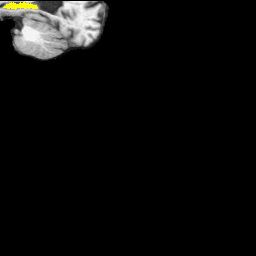
This is the Sagittal view as expected
Now using the Versor Transform
```
# Using a VersorRigid3DTransform
rotation = sitk.VersorRigid3DTransform()
rotation.SetMatrix(direction_mat);
rotation.SetCenter(LabelShape.GetOrientedBoundingBoxOrigin(1))
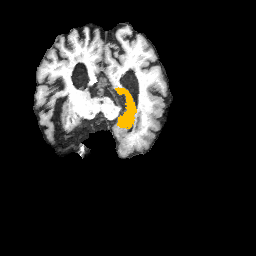
hippo_res2 = sitk.Resample(hippo,hippo.GetSize(),rotation.GetInverse(),
sitk.sitkNearestNeighbor, hippo.GetOrigin(),
hippo.GetSpacing(), hippo.GetDirection())
```
This is the Sagittal view
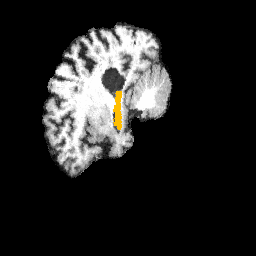
And the Coronal view
---
### Author:  [@zivy](https://discourse.itk.org/u/zivy)
#### Post date: [June 10, 2020, 6:18pm UTC](https://discourse.itk.org/t/align-image-along-hippocampus-axis/3125/2 "2020-06-10T18:18:13Z")
Hello @Pierrick,
Unfortunately using a rotation based on the axes defined by the oriented bounding box is not straightforward. The order of the columns in the rotation matrix actually depends on the shape (principal directions/components, I believe they are in the order of the PC), so if the shape changes the axis order will change. That is why your axes are permuted, they truly are. As the order of the axes from the oriented bounding box is arbitrary, you can change them as long as you maintain a right handed coordinate system.
I also suspect you want to rotate around the center of the original image and not the center of the segmented object.