# After the rotation of the image, some parts will be missing. How can we enlarge the visual field of the image to get the complete image?
**URL:** https://discourse.itk.org/t/after-the-rotation-of-the-image-some-parts-will-be-missing-how-can-we-enlarge-the-visual-field-of-the-image-to-get-the-complete-image/5748
**Category:** Uncategorized
**Created:** [February 23, 2023, 8:59am UTC](https://discourse.itk.org/t/after-the-rotation-of-the-image-some-parts-will-be-missing-how-can-we-enlarge-the-visual-field-of-the-image-to-get-the-complete-image/5748 "2023-02-23T08:59:18Z")
**Posts on this page:** 2
**Page:** 1
### Author:  [@ljjiayou](https://discourse.itk.org/u/ljjiayou)
#### Post date: [February 23, 2023, 8:59am UTC](https://discourse.itk.org/t/after-the-rotation-of-the-image-some-parts-will-be-missing-how-can-we-enlarge-the-visual-field-of-the-image-to-get-the-complete-image/5748/1 "2023-02-23T08:59:18Z")
transform = sitk.Euler3DTransform(center ,0.5,0,0,(100,0,0))
image\_resampled = sitk.Resample(moving\_image, transform)
My image is private and can’t be released, my image is 3D.
---
### Author:  [@Bouthros](https://discourse.itk.org/u/Bouthros)
#### Post date: [February 23, 2023, 10:25am UTC](https://discourse.itk.org/t/after-the-rotation-of-the-image-some-parts-will-be-missing-how-can-we-enlarge-the-visual-field-of-the-image-to-get-the-complete-image/5748/2 "2023-02-23T10:25:31Z")
I would suggest padding the image (start with a sitk.ConstantPad) to add 0 values around your image.
You should define the size of the padding you need. Then, after rotation, you should not lose any information.
Such as: `padded = sitk.ConstantPad(image, (20, 50, 1), (50, 100, 1), 5000)`
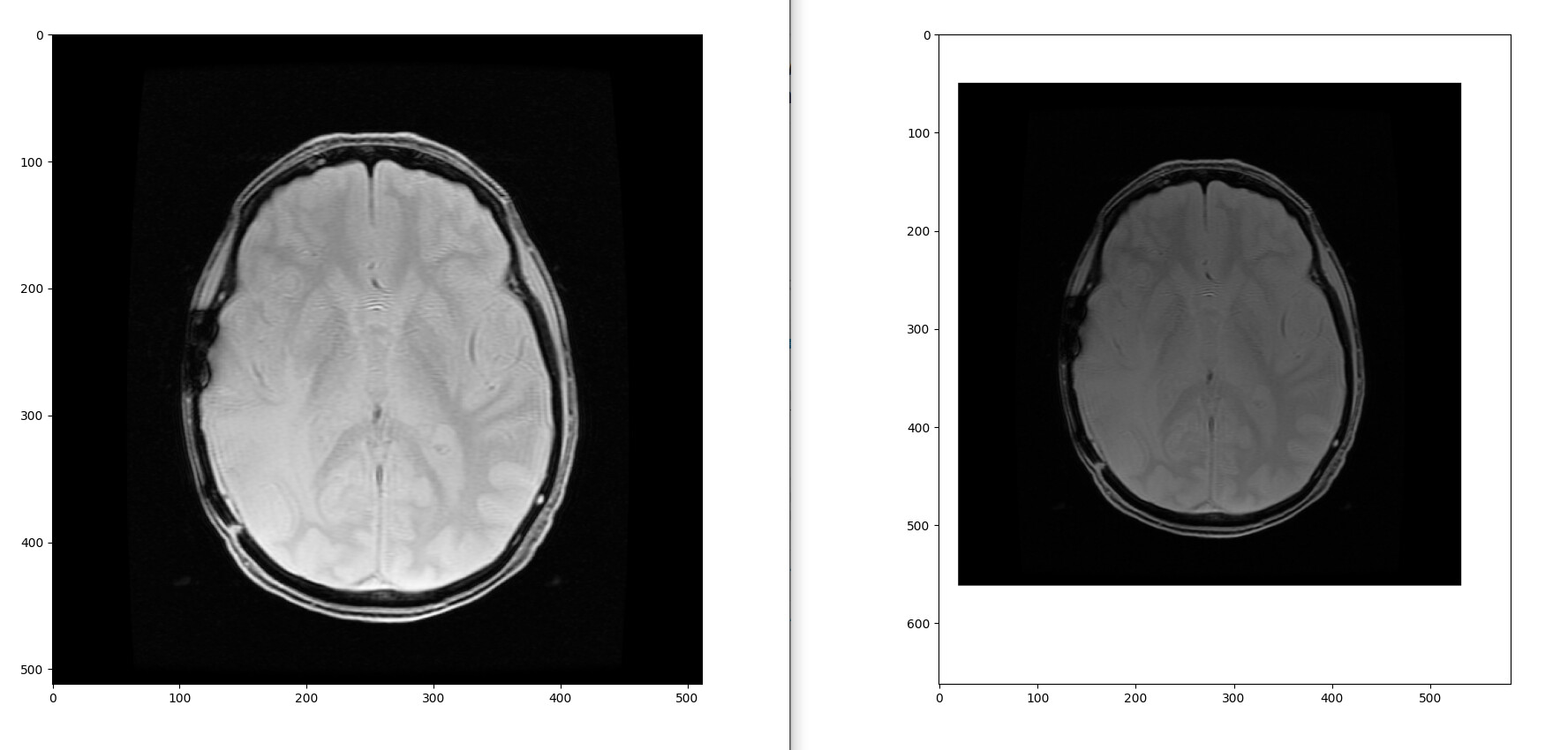
`Original image (left) and padded image (right)`
In this case, `padded` will contain the same `image` with 50 additional rows at the top, 100 additional lines at the bottom, 20 additional columns at the left and 50 additional columns at the right of the image.
All the new lines and columns are filled with the value 5000 but you can fill it with 0 if you prefer.
See ITK padding example: [https://examples.itk.org/src/filtering/imagegrid/padanimagewithaconstant/documentation](https://examples.itk.org/src/filtering/imagegrid/padanimagewithaconstant/documentation)
See the SimpleITK ConstantPaddingFilter documentation : [https://simpleitk.org/doxygen/latest/html/classitk\_1\_1simple\_1\_1ConstantPadImageFilter.html](https://simpleitk.org/doxygen/latest/html/classitk_1_1simple_1_1ConstantPadImageFilter.html)